What Is Cgi Access for Cpanel
CGI access in cPanel allows your website to run server-side scripts that process forms, generate dynamic content, and interact with databases. It is a foundational feature for anyone managing a website through cPanel hosting. Understanding how to enable and configure CGI access helps you unlock powerful server-side capabilities without needing advanced programming skills.
If you have ever wondered how websites process forms, generate dynamic pages, or run interactive tools behind the scenes, the answer is often CGI access. CGI stands for Common Gateway Interface, and it is one of the oldest and most reliable ways servers handle dynamic content. When you host a website through cPanel, you get access to this powerful feature right from your dashboard.
This guide breaks down everything you need to know about CGI access for cPanel. Whether you are a beginner setting up your first website or a developer managing multiple sites, understanding CGI will help you get more out of your hosting environment. Let us walk through it step by step.
Key Takeaways
- CGI stands for Common Gateway Interface: It is a standard protocol that lets web servers execute scripts and programs in response to user requests.
- cPanel includes built-in CGI support: You can enable CGI access through the cPanel interface without touching command-line configuration.
- CGI scripts power dynamic website features: From contact forms to shopping carts, CGI handles server-side tasks that static HTML cannot do alone.
- Common CGI languages include Perl and Python: These scripting languages are widely supported and easy to deploy through cPanel.
- File permissions and the shebang line matter: Setting correct permissions and script headers prevents most common CGI errors.
- Testing CGI locally is possible: You can use a local emulator to test scripts before uploading them to your cPanel server.
📑 Table of Contents
What Is CGI Access?
CGI access refers to the ability of a web server to run external programs or scripts in response to HTTP requests. When a visitor fills out a form on your website or clicks a link that triggers a server-side action, CGI is often what makes it happen. The server takes the request, runs the script, and sends the output back to the visitor as a web page.
Think of CGI as a bridge between your website and the server. Static HTML pages sit there and do nothing unless someone clicks a link. But with CGI, your website can actually do things. It can read data from a database, send emails, process payments, or generate customized content on the fly.
In cPanel, CGI access is typically managed through a simple toggle or directory configuration. You do not need root access or deep server knowledge to get started. The cPanel interface handles most of the heavy lifting for you.
How CGI Works in Simple Terms
Here is how the process flows when a user interacts with a CGI script:
- A visitor submits a form or clicks a link that points to a CGI script.
- The web server receives the request and identifies it as a CGI request.
- The server executes the script in a controlled environment.
- The script processes the input and generates output, usually in HTML format.
- The server sends that output back to the visitor’s browser.
This entire process happens in seconds. Most users never see it happening. They just fill out a form and get a confirmation page. That is CGI at work.
Why CGI Access Matters in cPanel
cPanel is one of the most popular web hosting control panels in the world. It gives website owners a user-friendly dashboard to manage files, databases, emails, and more. CGI access in cPanel adds another layer of functionality that many hosting plans include by default.
Without CGI, your website is limited to static content. You can display text and images, but you cannot process user input or create personalized experiences. CGI changes that. It opens the door to interactive features that modern websites expect.
Here are some reasons why CGI access matters:
- Form processing: Contact forms, registration forms, and survey forms all rely on CGI scripts to handle submissions.
- Dynamic content generation: CGI can create pages that change based on user input or database results.
- Security features: Many login systems and access controls use CGI scripts to authenticate users.
- Email automation: CGI can trigger email responses, forward messages, or manage mailing lists.
- E-commerce functions: Shopping carts and payment gateways often depend on CGI for transaction processing.
If you are building a website that goes beyond simple static pages, enabling CGI access in your cPanel account is one of the first steps you should take.
How to Enable CGI Access in cPanel
Enabling CGI access in cPanel is straightforward. Most hosting providers enable it by default, but it is always good to double-check. Here is how you can set it up.
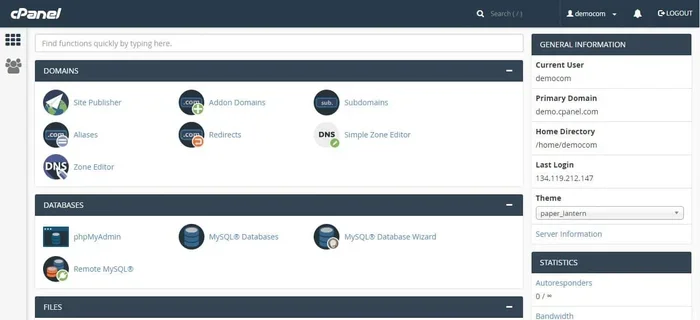
Step 1: Log in to cPanel
Open your browser and navigate to your cPanel login URL. This is usually something like yourdomain.com/cpanel. Enter your username and password provided by your hosting company.
Step 2: Locate the CGI Section
Once inside cPanel, look for a section labeled CGI or Advanced. Different cPanel themes may place this in slightly different locations. In the classic cPanel view, you will often find it under the “Advanced” group.
Step 3: Configure CGI Directory
cPanel typically uses a directory called cgi-bin to store CGI scripts. You can access this through the File Manager in cPanel. Make sure the directory exists and has the correct permissions.
Quick tip: CGI scripts in the cgi-bin directory usually need 755 permissions. This allows the server to execute the scripts while keeping them secure.
Step 4: Upload Your Scripts
Use the cPanel File Manager or an FTP client to upload your CGI scripts to the cgi-bin directory. Make sure your scripts have the correct shebang line at the top. For Perl scripts, this looks like #!/usr/bin/perl. For Python scripts, it would be #!/usr/bin/env python.
Step 5: Test Your CGI Script
After uploading, visit the script URL in your browser to test it. The URL usually looks like yourdomain.com/cgi-bin/yourscript.cgi. If everything is set up correctly, you should see the script output.
If you want to test scripts locally before uploading, you can set up a local environment using a tool like an emulator. Some developers prefer to test CGI scripts locally before deploying them to a live server. This helps catch errors early and saves time.
Common CGI Languages and Scripts
CGI is not tied to one specific programming language. You can write CGI scripts in many languages. Here are the most common ones you will encounter when working with cPanel.
Perl
Perl has been the go-to language for CGI scripting for decades. It was practically built for this purpose. Most cPanel servers come with Perl pre-installed, making it the easiest option for beginners. Perl scripts are powerful for text processing, form handling, and generating dynamic HTML pages.
Python
Python has become increasingly popular for CGI scripting. Its clean syntax makes it easy to read and write. Many modern web developers prefer Python for its simplicity and versatility. If you know Python basics, you can write functional CGI scripts relatively quickly.
Bash and Shell Scripts
For simple server tasks, Bash scripts can also work as CGI. These are useful for basic operations like file manipulation, log rotation, or system checks. However, they are less common for web-facing applications.
Other Languages
In theory, you can use almost any language that can read from standard input and write to standard output as a CGI script. This includes C, C++, Ruby, and even compiled binaries. However, Perl and Python remain the most practical choices for most cPanel environments.
Common CGI Errors and How to Fix Them
Even experienced developers run into CGI errors from time to time. Here are the most common issues you might face when using CGI access in cPanel and how to resolve them.
500 Internal Server Error
This is the most common CGI error. It usually means something went wrong during script execution. The first thing to check is your file permissions. Make sure your script has 755 permissions. Also check that your shebang line points to the correct interpreter path.
403 Forbidden Error
A 403 error means the server refuses to execute the script. This often happens when the script is not in the correct directory or when permissions are too restrictive. Make sure your script is in the cgi-bin directory and that it is readable by the server.
White Screen of Death
If your script runs but produces a blank page, check for syntax errors in your code. A missing semicolon in Perl or an indentation error in Python can cause this. Reviewing your server error logs in cPanel can help pinpoint the exact issue.
Headers Already Sent
This error occurs when your script outputs content before sending the required HTTP headers. Make sure your script prints the Content-Type header before any other output. For HTML output, this looks like print “Content-type: text/html\n\n” in Perl.
Best Practices for CGI Scripts in cPanel
To get the most out of CGI access and keep your website secure and fast, follow these best practices.
- Always set correct file permissions: Scripts should be 755, and data files they write to should be 644.
- Validate all user input: Never trust data coming from forms. Always sanitize inputs to prevent security vulnerabilities.
- Keep scripts simple: Complex scripts are harder to debug. Break large tasks into smaller, manageable functions.
- Use error logging: cPanel provides error logs. Use them to track down issues quickly.
- Test before deploying: If possible, test your scripts in a local environment first. Some developers use a PC emulator to simulate server conditions before going live.
- Update your scripts regularly: Outdated scripts can become security risks. Keep your code up to date with the latest practices.
Following these guidelines will help you maintain a smooth and secure experience when running CGI scripts through your cPanel account.
CGI vs Modern Alternatives
While CGI was revolutionary in its early days, modern web development has introduced alternatives that handle server-side tasks more efficiently. Technologies like PHP, Node.js, and Python frameworks (such as Flask and Django) offer faster execution and better scalability for many use cases.
However, CGI still has its place. It is simple, widely supported, and does not require additional server modules or configurations. For small to medium websites, CGI scripts through cPanel remain a reliable and practical choice. They are especially useful when you need a quick solution without the overhead of a full framework.
Some hosting environments also use FastCGI, which is an improved version of CGI. FastCGI keeps script processes in memory, reducing the overhead of starting a new process for each request. Check with your hosting provider to see if FastCGI is available as an option in your cPanel.
Final Thoughts
CGI access for cPanel is a powerful and straightforward feature that lets your website go beyond static pages. Whether you are processing forms, automating tasks, or building interactive tools, CGI gives you the server-side capability you need. The setup is simple, the languages are accessible, and the troubleshooting steps are well documented.
Take some time to experiment with CGI scripts in your cPanel account. Start with a simple Perl script or a basic Python program. Once you see how easy it is to make your website do more, you will wonder how you ever managed without it. The key is to start small, test thoroughly, and build from there.
With CGI access enabled and configured correctly, your cPanel-hosted website gains a whole new level of functionality. It is one of those features that stays relevant even after all these years of web development evolution.
Frequently Asked Questions
What is CGI access used for in cPanel?
CGI access in cPanel is used to run server-side scripts that process forms, generate dynamic web pages, and handle user interactions. It allows your website to perform tasks that static HTML pages cannot do on their own.
Do I need programming skills to use CGI in cPanel?
Basic knowledge of a scripting language like Perl or Python helps, but you do not need to be an expert. Many pre-written CGI scripts are available online that you can upload and configure through cPanel with minimal coding experience.
What file permissions should CGI scripts have in cPanel?
CGI scripts should have 755 permissions, which allows the server to read and execute them. Data files that scripts write to should have 644 permissions for proper security and functionality.
Can I run Python scripts as CGI in cPanel?
Yes, most cPanel servers support Python CGI scripts. You just need to make sure your script has the correct shebang line at the top and that the Python interpreter is available on the server.
What is the difference between CGI and FastCGI in cPanel?
Standard CGI starts a new process for each request, which can be slower. FastCGI keeps processes in memory, reducing overhead and improving performance. Check with your host to see if FastCGI is available.
Where should I store my CGI scripts in cPanel?
CGI scripts are typically stored in the cgi-bin directory within your public_html folder. This is the standard location that cPanel and most web servers expect CGI scripts to be placed in.
=== CONCLUSION ===
CGI access for cPanel is a fundamental feature that empowers website owners to add dynamic functionality without complex server setups. From processing simple contact forms to running automated workflows, CGI scripts remain a practical and reliable tool in the web hosting world. With cPanel making the configuration process so accessible, there is no reason not to take advantage of it. Enable CGI access today, experiment with a simple script, and watch your website become more interactive and capable.