What Is Raster Animation in Computer Graphics
Raster animation in computer graphics is the process of creating motion using pixel-based images. It works by displaying a sequence of static raster frames quickly to create the illusion of movement. This technique powers everything from video games to animated movies and web graphics. Understanding raster animation helps you choose the right tools and methods for your digital projects.
Raster animation in computer graphics is one of the most exciting and widely used techniques in digital art. If you have ever watched an animated cartoon, played a video game, or scrolled through a visually rich website, you have likely seen raster animation at work. At its core, raster animation is all about creating the illusion of motion by displaying a series of still images, called frames, in rapid succession. Each frame is a pixel-based picture, and when these frames play one after another, your eyes perceive smooth movement. This guide breaks down everything you need to know about how raster animation works, the tools you need, and where it is used in the real world.
Whether you are a beginner just curious about digital art or an aspiring animator looking to learn the ropes, this article covers the fundamentals. We will walk through the key concepts, compare raster animation to other methods, and share practical tips that you can use right away. The goal is to make raster animation in computer graphics easy to understand, no matter your skill level. Let us dive in and explore this fascinating topic together.
Key Takeaways
- Raster animation uses pixels: Each frame is made of a grid of colored pixels that form the image you see on screen.
- Frame rate controls smoothness: Higher frame rates like 24fps or 60fps make motion look fluid and natural.
- Raster differs from vector animation: Raster images are resolution-dependent, while vector graphics scale without losing quality.
- Popular software tools exist: Programs like Adobe Animate, Toon Boom, and Aseprite are widely used for raster animation work.
- Hardware matters: Having enough RAM in a laptop is essential for smooth raster animation editing and rendering.
- Many industries use it: Raster animation is used in gaming, film, advertising, and mobile app design.
📑 Table of Contents
- What Is Raster Animation?
- Key Components of Raster Animation
- Tools and Software for Raster Animation
- Applications of Raster Animation
- How Raster Animation Is Created
- Common Mistakes and How to Avoid Them
- Raster Animation vs Vector Animation: A Quick Comparison
- The Future of Raster Animation
- Conclusion
What Is Raster Animation?
Raster animation is a technique where each frame of an animation is built from a grid of tiny squares called pixels. Every pixel holds a specific color value, and together, millions of pixels form the complete image you see on your screen. When you flip through these frames quickly, your brain blends them into continuous motion. This is the same principle behind traditional flipbooks, but instead of paper pages, we use digital frames stored on a computer.
The word “raster” comes from the way screens display images. A computer monitor scans across the screen line by line, painting each row of pixels from top to bottom. This process is called rasterization, and it is the foundation of how every modern display shows graphics. When animation is created in this raster format, each frame is essentially a static raster image that changes slightly from the one before it. The result is a sequence of images that, when played in order, creates the feeling of movement.
How Raster Animation Differs from Other Types
To truly understand raster animation, it helps to see how it compares to other animation methods. The most common alternative is vector animation. Vector graphics use mathematical formulas to draw shapes, lines, and curves. This means they can be scaled up or down without losing any quality. Raster images, on the other hand, are made of fixed pixels. If you stretch a raster image beyond its original size, it becomes blurry and pixelated.
Another related concept is frame-by-frame animation, which is a technique where every single frame is drawn from scratch. This is common in traditional hand-drawn animation and in raster workflows. In contrast, some animation styles use tweening, where the software automatically fills in the frames between two key poses. Raster animation can use both approaches, but it is most closely associated with frame-by-frame creation because each pixel-level detail is hand-crafted by the artist.
Think of it this way. Vector animation is like drawing with shapes that never lose their crisp edges. Raster animation is like painting with tiny colored dots. Each approach has its strengths, and many professional projects use both together to get the best of both worlds.
Key Components of Raster Animation
Creating raster animation in computer graphics involves several important components that work together. Understanding each piece helps you make better creative decisions and avoid common pitfalls. Let us look at the core elements that make raster animation possible.
Pixels and Resolution
Every raster image is defined by its resolution, which is the total number of pixels it contains. A higher resolution means more pixels, which leads to sharper and more detailed images. For example, an image that is 1920 pixels wide and 1080 pixels tall has over two million pixels. Each one of those pixels carries color information that contributes to the final picture.
When you are working with raster animation, resolution directly affects the quality of your output. If you animate at a low resolution, the final product may look blurry or rough, especially on larger screens. Professional animators typically work at high resolutions and then export their animations at the target resolution for the intended platform. This ensures that every frame looks crisp and clean.
Frame Rate and Motion
Frame rate is the number of frames displayed per second, often measured in frames per second, or fps. The standard frame rate for films is 24fps, which has been used since the early days of cinema. Television in many regions uses 30fps, while modern games and high-end animations often run at 60fps or even higher.
The frame rate you choose has a big impact on how your animation feels. A lower frame rate, like 12fps, gives a choppy, stylized look that some artists prefer for certain projects. A higher frame rate creates buttery-smooth motion that feels realistic and polished. When working on raster animation in computer graphics, you need to balance frame rate with file size. More frames mean larger file sizes, which can slow down playback and increase storage needs.
Interestingly, the concept of capturing sequential images to create motion is not new. Early photography experiments, like half frame film cameras, explored ways to capture multiple images on a single strip of film. These innovations laid the groundwork for the animation techniques we use today. Similarly, time-lapse photography on devices like trail cameras uses sequential image capture to show changes over time, which shares a conceptual link with how raster animation creates the illusion of motion through rapid frame display.
Color Depth and Image Quality
Color depth refers to the number of colors each pixel can display. An 8-bit image supports 256 colors, while a 24-bit image can display over 16 million colors. Most modern raster animations use 24-bit or higher color depths to produce rich, vibrant visuals. Higher color depth means smoother gradients and more realistic shading, which is especially important for animations that aim for a lifelike look.
Another factor that affects image quality is the color space used. Common color spaces like sRGB and Adobe RGB define how colors are mapped and displayed. When you export your raster animation, choosing the right color space ensures that the colors look consistent across different devices and screens.
Tools and Software for Raster Animation
You do not need a supercomputer to start creating raster animation in computer graphics, but having the right software and hardware makes a huge difference. Let us explore the tools that animators use every day.
Popular Raster Animation Programs
Several software options stand out in the world of raster animation. Adobe Animate is one of the most well-known tools. It supports both raster and vector workflows, giving artists flexibility. Toon Boom Harmony is another industry favorite, especially for 2D animated films and TV shows. It offers powerful raster drawing tools and a robust animation pipeline.
For pixel art and retro-style animation, Aseprite is a go-to choice. It is lightweight, fast, and designed specifically for working with small raster images at low resolutions. Other notable tools include Procreate (popular on tablets), Krita (a free open-source option), and Clip Studio Paint, which is widely used among comic and manga artists.
Hardware Requirements
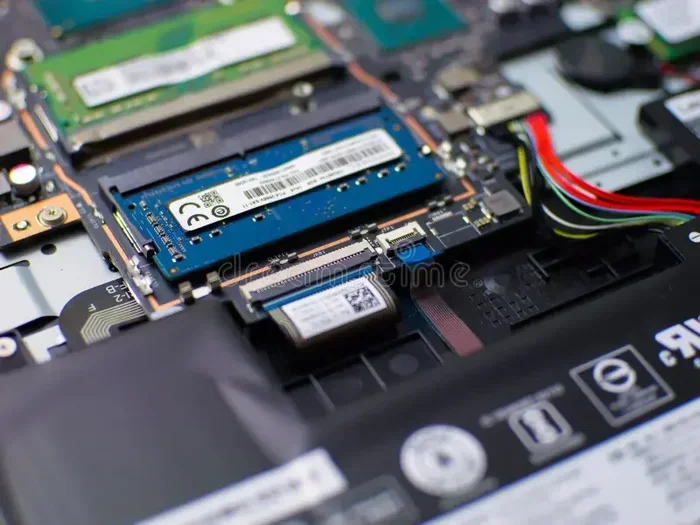
Running animation software smoothly requires a capable computer. Your processor handles the heavy lifting of rendering each frame, while your storage drive needs to be fast enough to handle large image sequences. Memory is equally important. Having sufficient RAM allows your computer to keep multiple frames loaded in memory at once, which is essential for a fluid editing experience.
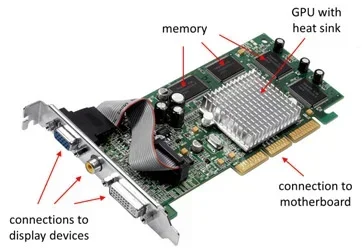
If you are building or choosing a workstation for raster animation, prioritize a machine with at least 16GB of RAM and a solid-state drive for fast file access. A dedicated graphics card also helps with real-time previews and rendering. The better your hardware, the smoother your workflow will be, especially when working on high-resolution frames or complex scenes with many layers.
Applications of Raster Animation
Raster animation in computer graphics is everywhere. It powers some of the most beloved forms of digital media and entertainment. Let us look at the key areas where raster animation plays a central role.
Video Games and Entertainment
Many video games use raster animation for character sprites, background art, and visual effects. Classic games from the 8-bit and 16-bit eras relied entirely on raster sprites animated frame by frame. Even modern games that use 3D models often incorporate raster textures and animated 2D elements to add detail and style. The warmth and charm of pixel art, a form of raster animation, continues to be popular among indie game developers and players alike.
Web and Mobile Design
Raster animations are common on websites and mobile apps. Animated banners, loading screens, and interactive illustrations often use raster formats like GIF or PNG sequences. These small, looping animations add visual interest and help guide users through a digital experience. Because raster images are widely supported across all browsers and devices, they remain a practical choice for web designers who need reliable, fast-loading animations.
Film and Television
The animation industry has a long history of using raster techniques. Studio Ghibli films, for example, combine traditional hand-drawn raster frames with digital coloring and effects. Modern animated series often use a mix of raster and vector tools to achieve their unique visual styles. The ability to paint every pixel by hand gives artists incredible control over the mood, texture, and emotion of each frame.
How Raster Animation Is Created
The process of creating raster animation in computer graphics follows a structured pipeline. Each stage is important for producing a polished final product. Here is a simplified look at how it all comes together.
The Animation Pipeline
The first step is concept development. Artists sketch out ideas, define characters, and plan the story. Next comes storyboarding, where the sequence of scenes is laid out visually. This gives the team a roadmap for the entire animation.
After storyboarding, the layout and design phase begins. Artists create detailed character designs, background art, and prop illustrations. These are all raster images that will be animated later. The animation phase is where the real magic happens. Artists draw or paint each frame, making small changes to the characters and backgrounds to create the illusion of movement.
Once all frames are complete, the post-production phase begins. This includes adding sound, music, special effects, and color correction. The final step is rendering and export, where the animation is compiled into a video file ready for distribution.
Common Techniques in Raster Animation
Several techniques are widely used in raster animation. Onion skinning is a popular feature in most animation software. It lets you see a faint overlay of the previous and next frames while you draw the current one. This makes it much easier to maintain smooth, consistent motion between frames.
Another technique is called tweening, which we mentioned earlier. While raster animation is often frame-by-frame, some software can automatically generate intermediate frames between two key drawings. This saves time and is useful for simple movements like a character waving or an object bouncing. However, many purists prefer the control and artistic quality of drawing every frame by hand.
Layering is also essential. Artists work on separate layers for characters, backgrounds, and effects. This makes it easy to adjust one element without affecting the rest of the scene. It also allows for more efficient workflows, especially when multiple team members are collaborating on the same project.
Common Mistakes and How to Avoid Them
Even experienced animators run into challenges when working with raster animation in computer graphics. Here are some common mistakes and tips to avoid them.
- Working at too low a resolution: Starting with a small canvas might seem convenient, but it limits the detail you can add. Always begin at the highest resolution your project requires.
- Ignoring frame rate consistency: Mixing frame rates within the same animation causes jittery, uneven motion. Stick to one frame rate throughout your project.
- Skipping onion skinning: Not using onion skinning makes it hard to maintain smooth transitions between frames. Turn it on from the start.
- Neglecting file management: Raster animation projects generate many large files. Organize your folders and use clear naming conventions to stay on top of your work.
- Forgetting about export settings: The way you export your final animation affects its quality and file size. Test different settings before committing to one format.
Raster Animation vs Vector Animation: A Quick Comparison
Understanding the difference between raster and vector animation helps you choose the right approach for your project. Here is a simple comparison of the two methods.
- Raster animation uses pixels and is best for detailed, painterly styles. It is resolution-dependent and can look amazing when crafted carefully.
- Vector animation uses mathematical shapes and is best for clean, scalable graphics. It is resolution-independent and ideal for logos, icons, and web graphics.
- Raster animation files tend to be larger because each frame stores pixel data for every point in the image.
- Vector animation files are generally smaller because they store mathematical descriptions of shapes rather than individual pixel values.
- Raster animation excels in artistic expression, while vector animation excels in scalability and flexibility.
Many professional studios use a combination of both. They might create character animations in raster format for a handcrafted feel while using vector graphics for backgrounds and UI elements. This hybrid approach gives you the best visual quality and the most efficient workflow.
The Future of Raster Animation
Raster animation in computer graphics continues to evolve alongside advances in technology. AI-powered tools are now helping artists with tasks like in-betweening, color matching, and even generating entire frames from rough sketches. While some worry that automation might replace human artists, most professionals see these tools as assistants that speed up the creative process without replacing the artist’s vision.
Real-time rendering engines are also changing the game. These engines allow animators to see the final result instantly as they work, eliminating long wait times for previews. As hardware continues to improve and software becomes more intuitive, the barrier to creating high-quality raster animation is getting lower every year. This means more people than ever can bring their animated ideas to life.
The rise of powerful yet affordable hardware, including laptops with strong processors and ample memory, has made raster animation more accessible. If you are considering starting your animation journey, a well-equipped machine with good RAM and a responsive display will make a noticeable difference in your creative workflow. The tools are there, and the community of animators sharing tutorials and resources online is growing every day.
Conclusion
Raster animation in computer graphics is a powerful and versatile technique that brings digital art to life. From the tiny pixels that form each frame to the smooth motion we see on screen, every aspect of raster animation requires care, skill, and creativity. Whether you are drawn to the nostalgic charm of pixel art, the rich detail of hand-painted frames, or the dynamic energy of animated games and films, raster animation offers endless possibilities for creative expression.
By understanding the core concepts, choosing the right tools, and following a structured workflow, you can create animations that captivate and inspire. The field is constantly evolving, and new techniques and technologies continue to push the boundaries of what is possible. So grab your stylus, open your favorite animation software, and start bringing your ideas to life one frame at a time.
Frequently Asked Questions
What is the difference between raster and vector animation?
Raster animation is built from pixels, making it ideal for detailed, artistic styles. Vector animation uses mathematical shapes, making it scalable without any loss of quality. Each method has its own strengths depending on the project.
Do I need a powerful computer to create raster animation?
A decent computer with sufficient RAM and a good processor helps, but you do not need a top-tier machine to start. Many beginners create raster animation on mid-range laptops. As your projects grow more complex, upgrading your hardware can improve your workflow significantly.
What frame rate is best for raster animation?
It depends on your project. 24fps is standard for film-style animations, 30fps works well for television, and 60fps is great for smooth, high-quality motion. Choose a frame rate that matches the platform and style you are aiming for.
Can raster animation be used in video games?
Absolutely. Many video games, especially indie titles and retro-style games, use raster animation for characters, enemies, and environmental effects. Pixel art, a popular form of raster animation, is a beloved style in the gaming world.
Is raster animation hard to learn?
Like any skill, it takes practice and patience. The basics are accessible to beginners, and plenty of free tutorials are available online. Starting with simple projects and gradually building your skills is the best way to grow as a raster animator.
What file formats are used for raster animation?
Common formats include GIF for simple looping animations, PNG sequences for high-quality frame-by-frame work, and MP4 for final exported videos. The right format depends on where your animation will be viewed and the level of quality you need.