What Is the Difference Between a Network Cable and an Ethernet Cable
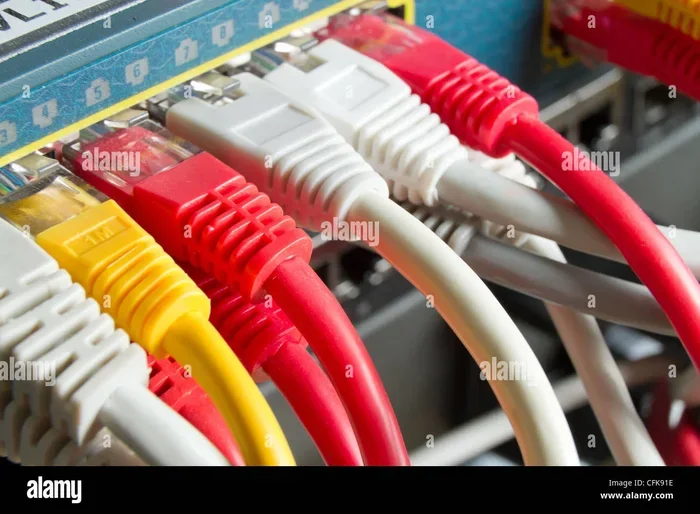
A network cable is a broad term for any cable used in a computer network, while an ethernet cable is a specific type of network cable designed for wired LAN connections. Ethernet cables use RJ45 connectors and follow standards like Cat5e or Cat6, whereas network cables can include fiber optic, coaxial, and other types. Understanding this distinction helps you choose the right cable for your internet setup.
You have probably heard the terms “network cable” and “ethernet cable” used interchangeably. Many people assume they mean the same thing. But here is the truth: they are not the same. Understanding the difference between a network cable and an ethernet cable can save you money, time, and a lot of confusion when setting up your home or office network.
Think of it this way. A network cable is like the word “vehicle.” It covers a wide range of things. An ethernet cable is like a “sedan.” It is one specific type of vehicle. In this guide, we will break down exactly what each cable does, how they differ, and which one you actually need. By the end, you will know your cables inside and out.
Key Takeaways
- Network cable is a general term: It covers all cables used to connect devices in a network, including ethernet, fiber optic, and coaxial cables.
- Ethernet cable is a specific type: It is the most common network cable used for wired local area networks (LANs).
- They are not interchangeable terms: Every ethernet cable is a network cable, but not every network cable is an ethernet cable.
- Cable categories matter: Standards like Cat5e, Cat6, and Cat6a determine speed and performance for ethernet connections.
- Use the right cable for the job: Choosing between network cable types depends on your speed needs, distance, and setup.
📑 Table of Contents
What Is a Network Cable?
A network cable is any cable that connects devices in a computer network. It carries data between computers, routers, switches, servers, and other devices. Network cables come in many shapes, sizes, and types. They are the physical backbone of any wired network setup.
Types of Network Cables
Not all network cables look the same. Here are the most common types you will encounter:
- Ethernet cables: These are the most familiar type. They use RJ45 connectors and are used for wired LAN connections.
- Fiber optic cables: These use light to transmit data. They are incredibly fast and can carry signals over long distances.
- Coaxial cables: These have a central conductor surrounded by shielding. They were widely used in early network setups and are still common in cable TV connections.
- Power over Ethernet (PoE) cables: These carry both data and electrical power to devices like IP cameras and wireless access points.
Each type of network cable serves a different purpose. The one you need depends on your network speed requirements, distance, and environment. Just like how the difference between coaxial and component speakers comes down to the type of connection and signal each carries, different network cables are built for different tasks.
Where Network Cables Are Used
Network cables are everywhere. You will find them in offices, data centers, schools, hospitals, and homes. They connect desktop computers to routers. They link switches together. They power security cameras and VoIP phones. In short, any time you need a wired connection between two network devices, a network cable is involved.
What Is an Ethernet Cable?
An ethernet cable is a specific kind of network cable. It is the most widely used cable for wired local area networks (LANs). You probably have several ethernet cables in your home right now. They connect your desktop PC to your router, your smart TV to your modem, or your gaming console to your network.
How Ethernet Cables Work
Ethernet cables transmit data using electrical signals. They typically contain four twisted pairs of copper wires inside a protective outer jacket. The twisting helps reduce interference and crosstalk between the pairs. At each end, you will find an RJ45 connector, which plugs into network ports on devices and routers.
Ethernet cables follow strict standards set by the Institute of Electrical and Electronics Engineers (IEEE). These standards define the cable’s speed, bandwidth, and performance capabilities. The most common standards you will see are:
- Cat5e: Supports speeds up to 1 Gbps at 100 MHz. This is the most basic modern ethernet cable.
- Cat6: Supports speeds up to 10 Gbps at 250 MHz. It offers better shielding than Cat5e.
- Cat6a: Supports speeds up to 10 Gbps at 500 MHz. It is ideal for longer runs and high-interference environments.
- Cat7 and Cat8: These are newer standards that support even higher speeds and better shielding for enterprise use.
Common Ethernet Cable Categories
When shopping for ethernet cables, you will see different categories printed on the cable jacket. Here is a quick comparison:
| Category | Max Speed | Bandwidth | Common Use |
|---|---|---|---|
| Cat5e | 1 Gbps | 100 MHz | Basic home networks |
| Cat6 | 10 Gbps (up to 55m) | 250 MHz | Home and office networks |
| Cat6a | 10 Gbps (up to 100m) | 500 MHz | Enterprise and high-performance setups |
| Cat7 | 10 Gbps | 600 MHz | Data centers and industrial use |
| Cat8 | 25-40 Gbps | 2000 MHz | High-speed data centers |
Just as confusing cable names can make choosing a laptop hard, choosing the right ethernet cable category can feel overwhelming. But the good news is that for most home users, Cat5e or Cat6 will handle everything you need.
Key Differences Between Network Cable and Ethernet Cable
Now that you know what each one is, let us look at the key differences. The easiest way to understand this is to think of the difference between two-way and three-way speakers. Both are speakers, but they have different configurations and capabilities. The same idea applies here.
Scope and Definition
The biggest difference is scope. A network cable is a broad category. It includes any cable used for networking purposes. An ethernet cable is a narrow, specific type of network cable. So every ethernet cable is a network cable, but not every network cable is an ethernet cable.
Cable Types and Materials
Network cables can be made from different materials. Fiber optic cables use glass or plastic fibers and light signals. Coaxial cables use copper conductors with layered shielding. Ethernet cables use twisted copper wire pairs. Each material affects speed, distance, and cost.
Connectors
Ethernet cables always use RJ45 connectors. Other network cables may use different connectors. Fiber optic cables use LC, SC, or ST connectors. Coaxial cables use F-connectors or BNC connectors. This difference matters when you are buying cables or setting up equipment.
Speed and Performance
Ethernet cables are designed for specific speed tiers based on their category. Other network cables, like fiber optic, can achieve much higher speeds over longer distances. The performance depends entirely on the cable type and standard.
Cost
Ethernet cables are generally affordable and widely available. Fiber optic network cables tend to be more expensive due to the specialized materials and manufacturing. Coaxial cables fall somewhere in between.
When to Use a Network Cable vs an Ethernet Cable
Choosing the right cable depends on your specific situation. Here are some practical guidelines to help you decide.
Use Ethernet Cables When
- You are setting up a standard home or office LAN.
- You need to connect a device directly to a router or switch.
- You want a reliable, fast wired internet connection.
- You are gaming or streaming and need low latency.
- You are upgrading from Wi-Fi to a more stable wired connection.
Use Other Network Cables When
- You need to run cables over long distances. Fiber optic cables can transmit data for kilometers without signal loss.
- You are building a data center or enterprise network. Fiber optic and high-grade copper cables offer superior performance.
- You need to carry both power and data. PoE cables can power devices like security cameras and wireless access points over a single cable run.
- You are connecting to cable internet infrastructure. Coaxial cables may be required for certain ISP setups.
A quick tip: always check your router and device specifications before buying a cable. Using a Cat6 cable with a device that only supports Cat5e speeds will not give you faster performance. Match your cable to your hardware capabilities for the best results.
Common Myths About Network and Ethernet Cables
There are several myths floating around about these cables. Let us clear them up.
Myth 1: All Network Cables Are Ethernet Cables
This is the most common misconception. As we discussed, network cable is a broad term. Ethernet is just one type of network cable. Fiber optic and coaxial cables are also network cables.
Myth 2: Thicker Cables Are Always Faster
Cable thickness does not always mean better performance. The category standard (Cat5e, Cat6, etc.) matters more than the physical thickness of the cable. A thin Cat6 cable will outperform a thick Cat5e cable every time.
Myth 3: Ethernet Cables Slow Down Over Distance
Ethernet cables do lose some signal strength over long distances. However, standard ethernet cables are rated for runs up to 100 meters (about 328 feet) without significant signal loss. If you need to go beyond that, consider fiber optic network cables instead.
Myth 4: You Need Expensive Cables for Good Internet
For most home users, a basic Cat5e or Cat6 ethernet cable is more than enough. You do not need to spend a fortune on premium cables. The difference in performance between a $5 ethernet cable and a $50 one is negligible for everyday use.
Quick Tips for Choosing the Right Cable
Here are some practical tips to keep in mind when shopping for cables:
- Check your speed needs: If you have gigabit internet, Cat5e or Cat6 will work perfectly. For 10 Gbps, go with Cat6a or higher.
- Measure your distance: Standard ethernet cables max out at 100 meters. For longer runs, use fiber optic cables.
- Look for certification: Buy cables that are tested and certified to their listed standards. Cables without proper certification may not perform as advertised.
- Consider the environment: For outdoor runs, use cables with UV-resistant jackets. For high-interference areas, choose shielded cables (STP or FTP).
- Do not confuse cable length with quality: A longer cable is not better than a shorter one. Choose the right category and length for your needs.
Remember, the goal is to match your cable to your network requirements. Just like how understanding the difference between 2 ohm and 4 ohm speakers helps you match the right speaker to your amplifier, choosing the right cable ensures your network performs at its best.
Final Thoughts
The difference between a network cable and an ethernet cable comes down to scope and specificity. A network cable is the umbrella term for all cables used in networking. An ethernet cable is one specific type under that umbrella. It is the most common and widely used cable for wired connections in homes and offices.
Now that you understand the distinction, you can make smarter choices when setting up or upgrading your network. Whether you need a simple ethernet patch cable for your desk or a fiber optic network cable for a long-distance run, you know exactly what to look for. Keep these differences in mind, and you will never buy the wrong cable again.
Take a moment today to check your current setup. Are you using the right type of cable? A small upgrade might make a big difference in your network speed and reliability. Happy networking!
Frequently Asked Questions
Can I use a network cable that is not an ethernet cable?
Yes. Network cables include many types beyond ethernet, such as fiber optic and coaxial cables. These are used in different networking scenarios, especially for long-distance connections or specific infrastructure needs.
Is an ethernet cable the same as an internet cable?
People often call ethernet cables “internet cables” because they connect devices to the internet through a router. However, “internet cable” is not a technical term. The proper term is ethernet cable, and it is a type of network cable.
Do I need a special ethernet cable for gaming?
Not necessarily. A standard Cat5e or Cat6 ethernet cable is more than sufficient for gaming. These cables provide low latency and stable connections. You only need higher categories like Cat6a or Cat7 if you have a 10 Gbps network setup.
Can I run an ethernet cable outdoors?
Yes, but you should use an outdoor-rated ethernet cable with a UV-resistant jacket. Standard indoor cables will degrade when exposed to sunlight and moisture. For very long outdoor runs, fiber optic network cables are a better choice.
Does the brand of ethernet cable matter?
For most users, the brand does not matter much. What matters is the cable category (Cat5e, Cat6, etc.) and whether it is certified to that standard. Stick with reputable brands that clearly list the cable standard on the jacket for best results.
How do I know which network cable I currently have?
Look at the markings printed on the cable jacket. It will usually list the category (like Cat5e or Cat6). If it has an RJ45 connector on both ends, it is an ethernet cable. If it has a different connector type, it is likely a different kind of network cable like fiber optic or coaxial.