What Is the Difference Between a Mini Usb Micro Usb
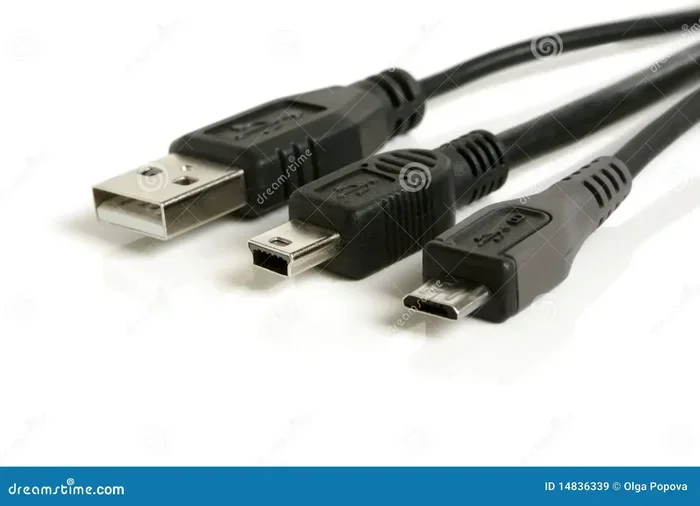
Mini USB and Micro USB are two different types of USB connectors that serve the same basic purpose but differ in size, design, and device compatibility. The Mini USB was introduced first and is larger, while the Micro USB is smaller, more durable, and became the standard for most mobile devices. Understanding the differences helps you choose the right cable for charging, data transfer, and connecting peripherals to your devices.
If you have ever dug through a drawer full of old cables and wondered which one goes where, you are not alone. The world of USB connectors can be confusing, especially when you come across different sizes and shapes. Two of the most common connectors you will encounter are the Mini Usb Micro Usb types. They look similar at first glance, but they are quite different in design, function, and the devices they support.
This guide breaks down everything you need to know about these two connector types. We will cover their sizes, shapes, speeds, and the devices that use them. By the end, you will know exactly which cable you need and why it matters.
Whether you are trying to charge an old camera, sync data from a portable hard drive, or just organize your cable collection, understanding the Mini USB vs Micro USB difference is essential. Let us dive in.
Key Takeaways
- Mini USB is larger: It was designed for early portable devices and is bulkier than Micro USB.
- Micro USB is smaller and more durable: It became the go-to connector for smartphones, tablets, and other mobile gadgets.
- They are not interchangeable: The shapes and sizes are different, so you cannot plug one into a port designed for the other.
- Micro USB supports faster data transfer: Micro USB 2.0 and 3.0 offer better speeds than Mini USB standards.
- USB-C is replacing both: Most modern devices now use USB-C, but Mini and Micro USB are still found in older gear.
- Device compatibility matters: Always check your device manual before buying a cable to avoid frustration.
📑 Table of Contents
- What Is a Mini USB?
- What Is a Micro USB?
- Mini USB vs Micro USB: Key Differences
- Which Devices Use Each Connector Type?
- Mini USB and Micro USB in the Context of Modern Laptops and Peripherals
- Common Mistakes When Using Mini and Micro USB Cables
- Quick Tips for Choosing the Right USB Cable
- The Future of USB Connectors
- Conclusion
What Is a Mini USB?
The Mini USB connector was introduced in the early 2000s as a smaller alternative to the standard USB Type-A connector. It was designed for portable devices that needed a compact USB option. Before the Micro USB came along, the Mini USB was the go-to choice for many smaller electronics.
Physical Characteristics of Mini USB
The Mini USB connector is noticeably larger than its Micro counterpart. It measures about 3mm by 7mm, making it compact but still thicker than a Micro USB plug. The Mini USB has a rectangular shape with a flat top and a slightly rounded bottom. It comes in two main variants: Mini-A and Mini-B.
- Mini-A: This is the host-side connector, similar to a standard USB-A but smaller.
- Mini-B: This is the device-side connector used in most portable devices.
The Mini USB connector has five pins inside. It supports USB 2.0 speeds, which means data transfer rates of up to 480 Mbps. It also provides power for charging, typically at 5 volts. The connector is not designed for high-speed charging or fast data transfer by modern standards, but it served its purpose well during its time.
Devices That Used Mini USB
Mini USB connectors were popular in a range of devices before Micro USB took over. Some common examples include:
- Early digital cameras
- Portable MP3 players
- Older GPS navigation devices
- Some mobile phones from the mid-2000s
- Portable hard drives and flash drives
- Gaming controllers and peripherals
If you have older electronics lying around, there is a good chance they use a Mini USB port. Many people still have these devices and need the right cable to keep them running. The connector is not as common today, but it is far from obsolete in the world of legacy devices.
What Is a Micro USB?
The Micro USB connector was introduced around 2007 and quickly became the standard for mobile devices. It was designed to be even smaller than the Mini USB while maintaining the same functionality. The Micro USB connector is compact, durable, and widely adopted across the electronics industry.
Physical Characteristics of Micro USB
The Micro USB connector is significantly smaller than the Mini USB. It measures about 1.5mm by 6.85mm, making it one of the smallest USB connectors available. The Micro USB comes in three main types: Micro-A, Micro-B, and Micro-B USB 3.0.
- Micro-A: The host-side connector, white in color, designed for devices that act as USB hosts.
- Micro-B: The device-side connector, black or sometimes grey, used in most smartphones and tablets.
- Micro-B USB 3.0: A blue-colored connector that supports faster USB 3.0 speeds while keeping the same small form factor.
The Micro USB has five pins in the standard version (Micro-A and Micro-B) and nine pins in the USB 3.0 version. The standard Micro USB supports data transfer speeds of up to 480 Mbps (USB 2.0), while the Micro USB 3.0 version can reach speeds of up to 5 Gbps. For charging, the Micro USB delivers 5 volts and supports various amperage levels depending on the device and charger.
Devices That Use Micro USB
The Micro USB became the dominant connector for mobile devices for many years. You will find it in:
- Smartphones (most Android phones before USB-C)
- Tablets
- Bluetooth headphones and speakers
- Portable battery packs and power banks
- Fitness trackers and smartwatches
- E-readers like early Kindle models
- Many budget and mid-range devices
If you own an Android phone from the last decade, there is a strong chance it uses a Micro USB port. Even though USB-C is now the new standard, millions of devices still rely on Micro USB connectors every day.
Mini USB vs Micro USB: Key Differences
Now that we know what each connector looks like, let us compare them side by side. The Mini Usb Micro Usb difference comes down to several key factors that matter in everyday use.
Size and Dimensions
The most obvious difference is the size. The Mini USB is about twice as wide as the Micro USB. This makes the Micro USB a better fit for slim and compact devices. The smaller size also means the Micro USB port is less likely to get damaged by dust or debris, though both connectors are relatively fragile compared to modern USB-C ports.
Durability and Lifespan
Durability matters when you plug and unplug a cable every day. The Micro USB was designed with a reinforced structure that can handle more insertion cycles than the Mini USB. A typical Micro USB connector is rated for about 10,000 plug/unplug cycles, while the Mini USB is rated for fewer cycles. Over time, loose or wobbly connections are more common with Mini USB cables.
Data Transfer Speeds
Both Mini USB and standard Micro USB support USB 2.0 speeds. However, the Micro USB 3.0 variant offers significantly faster data transfer rates. If you need to move large files quickly, a Micro USB 3.0 cable is the better choice. The Mini USB simply does not have a USB 3.0 version, so it is limited to 480 Mbps at best.
Power Delivery
When it comes to charging, the Micro USB has an edge. It supports higher amperage in some configurations, which means faster charging times. The Mini USB typically delivers standard 5-volt power, which is sufficient for charging but not as efficient as what modern Micro USB and USB-C cables can provide.
Compatibility and Adoption
The Micro USB was adopted as a universal standard by many manufacturers and even regulatory bodies in some regions. This widespread adoption means more device compatibility and a larger selection of cables and accessories. The Mini USB, while still used in some devices, has a much smaller market presence today.
| Feature | Mini USB | Micro USB |
|---|---|---|
| Size | Larger (3mm x 7mm) | Smaller (1.5mm x 6.85mm) |
| Pin Count | 5 pins | 5 pins (2.0) / 9 pins (3.0) |
| Max Data Speed | 480 Mbps (USB 2.0) | 480 Mbps (2.0) / 5 Gbps (3.0) |
| Durability Rating | ~5,000 cycles | ~10,000 cycles |
| Common Devices | Older cameras, MP3 players | Smartphones, tablets, power banks |
| USB 3.0 Support | No | Yes (Micro-B USB 3.0) |
| Current Relevance | Legacy devices only | Still widely used today |
Which Devices Use Each Connector Type?
Understanding which devices use which connector can save you a lot of time and frustration. The Mini Usb Micro Usb divide is clear when you look at the device categories.
Devices That Still Use Mini USB
Mini USB connectors are mostly found in older or legacy devices. If you own any of the following, you likely need a Mini USB cable:
- Digital cameras manufactured before 2010
- Older portable music players
- Vintage GPS units
- Some older e-readers
- Certain USB hubs and adapters
- Legacy gaming peripherals
These devices are still perfectly functional, but finding replacement cables can be tricky. Your best bet is to keep a spare Mini USB cable on hand or look for them at electronics surplus stores.
Devices That Use Micro USB
The Micro USB connector has a much wider range of devices. Most Android smartphones from 2010 to 2017 used Micro USB. Many budget devices and accessories still use this connector today. Common devices include:
- Android smartphones (Samsung, LG, Huawei, Motorola, etc.)
- Bluetooth speakers and headphones
- Smartwatches and fitness bands
- Portable power banks
- Tablets and e-readers
- USB microphones and audio interfaces
If you are buying a replacement cable, the Micro USB is much easier to find and more affordable than the Mini USB. Most electronics stores and online retailers carry a wide selection of Micro USB cables in various lengths and configurations.
Mini USB and Micro USB in the Context of Modern Laptops and Peripherals
While Mini and Micro USB are not the primary connectors for most modern laptops, they still play a role in the laptop ecosystem. Many laptops use standard USB-A or USB-C ports, but you may need an adapter or a specific cable to connect older peripherals.
For example, if you use an external mouse or other USB peripheral with your laptop, you might plug it into a USB port using a cable. If you are curious about what input device your laptop uses built-in, you can explore what is the mouse on a laptop called. Most modern laptops use a trackpad, but many users also connect external mice via USB for better precision and comfort.
When it comes to data transfer between devices, the amount of ram on a laptop can affect how quickly files are processed after they arrive through a USB connection. While the USB cable handles the transfer, your laptop’s internal components determine how efficiently the data is managed once it arrives.
If you are shopping for a new laptop and want to ensure it has enough memory to handle your workflow, checking what is a good ram size for a laptop before purchasing can help you make a smarter choice. More RAM means smoother multitasking, especially when moving large files between devices using USB connections.
Common Mistakes When Using Mini and Micro USB Cables
There are a few common pitfalls that people run into when using these connectors. Avoiding these mistakes can save you time, money, and frustration.
Assuming They Are Interchangeable
The biggest mistake is assuming a Mini USB cable can fit into a Micro USB port or vice versa. They are different sizes and shapes, and forcing a cable into the wrong port can damage both the cable and the device. Always double-check the port on your device before plugging in a cable.
Using Low-Quality Cables
Cheap, uncertified cables may seem like a good deal, but they can cause slow charging, data transfer errors, and even damage to your device. Look for cables that are certified by USB-IF (USB Implementers Forum) to ensure they meet safety and performance standards.
Ignoring the Orientation
Both Mini USB and Micro USB connectors have a specific orientation. Unlike USB-C, which is reversible, you need to align the connector correctly. If it does not fit on the first try, flip it over and try again. Forcing it can bend or break the pins inside the connector.
Neglecting Cable Wear and Tear
USB cables take a beating over time. Frayed cables can cause intermittent connections, slow charging, and even safety hazards. Inspect your cables regularly and replace them when you notice damage. A worn-out Mini or Micro USB cable is an easy fix that can prevent bigger problems down the road.
Quick Tips for Choosing the Right USB Cable
- Check your device manual to confirm which connector type it uses.
- Buy certified cables from reputable brands to ensure safety and performance.
- Choose the right length for your needs. Longer cables offer more flexibility but can result in slight voltage drops.
- Look for USB 3.0 markings if you need faster data transfer speeds.
- Keep spare cables at home, in your car, and at your office for emergencies.
- Consider an adapter if you need to connect a Mini USB device to a modern USB-A or USB-C port.
The Future of USB Connectors
The electronics industry is moving toward USB-C as the universal connector standard. USB-C is reversible, faster, and more durable than both Mini and Micro USB. Many new smartphones, laptops, and tablets now ship with USB-C ports exclusively.
However, Mini and Micro USB are not disappearing overnight. Millions of devices still use these connectors, and replacement cables remain widely available. If you have older devices that rely on Mini or Micro USB, there is no urgent need to replace them. Just keep the right cables on hand and enjoy continued use.
For those looking to upgrade, USB-C offers a future-proof solution that handles charging, data transfer, and video output all through a single cable. It is worth considering if you are purchasing new devices or accessories.
Conclusion
The difference between Mini Usb Micro Usb connectors comes down to size, durability, speed, and device compatibility. The Mini USB was an important step in the evolution of portable electronics, but the Micro USB improved on nearly every aspect and became the standard for mobile devices. Today, both connectors are considered legacy technologies, but they are still found in many devices around the world.
Knowing which connector your device uses can save you time and money. It ensures you buy the right cable the first time and keeps your devices powered and connected. As the industry continues to shift toward USB-C, Mini and Micro USB cables will gradually become less common, but they remain essential for anyone who still uses older electronics.
Take a moment to check the cables in your collection. If you have devices that still rely on Mini or Micro USB, make sure you have the right ones handy. A little knowledge goes a long way in keeping your tech running smoothly.
Frequently Asked Questions
Can I use a Mini USB cable in a Micro USB port?
No, you cannot. The Mini USB and Micro USB connectors have different sizes and shapes. The Mini USB is wider and thicker than the Micro USB, so it will not fit into a Micro USB port. Attempting to force a connector into the wrong port can damage both the cable and the device port.
Is Micro USB faster than Mini USB for data transfer?
Both Mini USB and standard Micro USB support USB 2.0 speeds, which max out at 480 Mbps. However, the Micro USB 3.0 variant supports much faster speeds of up to 5 Gbps. Since Mini USB does not have a USB 3.0 version, Micro USB is the clear winner when it comes to faster data transfer options.
Are Mini USB and Micro USB cables still available for purchase?
Yes, they are still available, though they are less common than USB-C cables. You can find Mini USB and Micro USB cables at most electronics stores, online retailers, and specialty shops. They are especially useful for older devices that have not been upgraded to newer connector standards.
Which is more durable, Mini USB or Micro USB?
The Micro USB is generally more durable than the Mini USB. It is designed to handle more insertion cycles and has a more robust build. The smaller size also means less exposed surface area, which reduces the risk of damage from dust, moisture, and physical wear over time.
Can I charge my phone with a Mini USB cable if it uses Micro USB?
No, you cannot. The charging port on your phone is designed for a specific connector type. A Mini USB cable will not fit into a Micro USB port, and vice versa. Always use the cable that matches your device’s port to ensure safe and proper charging.
What should I do if my Mini USB port is damaged?
If your Mini USB port is damaged, you have a few options. You can use a USB adapter to connect a modern USB cable to the damaged port. Alternatively, you can have the port repaired by a professional technician. If the device is older, it might be more cost-effective to replace it with a newer model that uses USB-C or Micro USB.