What Are the Functions of a Video Card in a Computer
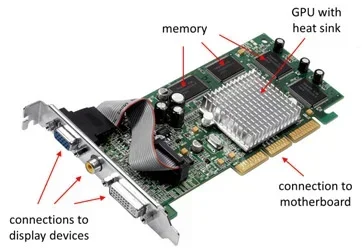
A video card is the part of your computer that handles everything you see on screen. It processes graphics, manages display output, and ensures smooth visual performance whether you are gaming, editing video, or just browsing the web. Understanding what a video card does helps you make smarter choices about your computer setup.
If you have ever wondered why some computers can run heavy games while others struggle to play a simple video, the answer often comes down to one component: the video card. Also known as a graphics card, this piece of computer hardware is responsible for everything you see on your screen. From the icons on your desktop to the most complex 3D game worlds, the video card makes it all possible.
Many people overlook the importance of a good video card when building or buying a computer. They focus on things like processor speed or storage space. But if you care about visual performance, the video card is one of the most important parts inside your machine. Whether you are a casual user, a gamer, or a creative professional, understanding what your video card does can help you get the most out of your system.
In this guide, we will break down every major function of a video card in clear, simple terms. You will learn how it works, why it matters, and how to choose the right one for your needs. Let us dive in.
Key Takeaways
- A video card renders all images, video, and graphics that appear on your computer screen.
- Dedicated video cards outperform integrated graphics for gaming, video editing, and 3D work.
- The GPU is the brain of the video card, handling complex calculations for smooth visual performance.
- Video cards manage display output, supporting multiple monitors and high resolutions.
- Choosing the right video card depends on your use case, budget, and system compatibility.
- Video card functions also include video encoding and hardware acceleration for smoother playback.
- Knowing when to upgrade your video card can breathe new life into an older computer.
📑 Table of Contents
What Is a Video Card and Why Does It Matter
The Basic Role of a Video Card
A video card is a specialized piece of computer hardware designed to handle graphics. Think of it as the artist inside your computer. Every image, video frame, and animation you see on your monitor is created or processed by the video card. Without it, your computer would not be able to display anything visually.
The video card takes raw data from your processor and turns it into the pixels you see on screen. This process happens many times per second. For a simple desktop, your video card might refresh the screen 60 times every second. For a fast-paced game, it might need to do this 144 times or more. The better your video card, the smoother and more detailed your visual experience will be.
Much like how the RAM of a laptop handles temporary memory for quick access, the video card has its own memory, called VRAM, that stores graphical data close to the GPU for fast retrieval. This setup allows for quick and efficient graphics processing without slowing down the rest of your system.
Why Your Computer Needs One
Every computer needs some form of graphics processing. Even the most basic desktop or laptop has a built-in graphics capability. However, the quality and power of that capability can vary a lot. A video card ensures that your computer can handle demanding visual tasks without lag or stuttering.
Here are some everyday tasks that rely on your video card:
- Displaying your desktop and open windows
- Playing videos and streaming content
- Running video games at different quality levels
- Editing photos and videos
- Running 3D modeling and animation software
- Using multiple monitors at the same time
As you can see, the video card touches almost everything you do on a computer. It is not just for gamers, even though that is where you hear about it most often.
How a Video Card Processes Graphics
From Data to Pixels
The way a video card works is fascinating. When you open a program or load a game, your computer sends raw data to the video card. The video card then processes this data through its graphics chip and turns it into a visual image. This image is sent to your monitor through a cable, and you see it on screen.
This whole process happens incredibly fast. We are talking about milliseconds. A powerful video card can process millions of pixels every single frame. It calculates colors, lighting, shadows, and textures all at once. This is why high-end video cards can make games look so realistic and smooth.
The speed at which your video card processes this data is measured in frame rate, usually expressed as FPS (frames per second). A higher frame rate means smoother motion on screen. A video card that can push 120 FPS will feel much smoother than one that only manages 30 FPS, especially in fast-moving games or videos.
The GPU at the Heart of It All
The GPU, or graphics processing unit, is the core of every video card. You can think of the GPU as the brain of the video card. It is a specialized processor designed specifically for graphics processing. While your computer’s main CPU handles general tasks, the GPU focuses entirely on rendering visuals.
Modern GPUs are incredibly powerful. They contain thousands of small cores that work together to process graphical data. This parallel processing power is what allows video cards to handle complex 3D graphics and high-resolution video. The more cores a GPU has, the more work it can do at once, which directly impacts your visual performance.
Some video cards also have dedicated cooling systems, extra fans, and built-in video acceleration features. These extras help the GPU run cool and fast, even during long gaming sessions or heavy rendering work.
Key Functions of a Video Card
Rendering Images and Video
The most fundamental function of a video card is rendering. Rendering is the process of creating an image from data. Every time you open a webpage, watch a video, or launch a game, your video card is rendering images to your screen.
For basic tasks like browsing the web or writing documents, rendering is relatively simple. But for tasks like playing a 4K video or running a modern game, the video card has to work much harder. It must render millions of pixels with accurate colors, shadows, and details, all in real time.
Good video rendering also matters for video editors and content creators. When you edit a video, your video card helps you preview the changes in real time. A weak video card can make editing feel slow and choppy, while a strong one makes the process smooth and responsive.
Handling 3D Graphics and Gaming
One of the most demanding tasks for any video card is handling 3D graphics. Games use complex 3D models, environments, and effects that require a lot of processing power. The video card calculates how light hits every surface, how shadows fall, and how objects move in three-dimensional space.
For gamers, the video card is the single most important component for performance. A powerful video card can mean the difference between a smooth, immersive experience and a laggy, frustrating one. It affects everything from gaming performance and frame rates to the visual quality of textures and effects.
Beyond gaming, 3D graphics work is also important for architects, engineers, and designers. These professionals use software that relies heavily on the video card to render realistic models and simulations. A strong video card makes these tasks faster and more accurate.
Managing Display Output
Your video card is responsible for managing the output to your display. It controls the resolution, refresh rate, and color depth of what you see on screen. A good video card can support high resolutions like 4K or even 8K, giving you sharp and detailed visuals.
The video card also handles multi-monitor setups. If you use two or more screens at the same time, your video card needs to drive each display independently. Some video cards can support three or more monitors, which is great for multitasking, trading, or immersive gaming setups.
Another important aspect of display output is the frame rate. A video card that supports high refresh rates (like 120Hz or 144Hz) can make motion on screen look much smoother. This is especially noticeable in fast-paced games and when scrolling through content on your desktop.
Video Encoding and Decoding
Many modern video cards include dedicated hardware for encoding and decoding video. This is called hardware acceleration. When you watch a video on YouTube or stream a movie, your video card helps decode the video stream efficiently. This reduces the load on your processor and saves battery life, especially on laptops.
Video encoding is the reverse process. When you record or export a video, your video card can handle the encoding work, making the process faster. This is incredibly useful for content creators who need to export large video files quickly.
Some video cards also support features like ray tracing, which simulates how light behaves in the real world. This creates incredibly realistic reflections, shadows, and lighting effects in games and professional renderings. Ray tracing is one of the most exciting advances in graphics processing today.
Integrated vs Dedicated Video Cards
What Is Integrated Graphics
Integrated graphics are built directly into your computer’s processor. They share system memory with the rest of your computer, which means they do not have their own dedicated graphics memory. Integrated graphics are fine for basic tasks like web browsing, office work, and watching videos.
However, integrated graphics have limitations. They are not powerful enough for heavy gaming, 3D modeling, or professional video editing. If you try to run demanding software on integrated graphics, you will likely experience lag, low frame rates, and poor visual quality. Think of integrated graphics as a basic solution that gets the job done for everyday use.
What Is a Dedicated Video Card
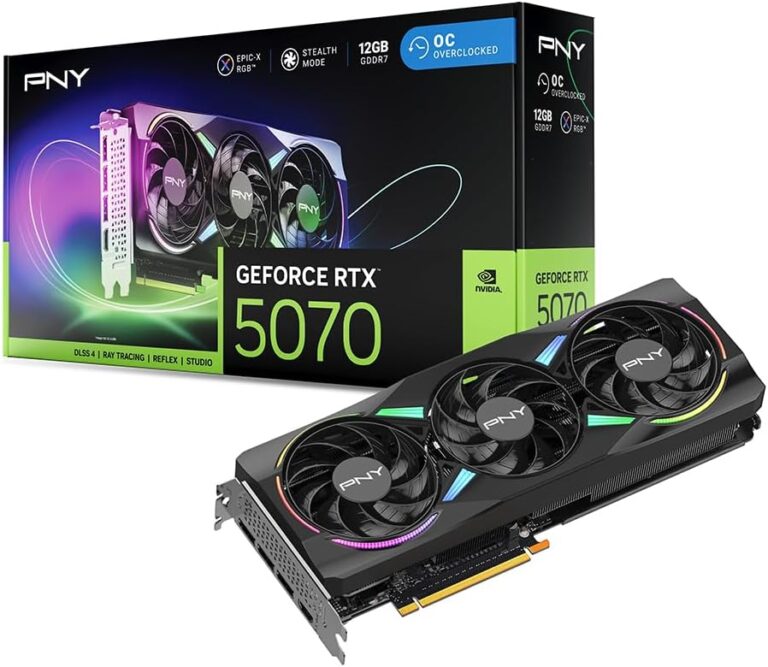
A dedicated video card is a separate component with its own GPU and its own graphics memory. It does not share resources with the rest of your system, which makes it much more powerful. Dedicated video cards are designed for demanding tasks like gaming, video editing, and 3D rendering.
With a dedicated video card, you get better display output, higher frame rates, and support for advanced features like ray tracing and hardware-accelerated video encoding. The difference in performance between integrated and dedicated graphics is huge, especially for anything visually demanding.
Which One Do You Need
The answer depends on what you use your computer for. If you mainly browse the web, check email, and watch videos, integrated graphics will serve you fine. But if you game, edit video, or work with 3D graphics, a dedicated video card is essential.
Here is a simple way to think about it:
- Basic use (web, email, office): Integrated graphics are enough.
- Casual gaming and photo editing: A mid-range dedicated video card works well.
- Heavy gaming, 4K video, 3D work: You need a high-end dedicated video card.
Also, keep in mind that some people upgrade their systems over time. You might start with integrated graphics and later add a dedicated video card as your needs grow. Just like you can upgrade the RAM of a laptop to improve performance, you can swap out or add a video card to boost your graphics power.
How to Choose the Right Video Card
Consider Your Use Case
Before you buy a video card, think about what you will use it for. A gamer needs different features than a video editor or a casual user. Make a list of what you do on your computer and how much graphical power each task requires.
For gaming, pay attention to the video card‘s frame rate performance and VRAM capacity. For creative work, look for video cards with strong encoding and decoding support. For general use, even a budget video card will be more than enough.
Check Your System Compatibility
Not every video card will fit in every computer. Before you buy, check your motherboard for a compatible slot (usually PCIe), your power supply for enough wattage, and your case for physical space. A video card that does not fit or cannot be powered properly will not work.
It is also worth checking if your video card needs extra power connectors. High-end cards often require one or more additional power cables from your power supply. Make sure your power supply can handle the demand.
Budget Considerations
Video cards range widely in price. You can find budget options for under $150 that handle basic tasks and casual gaming. Mid-range cards between $200 and $400 offer great value for most users. High-end cards can cost $500 or more and are designed for enthusiasts and professionals.
The best video card for you is the one that meets your needs without overspending. You do not need the most expensive card if you only play casual games or do basic work. Focus on what matters for your specific use case.
Final Thoughts
The video card is one of the most important components in any computer. It handles everything from displaying your desktop to running the most demanding games and creative software. Understanding the functions of a video card helps you appreciate what this component does and make better decisions about your setup.
Whether you are building a new computer or upgrading an existing one, the video card deserves serious consideration. Choose one that matches your needs, and you will enjoy a much better visual experience every time you sit down at your computer. Take the time to research, compare options, and pick the video card that fits your life best.
Frequently Asked Questions
What does a video card do in simple terms?
A video card takes data from your computer and turns it into images on your screen. It handles everything you see, from desktop icons to complex game graphics. Without it, your computer would not display anything visually.
Do I need a dedicated video card if I only use my computer for basic tasks?
No, for basic tasks like web browsing and office work, integrated graphics are usually enough. A dedicated video card becomes important if you game, edit video, or do 3D work. Most everyday users do not need a powerful standalone card.
Can a bad video card cause computer problems?
Yes, a weak or failing video card can cause screen glitches, lag, crashes, or poor display quality. If your computer struggles with visual tasks, your video card might be the culprit. Upgrading or replacing it can often solve these issues.
How is a video card different from a graphics card?
There is no real difference. The terms video card and graphics card are used interchangeably. Both refer to the same component that handles visual output and graphics processing in a computer. Some people use one term more than the other, but they mean the same thing.
How often should I upgrade my video card?
There is no set schedule. Upgrade your video card when you feel your current one cannot handle your tasks anymore. For gamers, this might mean every 3 to 5 years. For casual users, a video card can last much longer without needing an upgrade.
Does a video card affect gaming performance?
Yes, the video card is the most important component for gaming performance. It directly affects frame rates, visual quality, and smoothness. A stronger video card means better gaming performance, higher resolutions, and more detailed graphics in games.