Can You Upgrade Soldered Ram And What You Should Know
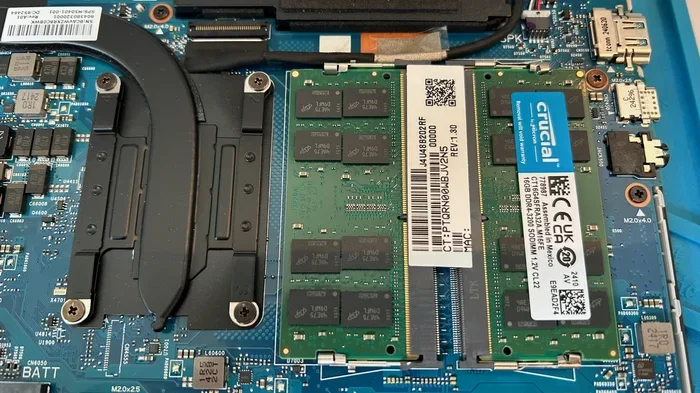
Can you upgrade soldered RAM? The short answer is no. Soldered RAM is permanently attached to the motherboard, meaning you cannot remove or replace it. However, there are still ways to improve your laptop’s performance even with fixed memory. This guide covers everything you need to know about soldered RAM, including what it is, why manufacturers use it, and what you can do to get the most out of your system.
You just bought a sleek new laptop. It’s fast, it’s thin, and it looks amazing. But after a few months, you notice it’s slowing down. You search online and wonder, can you upgrade soldered RAM? The answer might disappoint you. But don’t worry. This guide will walk you through everything you need to know about soldered memory, why it exists, and what you can actually do about it.
RAM, or Random Access Memory, is one of the most important parts of any computer. It handles everything you do right now. Open a browser, run a program, or edit a photo. Your RAM handles it all. But not all RAM is created equal. Some laptops let you swap out memory modules easily. Others have RAM that is soldered directly onto the motherboard. And that changes everything.
In this article, we will break down what soldered RAM means, why manufacturers choose this design, and whether you have any options left. We will also share practical tips to get more performance out of your laptop, even if the memory is fixed. Let us dive in.
Key Takeaways
- Soldered RAM cannot be upgraded: It is permanently attached to the motherboard and cannot be removed or replaced.
- Many modern laptops use soldered memory: Thin and lightweight laptops often sacrifice upgradeability for portability.
- You can still boost performance: Clearing cache, using SSDs, and optimizing settings help even with fixed RAM.
- Check your laptop before buying: Always verify whether RAM is soldered or removable before making a purchase decision.
- Future-proof wisely: Buy more RAM upfront if you plan to keep your laptop for several years.
- External options exist: Some workarounds can help manage memory limitations without physical upgrades.
📑 Table of Contents
What Is Soldered RAM?
Soldered RAM means the memory chips are permanently attached to the laptop’s motherboard. They are not plugged into a slot. You cannot pull them out or swap them for better modules. This design is very different from traditional RAM that sits in a removable DIMM slot or SO-DIMM slot.
When RAM is soldered, it becomes part of the laptop’s internal structure. Think of it like a component that is built into the wall rather than sitting on a shelf. You cannot easily take it out or replace it. This approach has become very common in modern laptops, especially ultrabooks and thin designs.
Why Do Manufacturers Solder RAM?
There are several reasons why laptop makers choose to solder memory onto the board. The biggest reason is space. Thin laptops need every millimeter to count. Soldered RAM takes up less room than a module in a slot. This allows manufacturers to build thinner, lighter devices.
Another reason is cost. Removing slots and connectors saves money in production. It also reduces the number of parts that can fail. A soldered connection can be more reliable than a removable one because there is no connector that can loosen over time.
Performance is a third factor. Soldered RAM can sometimes be placed closer to the CPU. This shorter distance can improve speed and reduce latency. For some laptops, this design choice actually boosts performance slightly.
Can You Upgrade Soldered RAM?
The direct answer is no. You cannot upgrade soldered RAM. Since the memory is permanently fixed to the motherboard, there is no way to remove it or add more. If your laptop came with 8GB of soldered RAM, that is what you are stuck with. There is no upgrade path.
This is a very important fact to understand before you buy a laptop. Many people assume they can always add more memory later. But with soldered designs, that is simply not possible. You need to get the right amount of RAM from the start.
If you are shopping for a new laptop and you think you might need more memory in the future, look for models with removable RAM slots. This gives you the flexibility to upgrade your RAM later as your needs grow. Always check the specs before you buy.
How to Check If Your Laptop RAM Is Soldered
Not sure if your laptop has soldered memory? There are a few ways to find out. First, check your laptop’s model specs on the manufacturer’s website. Look for terms like “soldered RAM” or “memory not user-upgradeable.”
Second, open your laptop and look inside. If you see RAM chips directly on the motherboard with no visible slots, your RAM is soldered. But be careful. Opening your laptop may void the warranty. If you are not comfortable doing this, check online forums or watch teardown videos for your specific model.
Third, you can use system information tools. On Windows, type “System Information” in the search bar and look for details about your installed RAM. On macOS, click the Apple menu and choose “About This Mac.” These tools will not always tell you if RAM is soldered, but they give you useful baseline information.
Why Soldered RAM Matters for Your Laptop
Soldered RAM affects your laptop in real ways. It limits what you can do and how long your device stays useful. If you buy a laptop with 4GB of soldered RAM today, you will likely feel the pinch in just a year or two. Modern apps and browsers use a lot of memory. 4GB simply is not enough anymore.
On the positive side, laptops with soldered RAM often come with better overall build quality. The design is tighter, the chassis is more rigid, and the device tends to be lighter. For many users, this trade-off is worth it. But for power users and gamers, limited memory is a serious problem.
If you already own a laptop with soldered memory, you need to work within those limits. The good news is that there are several things you can do to squeeze more performance out of your system. Let us look at those options now.
Can You Upgrade Laptop RAM in General?
Some laptops still come with removable RAM. These are often business laptops, gaming rigs, and older models. If your laptop has a user-accessible SO-DIMM slot, you can swap out the memory yourself or take it to a repair shop. This is much more flexible than soldered designs.
To find out if your laptop supports upgrades, check the manufacturer’s website or search for your model number online. Many tech forums have detailed teardowns that show exactly what is inside. If you want a general overview of what is possible, read our guide on whether laptop RAM can be upgraded for more details.
What You Can Do If You Have Soldered RAM
Having soldered RAM does not mean you are stuck with a slow laptop. There are several practical steps you can take to improve performance without touching the memory chips.
1. Optimize Your Current Memory Usage
The first step is to make the most of what you have. Close apps you are not using. Limit the number of browser tabs open at one time. Many browsers, especially Chrome, are very memory-hungry. Consider using a lighter browser like Firefox or Edge with tab sleeping enabled.
You can also check your task manager to see which programs are using the most memory. On Windows, press Ctrl + Shift + Esc to open Task Manager. Click the “Memory” column to sort by usage. Shut down anything you do not need.
2. Add External Storage
If your laptop has an SSD slot, adding a fast external or internal SSD can make a huge difference. When your RAM fills up, your system starts using the storage drive as virtual memory. A fast SSD makes this swap much smoother. You can learn more about general RAM upgrades and how storage interacts with memory performance.
3. Use Lightweight Software
Swap heavy applications for lighter alternatives. For example, use a lightweight text editor instead of Microsoft Word for simple tasks. Use a simpler media player instead of a heavy one. Small changes like these add up and free up valuable memory.
4. Keep Your System Clean
Regular maintenance goes a long way. Clear your temp files, disable startup programs you do not need, and keep your operating system updated. A clean system runs more efficiently, even with limited RAM.
5. Consider Cloud Solutions
If your laptop struggles with heavy tasks, consider using cloud-based tools. Google Docs, cloud photo editors, and web-based apps offload processing to remote servers. This reduces the strain on your local memory.
How Much RAM Do You Really Need?
If you are shopping for a new laptop and want to avoid the soldered RAM problem, buy enough memory upfront. Here is a quick guide to help you decide.
| Usage Type | Minimum RAM | Recommended RAM |
|---|---|---|
| Basic browsing and email | 4GB | 8GB |
| Office work and multitasking | 8GB | 16GB |
| Photo and video editing | 16GB | 32GB |
| Gaming | 16GB | 32GB |
| Programming and development | 16GB | 32GB |
As you can see, 8GB is the sweet spot for most users. If you buy a laptop with soldered RAM, aim for at least 16GB if your budget allows. This gives you room to grow and keeps your laptop useful for several years.
Also, keep in mind that RAM prices can change. Buying a laptop with more memory now may save you from buying a new device later. Think of it as an investment in longevity.
Common Mistakes People Make With Soldered RAM
There are several mistakes users make when dealing with soldered memory. Avoiding these can save you time, money, and frustration.
- Buying a laptop without checking the RAM type: Always verify whether the RAM is soldered or removable before purchasing.
- Assuming all laptops can be upgraded: Not every laptop supports RAM upgrades. The specs will tell you.
- Ignoring virtual memory settings: Properly configured virtual memory can help compensate for low physical RAM.
- Overlooking the cost of a new laptop: Sometimes replacing a laptop is more cost-effective than struggling with too little memory.
- Using heavy apps on low-RAM systems: Running demanding software on 4GB of RAM will only lead to frustration.
Expert Insights on Soldered RAM
Industry experts agree that soldered RAM is here to stay. As laptops get thinner and lighter, removable memory slots are becoming rarer. Most premium ultrabooks now use soldered designs. This trend is unlikely to reverse anytime soon.
However, experts also stress that users should not panic. Modern operating systems are becoming more efficient. Windows 11 and macOS both handle memory better than their predecessors. Background processes use less RAM than they did a few years ago. So even with fixed memory, a well-optimized laptop can still perform well.
Experts also recommend that buyers prioritize RAM when choosing a laptop. Storage can be upgraded later in many cases. But RAM on a soldered motherboard cannot. Always pick the most memory you can afford.
Final Thoughts
So, can you upgrade soldered RAM? Unfortunately, no. Soldered memory is permanent. But that does not mean you are out of options. By understanding your limitations and working within them, you can still get great performance from your laptop.
The key is to buy smart from the start. Choose a laptop with enough RAM for your needs. Check whether the memory is removable or soldered. And if you already own a laptop with fixed memory, use the optimization tips in this guide to get the most out of it.
Technology changes fast. But with the right knowledge and habits, your laptop can keep up. Do not let soldered RAM hold you back. Take control of your setup and make every byte of memory count.
If you want to explore more about laptop memory and upgrade possibilities, check out our detailed guide on whether you can upgrade your laptop RAM and learn about the different options available for your specific model.
Frequently Asked Questions
Can you upgrade soldered RAM on any laptop?
No, soldered RAM cannot be upgraded on any laptop. The memory chips are permanently attached to the motherboard and cannot be removed or replaced. If your laptop has soldered RAM, you are stuck with the amount it came with.
How do I know if my laptop RAM is soldered?
Check your laptop’s model specifications on the manufacturer’s website. Look for terms like “memory not user-upgradeable” or “soldered RAM.” You can also search for teardown videos of your specific model online to see the internal layout.
What happens if my soldered RAM is not enough?
If your soldered RAM is insufficient, your laptop will slow down. It may freeze, lag, or struggle with multiple apps. You can optimize performance by closing unused programs, using lightweight software, and adding external SSD storage for virtual memory support.
Are there any laptops with both soldered and removable RAM?
Yes, some laptops have a mixed setup. They come with a portion of RAM soldered and a slot for a removable module. This gives you a small degree of flexibility. Check your laptop’s specifications to see if this applies to your model.
Is it worth buying a laptop with soldered RAM?
It can be worth it if you buy enough RAM upfront. Soldered RAM laptops are often thinner, lighter, and more reliable. As long as you choose a configuration that meets your long-term needs, soldered RAM should not be a dealbreaker.
Can you use external RAM to compensate for soldered memory?
No, external RAM is not a viable solution. RAM must be installed internally and directly on the motherboard. However, you can improve performance by upgrading to a faster SSD, reducing startup programs, and using cloud-based tools to offload heavy tasks.