Does Ram Speed Matter For Laptop Performance Guide
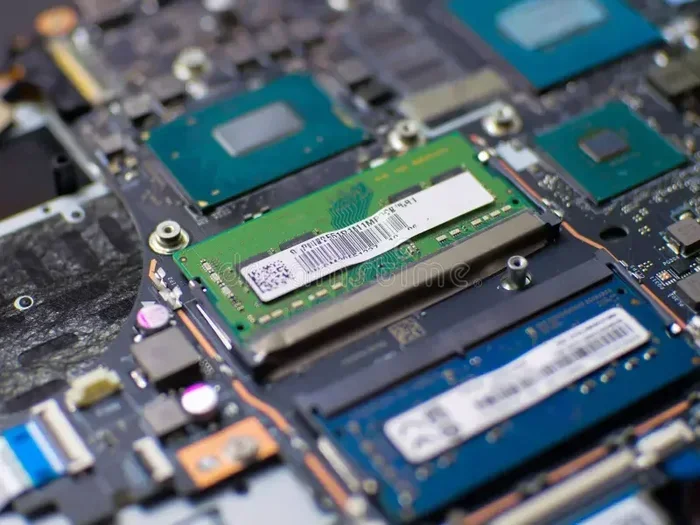
Does ram speed matter for laptop performance? The short answer is yes, but with important caveats. Faster memory can boost certain tasks like gaming and video editing, while everyday use often sees little difference. Understanding your needs helps you make the right choice without overspending.
When you shop for a new laptop, you see a lot of numbers thrown around. Processor speed, storage size, and screen resolution all get the spotlight. But one spec quietly hides in the background: ram speed. It might not sound exciting, but it plays a real role in how your laptop feels every day.
So, does ram speed matter for laptop use? The answer is more nuanced than you might think. If you just browse the web and write documents, you probably will not notice a huge difference. But if you game, edit video, or run heavy software, memory speed can make a real impact. Let us break it all down in simple terms.
In this guide, we will explore what ram speed actually means, how it affects your day-to-day tasks, and whether an upgrade is worth your money. We will also look at DDR4 vs DDR5, latency, and the sweet spots for different types of users. By the end, you will know exactly what to look for when choosing or upgrading your laptop memory.
Key Takeaways
- Ram speed affects some tasks more than others: gaming and creative work benefit more than basic browsing.
- DDR4 and DDR5 are the main types today: each offers different speed ranges and performance levels.
- Latency matters just as much as frequency: lower CAS latency can improve real-world responsiveness.
- Most users do not need the fastest RAM: 3200 MHz is often the sweet spot for everyday use.
- Compatibility is key: always check your laptop specs before buying faster memory.
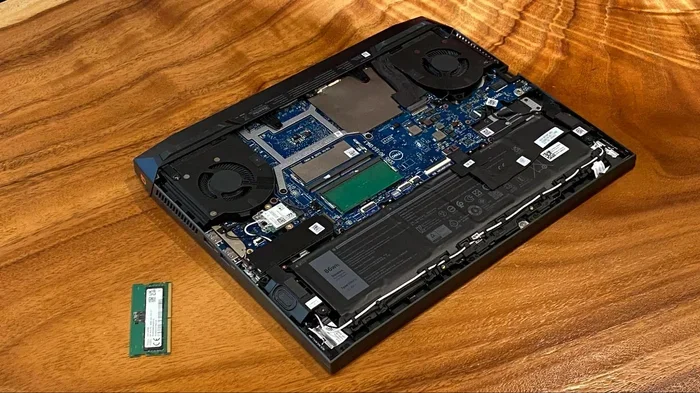
- Upgrading RAM is easy: you can boost performance without replacing your whole laptop.
📑 Table of Contents
What Does Ram Speed Actually Mean?
Ram speed refers to how fast your laptop’s memory can read and write data. Think of it like a highway. The wider the highway, the more cars can move at once. Ram speed works similarly. Higher speed means more data moves through your memory each second.
Ram speed is measured in megahertz, or MHz. You will often see numbers like 2400 MHz, 3200 MHz, or 4800 MHz. These numbers tell you how many data transfers happen per second. The higher the number, the faster the memory works. But speed is not the whole story. You also need to understand latency and bandwidth.
Ram Frequency vs Latency
Many people confuse frequency with overall performance. Frequency is the speed number you see in specs. But latency is the delay before data starts flowing. Think of it like a highway with a traffic light. Even if the road is wide, a long red light slows everything down.
Ram latency is measured in CAS latency, or CL. A lower CL number means less delay. So a 3200 MHz stick with CL16 can outperform a 3200 MHz stick with CL22. When you compare ram speed for laptop options, always check both frequency and latency. Together, they give you the real picture of performance.
DDR4 vs DDR5 Ram
Right now, two main types of memory dominate the laptop market. DDR4 has been the standard for years. It offers solid speeds and works well for most users. DDR5 is the newer generation. It brings higher speeds, better efficiency, and improved bandwidth.
DDR4 typically runs between 2133 MHz and 3200 MHz. DDR5 starts around 4800 MHz and can go well beyond 6000 MHz. The jump between the two generations is significant. However, DDR5 laptops still cost more. For many users, DDR4 ram for laptop remains the best value choice.
Here is a quick comparison to help you understand the differences:
- DDR4 Ram: Speeds from 2133 MHz to 3200 MHz. Widely available and affordable. Great for everyday tasks and mid-range gaming.
- DDR5 Ram: Speeds from 4800 MHz to 7200 MHz. Better for heavy workloads and future-proofing. Still relatively expensive.
- Bandwidth: DDR5 offers roughly double the bandwidth of DDR4 at the same clock speed.
- Power Efficiency: DDR5 uses less power, which can slightly improve battery life.
So when you ask, does ram speed matter for laptop buyers, the type of memory matters just as much as the number on the label.
How Ram Speed Affects Laptop Performance
Now let us get to the real question. How much does memory speed actually change how your laptop performs? The answer depends heavily on what you do with your machine.
Everyday Use: Browsing, Office Work, and Streaming
For basic tasks like checking email, watching videos, or writing in Word, ram speed barely makes a difference. These tasks do not push your memory hard. Whether you have 2400 MHz or 3600 MHz memory, you will feel the same smooth experience.
What matters more for everyday use is having enough total capacity. If your laptop runs slowly with many browser tabs open, the problem is usually not speed. It is is 8gb ram enough for laptop use? Most people need at least 8 GB for comfortable daily use. Adding more capacity often helps more than chasing higher speeds.
Gaming Performance
Gaming is where memory speed starts to show its teeth. Modern games load textures, AI data, and world assets into ram constantly. Faster memory means these assets arrive quicker. The result is smoother frame rates and shorter load times.
Studies show that moving from 2400 MHz to 3600 MHz can boost frame rates by 5 to 15 percent in some games. That is a noticeable improvement, especially in competitive titles where every frame counts. If you are a gamer, 8gb ram laptop for gaming with fast speeds is a smart investment.
However, there is a limit. Beyond 3600 MHz, the gains shrink significantly. Most modern GPUs and processors cannot fully use extremely fast memory. So spending extra money on 5000 MHz RAM may not give you the performance bump you expect.
Creative Work: Video Editing and 3D Rendering
If you edit videos, work with large images, or do 3D rendering, memory speed matters more. These tasks move huge amounts of data between your processor and memory. Faster ram means shorter render times and smoother playback in editing software.
For example, scrubbing through a 4K video timeline in Premiere Pro feels much smoother with faster memory. The same goes for rendering 3D scenes in Blender or Cinema 4D. In these workflows, does ram speed matter for laptop performance is a resounding yes.
Professional creators should aim for at least 3200 MHz with low latency. And having enough capacity is just as important. 16 GB is the minimum for serious creative work, while 32 GB or more is ideal for heavy projects.
Multitasking and Productivity
Do you often have dozens of apps open at once? Memory speed can help here too. When you switch between a browser, Slack, Spotify, and a design tool, your laptop pulls data from ram constantly. Faster memory reduces the lag between switching tasks.
You will notice this most when you have many apps running and your laptop starts to feel sluggish. Upgrading to faster ram can bring back that snappy feeling. It is one of the easiest ways to breathe life into an older machine without spending a fortune.
When Does Ram Speed NOT Matter?
It is equally important to know when memory speed does not make a big difference. Understanding this saves you from overspending on upgrades that will not move the needle.
CPU-Bound Tasks
Some tasks depend entirely on processor power, not memory speed. Compiling code, running complex calculations, or processing large datasets often bottleneck at the CPU. In these cases, a faster processor helps far more than faster memory.
If your laptop already has a strong CPU, adding faster RAM will not transform your experience. The processor simply cannot feed data to the memory fast enough to make the speed difference matter. This is an important point many people overlook when shopping for upgrades.
Storage-Bound Workloads
Tasks that rely heavily on your SSD or hard drive also see little benefit from faster ram. Loading large files, saving projects, or copying data all depend on storage speed. Upgrading from a mechanical hard drive to an NVMe SSD will give you a far bigger boost than upgrading your memory.
So before you rush to buy faster RAM, ask yourself what is actually slowing you down. Sometimes the bottleneck is not your memory at all.
Integrated Graphics vs Dedicated GPUs
Laptops with integrated graphics share system memory for visuals. In these cases, faster ram does matter more because the GPU has no dedicated video memory. It borrows from your system ram, so speed directly impacts graphics performance.
Laptops with dedicated GPUs, on the other hand, have their own memory. The dedicated VRAM handles graphics tasks independently. For these machines, system ram speed matters less for gaming and creative work. The GPU does the heavy lifting.
How to Choose the Right Ram Speed for Your Laptop
Picking the right memory speed does not have to be confusing. Follow these practical steps to find the best option for your needs and budget.
Step 1: Check Your Laptop’s Maximum Supported Speed
Not every laptop can use every speed of memory. Your laptop’s motherboard and processor set a maximum supported speed. Check your laptop’s manual or the manufacturer’s website to find this number. Buying faster RAM than your laptop supports is a waste of money.
For example, if your laptop supports up to 3200 MHz, buying 4800 MHz RAM will not give you any benefit. The memory will simply run at 3200 MHz. Always match your upgrade to what your system can handle.
Step 2: Match Ram Type and Generation
DDR4 and DDR5 are not interchangeable. They have different physical slots and electrical specs. You cannot put DDR5 RAM into a DDR4 laptop slot. Make sure you know which type your laptop uses before buying anything.
If you are shopping for an hp 8gb ram for laptop upgrade, check whether your model uses DDR4 or DDR5. The same applies for Dell, Lenovo, and other brands. Mixing RAM types is not possible and can damage your system.
Step 3: Balance Speed with Capacity
Speed and capacity are both important. But for most users, capacity should come first. Having 16 GB of RAM at 3200 MHz is better than 8 GB at 4800 MHz. More memory lets you run more apps at once without slowdowns.
Once you have enough capacity, then you can focus on speed. For most people, 3200 MHz DDR4 hits the perfect balance of performance and price. It is the sweet spot that delivers great results without breaking the bank.
Step 4: Consider Your Budget
Faster RAM costs more. The price gap between 3200 MHz and 4800 MHz can be significant. Before you spend extra, ask yourself if the performance boost justifies the cost. For gamers and creators, it often does. For casual users, it usually does not.
If you are on a tight budget, prioritize getting enough capacity first. A basic 8 GB or 16 GB setup at standard speeds will serve you well for most tasks. You can always upgrade later when your budget allows.
Common Mistakes People Make With Ram Upgrades
Upgrading your laptop memory seems simple, but people make mistakes all the time. Here are the most common ones to avoid.
- Buying incompatible RAM: Not all RAM sticks work in all laptops. Check your laptop’s exact model number and supported specs before buying.
- Ignoring dual-channel setup: Using two smaller sticks instead of one big stick can improve performance. Dual-channel memory doubles the data pathway, boosting speed even at the same frequency.
- Overestimating speed gains: Faster RAM does not make your laptop twice as fast. The improvements are often modest and task-specific.
- Forgetting about cooling: Some high-speed RAM generates more heat. In thin laptops, this can cause thermal throttling. Make sure your laptop can handle the extra heat.
- Skipping the BIOS update: Sometimes your laptop needs a BIOS update to support newer memory speeds. Check for updates before assuming your RAM is not working properly.
Avoiding these mistakes saves you time, money, and frustration. A simple check of compatibility and a BIOS update can make the difference between a successful upgrade and a wasted purchase.
Expert Tips for Maximizing Ram Performance
Want to get the most out of your laptop memory? These expert tips will help you squeeze every bit of performance from your setup.
Enable XMP Profiles: If your laptop supports XMP (Extreme Memory Profile), turn it on in your BIOS. This automatically sets your RAM to its rated speed instead of running at slower default speeds. Many laptops ship with XMP disabled out of the box.
Keep Your Drivers Updated: Updated chipset drivers can improve memory stability and performance. Manufacturers often release updates that optimize how the system communicates with RAM.
Close Unnecessary Background Apps: Even with fast RAM, too many open apps will slow you down. Use your task manager to see what is running in the background and close what you do not need.
Monitor Your RAM Usage: Use built-in tools or free apps to check how much memory your laptop uses. If you regularly hit 80 percent or more, you need more capacity, not faster speed.
Consider a Full Upgrade Path: If your laptop has upgradeable RAM, plan your upgrade with the future in mind. Buy sticks that can work together in dual-channel mode. This gives you the best balance of speed and capacity for years to come.
Conclusion
So, does ram speed matter for laptop performance? The answer is yes, but with important context. For casual users, memory speed makes little noticeable difference. What matters most is having enough total capacity to handle your daily tasks comfortably.
For gamers, video editors, and power users, faster RAM delivers real benefits. Smoother frame rates, quicker load times, and better multitasking are all within reach. But there is a limit to the gains. Chasing the absolute fastest memory often costs more than it is worth for the average user.
The best approach is to find the right balance. Match your RAM speed to your laptop’s capabilities, prioritize capacity first, and only spend extra on speed if your workload truly demands it. Whether you are looking at DDR4 ram for HP laptop options or exploring DDR5 upgrades, the key is knowing what your specific needs are.
Take the time to understand your usage patterns. Check your laptop’s specs. And when you are ready to upgrade, follow the steps we outlined above. A thoughtful RAM upgrade can bring new life to your laptop without the need for a full replacement. Your machine will thank you with faster load times, smoother multitasking, and a more responsive experience every single day.
If you want to learn more about how memory affects your system, check out our guide on what does ram do for a laptop to understand the fundamentals. Also, if you are considering an upgrade, our article on RAM upgrade for my laptop walks you through the entire process step by step.
For those wondering about capacity, we also have a detailed piece on is 8GB RAM enough for laptop use, which covers everything from student needs to professional workloads. And if you are specifically interested in gaming setups, explore our 8GB RAM laptop for gaming recommendations to find the right balance of speed and capacity.
Frequently Asked Questions
Does faster RAM make a laptop faster for everyday tasks?
For basic tasks like web browsing, email, and document editing, faster RAM makes very little difference. These activities do not push your memory hard enough to benefit from higher speeds. What matters more for everyday use is having enough total RAM capacity, like 8 GB or 16 GB.
What is the best RAM speed for a gaming laptop?
3200 MHz DDR4 is widely considered the sweet spot for gaming laptops. It offers excellent performance without a huge price premium. Going beyond 3600 MHz gives diminishing returns for most games. Make sure your laptop supports the speed you choose before buying.
Can I mix different RAM speeds in my laptop?
Technically yes, but it is not recommended. When you mix speeds, all the RAM will run at the slowest speed in the setup. This can also cause stability issues in some cases. Always try to use matching RAM sticks for the best performance and reliability.
How does RAM speed compare to RAM capacity?
Capacity and speed serve different purposes. Capacity is how much data your laptop can hold in memory at once. Speed is how fast it can access that data. For most users, having enough capacity is more important than having the fastest speed. 16 GB of RAM at 3200 MHz will outperform 8 GB at 4800 MHz in most real-world scenarios.
Does RAM speed affect battery life on a laptop?
Faster RAM can use slightly more power, which may reduce battery life by a small amount. However, the difference is usually minimal and not noticeable in everyday use. DDR5 RAM tends to be more power-efficient than DDR4, which can actually help extend battery life slightly.
Should I upgrade my RAM or my SSD first?
If your laptop feels slow when opening apps or loading files, upgrading your SSD will likely help more. If you struggle with multitasking or get memory warnings, then RAM is your bottleneck. Check your system performance first to identify what is actually causing the slowdown before spending money on an upgrade.