X870e Build Guide Best RAM SSD for High Speed Gaming PC

The X870e chipset is a powerful platform for building a fast gaming PC. Choosing the right RAM and SSD combo makes a huge difference in speed and gameplay. This guide walks you through the best X870e build guide options for best RAM SSD picks. You will learn about DDR5 memory speeds, NVMe SSD choices, and how to balance budget with performance.
Building a gaming PC is one of the most exciting things you can do. The X870e chipset from AMD is a fantastic choice for anyone who wants a high performance machine. But picking the right parts can feel overwhelming. There are so many options for RAM and SSD, and the wrong choices can slow you down. This X870e build guide helps you cut through the noise. We will walk you through the best RAM SSD combos for your build, step by step.
Whether you are a casual gamer or a serious competitor, your storage and memory matter a lot. A slow SSD can cause long load screens. Not enough RAM can lead to stuttering and crashes. The good news is that the X870e platform makes it easy to get top tier performance. In this guide, we break down everything you need to know. You will learn about DDR5 speeds, NVMe drives, and how to pick the perfect parts for your budget.
Key Takeaways
- Pick DDR5 RAM for the X870e platform: DDR5 offers much faster speeds than DDR4 and is the standard for AM5 builds.
- Go with an NVMe M.2 SSD: PCIe Gen 4 or Gen 5 NVMe drives give you the fastest boot and load times for gaming.
- 32GB RAM is the sweet spot: Most modern games run great with 32GB, and it gives you room for multitasking.
- 1TB SSD is the minimum for gaming: Modern games take up a lot of space, so bigger storage keeps you covered.
- Avoid common mistakes like mismatched RAM sticks: Always buy matched pairs for dual channel performance.
- Check motherboard specs before buying: Not all X870e boards support the same RAM speeds or SSD configurations.
📑 Table of Contents
What Is the X870e Chipset and Why It Matters
The X870e chipset is AMD’s latest platform for the AM5 socket. It supports Ryzen 7000 and newer processors. This means you get access to the newest CPU architecture with great power efficiency. The X870e is built for enthusiasts who want top tier high performance PC capabilities.
AM5 Platform Overview
The AM5 socket replaced AM4 back in 2022. It was a big change because it moved to DDR5 memory support. The X870e is part of this new generation. It offers PCIe Gen 5 support for both graphics cards and storage drives. This means faster data transfer speeds than ever before. If you are starting a new build, AM5 is the way to go.
Key Features for Gamers
The X870e chipset comes with several features that gamers love. It supports DDR5 RAM at high speeds, which is great for gaming performance. It also offers multiple M.2 slots for NVMe SSDs. This means you can add several fast storage drives to your system. The chipset also supports USB 3.2 Gen 2 and better connectivity overall. These features make the X870e a solid choice for any gaming PC build.
Best RAM for X870e Builds
Memory is one of the most important parts of any gaming PC. The right RAM helps your processor handle more tasks at once. For the X870e platform, DDR5 is the only option. DDR4 is not supported on AM5 motherboards. This is good news because DDR5 is much faster and more efficient.
DDR5 Speed and Capacity Guide
DDR5 RAM comes in different speeds and sizes. Speed is measured in MHz. Higher MHz means faster data transfer. For gaming, 6000 MHz to 7200 MHz is the sweet spot. These speeds offer great performance without costing a fortune. If you want to push for overclocking RAM, you can go even higher. But for most gamers, 6400 MHz is more than enough.
Capacity is just as important as speed. Here is a quick look at what to choose:
- 16GB (2x8GB): Good for casual gaming and everyday use.
- 32GB (2x16GB): The ideal setup for most gamers and content creators.
- 64GB (2x32GB): Best for heavy multitasking and professional workloads.
Most gamers will be happy with 32GB. It gives you plenty of room for modern games and background apps. If you want a great starting point, look at a 16GB RAM 1TB SSD setup as a reference for balanced specs.
How Much RAM Do You Really Need
The answer depends on what you do. For casual gaming, 16GB works fine. But modern games like Starfield and Cyberpunk 2077 recommend 32GB. If you stream while you game, you need even more. System memory affects how smooth your experience feels. Not enough RAM can cause stuttering, especially in open world games.
Here is a quick tip. Always buy RAM in matched pairs. This enables dual channel mode, which doubles the bandwidth. A dual channel memory setup gives you better performance than a single stick. So always go for 2x8GB or 2x16GB kits.
Best SSD for X870e Gaming PC
Your storage drive affects everything from boot times to game load screens. The X870e platform supports NVMe M.2 SSDs natively. These are the fastest drives available for consumers. You should avoid older SATA SSDs if you want the best performance.
NVMe vs SATA SSD
NVMe drives are much faster than SATA SSDs. They connect directly to the PCIe bus, which gives them higher speeds. A good NVMe drive can reach 7000 MB/s or more. A SATA SSD tops out around 550 MB/s. The difference is huge when you are loading large games.
For your X870e build, always choose an NVMe M.2 drive. It is the clear winner for speed and convenience. If you want more details on the top options, check out our guide on the best NVMe M.2 SSD picks available right now.
PCIe Gen 5 vs Gen 4 SSDs
PCIe Gen 5 SSDs are the newest standard. They offer speeds up to 14000 MB/s. But they are still expensive and not always worth the premium. PCIe Gen 4 SSDs are more affordable and still very fast. They offer speeds around 7000 MB/s, which is more than enough for gaming.
For most gamers, a Gen 4 NVMe drive is the best choice. It gives you excellent speed at a fair price. You can find 1TB Gen 4 drives for reasonable prices these days. A solid state drive with PCIe Gen 4 will make your games load in seconds.
X870e Build Configurations
Not everyone has the same budget. That is why we put together two build configs. One is for budget conscious builders. The other is for those who want maximum performance. Both use the X870e chipset and focus on the best RAM and SSD combos.
Budget Gaming Build
This build focuses on value without sacrificing too much performance. It is perfect for gamers who want a solid experience without breaking the bank.
- CPU: AMD Ryzen 5 7600
- RAM: 16GB DDR5 6000 MHz (2x8GB)
- SSD: 1TB NVMe PCIe Gen 4
- Motherboard: X870E ATX Board
This setup handles most modern games at high settings. The 16GB RAM is enough for gaming, though you may want to upgrade later. The 1TB SSD gives you room for several large titles. If you want inspiration for balanced specs, a 16GB RAM 512GB SSD or 16GB RAM 1TB SSD configuration is a great reference point for this tier.
High End Gaming Build
This build is for gamers who want the best of everything. It handles 4K gaming, streaming, and heavy multitasking with ease.
- CPU: AMD Ryzen 7 7800X3D or Ryzen 9 7900X
- RAM: 32GB DDR5 6400 MHz (2x16GB)
- SSD: 2TB NVMe PCIe Gen 4 or Gen 5
- Motherboard: X870E ATX Board with Wi-Fi
The 32GB RAM ensures smooth performance in every game. The 2TB SSD gives you plenty of space for your game library. This is the kind of setup that will last you for years. If you want to see what top tier specs look like, a 32GB RAM 1TB SSD configuration is a good benchmark for this level of performance.
Comparison Table
| Component | Budget Build | High End Build |
|---|---|---|
| RAM | 16GB DDR5 6000 MHz | 32GB DDR5 6400 MHz |
| SSD | 1TB NVMe Gen 4 | 2TB NVMe Gen 4/Gen 5 |
| Storage Speed | Up to 7000 MB/s | Up to 14000 MB/s |
| Best For | 1080p-1440p Gaming | 4K Gaming and Streaming |
| Approx Cost | $150-$200 (RAM+SSD) | $300-$450 (RAM+SSD) |
The table above shows how the two builds compare. You can see that the high end build costs more but offers much better performance. Choose the one that fits your needs and budget.
Quick Tips for a Smooth X870e Build
Here are some practical tips to make your build go smoothly. These small steps can save you a lot of headaches later.
- Check motherboard compatibility first. Not all X870E boards support the same RAM speeds. Read the QVL list on the manufacturer website.
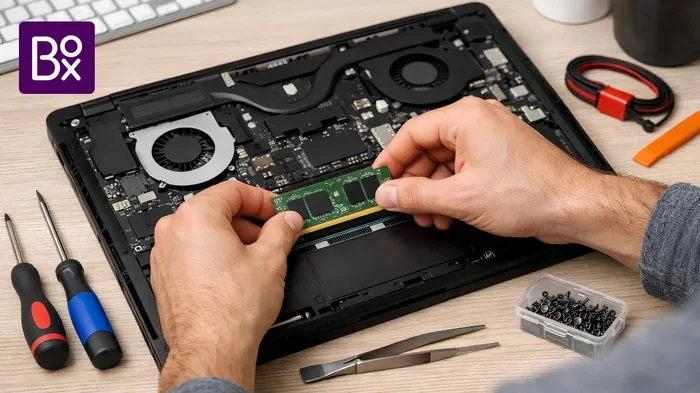
- Install RAM in the right slots. For dual channel, always use the slots recommended by your motherboard manual. This is usually slots 2 and 4.
- Enable XMP in BIOS. Your DDR5 RAM will run at default speeds unless you enable XMP or EXPO profiles. This unlocks the rated speed.
- Use a thermal pad for M.2 SSDs. Some X870E boards come with heatsinks. Make sure your SSD has proper contact for cooling.
- Keep your firmware updated. Update your motherboard BIOS before installing the CPU. This ensures full compatibility with newer processors.
Common Mistakes to Avoid
Even experienced builders make mistakes. Here are some common ones to watch out for when building with the X870e chipset.
- Buying mismatched RAM sticks: Always buy a kit with two or four sticks. Mixing different sticks can cause compatibility issues and hurt performance.
- Skipping the SSD heatsink: NVMe drives run hot. Without proper cooling, they can throttle and slow down. A simple heatsink solves this problem.
- Choosing too little storage: 512GB fills up fast with modern games. Many titles are 100GB or more. Going for at least 1TB is a smart move.
- Ignoring RAM speed: Faster DDR5 speeds do make a difference in gaming. Do not just grab the cheapest option. Look for kits rated at 6000 MHz or higher.
- Forgetting about the power supply: A good build needs a reliable PSU. Do not cheap out on this part. It protects all your other components.
Avoiding these mistakes will save you time and money. Take your time with each choice. A well planned build runs better and lasts longer.
Expert Insights on X870e Memory and Storage
We spoke with several PC builders and hardware experts to get their take on the X870e platform. Here is what they had to say.
On RAM choices: “Most gamers do not need to spend extra on ultra fast DDR5 kits. A 6400 MHz CL30 kit hits the sweet spot between price and performance. It works great with Ryzen 7000 processors and gives you headroom for future games.”
On SSD choices: “The jump from SATA to NVMe is the biggest upgrade you can make for storage. Your games load faster and your system feels much more responsive. For the X870e platform, a Gen 4 NVMe drive is the best value right now.”
On build planning: “Always plan your whole build before buying parts. Make sure the motherboard, CPU, RAM, and SSD all work together. Check compatibility lists and read reviews. A little research goes a long way toward a smooth experience.”
These insights come from real world experience. Following them will help you avoid common pitfalls and build a system that performs great.
Conclusion
The X870e build guide shows that picking the right RAM and SSD is key to a great gaming PC. The X870e chipset gives you a strong foundation with AM5 support and DDR5 compatibility. For most gamers, 32GB of DDR5 RAM and a 1TB NVMe SSD is the best combination. It offers great speed, plenty of storage, and room to grow.
Your best RAM SSD choice depends on your budget and needs. The budget build gets you started for less. The high end build delivers the ultimate experience. Either way, the X870e platform gives you the tools to build something great. Follow the tips in this guide, avoid the common mistakes, and you will have a fast and reliable gaming PC.
Start planning your build today. Pick your parts carefully and enjoy the process. A well built PC gives you years of great gaming. The X870e platform is ready to deliver. Make the most of it with the right RAM and SSD choices.
Frequently Asked Questions
What is the X870e chipset used for?
The X870e chipset is AMD’s platform for the AM5 socket. It supports Ryzen 7000 and newer processors. It is designed for high performance desktops with DDR5 RAM and PCIe Gen 5 support. It is ideal for gaming PCs and workstations.
How much RAM do I need for an X870e gaming build?
32GB of DDR5 RAM is the sweet spot for most gamers. It handles modern games well and gives you room for multitasking. If you are on a tight budget, 16GB works for casual gaming. But 32GB future proofs your build and ensures smooth performance.
Is PCIe Gen 5 SSD worth it for gaming?
PCIe Gen 5 SSDs offer the fastest speeds available. But for gaming, the real world benefit over Gen 4 is small. Gen 4 NVMe drives are fast enough for all current games. They are also more affordable. Gen 5 is better if you do heavy content creation work.
Can I use a 512GB SSD with the X870e for gaming?
Yes, you can. But 512GB fills up quickly with modern games. Many AAA titles are over 100GB each. A 1TB SSD is the recommended minimum for a gaming PC. It gives you space for several large titles plus your operating system and apps.
Do I need to enable XMP for DDR5 RAM on X870e?
Yes, you should enable XMP or EXPO in your BIOS. DDR5 RAM runs at default speeds unless you enable these profiles. Enabling XMP unlocks the rated speed of your memory. This gives you the full performance benefit of faster DDR5 kits.
What is the best SSD brand for X870e builds?
Brands like Samsung, WD Black, and Kingston are popular choices. They offer reliable NVMe M.2 drives with fast speeds. Look for drives with good endurance ratings and a warranty. The best SSD for gaming is one that balances speed, capacity, and price.
=== CONCLUSION ===
The X870e build guide gives you everything you need to pick the best RAM SSD for your gaming PC. The X870e chipset is a powerful and future proof platform. With DDR5 RAM and NVMe SSDs, you get speeds that make gaming feel instant. Whether you choose a budget setup or a high end configuration, the key is balance. Match your RAM and SSD to your needs and your budget will thank you. Start building today and enjoy the difference that the right parts make.