Best Ssd Brands Compared Plus Top Picks And Reviews
Choosing the right SSD brand can make or break your PC experience. In this guide, we compare the top SSD brands head-to-head, covering speed, endurance, and price. You will learn which best SSD brands deliver the most value for gaming, work, and everyday use.
Key Takeaways
- Samsung and WD Black dominate the premium NVMe market with top-tier speeds and reliability.
- Crucial and Kingston offer excellent budget-friendly options without sacrificing performance.
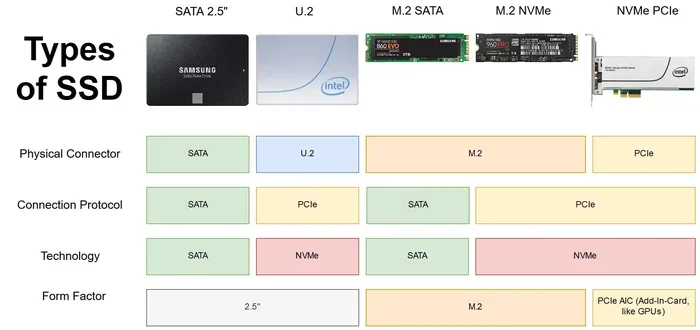
- NVMe SSDs are significantly faster than SATA SSDs for most demanding tasks.
- Endurance ratings and warranty length matter more than raw speed for long-term use.
- Your use case determines the best brand — gaming, professional work, and casual browsing have different needs.
- Price per gigabyte is the best metric for comparing value across brands.
📑 Table of Contents
Why Choosing the Right SSD Brand Matters
Your SSD brand choice affects everything. Boot times, game loading speeds, file transfers, and even system stability all depend on your drive. Not all SSD brands are created equal, and picking the wrong one can cost you performance and money.
When you build or upgrade a PC, the storage drive is one of the most important components. A fast NVMe SSD can turn a sluggish computer into a responsive machine overnight. But with so many brands on the shelf, how do you know which one to trust?
This guide breaks down the best SSD brands available today. We compare performance, price, durability, and real-world use cases. By the end, you will know exactly which brand fits your needs.
We focus on both NVMe M.2 SSDs and traditional SATA drives. Whether you need a gaming SSD, a workhorse for video editing, or a simple upgrade for an older laptop, this comparison covers you.
Top SSD Brands Overview
Let us start by looking at the major players in the SSD market. Each brand has its strengths and target audience. Some excel in raw speed, while others focus on budget value or enterprise reliability.
Samsung — The Gold Standard
Samsung is the most recognized name in SSD technology. Their Samsung 980 Pro and Samsung 970 EVO Plus have set benchmarks for years. Samsung drives offer blazing read speeds up to 7,000 MB/s on their latest Gen 4 models.
What makes Samsung stand out is consistency. Their drives maintain high performance even under heavy workloads. The company also provides strong warranty coverage, often five years or more. If you want the best of the best, Samsung is hard to beat.
However, Samsung drives tend to cost more per gigabyte. This premium is justified for professionals and enthusiasts, but casual users might find better value elsewhere.
WD Black — The Gaming Favorite
WD Black has become a go-to brand for gaming SSDs. Their WD Black SN850P NVMe SSD delivers excellent sequential read speeds and handles heavy gaming workloads with ease. WD Black drives are designed specifically for gamers who want fast load times and smooth performance.
The WD Black line offers competitive pricing compared to Samsung. You get strong performance without paying the premium price tag. Many PC builders choose WD Black for their gaming rigs, and for good reason.
WD also produces reliable consumer drives under their main WD brand. This gives them a wide range of options for different budgets. Their SSD reliability and customer support are solid across the board.
Crucial — The Value Champion
Crucial (a brand under Micron) offers some of the best value SSDs on the market. Their Crucial P3 Plus NVMe SSD provides solid Gen 4 speeds at a price that undercuts many competitors. Crucial drives are perfect for users who want good performance without spending a fortune.
Micron manufactures their own NAND flash memory, which gives Crucial a quality advantage. They control the supply chain and can offer consistent products at lower prices. For budget-conscious builders, Crucial is a top pick.
Crucial also offers SATA SSDs that work well in older systems. Their MX500 series has been a favorite for years. If you need a reliable drive for basic tasks, Crucial delivers without breaking the bank.
Kingston — The Reliable Workhorse
Kingston has been in the memory game for decades. Their NVMe SSDs offer solid performance at competitive prices. Kingston drives are known for reliability and wide availability. They make drives for every segment, from budget USB drives to high-performance NVMe SSDs.
Kingston’s KC3000 and NV2 series are popular choices among PC builders. They offer good speeds and come with decent warranties. Kingston may not win any speed records, but they rarely disappoint.
The brand also has a strong enterprise presence, which means their consumer drives benefit from advanced manufacturing processes. You get enterprise-grade quality in a consumer package.
Performance Comparison: Speed and Endurance
Raw speed is what most people look at first. But SSD endurance and real-world performance matter just as much. Let us break down what to look for when comparing SSD brands.
Sequential Read and Write Speeds
Sequential speeds measure how fast a drive can read or write large files. NVMe Gen 4 SSDs can reach read speeds above 7,000 MB/s. Gen 3 drives typically max out around 3,500 MB/s. For most users, the difference between Gen 3 and Gen 4 is noticeable during large file transfers.
Here is a quick look at what top brands offer:
- Samsung 980 Pro: Up to 7,000 MB/s read, 5,100 MB/s write
- WD Black SN850P: Up to 7,300 MB/s read, 6,600 MB/s write
- Crucial P3 Plus: Up to 5,000 MB/s read, 4,200 MB/s write
- Kingston NV2: Up to 4,900 MB/s read, 4,100 MB/s write
As you can see, the gap between premium and budget brands is narrowing. A budget SSD today is faster than a premium drive from just a few years ago.
Endurance and TBW Ratings
TBW stands for Terabytes Written. It tells you how much data you can write to the drive before it is expected to wear out. Higher TBW means a longer-lasting drive. Samsung and Micron (Crucial’s parent) typically offer the highest TBW ratings.
For most users, endurance is not a concern. A typical user writes about 30-40 GB per day. Even a budget SSD with 300 TBW would last over 20 years at that rate. But content creators and professionals who write large files constantly should pay attention to these numbers.
Random Read/Write Performance
Random speeds affect how your system feels during everyday use. This is where 4K random IOPS come into play. Higher IOPS mean faster app launches, quicker file searches, and snappier multitasking. Premium brands like Samsung and WD Black tend to excel here.
Budget drives from Kingston and Crucial are close enough for most users. You will not notice a huge difference in daily tasks. The gap shows up more during sustained heavy workloads.
Best SSD Brands by Use Case
Not all drives are created for the same purpose. Let us match the best SSD brands to specific use cases. This makes it easier to choose the right drive for your situation.
Best for Gaming
Gamers need fast load times and consistent performance. WD Black and Samsung are the top choices. The WD Black SN850P is a favorite among PC gamers for its excellent sequential speeds and competitive price. Samsung’s 980 Pro also delivers outstanding gaming performance with its high random read speeds.
For console upgrades, like the PS5 M.2 SSD, make sure the drive meets the console’s specifications. Both Samsung and WD Black offer drives that are PS5-compatible and deliver the speed needed for modern game installations.
Best for Budget Builds
If you are building a PC on a tight budget, Crucial and Kingston are your best friends. The Crucial P3 Plus offers Gen 4 NVMe speeds at a price that is hard to beat. Kingston’s NV2 series is another excellent budget option.
For users who do not need the fastest speeds, a SATA SSD from these brands works perfectly. A 500GB SATA SSD from Crucial or Kingston costs very little and still provides a massive upgrade over a traditional hard drive.
Best for Professional Work
Video editors, 3D renderers, and data professionals need drives with high endurance and sustained performance. Samsung leads this category with their Pro series drives. The Samsung 980 Pro handles sustained write workloads better than most competitors.
For enterprise-grade needs, look at drives with higher TBW ratings and longer warranties. Samsung’s data center line and WD’s Ultrastar series are designed for heavy professional use. But for most creative professionals, the consumer Pro series is more than enough.
Best for Everyday Use
For web browsing, office work, and light multitasking, almost any SSD brand will serve you well. A basic NVMe M.2 SSD from Kingston or Crucial provides a massive speed boost over an old hard drive. You will notice faster boot times and quicker app launches immediately.
Do not overspend on a drive for basic tasks. A budget 512GB NVMe SSD from a reliable brand gives you plenty of storage and speed for everyday computing without wasting money on features you will not use.
How to Choose the Best SSD for Your Needs
With so many options, choosing the right SSD brand can feel overwhelming. Here are the key factors to consider before you buy.
Check Your System Compatibility
Not every M.2 NVMe SSD works in every system. Check your motherboard or laptop manual for supported interfaces. Some older systems only support SATA M.2 SSDs or PCIe Gen 3 drives. Putting a Gen 4 drive in a Gen 3 slot will limit its speed.
Also check the M.2 key type and length. The most common size is the 2280 form factor (22mm wide, 80mm long). Some laptops support shorter lengths like 2242. Make sure you buy the right size for your device.
Consider Your Storage Needs
Think about how much space you actually need. 500GB SSDs work for operating systems and a few games. 1TB SSDs are the sweet spot for most users. If you store large media files or install many games, consider a 2TB or 4TB NVMe SSD.
Price per gigabyte drops as capacity increases. A 1TB drive often costs only slightly more than a 500GB drive, making it the better value in most cases.
Look at Warranty and Support
A good SSD warranty shows the manufacturer trusts their product. Samsung and WD typically offer five-year warranties. Crucial and Kingston offer limited warranties that cover defects. Longer warranties often indicate better confidence in drive longevity.
Also check if the brand offers data recovery services or software tools. Samsung Magician and WD Dashboard are excellent free utilities that help you monitor drive health and update firmware.
Read Reviews and Benchmarks
Before buying, read real-world reviews and benchmarks. Synthetic benchmarks tell you theoretical speeds, but real-world tests show actual performance. Look for reviews that test the drive in scenarios similar to your use case.
Pay attention to thermals as well. High-speed NVMe Gen 4 drives can get hot under sustained load. Some drives come with heatsinks or even built-in cooling fans. If your system has limited airflow, a drive with good thermal management is essential.
Common Mistakes When Buying an SSD
Avoid these common pitfalls when shopping for a solid state drive. They can save you money and frustration.
- Buying the fastest drive you can find: You may not need Gen 4 speeds. A Gen 3 drive saves money and still feels blazing fast.
- Ignoring thermals: Hot drives throttle performance. Make sure your system can handle the heat, or buy a drive with a heatsink.
- Skipping the warranty check: A longer warranty often means better build quality. Do not overlook this detail.
- Forgetting about capacity: Running out of space is worse than slightly slower speeds. Plan for future needs.
- Choosing a brand solely on price: The cheapest drive may use lower-quality NAND flash. It could fail sooner or perform poorly under load.
- Not checking compatibility: An incompatible drive will not work, no matter how good it is. Always verify your system supports the drive.
Final Verdict: Which SSD Brand Wins?
There is no single “best” brand for everyone. The right choice depends on your budget, needs, and system. Here is our quick summary of the top picks.
Samsung wins for overall performance and reliability. Their drives are fast, durable, and backed by excellent warranties. If money is no object, go with Samsung.
WD Black is the best choice for gamers. The WD Black SN850P NVMe SSD offers top-tier speeds at a competitive price. It is the perfect balance of performance and value for gaming rigs.
Crucial is the king of value. Their P3 Plus delivers Gen 4 speeds at budget-friendly prices. For users who want solid performance without spending extra, Crucial is hard to beat.
Kingston rounds out our list as a reliable all-rounder. Their drives may not win any speed records, but they offer consistent performance and wide availability. Kingston is a safe choice for any user.
No matter which SSD brand you choose, upgrading to an NVMe SSD is one of the best things you can do for your PC. You will wonder how you ever lived with a slow hard drive.
Before you make your final decision, check out our detailed guides on the best NVMe M.2 SSDs and the WD Black SN850P NVMe SSD for deeper dives into specific models. Also, explore our Samsung 980 Pro NVMe SSD review and Crucial P3 Plus NVMe SSD review for hands-on insights into these popular drives.
Frequently Asked Questions
Which SSD brand is the most reliable?
Samsung and WD are widely considered the most reliable SSD brands. They use high-quality NAND flash and offer strong warranty coverage. However, Crucial and Kingston also produce dependable drives with excellent track records.
Is NVMe faster than SATA SSD?
Yes, NVMe SSDs are significantly faster than SATA SSDs. NVMe drives use the PCIe interface, which offers much higher bandwidth than SATA. You will see much faster boot times, file transfers, and game loads with NVMe.
How much should I spend on an SSD?
For most users, a 1TB NVMe SSD costs between $60 and $100. This is the sweet spot for price and capacity. Budget 500GB drives start around $30, while premium 2TB drives run $150 or more depending on the brand.
Can I use any M.2 SSD in my laptop?
Not all M.2 SSDs work in every laptop. Check your laptop’s manual for supported interfaces. Some laptops only support SATA M.2 drives, while others support NVMe. The key type and length must also match.
Do I need a heatsink for my NVMe SSD?
It depends on your system. High-speed Gen 4 and Gen 5 NVMe drives can get hot under heavy load. If your PC case has good airflow, you may not need one. But if you have a compact build or limited airflow, a heatsink helps maintain performance.
How long do SSDs last?
Most modern SSDs last 5 to 10 years under normal use. Endurance is measured in TBW (Terabytes Written). A typical user writes 30-40 GB per day, which means even a budget SSD will last many years before wearing out.
=== CONCLUSION ===
Finding the best SSD brands does not have to be complicated. Samsung, WD Black, Crucial, and Kingston all offer excellent options for different needs and budgets. Whether you are a gamer chasing fast load times, a professional needing endurance, or a casual user wanting a simple upgrade, there is a perfect drive for you.
Focus on your specific needs. Consider speed, capacity, endurance, and price. Read reviews, check compatibility, and do not fall for marketing hype. The best SSD brand is the one that fits your use case and your wallet.
Upgrading to a quality NVMe SSD is one of the easiest ways to breathe new life into any PC. You will experience faster boot times, snappier applications, and smoother multitasking. Make the switch today and feel the difference.