16 Gb Ram for Laptop
16GB of RAM has firmly established itself as the modern performance sweet spot for laptops. It smoothly handles everyday multitasking, demanding creative work, and modern gaming. For most users buying a new laptop today, 8GB is already insufficient, while 32GB is often overkill and more expensive. This capacity provides an excellent balance of speed, capability, and value, ensuring your laptop feels fast today and remains usable for years to come. Choosing a laptop with 16GB RAM is a smart investment in a frustration-free computing experience.
Key Takeaways
- The Modern Sweet Spot: 16GB RAM is the recommended minimum for new laptops in 2024, offering the best balance of performance, future-proofing, and cost for the vast majority of users.
- Beyond Basic Multitasking: It effortlessly handles running dozens of browser tabs, office suites, communication apps, and media players simultaneously without slowdowns.
- Essential for Creativity & Gaming: 16GB is the entry point for serious photo/video editing, 3D rendering, and playing modern, graphically intensive games at good settings.
- Future-Proofing Your Investment: As software and operating systems become more demanding, 16GB provides crucial headroom to keep your laptop feeling fast for 3-5 years.
- Check Upgradeability: Not all laptops allow RAM upgrades. For long-term value, prioritize models with user-accessible slots or soldered configurations of 16GB or higher.
- OS & Background Load: Modern Windows and macOS themselves use 4-8GB. 16GB ensures your productive apps get the memory they need after the OS takes its share.
- Cost-Effective Power: The price premium for 16GB over 8GB is often small, delivering a massive leap in real-world usability that makes it the smart financial choice.
📑 Table of Contents
- Understanding RAM: The Engine Behind Your Laptop’s Smarts
- Who Exactly Needs 16GB of RAM in Their Laptop?
- The Tangible Performance Benefits of 16GB Over 8GB
- Upgrading vs. Buying New: The Strategic Decision
- Debunking Common Myths and Misconceptions
- Future-Proofing: Why 16GB is the Smart Long-Term Bet
- Conclusion: The Clear-Cut Recommendation
Understanding RAM: The Engine Behind Your Laptop’s Smarts
Before we dive into why 16GB is the magic number, let’s quickly demystify what RAM actually is. Think of your laptop’s RAM (Random Access Memory) as its immediate, short-term workspace. It’s the digital equivalent of a large, clear desk. When you open a program, a document, or even a website tab, your laptop pulls that information from the slower, long-term storage (your SSD or hard drive) onto this fast, accessible desk—the RAM. The bigger the desk (the more RAM you have), the more projects you can have open and working on simultaneously without things getting cluttered and slow.
This is fundamentally different from your laptop’s storage (e.g., a 512GB SSD). Storage is like a filing cabinet or library—it holds everything permanently but is slower to access. RAM is the active, in-progress work area. When your RAM fills up, your laptop starts using a tiny, hidden portion of your SSD as “virtual memory,” which is dramatically slower. This is when you feel the lag, the stuttering, and the spinning wheel of death. So, the question isn’t just “how much RAM do I need?” but “how big a desk do I need to avoid ever tripping over my own work?”
Speed vs. Capacity: It’s Not Just About MHz
RAM is often marketed with speed ratings like 3200MHz or 4800MHz. While faster RAM can provide a measurable boost in specific tasks like gaming or integrated graphics performance, capacity is almost always the more important factor for general responsiveness. You will feel a more significant day-to-day difference going from 8GB to 16GB than you will from 3200MHz to 4800MHz RAM, all else being equal. Think of speed as how fast you can grab one item off your desk, while capacity is how many items you can have on the desk at once. For most people, having more items comfortably present is more valuable than grabbing any single one slightly faster.
Who Exactly Needs 16GB of RAM in Their Laptop?
The answer is: almost everyone buying a new laptop today. The computing landscape has changed. Web browsers are memory-hungry beasts, with a single Chrome tab easily using 500MB to 1GB. Operating systems themselves are more resource-intensive. Let’s break down user profiles.
The Casual User & Student: No Longer “Just Browsing”
If your workflow involves a web browser with 10-20 tabs open (research, social media, videos), a Word document or two, Spotify playing music, and a Discord or Zoom call in the background, you are already pushing against the limits of 8GB RAM. Your laptop will feel sluggish switching between apps. For students writing papers with dozens of browser sources, or casual users who simply want a snappy experience, 16GB is the new baseline for a frustration-free, multitasking lifestyle. It provides the breathing room to keep everything open and instantly responsive.
The Professional & Power User: The Non-Negotiable Standard
For anyone using their laptop for work—developers running local servers and IDEs, analysts with giant Excel files and multiple data visualization tools, or office professionals juggling large PDFs, PowerPoints, and Outlook with hundreds of emails—8GB is a painful bottleneck. 16GB is the professional standard. It allows large datasets and complex documents to stay in memory, making saves, searches, and switches instantaneous. It’s the difference between a tool that empowers you and one that actively fights against your productivity.
The Content Creator: From Hobbyist to Prosumer
This is where RAM needs skyrocket. Photo editing in Lightroom or Photoshop with multiple high-resolution images? 16GB is comfortable. Light video editing in DaVinci Resolve or Premiere Pro with 1080p or light 4K footage? You absolutely need 16GB as a starting point. 3D modeling, animation, and audio production are similarly demanding. While professional 4K/8K video editors or architects working on massive models may eye 32GB or 64GB, 16GB is the capable entry point that allows serious hobbyists and prosumers to complete projects without constant crashes or rendering stalls.
The Gamer: Beyond Just the Graphics Card
Gamers often focus on the GPU, but RAM is critically important. Modern open-world games (like *Cyberpunk 2077*, *Elden Ring*) and competitive multiplayer titles (like *Call of Duty: Warzone*) can easily consume 10-12GB of system RAM on their own, especially at higher texture settings. Pair that with Discord, a web browser for guides, and streaming software, and you can saturate 16GB. However, 16GB remains the recommended target for 1080p and 1440p gaming. It provides enough for the game and essential background tasks. Only those doing heavy streaming/recording while gaming or playing at ultra-high resolutions with maxed settings should immediately consider 32GB.
The Tangible Performance Benefits of 16GB Over 8GB
The jump from 8GB to 16GB isn’t a minor upgrade; it’s a fundamental transformation in how your laptop feels to use. Here’s what you can practically expect.
Visual guide about 16 Gb Ram for Laptop
Image source: static-01.daraz.com.bd
Effortless Multitasking Without the Mental Load
With 8GB, you develop habits of closing apps to save memory. You hesitate to open another browser tab. With 16GB, that cognitive load vanishes. You can have your work documents, 30+ browser tabs, a music streaming app, a chat client, and a video call all running and switch between them with zero hesitation. The system remains responsive because your “desk” is never cluttered. This might sound trivial, but it dramatically improves workflow fluidity and reduces frustration.
Smoother Performance in Demanding Applications
Applications like Google Chrome, Visual Studio Code, and even newer versions of Microsoft Office are designed to use available RAM to cache data for faster access. With 16GB, these apps can operate at peak efficiency. In creative apps, large project files load faster, scrubbing through video timelines is smoother, and applying filters or effects happens without the “not enough memory” error. You’re not just avoiding slowdowns; you’re enabling the software to work as intended.
Better Handling of Background Processes & System Updates
Your operating system runs countless background processes—security scans, update services, cloud sync clients (OneDrive, Google Drive, Dropbox), and peripheral utilities. These can consume 2-4GB of RAM on their own. When you have only 8GB total, these background tasks are in constant competition with your foreground apps for limited space, causing micro-stutters and slowdowns. 16GB gives the OS and its services the RAM they need to run quietly in the background, leaving a generous pool for your actual work.
Upgrading vs. Buying New: The Strategic Decision
If you own a laptop with 8GB RAM and are feeling the pinch, you have two paths: upgrade the existing machine or buy a new one with 16GB pre-installed. The right choice depends heavily on your laptop’s design.
When Upgrading is Possible and Cost-Effective
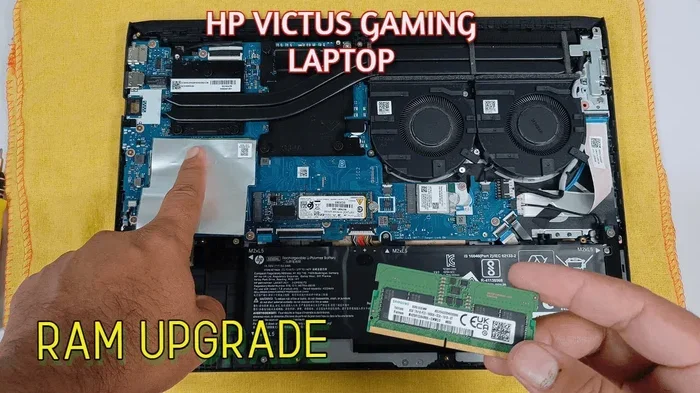
Many business laptops (Dell Latitude, Lenovo ThinkPad, HP EliteBook) and some consumer models (certain gaming and productivity lines) have easily accessible RAM slots. If your laptop has a free slot or uses removable sticks, upgrading to 16GB (by adding an 8GB stick to your existing 8GB, or replacing two 4GB sticks with two 8GB sticks) can be a very affordable $40-$80 DIY project. Always check your laptop’s exact model specifications on the manufacturer’s website or using a tool like Crucial’s System Scanner before assuming it’s upgradeable. This is the most economical way to gain the benefits of 16GB.
When You’re Stuck with Soldered RAM
The unfortunate trend, especially in thin-and-light ultrabooks and many Apple MacBooks, is RAM that is soldered directly to the motherboard. This means it cannot be upgraded after purchase. If your laptop has 8GB of soldered RAM, your only option is a new machine. This is why choosing a configuration with 16GB at the time of purchase is absolutely critical for these models. The cost difference is almost always worth it to avoid being stuck with an obsolete machine in 2-3 years. For Apple Silicon MacBooks, 16GB is strongly recommended for any professional work, as the unified memory architecture means the RAM serves both the CPU and GPU.
The “Whole System” Consideration
Even if you can upgrade RAM, consider the rest of your laptop. An older laptop with a 5th-gen Intel Core i5 processor and a spinning hard drive will still feel slow, even with 16GB of RAM. RAM amplifies the capability of the rest of the system. If your CPU is very weak or your storage is a slow HDD, upgrading RAM will help, but it won’t work miracles. For older systems, the upgrade is most worthwhile if you also have a decent SSD and a reasonably modern (last 4-5 years) CPU.
Debunking Common Myths and Misconceptions
Let’s clear the air on some persistent RAM myths that might hold you back from making the smart choice.
“I’ll never use more than 8GB, I just browse the web.”
This was perhaps true a decade ago. Today’s web is a different beast. A single browser tab with a modern website (looking at you, YouTube, Facebook, any news site with dozens of ads and trackers) can use 1GB+. Open 15 of those, and you’re at 15GB before you even open your email client. Modern web applications like Google Docs, Figma, or Notion are essentially full programs running in your browser and love RAM. This myth is the #1 reason people suffer with slow, 8GB laptops.
“More RAM always means a faster computer.”
This is false. RAM capacity affects multitasking and the ability to handle large datasets. It does not directly make your CPU faster at single-threaded tasks (like basic web browsing or simple document editing). If your laptop is slow because it has an ancient, low-power processor, adding more RAM will not magically make it fast. It will, however, stop it from being *slow because it’s swapping memory to disk*, which is a different and very common kind of slowness.
“32GB is better, so I should just get that.”
While more isn’t inherently bad, it’s often wasteful for a laptop. 32GB RAM kits cost significantly more. For the vast majority of laptop users—even gamers and most content creators—the performance difference between 16GB and 32GB in everyday tasks is zero. You’re paying for capacity you won’t utilize. That extra $100-$200 could be better spent on a faster SSD, a better CPU, or a higher-quality display. Save 32GB for specialized workstations running multiple virtual machines, compiling massive codebases, or editing 8K video raw footage.
“RAM speed (DDR4 vs. DDR5) is the most important spec.”
DDR5 is the newer standard, offering higher speeds and better efficiency. It’s a nice-to-have. But again, capacity trumps speed for overall system responsiveness. A laptop with 16GB of slightly slower DDR4 RAM will feel infinitely more capable and less frustrating than one with 8GB of blazing-fast DDR5. When comparing two otherwise similar laptops, a DDR5 platform is a bonus, but never choose less RAM for a newer RAM standard.
Future-Proofing: Why 16GB is the Smart Long-Term Bet
Technology marches on. Software becomes more feature-rich and, consequently, more demanding. Operating system updates add new services and visual effects. What is “plenty” today is “bare minimum” tomorrow. This is the core argument for 16GB.
The Relentless March of Software Bloat
Look at the history. Ten years ago, 4GB was the standard. Five years ago, 8GB took over. Today, 16GB is the recommendation. This isn’t arbitrary; it’s driven by richer applications, more complex websites, and higher-resolution assets (think 4K videos and 48MP photos). A laptop with 16GB in 2024 is positioned to be a comfortable, usable machine in 2027. A laptop with 8GB is already struggling in 2024 and will be a paperweight by 2025 for any serious multitasking. 16GB provides a 3-5 year usable lifespan for a performance-focused user, whereas 8GB may only give 2-3 years before it feels obsolete.
Resale Value and Longevity
When you eventually sell or trade-in your laptop, its specifications will dictate its value. In the coming years, a 2023/2024 laptop with 8GB RAM will be seen as a severely limited, outdated machine, commanding a much lower price. The same laptop with 16GB will retain a significant portion of its value because it meets the then-current “minimum recommended” spec. Investing in 16GB protects your total cost of ownership, stretching the useful life and financial value of your device.
The Hidden Cost of a RAM Upgrade Later
If you buy a laptop with 8GB and decide you need more in two years, you face a hassle. You have to find compatible RAM, open the laptop (which may be difficult or void warranty), install it yourself or pay a technician, and hope it works. For soldered-RAM laptops, this option doesn’t exist at all. The “future upgrade” path is often a mirage. Getting 16GB from the start is the simplest, cheapest, and most reliable way to future-proof. You pay a small premium now to avoid a major headache and potential dead-end later.
Conclusion: The Clear-Cut Recommendation
So, should you buy a laptop with 16GB RAM? If you are purchasing a new laptop in 2024 or 2025 and plan to use it for more than the most basic, single-app-at-a-time tasks, the answer is a resounding YES. 16GB of RAM is no longer a luxury; it is the essential, sensible, and forward-looking choice for a good laptop experience.
It transforms your computing from a series of managed compromises—closing tabs, quitting apps, waiting for windows to switch—into a seamless, fluid, and productive flow. The small price increase over 8GB is one of the most cost-effective upgrades you can make in a laptop, paying dividends in saved time, reduced frustration, and extended device life every single day. Unless your budget is absolutely fixed and your needs are truly minimal (a dedicated e-reader or a single-application kiosk), make 16GB your non-negotiable starting point. Your future self, buried under a mountain of open browser tabs and project files, will thank you.
Frequently Asked Questions
Is 16GB RAM overkill for a laptop?
No, for a new laptop in 2024, 16GB is the recommended sweet spot, not overkill. It’s the amount needed to comfortably run a modern operating system, a web browser with multiple tabs, and several productivity or creative applications simultaneously without slowdowns. 8GB is now the entry-level minimum, and 16GB provides essential headroom for future software demands.
Can I upgrade my laptop’s RAM to 16GB myself?
It depends entirely on your laptop model. Many business-class and some gaming laptops have accessible RAM slots. However, most modern ultrabooks and all Apple Silicon MacBooks have RAM soldered to the motherboard, making upgrades impossible. You must check your specific laptop’s technical specifications or service manual to determine if an upgrade is possible before purchasing RAM.
Is 16GB RAM enough for video editing on a laptop?
Yes, 16GB is the considered the minimum viable amount for light to moderate video editing. It can comfortably handle 1080p and 1440p projects in applications like DaVinci Resolve or Adobe Premiere Pro with some effects. For professional 4K editing, working with RAW footage, or using heavy effects/compositing, 32GB is strongly recommended to avoid constant rendering and playback issues.
Does macOS or Windows use RAM differently? Does that change the 16GB recommendation?
Both operating systems use RAM efficiently, but their philosophies differ slightly. macOS (especially on Apple Silicon) aggressively uses available RAM for caching to improve speed, so it may show higher “used” RAM in Activity Monitor even when apps aren’t running. Windows manages memory more conservatively for background processes. However, the practical outcome is the same: both OSes with modern software demand a baseline of 16GB for a smooth, multitasking experience. The recommendation holds true for both platforms.
What’s more important for performance: more RAM or a faster processor (CPU)?
They solve different problems. A faster CPU improves how quickly a single task is completed (like exporting a video or compiling code). More RAM improves your ability to have many tasks or large datasets open at once without slowdowns. For most users feeling general “sluggishness” when multitasking, adding RAM will provide a more noticeable improvement. If your laptop is slow on single-threaded tasks despite having enough RAM, then a CPU upgrade (via a new laptop) is needed. Ideally, you need both a capable CPU and sufficient RAM.
Should I get 16GB RAM or a better graphics card (GPU) for gaming?
For gaming, the GPU is the primary factor for graphics performance and frame rates. However, if your laptop has a capable mid-range GPU (like an RTX 3050/4050 or RX 6600M), pairing it with only 8GB of system RAM will severely bottleneck performance in modern games. 16GB of system RAM is a critical companion to a good gaming GPU. Prioritize a balanced system: a good GPU and 16GB RAM is a far better combination than a great GPU starved by 8GB of RAM. Only consider 32GB RAM for gaming if you also do heavy streaming or use massive texture packs.