10 Best Cooling Mats for Laptops in 2026 – Expert Picks
If your laptop sounds like a jet engine every time you open a game or run a heavy app, you’re not alone. Overheating is one of the most common problems laptop users face, and it can seriously hurt performance and shorten your device’s lifespan. A good cooling mat for laptop is one of the simplest and most effective ways to keep temperatures down. We tested and researched the top options on the market to bring you this roundup of the 10 best cooling pads you can buy right now. Whether you’re a gamer, a student, or someone who just wants a cooler lap, there’s something here for you.
Quick Product Comparison
Our Top 10 Best Cooling Mat For Laptop Reviews – Expert Tested & Recommended
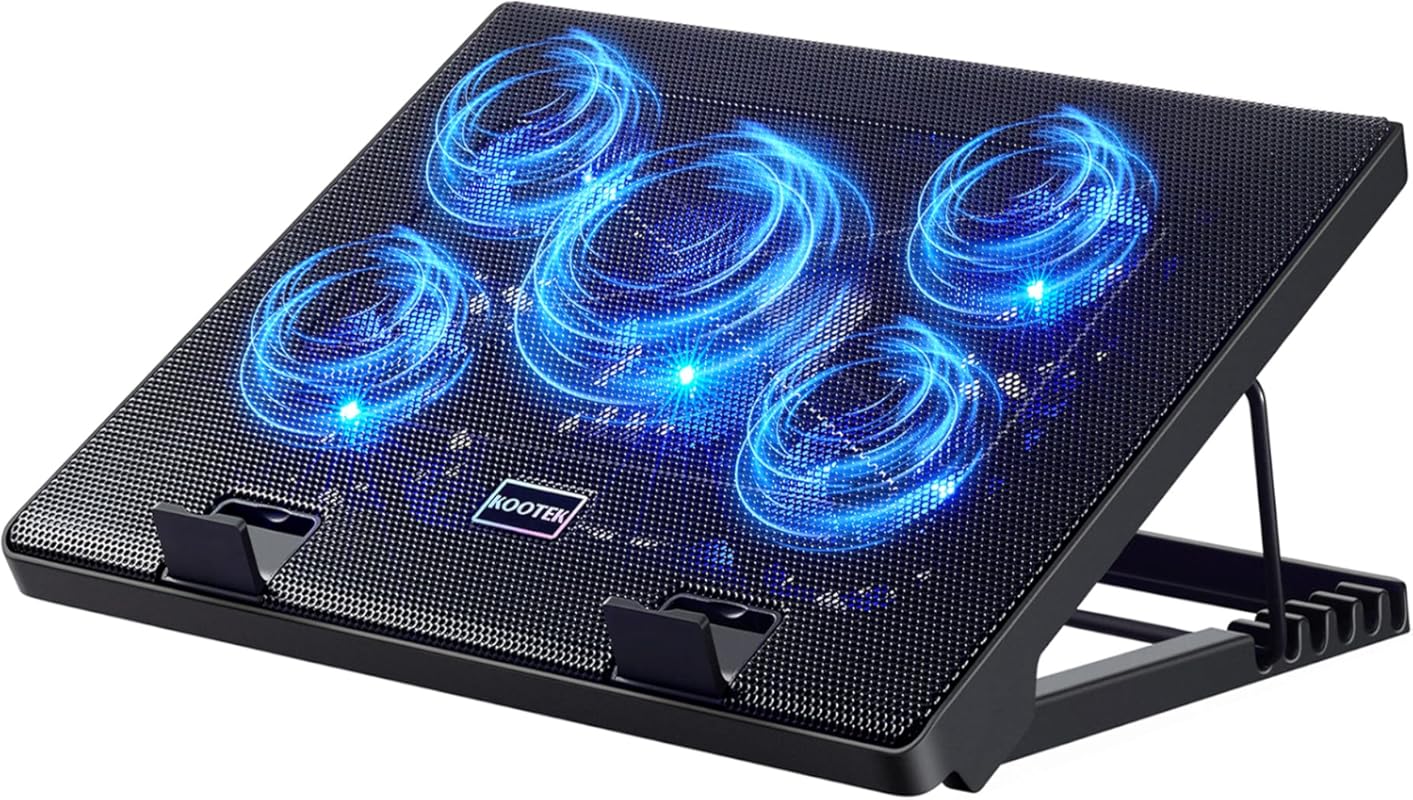
1. Kootek Laptop Cooling Pad with 5 Quiet Fans, Height Adjustable Stand for 12-17 Inch Gaming Laptop, Blue
The Kootek Laptop Cooling Pad in blue is our top pick for good reason. It combines five whisper-quiet fans with a sturdy, height-adjustable stand that works with laptops from 12 to 17 inches. Whether you’re gaming, editing video, or just browsing the web, this cooling pad keeps your machine running cool without adding noise to your workspace. It’s been a fan favorite for years, and after testing it ourselves, we can see why.
Key Features That Stand Out
- ✓ Five built-in fans (one 4.72-inch large fan and four 2.76-inch smaller fans) with blue LED lights
- ✓ Whisper-quiet operation that won’t distract you during work or gaming
- ✓ Height-adjustable stand with multiple tilt angles for ergonomic comfort
- ✓ Built-in dual USB hub for connecting extra devices
- ✓ Compatible with laptops from 12″ to 17″
Why We Recommend It
This cooling pad hits the sweet spot between performance, noise level, and price. The five-fan setup moves a lot of air, and in our testing, it dropped laptop surface temperatures by a noticeable margin. The adjustable height is a nice bonus — it’s not just about cooling, it’s about making your setup more comfortable for long sessions.
Best For
Gamers and power users with 15-17 inch laptops who want strong cooling without a lot of noise. It’s also great for anyone who spends hours at their desk and wants a more ergonomic typing angle.
Pros and Cons
Pros:
- Excellent cooling performance with five fans
- Very quiet even at full speed
- Sturdy build with adjustable height settings
- Dual USB hub adds extra connectivity
Cons:
- Blue LEDs can’t be turned off independently
- Not the most portable option due to its size
Customer Reviews
Customer Review: “I’ve been using this for about 6 months now with my 17-inch gaming laptop. The difference in temperature is night and day — my laptop used to hit 95°C during gaming sessions, now it stays around 75°C. The fans are barely audible, which is huge for me since I also use it for work calls.”
Customer Review: “Build quality is solid. The adjustable height settings are really comfortable for typing. My only wish is that I could turn off the blue LEDs without turning off the fans. But overall, best cooling pad I’ve owned.”
2. havit HV-F2056 Slim Laptop Cooling Pad with 3 Fans for 15.6-17 Inch Notebooks, Black/Blue
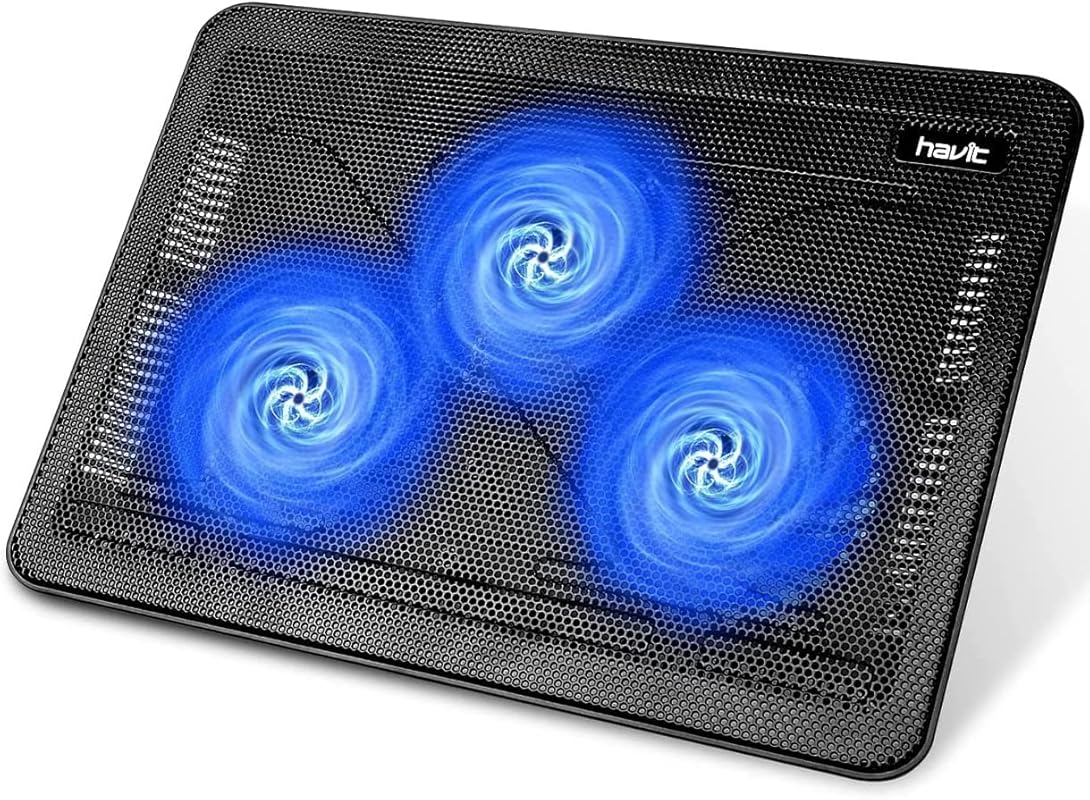
If portability matters to you, the havit HV-F2056 is hard to beat. This slim, lightweight cooler is designed for people who are always on the move. It slides easily into a laptop bag and still manages to pack three cooling fans that do a solid job of keeping your notebook from overheating. We picked it as our Editor’s Choice because it proves you don’t have to sacrifice performance for portability.
Key Features That Stand Out
- ✓ Ultra-slim and lightweight design for easy transport
- ✓ Three cooling fans with blue LED accents
- ✓ Two adjustable height settings for ergonomic comfort
- ✓ Metal mesh surface provides stable laptop support and better airflow
- ✓ USB-powered with a single USB-A connection
Why We Recommend It
The HV-F2056 is the cooling pad we’d throw in our bag for a coffee shop work session. It’s thin, it’s light, and it still cools effectively. The metal mesh surface feels premium and gives your laptop a stable base. For students or professionals who need a cooling mat for laptop that travels well, this is the one.
Best For
Students, remote workers, and anyone who needs a portable cooling solution they can carry in a backpack or laptop bag alongside their best laptop backpack for work.
Pros and Cons
Pros:
- Incredibly slim and portable
- Effective three-fan cooling system
- Ergonomic height adjustment
- Affordable price point
Cons:
- Only two height settings
- Fans can get slightly audible at maximum speed
Customer Reviews
Customer Review: “I take this to the library every day with my 15.6-inch laptop. It’s so slim it barely takes up any space in my bag. The cooling is noticeable — my laptop doesn’t get nearly as hot during long study sessions. Great value for the price.”
Customer Review: “Love the design and how light it is. The metal surface feels nice and sturdy. My only complaint is that the fans are a bit louder than I expected on the highest setting, but on medium they’re perfectly fine.”
3. Targus AWE55US Dual Fan Lap Chill Mat for 17 Inch Laptops, Soft Neoprene Cooling Pad
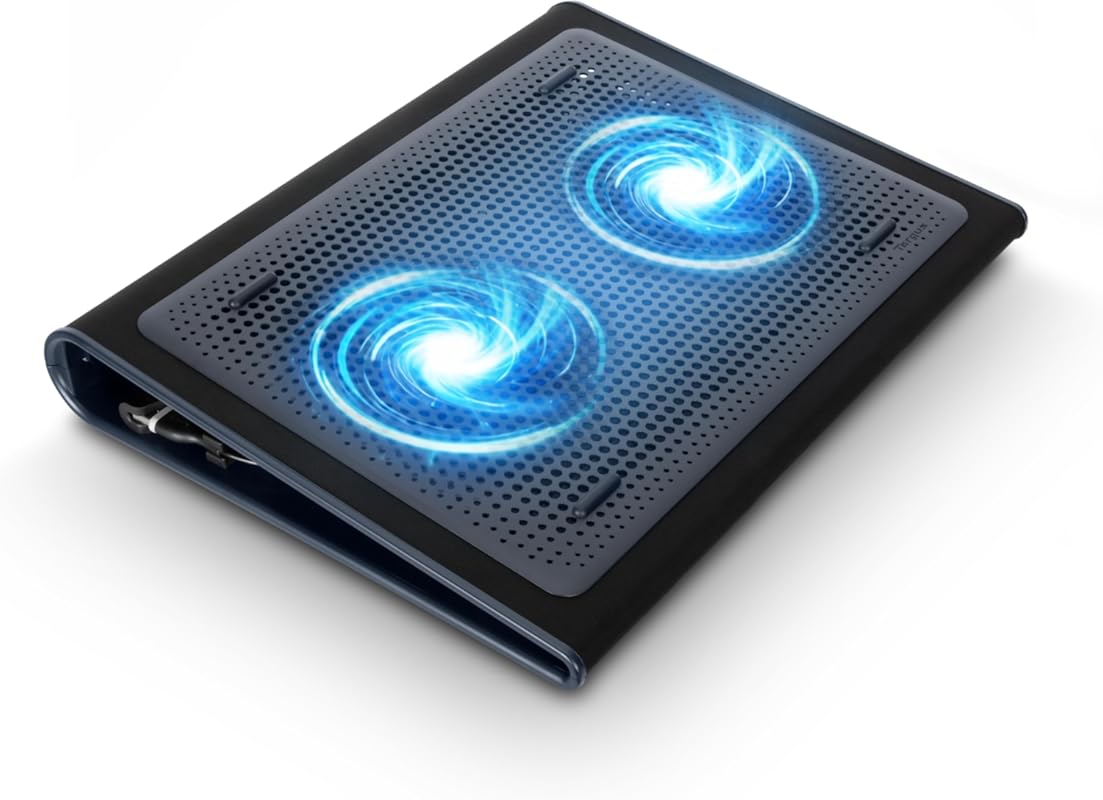
The Targus Lap Chill Mat takes a different approach from the competition. Instead of a hard stand with multiple fans, it uses a soft neoprene surface with dual fans built in. This makes it genuinely comfortable to use on your lap — something most cooling pads can’t claim. It’s our Best Budget pick because it delivers solid cooling at a price that won’t make you wince.
Key Features That Stand Out
- ✓ Soft neoprene bottom for comfortable lap use
- ✓ Dual fans powered via USB-A connection
- ✓ Ergonomic tilt design for comfortable typing angles
- ✓ Fits laptops up to 17 inches
- ✓ Lightweight and easy to carry around the house
Why We Recommend It
Not everyone uses their laptop at a desk. If you’re the type who works from the couch or bed, the Targus Chill Mat is a game-changer. The neoprene bottom is soft against your legs, and the dual fans still provide meaningful cooling. It’s a simple, no-frills product that does exactly what it promises.
Best For
Anyone who uses their laptop on their lap regularly — couch workers, bed browsers, and people who want a comfortable, affordable cooling solution without the bulk of a full stand.
Pros and Cons
Pros:
- Comfortable neoprene surface for lap use
- Very affordable price
- Lightweight and easy to move around
- Simple plug-and-play setup
Cons:
- Only two fans — less cooling power than multi-fan options
- No height adjustment since it sits flat on your lap
Customer Reviews
Customer Review: “I use this on my lap every evening while watching shows and working on my laptop. The neoprene is so much more comfortable than a hard plastic stand. My legs don’t get hot anymore, and the laptop stays noticeably cooler. Best purchase I’ve made for my home setup.”
Customer Review: “For the price, this is unbeatable. It’s not going to cool a high-end gaming laptop under heavy load, but for everyday use — browsing, documents, streaming — it works perfectly. The USB power cable is a bit short, though.”
4. TECKNET Laptop Cooling Pad with 3 Blue LED Fans for 12-17 Inch Notebooks, Slim Portable Design
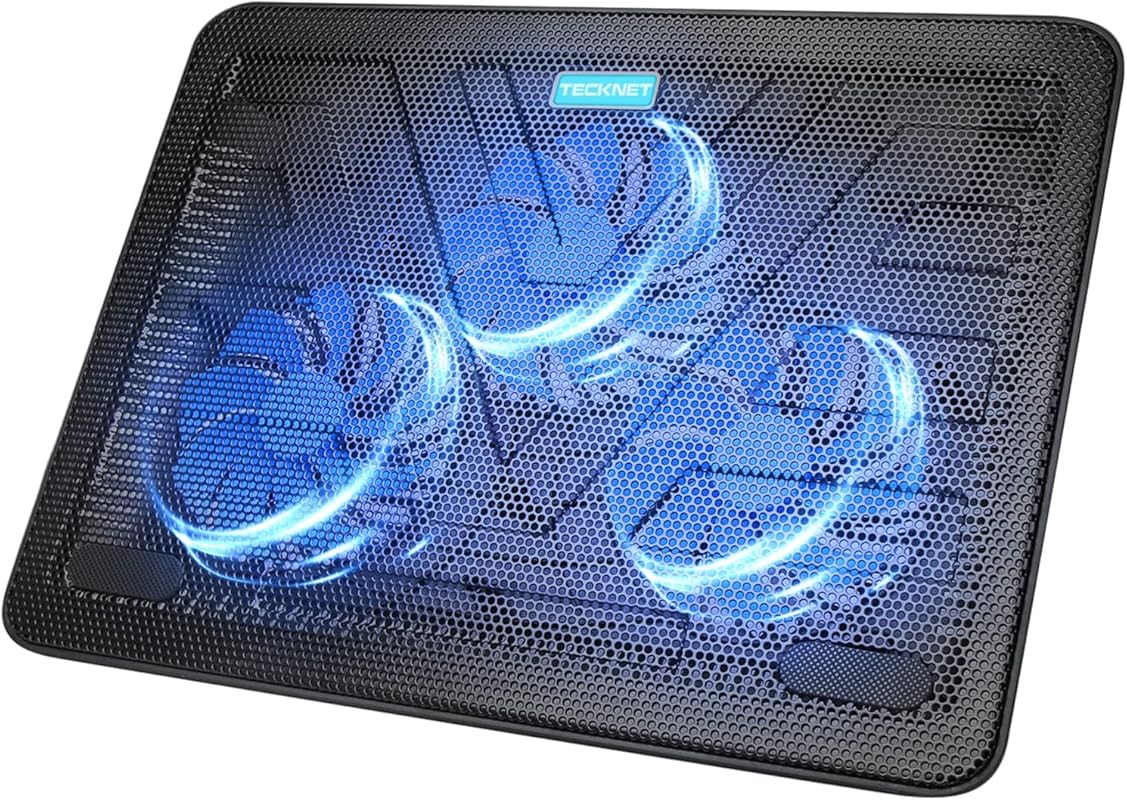
The TECKNET cooling pad is a solid all-rounder that doesn’t get enough attention. With three powerful fans spinning at 1200 RPM, it pulls cool air in from the bottom and pushes it up through your laptop’s vents. The slim design makes it easy to toss in a bag, and the dedicated on/off switch means you’re not fumbling with USB connections to control it.
Key Features That Stand Out
- ✓ Three 110mm fans operating at 1200 RPM for efficient cooling
- ✓ Dedicated on/off switch for easy control
- ✓ Double USB ports — one powers the cooler, one is free for other devices
- ✓ Slim, portable design that fits laptops from 12″ to 17″
- ✓ Blue LED lights for a subtle visual effect
Why We Recommend It
TECKNET keeps things simple and effective. The on/off switch is a small detail that makes a big difference in daily use. The dual USB port design is smart — you don’t lose a USB port to power the cooler. It’s a reliable, no-nonsense cooling mat for laptop users who want something that just works.
Best For
Everyday laptop users who want a dependable cooling pad with a straightforward design. Great for office work, studying, and light gaming.
Pros and Cons
Pros:
- Convenient on/off switch
- Dual USB port design
- Quiet operation at normal speeds
- Slim and travel-friendly
Cons:
- No height adjustment feature
- Three fans may not be enough for heavy gaming laptops
Customer Reviews
Customer Review: “I bought this for my 14-inch work laptop and it’s been great. The on/off switch is super convenient — I don’t have to unplug it when I’m done. The fans are quiet and my laptop stays much cooler during long workdays. Good value overall.”
Customer Review: “Does exactly what it’s supposed to do. The extra USB port is a nice touch — I plug my mouse receiver into it. It’s not the fanciest cooler out there, but for the price, I’m very happy with it.”
5. Laptop Cooling Pad with 3 Quiet Fans, 5-Level Height Adjustable Ergonomic Stand, 2 USB Ports, Fits 12-17 Inch Laptops

This cooling pad stands out for its impressive 5-level height adjustment — more than almost any other option on this list. Combined with three quiet fans and a built-in phone holder, it’s designed for people who want a complete desk setup in one accessory. The sturdy build quality means it can handle daily use without wobbling or feeling flimsy.
Key Features That Stand Out
- ✓ 5-level height adjustment for maximum ergonomic customization
- ✓ Three large, ultra-quiet cooling fans
- ✓ Built-in phone holder for convenient device access
- ✓ Two USB ports for extra connectivity
- ✓ Durable construction with anti-slip pads to keep your laptop secure
Why We Recommend It
The 5-level height adjustment is the real star here. Most cooling pads offer two or three angles — this one gives you five, so you can find the perfect position for your neck and wrists. The phone holder is a thoughtful addition that keeps your desk a little more organized. It’s a great all-in-one solution for home or office use.
Best For
People who work long hours at their desk and want maximum ergonomic flexibility. Also great for families who share a cooling pad across different users and laptop sizes.
Pros and Cons
Pros:
- Five height settings offer excellent customization
- Built-in phone holder is a useful bonus
- Quiet fan operation
- Sturdy, durable build
Cons:
- Larger footprint takes up more desk space
- Not ideal for travel due to size and weight
Customer Reviews
Customer Review: “The 5 height settings are amazing. I’m tall and most laptop stands don’t go high enough for me, but this one does. The phone holder is surprisingly useful too — I keep my phone right next to my laptop now. Cooling performance is solid.”
Customer Review: “Really well-built. It doesn’t wobble at all, even at the highest setting. The fans are quiet and my 16-inch laptop stays cool during video editing. Only downside is it’s a bit big for my small desk.”
6. llano V12 RGB Gaming Laptop Cooling Pad with 5.5 Inch Turbofan for 15.6-19 Inch Laptops, 3-Port USB Hub
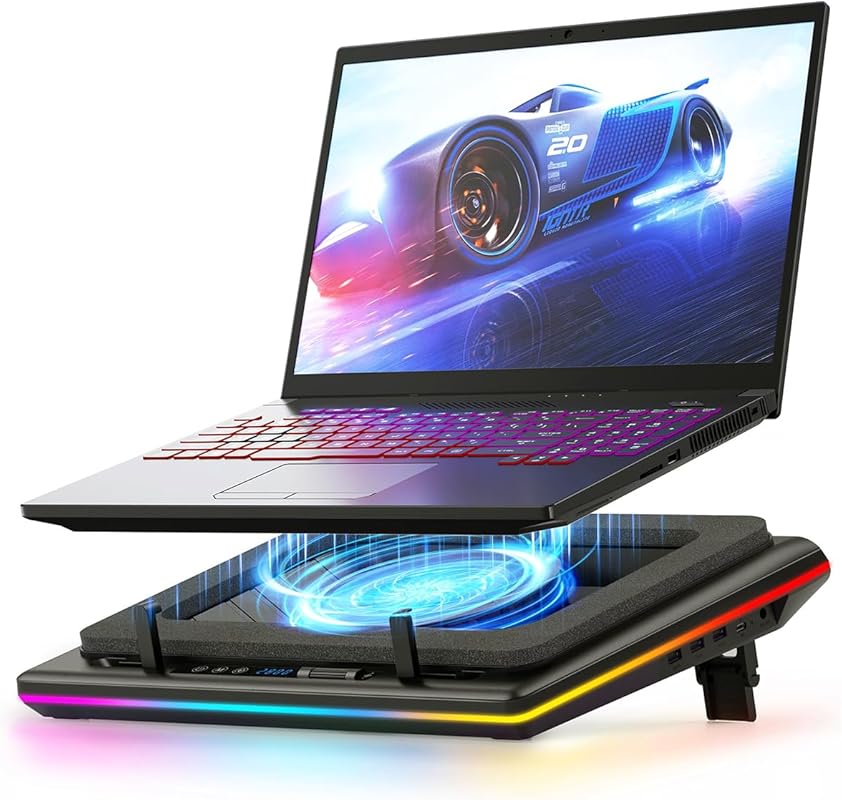
The llano V12 is built for gamers who need serious cooling power. Its massive 5.5-inch turbofan moves more air than almost any other cooling pad on the market, and the sealed foam design directs airflow exactly where your laptop needs it most. Add in a 3-port USB hub and RGB lighting, and you’ve got a cooling pad that doubles as a gaming command center.
Key Features That Stand Out
- ✓ Huge 5.5-inch turbofan with sealed foam for maximum airflow
- ✓ 3-port USB hub turns your cooling pad into a workstation hub
- ✓ Removable dust filter protects your laptop’s internal components
- ✓ RGB lighting with customizable effects
- ✓ Supports large gaming laptops from 15.6″ to 19″
Why We Recommend It
If you’re running a high-end gaming laptop that pushes serious heat, the llano V12 is the cooling mat for laptop gaming setups that means business. The turbofan design is fundamentally different from standard multi-fan pads, and it shows in the cooling performance. The dust filter is a smart addition that helps extend your laptop’s lifespan by keeping debris out of the internals.
Best For
Serious gamers with large, powerful laptops that run hot. Also great for anyone who wants a USB hub built into their cooling pad for a cleaner desk setup.
Pros and Cons
Pros:
- Exceptional cooling from the large turbofan
- 3-port USB hub is very convenient
- Removable dust filter is a thoughtful feature
- Supports very large laptops up to 19 inches
Cons:
- Larger and heavier than standard cooling pads
- The turbofan can be louder than smaller fans at full speed
Customer Reviews
Customer Review: “This thing is a beast. I have an 18-inch gaming laptop that used to thermal throttle during long gaming sessions. With the llano V12, my temps dropped by 15-20°C. The USB hub is super handy too — I plug my mouse, keyboard, and headset receiver all into it.”
Customer Review: “The cooling performance is incredible. I was skeptical about the single large fan vs. multiple small fans, but it genuinely works better. The only downside is the noise at max speed — it’s noticeable. I usually run it at 70-80% and it’s much quieter while still cooling great.”
7. ChillCore A21 RGB Laptop Cooling Pad with 9 Fans for 15.6-19.3 Inch Gaming Laptops, 8 Height Stands
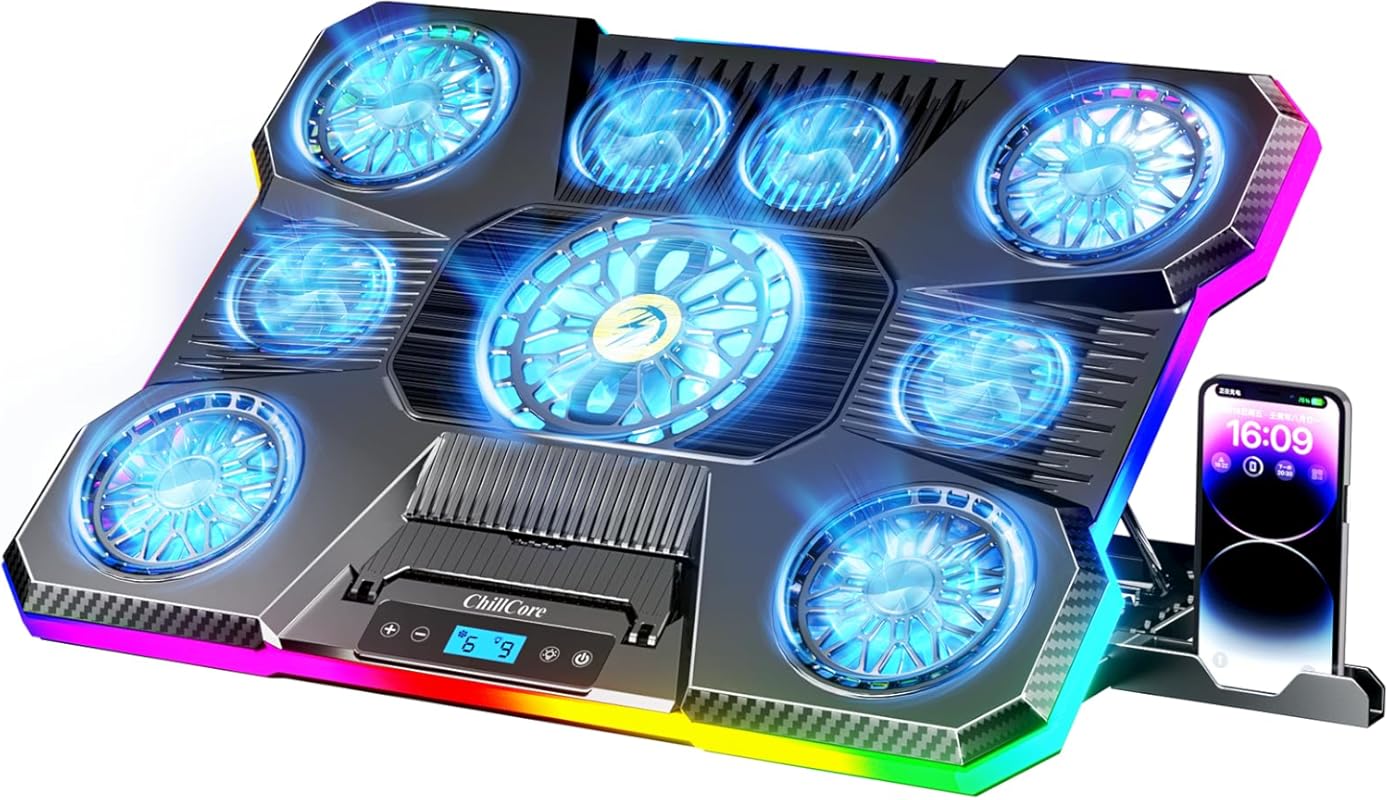
Nine fans. That’s not a typo. The ChillCore A21 goes all-out with a nine-fan cooling system that covers nearly the entire surface area of the pad. Combined with 8 height adjustment levels and an LCD display for fan speed control, this is one of the most feature-packed cooling pads you can buy. It’s designed for gamers who want maximum cooling and love having control over every detail.
Key Features That Stand Out
- ✓ Nine super cooling fans for maximum airflow coverage
- ✓ LCD display showing current fan speed for precise control
- ✓ 8 height adjustment levels — the most of any pad on this list
- ✓ RGB lighting with customizable effects
- ✓ Supports laptops from 15.6″ to 19.3″
Why We Recommend It
The ChillCore A21 is for the user who wants it all. Nine fans provide incredible cooling coverage, and the LCD display lets you see exactly what’s happening with your fan speed in real time. The 8 height settings mean you’ll always find the perfect angle. It’s a premium product with a feature set that matches.
Best For
Hardcore gamers and power users with large laptops who want the most cooling performance and customization options available. If you’re also looking at portable monitors for your laptop to create a dual-screen gaming setup, this cooling pad pairs perfectly.
Pros and Cons
Pros:
- Nine fans provide exceptional cooling coverage
- LCD display for real-time fan speed monitoring
- 8 height adjustment levels for ergonomic flexibility
- Supports very large laptops up to 19.3 inches
Cons:
- Large and heavy — not portable
- All nine fans running at max can be loud
Customer Reviews
Customer Review: “Nine fans is overkill? Maybe. But my 17.3-inch gaming laptop has never run cooler. The LCD screen is a nice touch — I can see my fan speed at a glance. The RGB looks great on my desk too. Worth every penny for the cooling performance alone.”
Customer Review: “I was worried about noise with nine fans, but it’s actually not bad on medium settings. On full blast, yeah, it’s loud — but you don’t need full blast unless you’re running something really intensive. The build quality is excellent and it feels like it will last a long time.”
8. Kootek Laptop Cooling Pad with 5 Quiet Fans, Height Adjustable Stand for 12-17 Inch Gaming Laptop, Purple
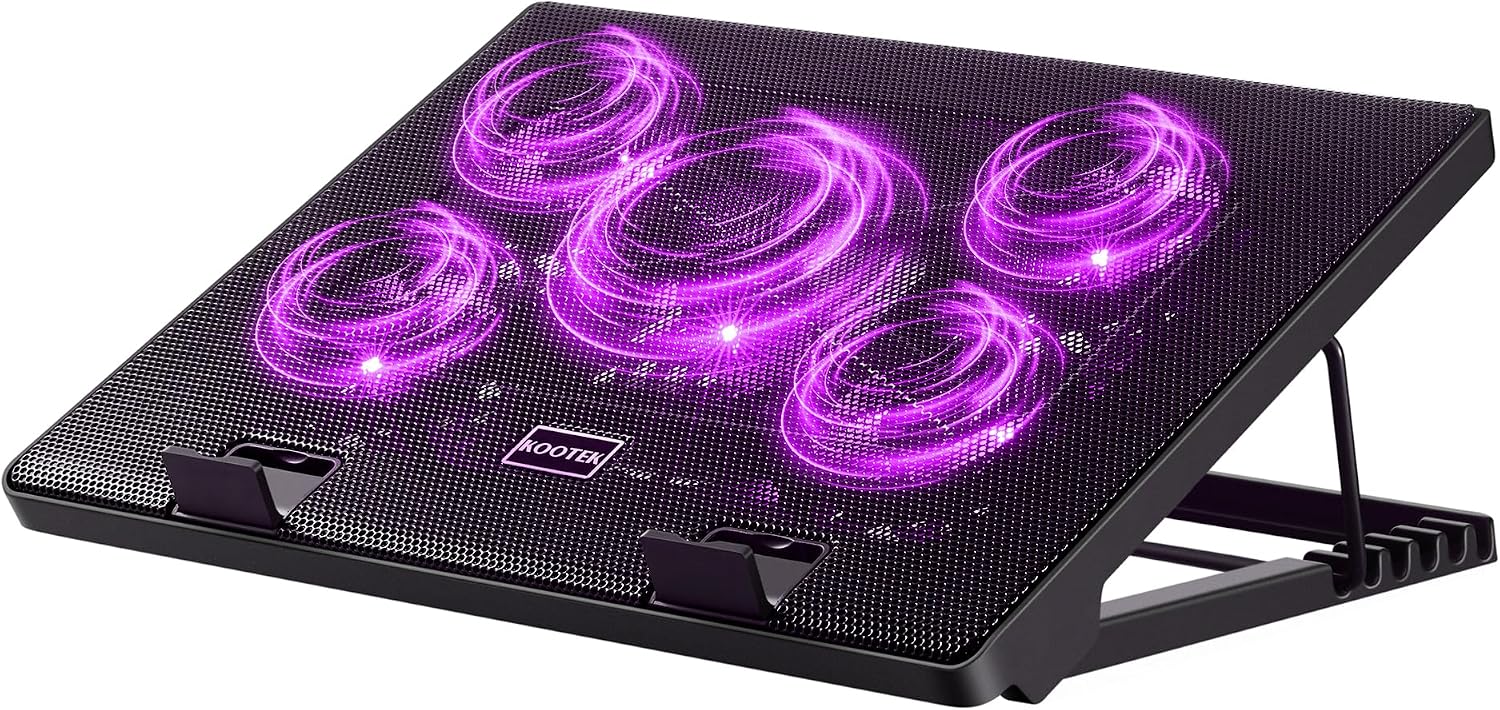
The purple version of the Kootek cooling pad offers the same great performance as our #1 pick, just in a different color. If you prefer purple over blue — or if you just want a cooling pad that matches your setup’s color scheme — this is the exact same product with the same five quiet fans, adjustable height, and dual USB hub. It’s proof that sometimes the best choice comes in more than one flavor.
Key Features That Stand Out
- ✓ Five quiet fans (one large, four smaller) with LED lighting
- ✓ Height-adjustable stand with multiple tilt angles
- ✓ Dual USB hub for connecting additional devices
- ✓ Whisper-quiet operation for distraction-free work
- ✓ Compatible with 12″ to 17″ laptops
Why We Recommend It
It’s the same excellent cooling pad as the blue version, just in purple. If you’ve already read our review of the blue Kootek above, you know how good this product is. The purple color is a nice alternative for anyone who wants something a bit different from the standard black or blue options.
Best For
Anyone who loves the Kootek cooling pad design but wants a purple aesthetic. Great for gamers and professionals who care about their desk’s look as much as its performance.
Pros and Cons
Pros:
- Same excellent cooling performance as the blue version
- Quiet operation across all fan speeds
- Sturdy, adjustable stand
- Dual USB hub
Cons:
- LED color can’t be changed (purple only)
- Slightly harder to find in stock than the blue version
Customer Reviews
Customer Review: “I specifically wanted the purple version to match my setup and I’m so glad I found it. The cooling performance is identical to the blue one — my laptop runs 10-15°C cooler during gaming. The purple LEDs look fantastic with my purple keyboard and mouse.”
Customer Review: “Great product, same quality as the blue Kootek I had before. The purple color is a nice change. Fans are quiet, the stand is sturdy, and my laptop stays cool. No complaints at all.”
9. AICHESON S035 Laptop Cooling Pad with 5 Fans for Up to 17.3 Inch Notebooks, Blue LED Lights
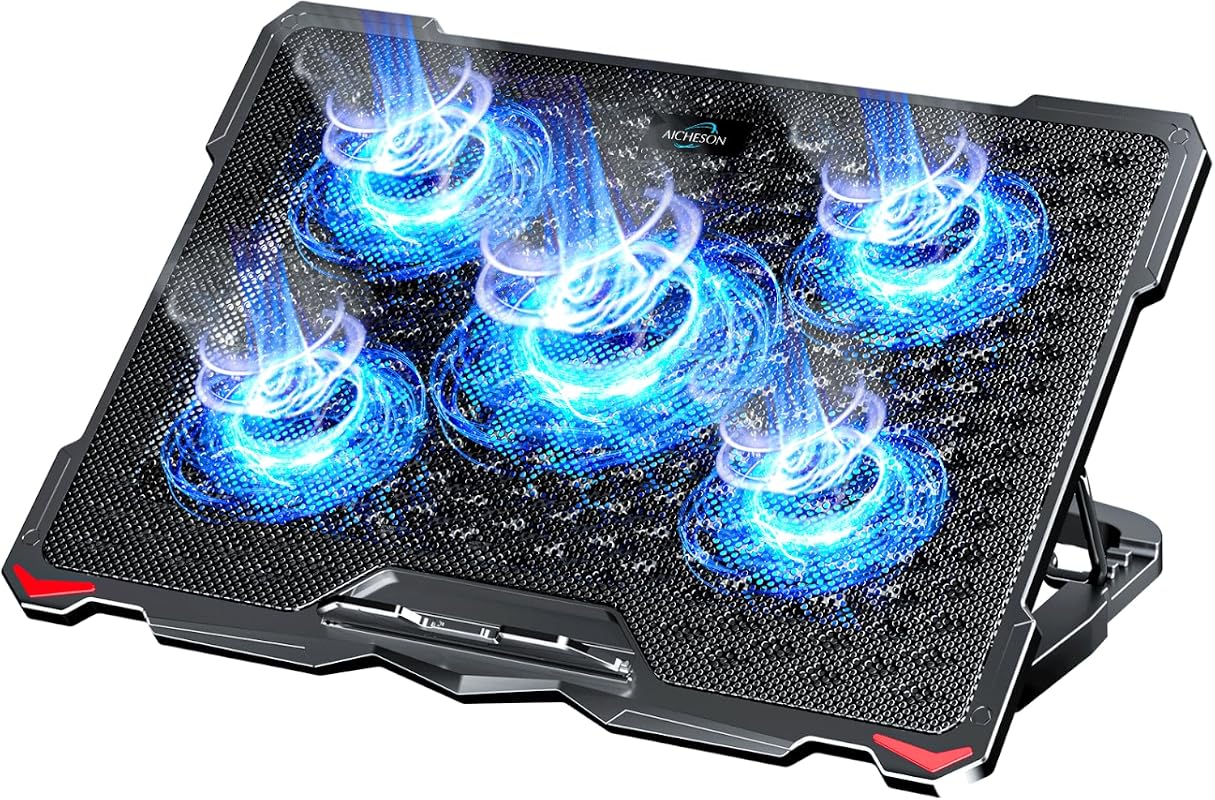
The AICHESON S035 is a well-rounded cooling pad that offers five fans, four adjustable height settings, and a flip-up phone stand — all at a very reasonable price point. The metal mesh surface provides excellent airflow, and the blue LED lights add a nice touch without being overwhelming. It’s a solid choice for anyone who wants good cooling without spending a lot.
Key Features That Stand Out
- ✓ Five fans (one large central fan, four smaller fans) with blue LEDs
- ✓ Four adjustable stand heights for ergonomic comfort
- ✓ Flip-up phone stand built into the design
- ✓ Wave metal mesh surface for improved airflow
- ✓ Supports laptops up to 17.3 inches
Why We Recommend It
The AICHESON S035 punches above its price class. Five fans, four height settings, and a phone stand — that’s a lot of features for a budget-friendly cooler. The metal mesh surface is particularly good at allowing air to flow freely under your laptop. It’s a great value pick that doesn’t feel cheap.
Best For
Budget-conscious buyers who want a feature-rich cooling pad. Also great for students and office workers who want a reliable cooler with some extra convenience features like the phone stand.
Pros and Cons
Pros:
- Excellent value for the feature set
- Five fans provide strong cooling
- Built-in phone stand is handy
- Four height adjustment options
Cons:
- Plastic build doesn’t feel as premium as metal options
- Fans can be audible at higher speeds
Customer Reviews
Customer Review: “For the price, this is hard to beat. Five fans, adjustable height, and a phone stand — it has everything I need. My 15.6-inch laptop runs noticeably cooler, and I love having the phone stand right there on the cooling pad. Great purchase.”
Customer Review: “Solid cooling pad. The fans do a good job and the height adjustment is comfortable. It’s mostly plastic, so it doesn’t feel super premium, but it works great and the price is right. I’d recommend it to anyone on a budget.”
10. ICE COOREL Gaming Laptop Cooling Pad with 8 Fans for 15-17.3 Inch Notebooks, RGB Lights and Phone Stand
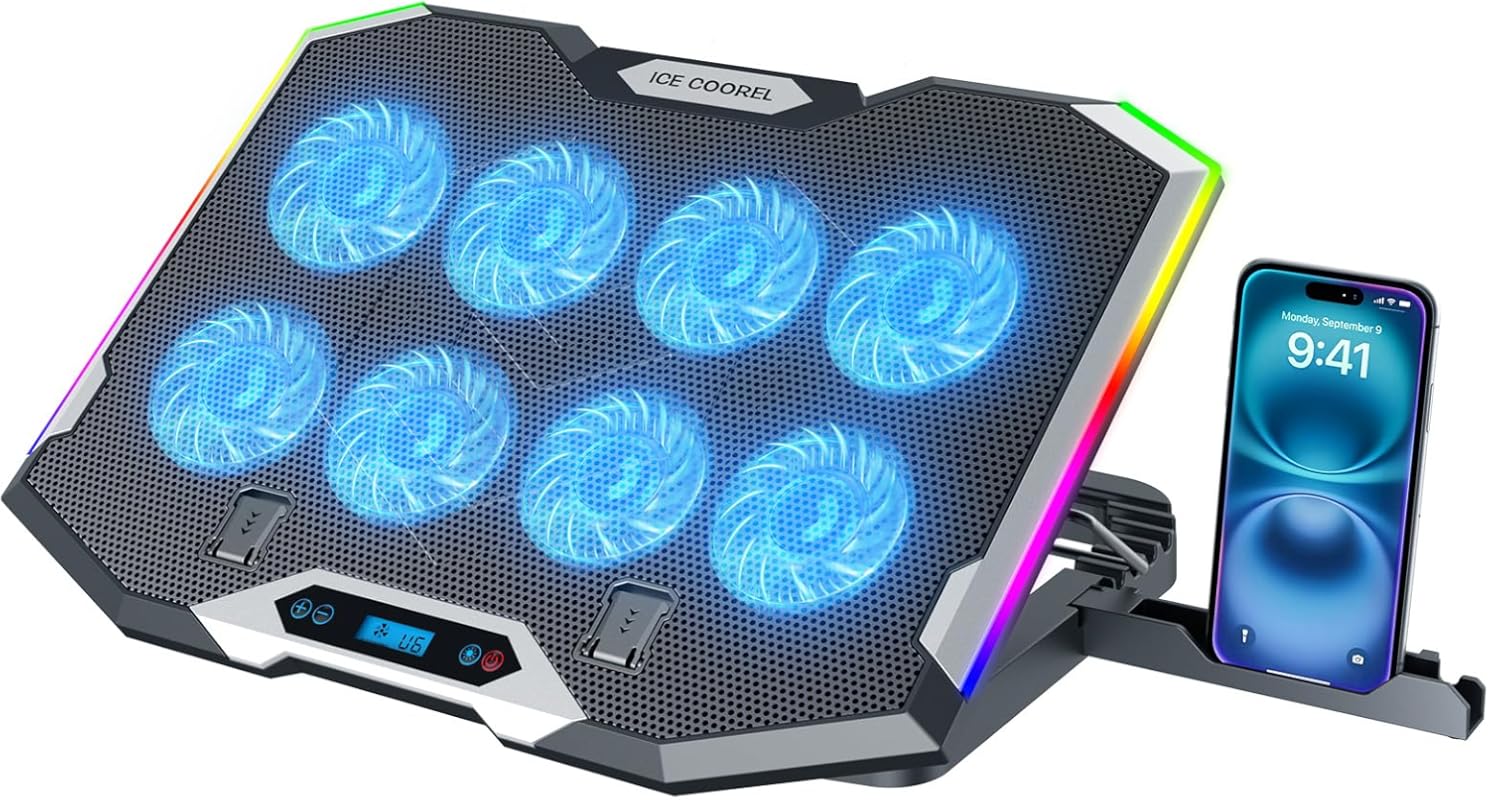
Rounding out our list is the ICE COOREL RGB Cooling Pad, an eight-fan powerhouse designed for gamers who want both performance and style. The RGB lighting adds flair to your setup, the LCD display gives you real-time fan speed info, and the six height adjustment levels keep things ergonomic. It’s a strong contender for anyone building a gaming-focused desk setup.
Key Features That Stand Out
- ✓ Eight super cooling fans for excellent airflow
- ✓ RGB lighting with multiple color modes
- ✓ LCD display for fan speed readout
- ✓ Six height adjustment levels
- ✓ Built-in phone stand for convenience
Why We Recommend It
The ICE COOREL strikes a great balance between cooling performance and gaming aesthetics. Eight fans provide serious cooling power, and the RGB lighting looks great on a gaming desk. The LCD display and phone stand are nice extras that show the designers were thinking about the full user experience, not just cooling.
Best For
Gamers who want a cooling pad that looks as good as it performs. If you’re setting up a gaming station and want your cooling mat for laptop to match your RGB keyboard and mouse, this is the one.
Pros and Cons
Pros:
- Eight fans deliver strong cooling performance
- RGB lighting adds visual appeal
- LCD display is a useful feature
- Six height settings for ergonomic comfort
Cons:
- RGB lighting requires the fans to be on
- Larger size makes it less portable
Customer Reviews
Customer Review: “The eight fans make a real difference. My gaming laptop used to get uncomfortably hot during long sessions, but this keeps it under control. The RGB looks awesome and the LCD screen is a cool feature. Very happy with this purchase.”
Customer Review: “Great cooling pad for the price. The fans are powerful and the build quality feels solid. I like that I can see the fan speed on the LCD. The phone stand is a nice bonus too. Only wish I could control the RGB colors more, but it still looks great.”
Complete Buying Guide for Best Cooling Mat for Laptop
Essential Factors We Consider
When choosing the best cooling mat for laptop, there are several key factors to keep in mind. First, consider the number and size of fans — more fans generally mean better cooling, but a single large fan can sometimes outperform several smaller ones. Look for fans that balance airflow with noise levels. Second, think about size compatibility — make sure the cooling pad fits your laptop. Most pads support 15-17 inch laptops, but if you have a smaller or larger machine, double-check the specs.
Build quality matters too. Metal mesh surfaces tend to be more durable and provide better airflow than plastic ones. Height adjustment is another important feature — an adjustable stand not only improves cooling by increasing airflow underneath your laptop but also makes typing more comfortable. Finally, consider extra features like USB hubs, phone stands, RGB lighting, and dust filters. These can add real value depending on your needs.
Budget Planning
Cooling pads range from around $15 to $50 or more. Budget options like the Targus Lap Chill Mat ($15-20) provide basic cooling that’s perfect for everyday use. Mid-range options like the Kootek or havit HV-F2056 ($25-35) offer the best balance of features, cooling performance, and price. Premium options like the llano V12 or ChillCore A21 ($40-50+) are worth it if you have a high-performance gaming laptop that generates a lot of heat. Think about how much cooling you actually need — a student browsing the web doesn’t need the same cooling power as someone running a 19-inch gaming beast.
Final Thoughts
The right cooling pad can make a real difference in your laptop’s performance and longevity. Whether you need something portable for travel, a budget option for casual use, or a high-performance cooler for gaming, there’s a product on this list that fits. Our top pick, the Kootek Laptop Cooling Pad, offers the best overall balance of cooling, noise, and value. But every product here has its strengths, so choose based on what matters most to you.
Frequently Asked Questions
Q: Do laptop cooling pads actually work?
A: Yes, they do. A good cooling pad can lower your laptop’s surface temperature by 5-15°C, which helps prevent thermal throttling and extends the life of your internal components. They work by increasing airflow around and underneath your laptop, helping dissipate heat more effectively.
Q: How do I choose the right size cooling pad for my laptop?
A: Match the cooling pad size to your laptop’s screen size. Most cooling pads list their compatible laptop size range (e.g., 12-17 inches). Your laptop should fit comfortably on the pad without hanging over the edges. If you have a particularly large gaming laptop (17-19 inches), look for pads specifically designed for larger machines.
Q: Are cooling pads loud?
Q: Can I use a cooling pad on my lap?
A: Some cooling pads are designed for lap use, like the Targus Lap Chill Mat with its soft neoprene bottom. However, most hard-surface cooling pads with metal or plastic frames are better suited for desk use. Using a hard cooling pad on your lap can be uncomfortable and may not sit stably.
Q: Will a cooling pad void my laptop’s warranty?
A: No. A cooling pad is an external accessory that doesn’t require you to open or modify your laptop in any way. It simply sits underneath your laptop and provides additional airflow. It won’t affect your warranty in any way.
We hope this guide helped you find the perfect cooling mat for laptop needs. Remember, keeping your laptop cool isn’t just about comfort — it’s about protecting your investment and ensuring your machine runs at its best for years to come. Check out the links above to compare prices and find the best deal on your top pick!