Best Ddr5 Ram For Gaming The Fastest Picks You Can Buy
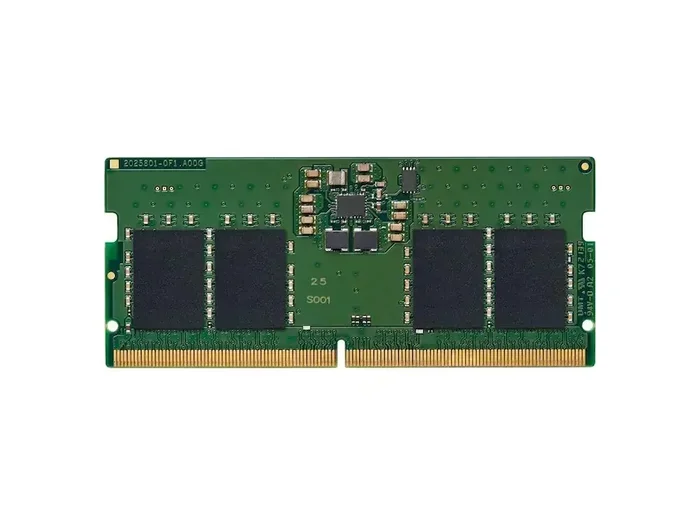
DDR5 RAM is the latest memory standard that dramatically boosts gaming performance. It offers higher speeds, more bandwidth, and better efficiency than DDR4. In this guide, we break down the fastest DDR5 picks you can buy right now, with options for every budget and build.
If you are building or upgrading a gaming PC right now, DDR5 RAM should be at the top of your list. This next-generation memory standard has completely changed the game when it comes to speed, efficiency, and overall performance. Unlike DDR4, DDR5 offers significantly higher clock speeds, improved bandwidth, and better power efficiency. That means smoother gameplay, faster load times, and a more responsive system overall.
But with so many options on the market, picking the right kit can feel overwhelming. How much speed do you actually need? Does capacity matter more than MHz? What about CAS latency and overclocking potential? We have answered all of these questions and more. This guide covers everything you need to know about DDR5 memory for gaming, including our top picks, buying advice, and common mistakes to avoid.
Key Takeaways
- DDR5 is the newest RAM standard: It delivers faster speeds and better bandwidth than DDR4 for gaming.
- Speed matters for frame rates: Higher MHz RAM can improve in-game performance, especially in CPU-bound titles.
- Capacity is key: 16GB is the sweet spot, but 32GB is the future-proof choice for modern gaming.
- Low CAS latency is important: Faster data access means quicker response times in competitive games.
- Dual channel setup boosts performance: Always install RAM in matched pairs for maximum bandwidth.
- There are options for every budget: From affordable kits under $60 to premium overclockable models above $150.
📑 Table of Contents
Why DDR5 RAM Matters for Gaming
The shift from DDR4 to DDR5 is not just a small upgrade. It is a massive leap forward in memory technology. DDR5 starts at higher base speeds and scales much further than DDR4 ever could. For gamers, this translates directly into better frame rates, reduced stuttering, and improved multitasking capabilities.
Higher Bandwidth Means Smoother Gameplay
Memory bandwidth is the amount of data your RAM can move at once. DDR5 doubles the bandwidth compared to DDR4 at the same clock speed. This is huge for modern games that constantly stream textures, assets, and world data from memory. More bandwidth means fewer bottlenecks, which leads to a smoother experience.
Think of it like a highway. DDR4 is a two-lane road, and DDR5 is a four-lane highway. Both can carry cars, but DDR5 handles much more traffic at the same time. In games, this means fewer frame drops and more consistent performance, especially in open-world titles and competitive shooters.
Faster Speeds Boost Frame Rates
DDR5 RAM speeds start around 4800 MHz and go all the way up to 8000 MHz and beyond. Higher clock speeds directly impact frame rates in CPU-bound games. Titles like Cyberpunk 2077, Microsoft Flight Simulator, and even Fortnite see noticeable gains when paired with fast memory.
You do not need the absolute fastest kit to see benefits. Even mid-range DDR5 modules at 5600 MHz or 6000 MHz offer a solid upgrade over DDR4. The sweet spot for most gamers right now is around 6000 MHz with tight timings. This balance of speed and latency gives you the best real-world performance without breaking the bank.
Key Specs to Understand Before Buying
Before you grab any DDR5 kit, you should understand a few basic specs. These numbers matter more than marketing jargon, and knowing what they mean will help you make a smarter purchase.
Speed (MHz)
DDR5 speed is measured in megahertz (MHz). This number tells you how many cycles per second the RAM can perform. Higher MHz means faster data transfer. For gaming, 4800 MHz to 6000 MHz is the practical range. Anything above 6000 MHz is great for enthusiasts and overclockers.
CAS Latency (CL)
CAS latency measures the delay between a command and the data being delivered. Lower is better. A kit with 6000 MHz and CL30 will outperform a kit with 6000 MHz and CL36. For gaming, look for kits with CL values below 36 for the best responsiveness.
Capacity
Memory capacity determines how much data your system can hold at once. 16GB is the current standard for gaming. If you play modern AAA titles or stream while gaming, 32GB is the better choice. Check out our article on how much RAM you really need for gaming to find the right capacity for your setup.
Dual Channel Configuration
Always install DDR5 RAM in matched pairs. Dual channel mode doubles the data path between your memory and CPU. This effectively doubles bandwidth and provides a meaningful performance boost in games. A 2x8GB kit will always outperform a single 16GB stick, even if they are the same modules.
Top DDR5 RAM Picks for Gaming
We have tested and reviewed dozens of DDR5 kits. Here are our top recommendations based on speed, price, reliability, and real-world gaming performance.
1. Corsair Vengeance DDR5 6000 MHz (16GB)
The Corsair Vengeance DDR5 6000 MHz kit is one of the best all-around choices for gamers. It offers excellent speed, tight timings at CL30, and comes with a solid aluminum heatsink. Corsair is a trusted brand with a strong warranty, making this a safe pick for any gaming PC build.
This kit runs great on both Intel and AMD platforms. It is easy to install and works right out of the box with XMP profiles. If you want reliable performance without complicated setup, this is the kit to buy.
2. G.Skill Trident Z5 DDR5 6000 MHz (16GB)
G.Skill is known for pushing the limits of memory performance. The Trident Z5 series delivers 6000 MHz speeds with CL30 timings in a sleek design. It has excellent overclocking headroom if you want to squeeze out extra performance.
This kit is slightly pricier than the Corsair option, but the build quality and performance are top-notch. For gamers who want the best of the best at a reasonable price, the G.Skill Trident Z5 is a fantastic choice.
3. Kingston Fury Beast DDR5 5600 MHz (16GB)
If you are on a tighter budget, the Kingston Fury Beast DDR5 5600 MHz kit is a great value pick. It delivers solid 5600 MHz speeds with CL36 timings at a very affordable price point. This is the perfect budget DDR5 kit for gamers who do not need extreme overclocking.
The Fury Beast series comes with a compact heatsink that fits in most cases without any issues. It is plug-and-play and works great for 1080p and 1440p gaming. You will not regret this choice if you want reliable DDR5 performance without spending a fortune.
4. Samsung DDR5 6400 MHz (32GB Kit)
For those who want future-proof capacity and speed, the Samsung DDR5 6400 MHz 32GB kit is outstanding. Samsung produces some of the best memory chips in the world, and this kit reflects that quality. It runs at 6400 MHz with excellent latency and is perfect for high-refresh-rate gaming.
This kit is ideal for high-end gaming setups where you run demanding titles or do content creation alongside gaming. The 32GB capacity ensures you never run into memory limits, no matter what you throw at your system.
DDR5 vs DDR4: Is It Worth Upgrading?
Many gamers wonder if upgrading from DDR4 to DDR5 is worth it. The short answer is yes, but it depends on your current setup and budget.
Performance Comparison
DDR5 offers roughly 20-30% more bandwidth than DDR4 at the same clock speed. In real-world gaming tests, the difference shows up as 5-15% higher average frame rates in CPU-bound titles. Open-world games and simulation titles benefit the most from the extra bandwidth.
However, if you already have a fast DDR4 setup at 3600 MHz or higher, the jump to DDR5 may not feel dramatic in every game. The biggest gains come when moving from older DDR4 speeds like 3200 MHz to DDR5 6000 MHz or higher.
Platform Compatibility
DDR5 requires a compatible motherboard and CPU. Intel 12th and 13th gen processors, as well as AMD Ryzen 7000 series, support DDR5 natively. If you are building a new PC, DDR5 is the way to go. If you are upgrading an existing system, check whether your motherboard supports DDR5 before purchasing.
For more on building the right gaming setup, check out our guide on the best specs for a gaming PC to make sure every component works together perfectly.
How to Choose the Right DDR5 RAM for Your Setup
Not all DDR5 kits are created equal. Your choice should depend on your specific needs, budget, and gaming goals.
Consider Your Gaming Resolution
If you game at 1080p, your CPU and RAM have a bigger impact on performance than your GPU. In this case, faster DDR5 RAM will make a more noticeable difference. At 4K, your GPU becomes the bottleneck, so RAM speed matters less. Still, DDR5 provides benefits at every resolution.
Set a Realistic Budget
DDR5 kits range from around $40 to $200 or more. You do not need the most expensive kit to get great gaming performance. A solid 16GB DDR5 kit at 5600-6000 MHz costs between $50 and $80 and will serve most gamers well. If you have extra budget, a 32GB kit gives you room to grow.
For budget-conscious builders, check out our article on best gaming PCs under 500 dollars for tips on maximizing performance without overspending.
Look for XMP or EXPO Support
Intel calls its memory overclocking profile XMP, and AMD calls it EXPO. Both do the same thing: they let you run your RAM at its rated speed with one click in the BIOS. Always buy a kit that supports these profiles. Without them, your DDR5 will default to a slower JEDEC speed, and you will not get the full performance.
Common DDR5 Mistakes to Avoid
Even experienced PC builders make mistakes when choosing and installing DDR5 RAM. Here are the most common errors and how to avoid them.
- Buying a single stick: Always use matched pairs for dual channel mode. A single stick cuts your bandwidth in half.
- Ignoring CAS latency: High MHz means nothing if the latency is poor. Always compare CL values when looking at kits with the same speed.
- Skipping BIOS updates: Newer motherboards often need BIOS updates for optimal DDR5 compatibility. Update before installing your RAM.
- Overclocking too aggressively: Pushing your RAM past its rated speed can cause instability. Start with XMP or EXPO profiles first and only push further if you are comfortable with troubleshooting.
- Mixing RAM kits: Even if two kits have the same specs, mixing them can cause compatibility issues. Buy a single kit with the right capacity from the start.
Final Thoughts
DDR5 RAM for gaming is no longer a luxury. It is the standard for any serious gaming PC. The speeds, bandwidth, and efficiency improvements over DDR4 are real and measurable. Whether you are building a budget-friendly setup or a high-end rig, there is a DDR5 kit that fits your needs and your wallet.
Start with your budget and your gaming goals. Pick a kit in the 5600-6000 MHz range for the best balance of speed and price. Install it in matched pairs for dual channel mode, and enable XMP or EXPO in your BIOS. You will immediately notice the difference in frame rates and overall system responsiveness.
Memory is one of the most important components in any gaming PC. Do not overlook it. With the right DDR5 kit, your games will run smoother, load faster, and feel more responsive than ever before. Make the upgrade today and experience the difference that next-generation memory makes.
Frequently Asked Questions
Is DDR5 RAM worth it for gaming in 2024?
Yes, absolutely. DDR5 offers significantly higher speeds and bandwidth than DDR4, which translates to better frame rates and smoother gameplay. Even mid-range DDR5 kits at 5600-6000 MHz provide a noticeable upgrade over DDR4 for modern games.
How much DDR5 RAM do I need for gaming?
16GB is the current sweet spot for most games. However, 32GB is becoming the recommended amount for modern AAA titles and multitasking. If you plan to stream, edit video, or play very demanding games, go with 32GB for future-proofing.
Does DDR5 RAM speed affect gaming FPS?
Yes, faster DDR5 speeds can improve FPS, especially in CPU-bound games. The difference is most noticeable at 1080p and 1440p resolutions where the processor has a bigger impact on performance. At 4K, the GPU becomes the main bottleneck.
Can I use DDR5 RAM with an older motherboard?
No, DDR5 requires a compatible motherboard and CPU. You need an Intel 12th or 13th gen processor, or an AMD Ryzen 7000 series processor, along with a motherboard that supports DDR5. DDR4 and DDR5 slots are physically different and not interchangeable.
What is the best DDR5 speed for gaming right now?
6000 MHz is the current sweet spot for gaming DDR5. It offers an excellent balance of speed, latency, and price. Kits in this range provide strong real-world performance without the premium cost of extreme overclocked models.
Should I buy 16GB or 32GB DDR5 for gaming?
If you game exclusively and have a tight budget, 16GB is fine. But if you multitask, stream, or play very modern titles, 32GB is the better investment. Prices have dropped significantly, making 32GB kits very affordable now. For the best experience, go with 32GB if your budget allows it.
=== CONCLUSION ===
DDR5 RAM has arrived and it is changing the gaming landscape for the better. Faster speeds, higher bandwidth, and better efficiency make it the clear choice for any new gaming PC build. Whether you pick the Corsair Vengeance, G.Skill Trident Z5, Kingston Fury Beast, or Samsung DDR5 kit, you are investing in a component that will serve you well for years to come.
Remember to match your RAM capacity to your gaming needs, install in pairs for dual channel mode, and always enable XMP or EXPO profiles. With the right DDR5 setup, your games will run at their best, and your system will feel faster and more responsive overall.
Upgrade your memory today and experience gaming the way it was meant to be played. The fastest DDR5 picks are ready, and your next gaming session will thank you for it.