Best Laptop Ram Brands Compared For Faster Performance
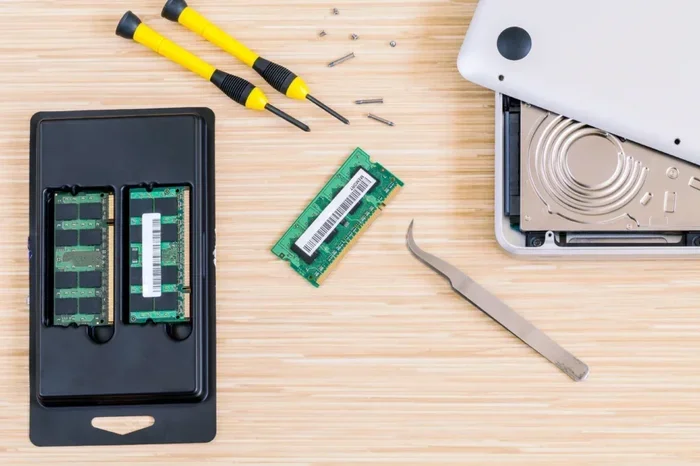
Choosing the right laptop RAM can transform your device’s speed and responsiveness. In this guide, we compare the top laptop RAM brands so you can pick the best option for your needs. Whether you need 8GB or 32GB, our best laptop RAM brands review covers speed, compatibility, and value to help you make a smart choice.
If your laptop feels slow, the problem might be your RAM. Random Access Memory is what your laptop uses to handle tasks right now. More RAM means smoother multitasking, faster app switching, and better overall performance. But not all RAM is the same. Different brands offer different speeds, sizes, and reliability levels. That is why we put together this guide to the best laptop RAM brands compared side by side.
Whether you are a student, a professional, or a casual user, picking the right memory module makes a big difference. In this article, we break down the top brands, compare their strengths, and help you choose the best option for your needs. We also share tips on how to pick the right speed and capacity for your setup.
Key Takeaways
- Top brands matter: Samsung, Corsair, Kingston, Crucial, and G.Skill lead the laptop RAM market with reliable performance.
- DDR4 vs DDR5: Understanding the difference helps you choose the right generation for your laptop and budget.
- Compatibility is key: Always check your laptop’s specs before buying RAM to avoid wasted money.
- Upgrade potential: Many laptops allow RAM upgrades, which can significantly boost speed without buying a new device.
- Speed and capacity balance: The best RAM for you depends on your use case, from basic tasks to heavy multitasking.
- Value for money: Some brands offer excellent performance at lower prices, making them ideal for budget-conscious buyers.
📑 Table of Contents
- Why Laptop RAM Brand Matters
- Samsung: The Industry Leader in Laptop RAM
- Corsair: Premium Performance for Power Users
- Kingston: Reliable and Budget-Friendly
- Crucial: The Smart Choice for Upgrades
- G.Skill: The Enthusiast’s Pick
- Comparison Table: Best Laptop RAM Brands at a Glance
- DDR4 vs DDR5: Which Should You Choose?
- How Much RAM Do You Really Need?
- Common Mistakes to Avoid When Buying Laptop RAM
- Final Thoughts on the Best Laptop RAM Brands
Why Laptop RAM Brand Matters
You might wonder why the brand of RAM matters. After all, memory is memory, right? Not quite. Different manufacturers use different materials, testing processes, and quality controls. A trusted brand ensures better stability, longer lifespan, and often faster speeds right out of the box. Cheap, no-name RAM can cause crashes, freezes, and compatibility issues.
When you are looking at laptop memory, you want to know you are getting a reliable product. The brands we cover below have strong reputations in the industry. They consistently deliver quality modules that work well with various laptop models. If you are wondering what makes a good laptop, check out our guide on the best laptop brands for more context on how RAM fits into the bigger picture.
Key Factors to Consider When Choosing RAM
- Type: DDR4 is the most common, but DDR5 is the newer standard offering faster speeds.
- Speed (MHz): Higher MHz means faster data transfer. Most laptops work well with 3200MHz to 4800MHz.
- Capacity: 8GB is the minimum for basic use. 16GB is ideal for most users. 32GB or more suits heavy workloads.
- Form Factor: SO-DIMM is the standard for laptops. Do not buy desktop RAM by mistake.
- Latency: Lower CAS latency means faster response times, though this matters less for most users.
Samsung: The Industry Leader in Laptop RAM
Samsung is the biggest name in memory production worldwide. They make RAM chips that power many of the top laptop brands on the market. When you buy Samsung RAM, you are getting a product backed by years of research and innovation. Their DDR4 and DDR5 modules are known for stability and excellent performance.
Samsung RAM modules are widely available and compatible with most laptops. They offer both standard and high-performance options. If you want reliable laptop RAM that just works, Samsung is a top choice. Their modules often come with solid warranties and are found in many pre-built laptops, including systems from top laptop brands like Dell, HP, and Lenovo.
For users who want to upgrade their current machine, Samsung offers affordable SO-DIMM options in 8GB, 16GB, and 32GB sizes. Their DDR5 modules are especially impressive, delivering speeds up to 5600MHz. This makes them a great pick for anyone who wants faster performance without breaking the bank.
Corsair: Premium Performance for Power Users
Corsair is known for its high-performance computer components, and their laptop RAM is no exception. They focus on speed and reliability, making them a favorite among gamers and creative professionals. Corsair SO-DIMM modules are built with premium materials and undergo rigorous testing.
If you need laptop RAM that can handle demanding tasks like video editing or 3D rendering, Corsair delivers. Their Vengeance and Dominator lines offer some of the fastest DDR4 and DDR5 options available. However, Corsair RAM tends to cost more than other brands. It is a great choice if performance is your top priority.
One thing to keep in mind: Corsair laptop RAM may not be available in all regions. Their distribution is more limited compared to Samsung or Kingston. But if you can find it, the quality is excellent. For users exploring upgrade options, you might also want to check out our guide on RAM upgrade for your laptop to understand what is possible with your current device.
Kingston: Reliable and Budget-Friendly
Kingston is one of the most trusted names in memory. They have been making RAM for decades and supply modules to many major laptop manufacturers. Kingston offers a wide range of DDR4 SO-DIMM options that work well for everyday use and moderate multitasking.
What makes Kingston stand out is its value for money. Their Fury Impact line is specifically designed for laptops and offers great speeds at affordable prices. You can find Kingston RAM in 8GB, 16GB, and 32GB configurations. It is a solid choice for students and office workers who need dependable performance without spending too much.
Kingston also offers lifetime warranties on most of their modules. This gives you peace of mind that your investment is protected. For those looking for a balance between quality and cost, Kingston is hard to beat. Their DDR4 modules are compatible with most laptops, and their DDR5 options are growing in availability.
Crucial: The Smart Choice for Upgrades
Crucial is a brand owned by Micron, one of the world’s largest memory manufacturers. This means Crucial RAM is built with top-quality chips and backed by serious engineering. Their laptop memory is designed for easy installation and broad compatibility.
Crucial makes it simple to find the right RAM for your laptop. Their online scanner tool checks your system and recommends compatible modules. They offer DDR4 SO-DIMMs in 8GB, 16GB, and 32GB sizes. Their DDR5 options are also becoming more available, giving users a path to faster speeds.
Crucial RAM is known for its plug-and-play compatibility. Most users report smooth installation and immediate performance gains. It is an excellent brand for anyone who wants a hassle-free upgrade. If you are considering upgrading, you can also explore options for specific brands like HP in our HP laptop RAM upgrade guide.
G.Skill: The Enthusiast’s Pick
G.Skill is a brand that enthusiasts love. They push the limits of speed and performance with their high-frequency RAM modules. While they are more known for desktop memory, G.Skill also offers laptop-grade SO-DIMM options for users who want the fastest speeds possible.
G.Skill’s Trident Z Neo line for laptops offers DDR4 speeds up to 3200MHz and beyond. These modules are designed for performance-driven users who game, stream, and run intensive applications. The build quality is excellent, and the heat spreaders help keep temperatures in check.
However, G.Skill laptop RAM comes at a premium price. It is not the most budget-friendly option. But if you need the absolute best performance and do not mind the cost, G.Skill is worth considering. Their modules are perfect for power users who want every ounce of speed from their machine.
Comparison Table: Best Laptop RAM Brands at a Glance
| Brand | Best For | Speed Range | Price Range | Warranty |
|---|---|---|---|---|
| Samsung | Reliability and wide compatibility | 3200MHz – 5600MHz | Budget to Mid | Limited Lifetime |
| Corsair | High-performance and gaming | 3200MHz – 5200MHz | Premium | Limited Lifetime |
| Kingston | Value and everyday use | 2666MHz – 4800MHz | Budget | Lifetime |
| Crucial | Easy upgrades and compatibility | 3200MHz – 4800MHz | Budget to Mid | Limited Lifetime |
| G.Skill | Enthusiast-level performance | 3200MHz – 3600MHz+ | Premium | Limited Lifetime |
DDR4 vs DDR5: Which Should You Choose?
The RAM generation you choose has a big impact on performance. DDR4 has been the standard for years and is still excellent for most users. It offers speeds from 2666MHz to 4800MHz and works with a wide range of laptops. If your laptop was made before 2022, it likely uses DDR4.
DDR5 is the newer generation, and it brings faster speeds and better efficiency. DDR5 modules start at 4800MHz and can reach 6400MHz or higher. However, not all laptops support DDR5. You need to check your laptop’s motherboard and processor compatibility before buying. If you own one of the laptops with the most RAM on the market, there is a good chance it uses DDR5.
For most users, DDR4 is still the practical choice. It is more affordable and widely available. DDR5 is the future, but it comes at a higher cost. If you are building or upgrading a high-performance machine, DDR5 is worth the investment. Just make sure your laptop supports it first.
Quick Tips for Choosing the Right RAM Generation
- Check your laptop manual or use a system scanner tool to confirm DDR4 or DDR5 support.
- Do not mix DDR4 and DDR5 modules. They are not compatible with each other.
- If you are unsure, DDR4 is the safer and more affordable choice for most laptops today.
- For future-proofing, consider DDR5 if your laptop supports it and your budget allows.
How Much RAM Do You Really Need?
The right amount of RAM depends on what you do with your laptop. For basic tasks like browsing, email, and word processing, 8GB is enough. Most modern laptops come with 8GB as a baseline, and it handles light use well.
If you multitask with several apps open, 16GB is the sweet spot. It gives you room to run a browser with many tabs, a word processor, and a video call all at once. For creative professionals, gamers, and developers, 32GB or more is ideal. These users run demanding software that benefits from extra memory.
You can also explore laptops pre-loaded with high RAM options. If you want ideas, check out our list of laptops with the most RAM to see what is available on the market today.
Common RAM Capacity Guidelines
- 8GB: Web browsing, office work, streaming, and light multitasking.
- 16GB: Multitasking, photo editing, casual gaming, and programming.
- 32GB: Video editing, 3D rendering, virtual machines, and heavy multitasking.
- 64GB+: Professional workloads, data science, and extreme multitasking.
Common Mistakes to Avoid When Buying Laptop RAM
One of the biggest mistakes is buying the wrong type of RAM. Laptops use SO-DIMM modules, which are smaller than desktop RAM. If you buy desktop RAM, it will not fit. Always double-check the form factor before purchasing.
Another mistake is ignoring speed compatibility. Your laptop motherboard has a maximum supported speed. Buying RAM that runs faster than your laptop supports will not give you any benefit. The RAM will simply run at the maximum speed your laptop allows.
Some users also forget to check if their laptop has upgradeable RAM. Many thin and light laptops have soldered memory that cannot be replaced. Before buying RAM, confirm that your laptop has an accessible RAM slot. If you are unsure, you can search for your laptop model online or consult the manufacturer’s website.
Finally, do not overlook the importance of matching RAM sticks. If you are adding a second module, try to match the brand, speed, and capacity of your existing RAM. This ensures the best compatibility and dual-channel performance. Mixing mismatched modules can sometimes cause issues or reduce performance.
Final Thoughts on the Best Laptop RAM Brands
Choosing the best laptop RAM brands comes down to your needs and budget. Samsung offers the best overall reliability and compatibility. Corsair is the top pick for performance enthusiasts. Kingston delivers excellent value for everyday users. Crucial makes upgrades simple and straightforward. And G.Skill is the choice for those who want maximum speed.
No matter which brand you choose, make sure it matches your laptop’s specifications. Check the type (DDR4 or DDR5), the form factor (SO-DIMM), and the capacity you need. A good RAM upgrade can breathe new life into an older laptop and make your daily tasks feel much faster.
Remember, RAM is one of the easiest and most affordable upgrades you can make. It does not require technical expertise, and the results are immediate. You will notice smoother multitasking, faster app launches, and fewer slowdowns. Take the time to pick the right brand and configuration, and your laptop will thank you.
For more tips on improving your laptop’s performance, explore our other guides and comparisons. We cover everything from RAM upgrades to full laptop reviews to help you get the most out of your device.
Frequently Asked Questions
Is Samsung RAM better than Kingston for laptops?
Both are excellent brands, but they serve different needs. Samsung is the industry leader with top-tier reliability and wide compatibility. Kingston offers great value and is perfect for everyday use. If you want the safest bet, go with Samsung. If you want to save money, Kingston is a fantastic choice.
Can I mix RAM brands in my laptop?
Yes, you can mix brands, but it is not always ideal. Matching the same brand, speed, and capacity gives the best results. If you mix different RAM modules, your laptop will usually still work. However, it may run in single-channel mode or at the slower module’s speed.
How do I know if my laptop supports DDR5 RAM?
Check your laptop’s specifications online or in the user manual. Look for the processor model and motherboard details. DDR5 support depends on the CPU and chipset. If your laptop was purchased before 2023, it most likely uses DDR4. You can also use a system information tool like CPU-Z to check your current RAM type.
Does more RAM always make a laptop faster?
More RAM helps with multitasking and running demanding apps. But it does not make your laptop faster for simple tasks. If you already have enough RAM for your workflow, adding more will not make a noticeable difference. Focus on getting the right amount for your use case rather than always going for the maximum.
What is the difference between SO-DIMM and DIMM RAM?
SO-DIMM stands for Small Outline Dual In-Line Memory Module. It is the smaller version designed for laptops and compact devices. DIMM is the standard size used in desktop computers. They are not interchangeable. Always make sure you buy SO-DIMM for your laptop to avoid compatibility issues.
How hard is it to upgrade laptop RAM?
Upgrading laptop RAM is usually straightforward. Most laptops have a small access panel on the bottom. You open it, remove the old module at an angle, and insert the new one at an angle until it clicks. No special tools are needed beyond a small Phillips screwdriver. If your laptop has soldered RAM, however, it cannot be upgraded.
=== CONCLUSION ===
Finding the best laptop RAM brands does not have to be confusing. Samsung, Corsair, Kingston, Crucial, and G.Skill all offer excellent options for different needs and budgets. The key is to match your RAM to your laptop’s specifications and your personal usage needs. Whether you need a simple 8GB upgrade or a powerful 32GB DDR5 kit, there is a brand and module that fits perfectly.
Take the time to research, check compatibility, and choose a reputable brand. A quality RAM upgrade is one of the best investments you can make for your laptop. It costs less than a new device and delivers noticeable improvements in speed and responsiveness. Start with the right RAM, and your laptop will feel faster and more capable than ever before.