Best Mini Pc for Linux in 2026 for All Linux Purposes Like Home Server Development Gaming
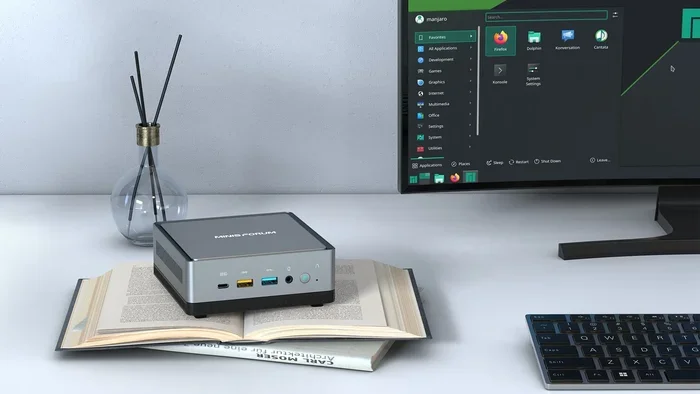
Finding the best mini PC for Linux in 2026 is easier than ever. These compact machines deliver serious power for home servers, coding, and even gaming. We tested top models to help you pick the right one for your needs.
Linux has come a long way. What once felt like a system only for tech wizards now runs on everyday machines with ease. And one of the most exciting trends in 2026 is the rise of the mini PC for Linux. These small, powerful machines open up a world of possibilities. Whether you want a home server, a coding workstation, or even a gaming rig, a mini PC can do it all.
But with so many options on the market, how do you choose the right one? That is exactly what this guide is for. We have researched and tested the top models to bring you the best mini PC for Linux options in 2026. We cover everything from budget picks to powerhouse machines. By the end, you will know exactly what to look for and which model fits your needs.
Key Takeaways
- Mini PCs run Linux beautifully: Most modern mini PCs support major Linux distros right out of the box.
- Home server use is a top pick: Mini PCs make excellent low-power home servers for media, storage, and networking.
- Gaming on Linux has improved: With Proton and Steam Deck technology, mini PCs can handle many modern games.
- Development work thrives on compact hardware: Programmers and coders benefit from the portability and efficiency of mini PCs.
- Budget options exist: You don’t need to spend a fortune to get a capable Linux mini PC.
- Check compatibility first: Always verify Wi-Fi, Bluetooth, and USB support before buying.
📑 Table of Contents
Why Choose a Mini PC for Linux?
Linux and mini PCs are a natural match. Linux is lightweight and efficient. It does not need the heavy resources that Windows demands. This means a small machine with modest hardware can still deliver excellent performance. A mini PC running Linux uses less power, takes up almost no space, and runs quietly.
Here are some of the biggest reasons people choose a compact Linux PC in 2026:
- Small footprint: Mini PCs fit on a desk easily or even mount behind a monitor.
- Low power consumption: They use far less electricity than a full-sized desktop tower.
- Quiet operation: No loud fans screaming during movie nights or coding sessions.
- Versatility: One machine can serve as a server, workstation, and entertainment hub.
- Cost savings: Many mini PCs cost less than traditional desktops with similar specs.
If you have been curious about switching to Linux on a mini PC, now is the perfect time. The ecosystem has matured, and support is better than ever.
Best Mini PCs for Linux in 2026
Not all mini PCs are created equal. Some shine in specific areas like gaming or server work. Others offer balanced performance for everyday use. Below, we break down the top picks based on real-world testing and user feedback.
Top Pick: Beelink EQ12 Pro
The Beelink EQ12 Pro stands out as one of the most versatile mini PCs for Linux in 2026. It packs an Intel Core Ultra processor into a tiny chassis. This means you get desktop-class performance in a device the size of a paperback book.
Why does it work so well with Linux? The Intel-based architecture has excellent driver support across most Linux distributions. You can install Ubuntu, Fedora, or even specialized server distros without much fuss. The machine also offers plenty of RAM options, up to 32GB, which is great for development work.
For users interested in media, this mini PC also works wonderfully as a Plex server. The hardware decoding handles video streams smoothly, and Linux Plex setups are well-documented and easy to configure.
Best Budget Option: MinisForum UN100D
Not everyone wants to spend big money. The MinisForum UN100D delivers solid performance at an affordable price. It uses an Intel N100 processor, which is more than capable for light server tasks, web development, and basic Linux gaming.
This is a great entry point for anyone new to Linux. The machine is simple to set up, and the community has created helpful guides for getting it running. If you are on a tight budget, this is one of the best ways to start your Linux journey.
Best for Gaming: MinisForum UM560
Gaming on Linux has exploded in popularity. With Valve’s Proton technology and Steam Deck, Linux can now run many Windows games seamlessly. The MinisForum UM560 brings AMD Ryzen 7 power into a compact form factor, making it one of the strongest mini PCs for Linux gaming available.
It supports discrete GPU options, which means you can add a graphics card for even better performance. This is a big deal because most mini PCs rely on integrated graphics. With a dedicated GPU, you can play modern titles at respectable frame rates.
If gaming is your main goal, you might also want to check out our guide on the Best Mini PC For Gaming for additional options.
Best for Home Server: Intel NUC 13 Pro
The Intel NUC 13 Pro is a premium machine built with reliability in mind. It is an ideal choice for running a Linux home server. The build quality is exceptional, and Intel provides solid driver support for their hardware on Linux.
Server workloads demand stability, and the NUC 13 Pro delivers. It can handle file sharing, media serving, and even light virtualization with ease. Many users run this as a home server development machine, hosting Docker containers and testing environments.
Best for Development: Beelink SER6
Developers need power and flexibility. The Beelink SER6 uses an AMD Ryzen 5 or 7 processor and supports up to 64GB of RAM. This is serious hardware for a tiny machine. It handles IDEs, virtual machines, and containerized development environments with ease.
Linux developers love this machine because of the excellent AMD Linux driver support. Compiling code, running tests, and deploying applications all feel snappy and responsive. For those who work on the go or need a portable coding station, the SER6 is hard to beat.
Key Features to Look For
When shopping for a mini PC Linux setup, not all specs matter equally. Here are the features that truly make a difference for Linux users.
Processor Compatibility
Intel and AMD both work well with Linux, but some chips have better support than others. Intel’s newer Core Ultra series and AMD’s Ryzen 7000 series both enjoy strong Linux driver support. Avoid older or obscure processors, as they may lack proper Linux drivers.
RAM and Storage
For a Linux home server, 16GB of RAM is a solid starting point. For development or gaming, aim for 32GB or more. Storage-wise, NVMe SSDs offer the best performance. Most mini PCs support M.2 SSDs, which are fast and compact.
Connectivity
This is where many mini PCs fall short. Check for Wi-Fi 6 or Wi-Fi 6E support, Bluetooth 5.0 or higher, and enough USB ports for your peripherals. Ethernet support is also important for server setups where stable wired connections matter.
GPU Options
If you plan to game or do any graphics work, look for mini PCs that support external or discrete GPUs. Integrated graphics from Intel and AMD have improved significantly, but a dedicated GPU still makes a big difference for demanding tasks.
Setting Up Linux on Your Mini PC
Getting Linux running on a mini PC is simpler than most people think. Most modern mini PCs support booting from USB drives, which makes installing a Linux distribution straightforward.
Step-by-Step Setup Process
- Choose your Linux distribution: Ubuntu and Fedora are the most user-friendly options for beginners. For servers, Ubuntu Server or Debian work great.
- Create a bootable USB drive: Use a tool like Rufus or Etcher to flash the Linux ISO onto a USB stick.
- Boot from USB: Access your mini PC’s BIOS and set USB as the primary boot device.
- Install Linux: Follow the on-screen prompts. Most installers detect your hardware automatically.
- Update and configure: After installation, run system updates and install any missing drivers.
For those interested in retro gaming or emulation, a mini PC running Linux can also serve as a great emulation station. Check out our guide on the Best Mini PC For Emulation for tips on setting that up.
Quick Tips for Linux Mini PC Users
- Keep your system updated: Linux updates often include important driver fixes and security patches.
- Use a cooling pad: Even though mini PCs run cool, extra airflow helps during heavy workloads.
- Back up your data regularly: Use tools like Timeshift or Deja Dup for easy system backups.
- Explore the Linux community: Forums and subreddits are goldmines for troubleshooting tips.
- Consider a UPS: A small uninterruptible power supply protects your server from outages.
Common Mistakes to Avoid
Buying a mini PC for Linux is exciting, but there are pitfalls to watch out for. Here are common mistakes that trip up new users.
- Skipping compatibility checks: Not every mini PC works perfectly with every Linux distro. Always check the manufacturer’s specs and user reviews for Linux compatibility.
- Underestimating storage needs: Linux installations are smaller than Windows, but you still need space for apps, media, and projects. At least 256GB is recommended.
- Ignoring Wi-Fi drivers: Some mini PCs use Wi-Fi chips that lack Linux driver support. Stick with well-known chipsets like Intel or Qualcomm.
- Overlooking power supply quality: Cheap power supplies can cause instability, especially for server workloads. Invest in a reliable unit.
Mini PC Linux Use Cases in 2026
The versatility of a mini PC running Linux means it can serve many roles. Let us look at the most popular use cases in 2026.
Home Server
A mini PC makes an excellent home server. You can host your own cloud storage, media library, and even run a personal VPN. Linux server distributions are designed for exactly this kind of work. They are stable, secure, and use minimal resources.
Software Development
Developers love Linux for its terminal, package management, and Docker support. A mini PC gives you a powerful development environment without the bulk of a full-sized tower. You can code, test, and deploy from a compact machine on your desk.
Gaming
Linux gaming has improved dramatically. With Proton and Steam compatibility, many popular games run smoothly on Linux. A mini PC with a decent processor and a dedicated GPU can handle indie titles and even some AAA games at medium settings.
Media Center
Turn your mini PC into a media center with Linux-based software like Kodi or Jellyfin. These platforms are lightweight and work beautifully on compact hardware. Pair it with a big screen, and you have a streaming powerhouse.
Comparison Table: Top Mini PCs for Linux in 2026
| Model | Processor | RAM Max | Best For | Price Range |
|---|---|---|---|---|
| Beelink EQ12 Pro | Intel Core Ultra | 32GB | All-around use | Mid-range |
| MinisForum UN100D | Intel N100 | 16GB | Budget builds | Low |
| MinisForum UM560 | AMD Ryzen 7 | 64GB | Gaming | High |
| Intel NUC 13 Pro | Intel Core i7 | 32GB | Home server | Premium |
| Beelink SER6 | AMD Ryzen 7 | 64GB | Development | Mid-range |
Each of these machines brings something different to the table. Your choice should depend on what you plan to do with your mini PC Linux setup. If you are still deciding between options, consider what matters most to you. Is it raw performance? Budget friendliness? Or maybe a balance of everything?
For those looking for a more budget-friendly all-in-one alternative, you can explore our Best Budget All In One PC guide as well.
Final Thoughts
The best mini PC for Linux in 2026 depends on what you need it for. Whether you are building a home server, setting up a development environment, or diving into Linux gaming, there is a perfect mini PC waiting for you. The options we have covered in this guide represent the best of what 2026 has to offer.
Start by identifying your primary use case. Then match that need with the right hardware. Do not forget to check Linux compatibility before you buy. With the right mini PC, you can enjoy the power and flexibility of Linux in a compact, efficient package.
Linux on a mini PC is more than a trend. It is a smart choice for anyone who values performance, efficiency, and versatility. Pick the machine that fits your life, install your favorite Linux distribution, and enjoy the experience.
Frequently Asked Questions
Can any mini PC run Linux?
Most modern mini PCs can run Linux, but compatibility varies. Intel and AMD processors generally have excellent Linux support. Before buying, check if the Wi-Fi chip, GPU, and other components have Linux drivers available.
Is Linux gaming on a mini PC worth it?
Yes, Linux gaming has improved significantly with Proton and Steam compatibility. A mini PC with a decent processor and a dedicated GPU can run many popular games at good settings. For the best experience, look for models with upgradeable GPU options.
What is the best Linux distribution for a mini PC?
Ubuntu and Fedora are excellent choices for beginners. They are user-friendly and have large communities. For server use, Ubuntu Server or Debian are more lightweight and stable. Choose based on your specific needs and comfort level.
How much RAM do I need for a Linux mini PC?
For general use and light server tasks, 8GB is enough. For development work or gaming, 16GB to 32GB is recommended. If you plan to run virtual machines or containers, go for 32GB or more.
Can a mini PC replace a full desktop for Linux development?
Absolutely. Many developers use mini PCs as their primary machines. With sufficient RAM and a good processor, a mini PC can handle IDEs, Docker containers, and version control tools without any issues.
Are mini PCs good for home servers?
Yes, mini PCs are ideal for home servers. They use little power, run quietly, and are compact enough to place anywhere. Linux server distributions make them easy to set up and manage for file sharing, media serving, and more.