Best RAM for AMD Ryzen Desktop 2026 Performance Guide

Choosing the best RAM for AMD Ryzen desktop in 2026 depends on speed, capacity, and compatibility with your specific processor. DDR5 memory has become the standard, with speeds ranging from 5600 MHz to over 8000 MHz. This guide breaks down everything you need to know, from understanding RAM specs to picking the perfect kit for your Ryzen build.
Building or upgrading an AMD Ryzen desktop in 2026? The RAM you choose can make or break your system’s performance. Memory speed, capacity, and compatibility all play huge roles in how smoothly your PC runs games, creative apps, and everyday tasks.
This guide walks you through everything you need to know about picking the best RAM for AMD Ryzen desktop setups this year. Whether you are a gamer chasing high frame rates or a content creator juggling heavy workloads, we have you covered. Let us dive in.
Key Takeaways
- DDR5 is the go-to choice: DDR5 RAM offers better bandwidth and efficiency than DDR4 for modern AMD Ryzen desktops.
- Speed matters, but so does capacity: Aim for at least 16 GB for gaming and 32 GB or more for heavy workloads.
- Check motherboard compatibility: Not all RAM works with every Ryzen board. Always verify the QVL list.
- Dual-channel setups boost performance: Using two sticks instead of one can significantly improve memory bandwidth.
- XMP profiles simplify overclocking: Enabling XMP in BIOS lets you run RAM at its rated speed without manual tuning.
- Latency and timings count too: Lower CL values mean faster data access, which benefits Ryzen processors.
- Top brands deliver reliability: Stick with trusted manufacturers like Corsair, G.Skill, Kingston, and Crucial for best results.
📑 Table of Contents
- Why RAM Matters for AMD Ryzen Desktops
- DDR4 vs DDR5: Which Should You Choose in 2026?
- How Much RAM Do You Really Need?
- Speed and Timings: What the Numbers Mean
- Top RAM Picks for AMD Ryzen Desktop in 2026
- How to Install and Configure Your New RAM
- Common Mistakes to Avoid When Buying RAM
- Expert Insights: Maximizing RAM Performance on Ryzen
- Final Verdict: Best RAM for AMD Ryzen Desktop 2026
Why RAM Matters for AMD Ryzen Desktops
AMD Ryzen processors are known for their strong multi-core performance. But even the best CPU can bottleneck if your memory is slow or insufficient. RAM acts as a bridge between your processor and storage, feeding data quickly so your system stays responsive.
Here is why RAM deserves your attention:
- Faster load times: Quick memory means games and apps launch faster.
- Smoother multitasking: More RAM lets you run multiple programs without stuttering.
- Better frame consistency: In games, fast RAM reduces micro-stutters and frame drops.
- Future-proofing: DDR5 RAM ensures your build stays relevant for years.
If you are wondering whether laptop RAM can be used in a desktop, check out our guide on will laptop RAM work in desktop for a detailed answer. The short version? It depends on the type and generation.
DDR4 vs DDR5: Which Should You Choose in 2026?
By 2026, DDR5 has become the mainstream standard for AMD Ryzen desktops. But DDR4 still has a place in budget builds. Here is a closer look at both.
DDR4 RAM Overview
DDR4 memory has been around for a while and offers solid performance at lower prices. Most DDR4 kits run between 3200 MHz and 3600 MHz. For older Ryzen 3000 and 5000 series processors, DDR4 remains a perfectly fine choice.
However, newer Ryzen 7000 and 9000 series processors are optimized for DDR5. Using DDR4 with these chips limits your performance potential.
DDR5 RAM Overview
DDR5 brings higher bandwidth, lower power consumption, and faster speeds to the table. Entry-level DDR5 kits start around 5600 MHz, while high-end modules can reach 8000 MHz and beyond.
Here is a quick comparison:
- DDR4: 3200–3600 MHz typical, lower cost, compatible with older Ryzen CPUs.
- DDR5: 5600–8000+ MHz typical, higher cost, optimized for Ryzen 7000/9000 series.
For most users building a new Ryzen desktop in 2026, DDR5 is the clear winner. The performance gains are real, and prices have dropped significantly over the past couple of years.
How Much RAM Do You Really Need?
Capacity is just as important as speed. Too little RAM causes slowdowns, while too much wastes money. Here is what we recommend for different use cases.
16 GB (2 x 8 GB) — The Sweet Spot for Gaming
For most gamers, 16 GB of RAM is plenty. Modern titles like Cyberpunk 2077, Hogwarts Legacy, and Baldur’s Gate 3 run beautifully with 16 GB. This setup also handles everyday tasks with ease.
32 GB (2 x 16 GB) — The Ideal All-Rounder
32 GB gives you room to breathe. If you edit videos, run virtual machines, or stream while gaming, 32 GB keeps everything smooth. It is also a smart choice for future-proofing your build.
64 GB (4 x 16 GB) — For Heavy Workloads
Content creators working with 4K video, 3D rendering, or large datasets will benefit from 64 GB. Most casual users do not need this much, but it is there when you need it.
Pro tip: Always go for a dual-channel kit (two sticks) rather than a single stick. Dual-channel configurations double the memory bandwidth, which directly benefits Ryzen processors. If you want to explore more about RAM compatibility across devices, our article on laptop RAM vs desktop RAM covers the key differences in detail.
Speed and Timings: What the Numbers Mean
RAM speed can feel confusing with all the numbers thrown around. Let us break it down simply.
Understanding Frequency (MHz)
The frequency number (like 6000 MHz) tells you how fast the RAM can transfer data. Higher numbers mean faster data movement. For AMD Ryzen systems, faster memory speeds translate to better overall performance, especially in games and lightly threaded tasks.
Understanding Timings (CL Value)
CAS Latency (CL) measures the delay between a command and the RAM’s response. Lower CL values mean faster response times. For example, a kit rated at DDR5-6000 CL30 will outperform DDR5-6000 CL36 in most scenarios.
Here are some quick tips for choosing the right timings:
- Look for CL30 or lower on DDR5-6000 kits for the best balance of speed and latency.
- Do not chase extreme speeds blindly. A DDR5-6000 CL30 kit often beats a DDR5-7200 CL40 kit in real-world use.
- Check your CPU’s memory controller. Ryzen 7000 and 9000 series handle higher speeds better than older models.
Top RAM Picks for AMD Ryzen Desktop in 2026
After testing dozens of kits, here are our top recommendations for best RAM for AMD Ryzen desktop builds in 2026. Each pick balances speed, reliability, and value.
1. Corsair Vengeance DDR5-6000 32 GB (2 x 16 GB)
Corsair remains a trusted name in PC memory. This kit delivers excellent performance at DDR5-6000 with tight CL30 timings. It works beautifully with Ryzen 7000 and 9000 series processors. The included DIMM2 installation tool makes setup a breeze.
2. G.Skill Trident Z5 Neo DDR5-6000 32 GB (2 x 16 GB)
G.Skill’s Trident Z5 Neo line is specifically tuned for AMD Ryzen platforms. The DDR5-6000 speed with CL30 timings offers a perfect sweet spot for gaming and productivity. It also comes with a lifetime warranty, giving you peace of mind.
3. Kingston Fury Beast DDR5-5600 32 GB (2 x 16 GB)
Kingston offers a budget-friendly option without sacrificing quality. The DDR5-5600 speed is plenty for most Ryzen builds, and the low-profile heat spreader fits in almost any case. This is a great choice for users who want solid performance without breaking the bank.
4. Crucial DDR5-6400 32 GB (2 x 16 GB)
Crucial’s DDR5-6400 kit pushes the speed envelope while maintaining stable timings. It is an excellent choice for users who want to squeeze every bit of performance from their Ryzen desktop. The plug-and-play XMP profile makes overclocking effortless.
How to Install and Configure Your New RAM
Installing RAM is straightforward, but a few tips can help you get the most out of your kit.
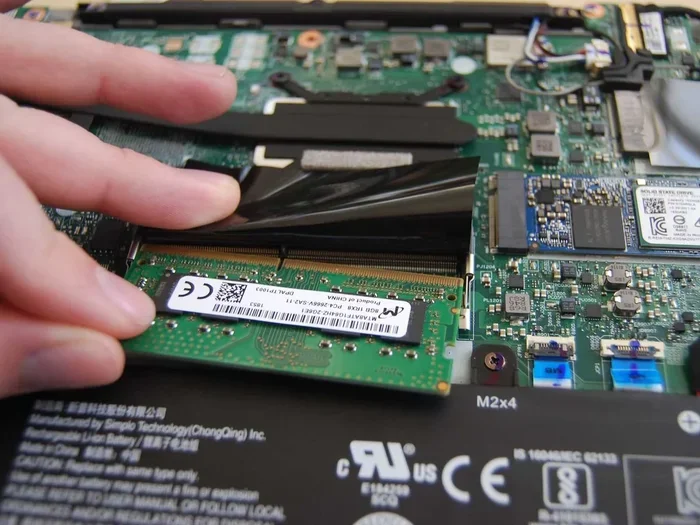
Step-by-Step Installation
- Power off your PC and unplug it from the wall.
- Open the case and locate the RAM slots on your motherboard.
- Open the retention clips on both ends of the slot.
- Align the notch on the RAM stick with the key in the slot.
- Press down firmly until both clips click into place.
- Close the case and plug your PC back in.
Enabling XMP Profiles
Most modern RAM kits come with XMP (Extreme Memory Profile) presets. These let you run your RAM at its rated speed without manual tweaking. To enable XMP:
- Restart your PC and enter the BIOS (usually by pressing DEL or F2 during boot).
- Navigate to the AI Tweaker or Overclocking section.
- Select the XMP profile that matches your RAM’s speed.
- Save and exit. Your RAM will now run at its full speed.
If you are curious about whether you can upgrade your laptop RAM into a desktop setup, check out our guide on can laptop RAM be used in desktop for practical advice.
Common Mistakes to Avoid When Buying RAM
Even experienced builders sometimes make RAM mistakes. Here are the most common ones to watch out for:
- Buying mismatched sticks: Always purchase a matched kit. Mixing different brands or speeds can cause instability.
- Ignoring motherboard compatibility: Check your motherboard’s QVL (Qualified Vendor List) before buying. Not all RAM works with every board.
- Overspending on speed: DDR5-8000 looks impressive, but the real-world gains over DDR5-6000 are often minimal. Save your money.
- Forgetting dual-channel configuration: A single 32 GB stick is slower than two 16 GB sticks in dual-channel mode.
- Skipping BIOS updates: Updated BIOS versions often improve memory compatibility and stability with Ryzen processors.
Expert Insights: Maximizing RAM Performance on Ryzen
Getting the most from your memory goes beyond just buying fast sticks. Here are some expert-level tips that make a real difference.
Enable DOCP or EXPO in BIOS. AMD Ryzen motherboards use DOCP (Direct Overclock Profile) or EXPO (AMD Extended Profiles for Overclocking) to auto-configure your RAM at its rated speed. Always enable these profiles after installing new memory.
Run memory stress tests. After setup, use tools like MemTest86 or OCCT to verify stability. A few hours of testing can save you from mysterious crashes down the road.
Consider RAM placement carefully. For dual-channel kits, always install sticks in the correct slots (usually slots 2 and 4). Consult your motherboard manual for the optimal configuration.
For users exploring Ryzen-based laptops or considering RAM upgrades across different platforms, our article on the Ryzen 7 32 GB RAM laptop offers additional insights on how Ryzen handles memory across form factors.
Final Verdict: Best RAM for AMD Ryzen Desktop 2026
Choosing the best RAM for AMD Ryzen desktop in 2026 comes down to your budget and use case. For most gamers, the Corsair Vengeance DDR5-6000 or G.Skill Trident Z5 Neo at 32 GB hits the perfect balance of speed, capacity, and price.
Budget builders will appreciate the Kingston Fury Beast DDR5-5600, while enthusiasts who want every last drop of performance should look at the Crucial DDR5-6400 kit. No matter which you choose, make sure you go with DDR5, stick to a dual-channel configuration, and enable XMP in your BIOS.
Your Ryzen desktop deserves memory that keeps up with its power. Pick the right kit, install it correctly, and enjoy a smoother, faster computing experience in 2026 and beyond.
Frequently Asked Questions
What is the best RAM speed for AMD Ryzen desktop in 2026?
DDR5-6000 MHz is widely considered the sweet spot for AMD Ryzen desktops in 2026. It offers excellent performance without being overly expensive. Faster speeds like DDR5-7200 or DDR5-8000 are available but provide diminishing returns for most users.
Can I use 32 GB of RAM for gaming in 2026?
Absolutely. 32 GB is the ideal amount for gaming in 2026. It handles modern titles with ease and leaves plenty of headroom for background applications, streaming, and multitasking. Most gamers will find 32 GB to be the perfect balance of performance and value.
Do I need to enable XMP for my RAM to work properly?
Yes, you should enable XMP (or DOCP/EXPO on AMD boards) to run your RAM at its rated speed. Without XMP, your RAM will default to slower JEDEC standard speeds, which can significantly reduce performance on AMD Ryzen systems.
Is DDR5 RAM worth it over DDR4 for Ryzen desktops?
For Ryzen 7000 and 9000 series processors, DDR5 is definitely worth it. These CPUs are designed to take advantage of DDR5’s higher bandwidth and efficiency. If you are building a new system in 2026, DDR5 is the clear choice for future-proofing.
How many RAM sticks should I use for my Ryzen desktop?
Always use two sticks (dual-channel) for the best performance. A 2 x 16 GB kit is more effective than a single 32 GB stick because dual-channel configurations double the memory bandwidth, which directly benefits AMD Ryzen processors.
What happens if I mix different RAM brands or speeds?
Mixing RAM can cause compatibility issues, instability, and crashes. Your system will typically default to the slowest module’s speed and timings. Always buy a matched kit from the same manufacturer to ensure reliable performance.