Ddr4 Vs Ddr5 Laptop Ram Which One Is Better For You

The DDR4 vs DDR5 laptop RAM debate is one of the most common questions we get. DDR5 offers faster speeds and better efficiency, but DDR4 still holds strong in affordability and compatibility. This guide breaks down everything you need to know so you can make the right choice for your laptop.
Choosing between DDR4 and DDR5 laptop RAM can feel confusing. Both are types of computer memory, but they work quite differently. If you have been wondering which one is better for your laptop, you are in the right place. This guide will walk you through everything in simple terms.
Memory is one of the most important parts of any laptop. It affects how fast your computer runs, how many apps you can open, and how smoothly everything works. The DDR4 vs DDR5 laptop RAM comparison is not just about numbers on a box. It is about what fits your laptop, your budget, and your needs.
DDR4 has been around for a long time. It is reliable, affordable, and works in millions of laptops worldwide. DDR5 is the newer generation. It brings faster speeds, better power efficiency, and improved performance. But does that mean DDR5 is always the better choice? Not necessarily. Let us dive deep into the details.
Key Takeaways
- DDR5 is faster: It delivers higher speeds and better bandwidth than DDR4, making it ideal for demanding tasks.
- DDR4 is cheaper: DDR4 RAM modules are still more affordable and widely available in the market.
- Compatibility matters: Not every laptop supports DDR5, so always check your motherboard before upgrading.
- Power efficiency differs: DDR5 runs at a lower voltage, which can improve battery life on laptops.
- Mixing is not recommended: Avoid combining DDR4 and DDR5 modules in the same system.
- Future-proofing favors DDR5: Newer laptops and motherboards are shifting toward DDR5 support.
- Your use case decides: Casual users may not need DDR5, but power users will benefit greatly.
📑 Table of Contents
What Is DDR4 Laptop RAM?
DDR4 stands for Double Data Rate 4. It is the fourth generation of double data rate synchronous dynamic random-access memory. In simpler terms, it is the type of memory your laptop uses to store temporary data while you work. DDR4 laptop RAM has been the standard for many years now.
Most laptops built between 2015 and 2022 use DDR4 memory. It typically runs at speeds between 2133 MHz and 3200 MHz. The voltage for DDR4 is usually 1.2 volts, which is quite efficient. If you are looking at options like DDR4 RAM for HP Laptop, you will find plenty of choices at different price points.
Key Features of DDR4
- Speed: Typically ranges from 2133 MHz to 3200 MHz.
- Voltage: Operates at 1.2 volts.
- Capacity: Available in 4GB, 8GB, 16GB, and 32GB modules.
- Compatibility: Works with a wide range of older and mid-range laptops.
- Price: Generally cheaper than DDR5 options.
DDR4 memory is still a great choice for everyday tasks. Browsing the web, watching videos, working on documents, and even light photo editing all run smoothly on DDR4. If your laptop supports DDR4, you can find affordable modules from brands like Kingston and Crucial. For example, you might consider 16GB DDR4 RAM for laptop to boost your system performance without breaking the bank.
What Is DDR5 Laptop RAM?
DDR5 stands for Double Data Rate 5. It is the newest generation of laptop memory technology. DDR5 laptop RAM started appearing in laptops around 2023 and 2024. It brings significant improvements over DDR4 in both speed and efficiency.
DDR5 memory starts at speeds around 4800 MHz and can go well beyond 6400 MHz. It runs at a lower voltage of 1.1 volts, which means it uses less power. This is great news for laptop battery life. If you are considering an upgrade, options like DDR5 laptop RAM 32GB 5600MHz are becoming more accessible.
Key Features of DDR5
- Speed: Starts at 4800 MHz and can reach 8400 MHz or higher.
- Voltage: Operates at 1.1 volts, saving power.
- Capacity: Available in 8GB, 16GB, 32GB, and 64GB modules.
- Bandwidth: Significantly higher than DDR4 for multitasking.
- Architecture: Includes on-die error correction and improved signal integrity.
DDR5 memory shines when you need top performance. Video editing, gaming, 3D rendering, and running virtual machines all benefit from the extra speed and bandwidth. If you are building or upgrading a powerful laptop, DDR5 is the way to go. A popular choice is 16GB DDR5 5600MHz laptop RAM, which offers excellent value for most users.
DDR4 vs DDR5: Head-to-Head Comparison
Now let us compare DDR4 and DDR5 side by side. This table breaks down the most important differences between the two memory types.
| Feature | DDR4 | DDR5 |
|---|---|---|
| Starting Speed | 2133 MHz | 4800 MHz |
| Max Speed (Common) | 3200 MHz | 6400 MHz |
| Voltage | 1.2V | 1.1V |
| Bandwidth | Lower | Higher |
| Power Efficiency | Good | Better |
| Price (per GB) | Lower | Higher |
| Availability | Widespread | Growing |
| Compatibility | Older and mid-range laptops | Newer laptops only |
| Max Module Size | Up to 32GB common | Up to 64GB available |
The DDR4 vs DDR5 laptop RAM comparison shows clear advantages for DDR5 in speed and efficiency. However, DDR4 still wins on price and compatibility. Your choice depends on what matters most to you.
Speed and Performance
DDR5 is significantly faster than DDR4. The starting speed of DDR5 is more than double that of DDR4. This means your laptop can process more data at once. For users who run heavy applications or multitask with many browser tabs open, DDR5 makes a noticeable difference.
However, for casual users who mainly browse the web and use office apps, DDR4 is more than enough. The speed difference may not be obvious in everyday use. It really depends on what you do with your laptop each day.
Price Differences
DDR4 RAM is still much cheaper than DDR5. A 16GB DDR4 module can cost half as much as a 16GB DDR5 module. If you are on a tight budget, DDR4 offers the best value. You can get solid performance without spending extra money.
As DDR5 becomes more popular, prices are dropping. But DDR4 will likely remain the budget-friendly option for a while. If you are planning a memory upgrade, check out RAM upgrade for my laptop guides to find the best deals.
Compatibility and Motherboard Support
This is where things get important. DDR4 and DDR5 are not interchangeable. A laptop that supports DDR4 cannot use DDR5 RAM, and vice versa. Always check your laptop’s specifications before buying any memory.
You can usually find this information in your laptop’s manual or on the manufacturer’s website. Look for the memory type, maximum supported capacity, and available slots. If your laptop only supports DDR4, there is no point in buying DDR5.
Power Consumption and Battery Life
DDR5 uses less power than DDR4 thanks to its lower voltage. This might not sound like a big deal, but it adds up over time. For laptop users who care about battery life, DDR5 can offer a slight improvement.
The difference is not huge, but it is there. If you travel often or work away from power outlets, every bit of battery savings counts. DDR5 also generates less heat, which can help keep your laptop cooler during heavy workloads.
Who Should Choose DDR4?
DDR4 is still a great choice for many users. Here are some situations where DDR4 makes sense:
- Budget-conscious buyers: DDR4 is cheaper and offers solid performance for the price.
- Older laptops: If your laptop was made before 2023, it likely uses DDR4.
- Casual users: For web browsing, streaming, and office work, DDR4 is more than enough.
- Easy upgrades: DDR4 modules are widely available and easy to find.
- Light gaming: DDR4 handles casual and mid-range games just fine.
If you are not doing heavy creative work or gaming, DDR4 will serve you well. There is no need to spend extra on DDR5 if your daily tasks do not require it. Many users are perfectly happy with 16GB DDR4 RAM in their laptops.
Who Should Choose DDR5?
DDR5 is the better choice for certain types of users. Here is when DDR5 makes the most sense:
- Power users: If you run demanding software like video editors or 3D modelers, DDR5 helps a lot.
- Gamers: High-end games benefit from the extra speed and bandwidth of DDR5.
- Content creators: Video editing and rendering tasks finish faster with DDR5.
- Future-proofing: Buying DDR5 now means your laptop will stay relevant longer.
- Multitaskers: DDR5 handles many apps running at once with ease.
If you have a newer laptop that supports DDR5, upgrading to it is a smart move. The performance boost is real and noticeable. Look for DDR5 modules that match your laptop’s supported speed and capacity. For heavy workloads, consider DDR5 5600 laptop RAM 64GB for maximum headroom.
Common Mistakes When Choosing Laptop RAM
Many people make mistakes when upgrading their laptop memory. Here are a few to avoid:
- Mixing DDR4 and DDR5: Never put both types in the same laptop. They are physically and electrically different.
- Ignoring speed limits: Your laptop may not support the fastest DDR5 speeds. Check your manual first.
- Buying the wrong size: Make sure the RAM module fits your laptop’s slot type and maximum capacity.
- Forgetting about dual channel: Using two matching RAM sticks can boost performance over a single stick.
- Overlooking compatibility: Not all RAM works with all laptops. Always verify before purchasing.
Taking a few minutes to research can save you money and frustration. Always double-check your laptop model’s RAM requirements before making a purchase.
How to Upgrade Your Laptop RAM
Upgrading your laptop RAM is easier than most people think. Here is a simple step-by-step process:
- Check compatibility: Find out what type of RAM your laptop supports (DDR4 or DDR5).
- Buy the right modules: Choose the correct speed, capacity, and form factor.
- Back up your data: Always save your work before opening your laptop.
- Power off and unplug: Turn off your laptop and disconnect the charger.
- Open the back panel: Use the right screwdriver to remove the bottom cover.
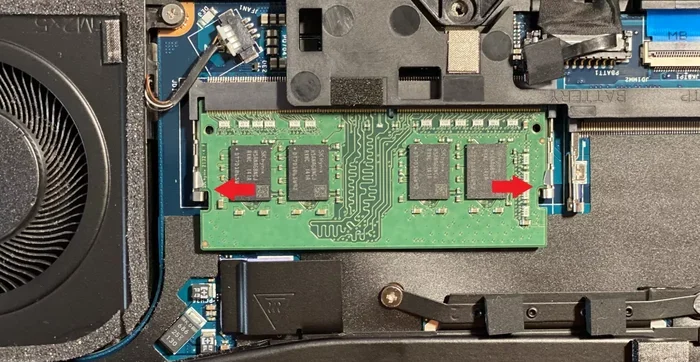
- Install the RAM: Align the module with the slot and press gently until it clicks.
- Close and test: Put the panel back on, power on, and check if the new RAM is recognized.
If you are not comfortable opening your laptop, consider visiting a professional. Many computer shops offer affordable RAM installation services. For HP laptop users, you can find specific guidance in our upgrade RAM in laptop HP article.
The Future of Laptop RAM
DDR5 is clearly the future of laptop memory. More and more new laptops are shipping with DDR5 as standard. As manufacturing improves, DDR5 prices will continue to drop, making it the default choice for most users.
DDR4 will not disappear overnight. It will remain available for older laptops and budget builds for several more years. But if you are buying a new laptop or doing a major upgrade, DDR5 is the smart investment.
Technology moves fast. What is cutting-edge today becomes standard tomorrow. Staying informed about memory trends helps you make better decisions. Whether you choose DDR4 or DDR5, the most important thing is that your laptop has enough memory for your daily tasks.
Final Verdict: DDR4 vs DDR5 Laptop RAM
The DDR4 vs DDR5 laptop RAM debate does not have a single winner. It depends entirely on your needs, budget, and laptop compatibility. DDR4 is affordable, reliable, and perfect for everyday use. DDR5 is faster, more efficient, and built for demanding workloads.
If you are a casual user on a budget, DDR4 is the way to go. If you need top performance and have a compatible laptop, DDR5 is worth every penny. Either way, upgrading your laptop memory is one of the best ways to speed up your system.
Take the time to check your laptop specifications, compare prices, and choose the right module. A simple RAM upgrade can breathe new life into an older laptop or push a newer one to its full potential. Make your choice wisely, and you will enjoy a faster, smoother computing experience.
Frequently Asked Questions
Can I mix DDR4 and DDR5 RAM in the same laptop?
No, you cannot mix DDR4 and DDR5 RAM. They are different technologies with different physical slots and electrical requirements. Always use the same type of memory that your laptop supports.
Is DDR5 worth the extra cost for casual users?
For casual users who mainly browse the web and use office apps, DDR4 is usually enough. DDR5 is worth it if you do heavy multitasking, gaming, or creative work that benefits from extra speed.
How do I know if my laptop supports DDR5?
Check your laptop’s specifications on the manufacturer’s website or in the user manual. Look for the memory type listed. If it says DDR5, you can use DDR5 modules. If it says DDR4, stick with DDR4.
Does DDR5 really improve battery life?
DDR5 uses slightly less power than DDR4 because it runs at 1.1 volts instead of 1.2 volts. The improvement is modest but real, especially during heavy workloads that stress the memory subsystem.
What is the best DDR4 laptop RAM for everyday use?
16GB DDR4 RAM at 3200MHz is the sweet spot for most everyday users. It handles multitasking, streaming, and office work with ease. Options like 16GB DDR4 RAM for laptop are widely available and affordable.
Will upgrading RAM make my laptop faster?
Yes, upgrading RAM can make your laptop noticeably faster, especially if you currently have low memory. More RAM allows your laptop to handle more apps at once without slowing down. However, if your laptop already has enough RAM for your tasks, the improvement may be small.