Do I Need Both Vga and Hdmi
You do not always need both VGA and HDMI, but having both can be useful depending on your devices and setup. VGA is an older analog connection, while HDMI delivers digital audio and video through a single cable. This guide helps you understand when each port matters and whether you truly need both.
This is a comprehensive guide about Do I Need Both Vga And Hdmi.
Key Takeaways
- VGA is analog: It carries only video signals and does not support audio.
- HDMI is digital: It transmits both high-quality video and audio through one cable.
- You may not need both: Most modern devices work fine with HDMI alone.
- Legacy devices may require VGA: Older projectors, monitors, and systems still use VGA.
- Adapters exist: You can convert between VGA and HDMI using simple adapters.
- Check your devices first: Know what ports your monitor and laptop support before buying cables.
- HDMI is the future: Newer devices are dropping VGA support in favor of digital connections.
[FEATURED_IMAGE_PLACEHOLDER]
Do I Need Both VGA and HDMI?
Many people ask this question when they look at the back of their laptop or desktop. You see a VGA port and an HDMI port and wonder if you really need both. The short answer is: it depends on what devices you are connecting.
VGA and HDMI serve the same basic purpose. They both carry video signals from your computer to a display. But they do it in very different ways. VGA is older and analog. HDMI is newer and digital. Understanding these differences helps you make smarter choices about your setup.
In this article, we will walk you through everything you need to know. We will compare both connection types, explain when you need each one, and help you decide if keeping both ports is worth it. By the end, you will know exactly what to do with your cables and ports.
What Is VGA and What Is HDMI?
Before we dive into whether you need both, let us understand what each port actually does. Many people use these terms without knowing what stands behind them.
Understanding VGA
VGA stands for Video Graphics Array. It was introduced by IBM back in 1987. That makes it over 35 years old in tech terms. VGA uses an analog signal to transmit video from your computer to a display.
Here are some key facts about VGA:
- It carries video only. There is no audio support through VGA cables.
- It uses a 15-pin connector. The blue trapezoid-shaped plug is easy to recognize.
- Maximum resolution is limited. VGA works best at 1080p or lower. Higher resolutions can look blurry.
- Signal quality degrades over distance. Longer VGA cables may lose clarity.
- It is a legacy port. Many new laptops and monitors no longer include VGA.
If you have an older monitor or projector, VGA might be your only option. That is where it still holds value. But for everyday use, VGA has clear limitations.
Understanding HDMI
HDMI stands for High-Definition Multimedia Interface. It became popular in the mid-2000s and quickly became the standard. HDMI carries both video and audio through a single cable.
Here is what makes HDMI so popular:
- It supports digital signals. This means sharper, cleaner image quality.
- It carries audio and video. One cable does the work of two.
- It supports higher resolutions. HDMI can handle 4K and even 8K content.
- It has better refresh rates. Great for gaming and smooth video playback.
- It is widely supported. Nearly every modern device has at least one HDMI port.
HDMI is the go-to connection for most people today. If you are setting up a new monitor or home theater, HDMI is almost always the better choice.
VGA vs HDMI: Key Differences
Now let us compare both connections side by side. This helps you see exactly where each one shines and where it falls short.
Signal Type and Quality
VGA uses an analog signal. Analog signals are more prone to interference. You might notice ghosting or blurriness, especially at higher resolutions. HDMI uses a digital signal. Digital signals stay crisp and clear from end to end.
For image quality, HDMI wins easily. There is no real contest here. If you care about sharp text and vibrant colors, HDMI is the way to go.
Audio Support
VGA does not carry audio. You need a separate cable for sound. HDMI handles both in one cable. This is a huge convenience factor. One cable means less clutter and fewer ports used.
Resolution and Refresh Rate
VGA maxes out around 1080p in practice. HDMI supports 4K and beyond. If you want to connect your laptop to a 4K monitor, HDMI is your only option between the two.
Compatibility
Older devices rely heavily on VGA. Many projectors in conference rooms still use VGA. Newer devices almost always have HDMI. Some modern laptops have dropped VGA entirely.
Check your device ports before buying cables. If your laptop only has HDMI, you may need an adapter to connect to a VGA monitor.
When Do You Need Both VGA and HDMI?
There are specific situations where having both ports makes sense. Let us look at when each one becomes important.
When VGA Still Matters
VGA is not completely dead. You will still encounter it in these situations:
- Older projectors in meeting rooms. Many businesses still use VGA projectors. If you present at conferences, VGA may be your only option.
- Legacy monitors. Some people still use old CRT or early LCD monitors that only have VGA inputs.
- Industrial or specialized equipment. Certain machines and displays use VGA connections.
- Backup connections. If your HDMI port stops working, having VGA as a backup can save you.
In these cases, VGA remains useful. It is not the best option, but it gets the job done when nothing else is available.
When HDMI Is All You Need
For most modern setups, HDMI covers everything you need. Here is when HDMI alone is enough:
- Connecting to modern monitors. Any monitor made in the last 10 years likely has HDMI.
- Home theater setups. HDMI carries both video and audio to your TV or sound system.
- Gaming setups. HDMI supports higher refresh rates, which matter for smooth gameplay.
- Standard laptop-to-monitor connections. If both devices have HDMI, just use one cable.
Most people only need HDMI in their daily lives. It is simpler, faster, and delivers better quality.
When You Might Need Both
There are a few scenarios where having both ports on your device is genuinely helpful:
- You use multiple displays. One monitor might have HDMI and another only has VGA. Having both ports lets you connect both without adapters.
- You work in a corporate environment. Meeting rooms often have VGA projectors, while your office monitor uses HDMI.
- You own older and newer devices. A mix of legacy and modern equipment means you need both connection types.
- You want flexibility. Even if you do not need both right now, having both ports gives you options for the future.
If none of these apply to you, you probably do not need both. A single HDMI connection will handle most tasks just fine.
Do Laptops Still Come With VGA Ports?
This is a common question, especially if you are shopping for a new laptop. The trend is clear: manufacturers are dropping VGA ports in favor of HDMI and newer connections like USB-C and DisplayPort.
Older laptops often included both VGA and HDMI. This gave users more flexibility. But modern laptops are moving away from VGA. You can still find some business laptops with VGA, but it is becoming rare.
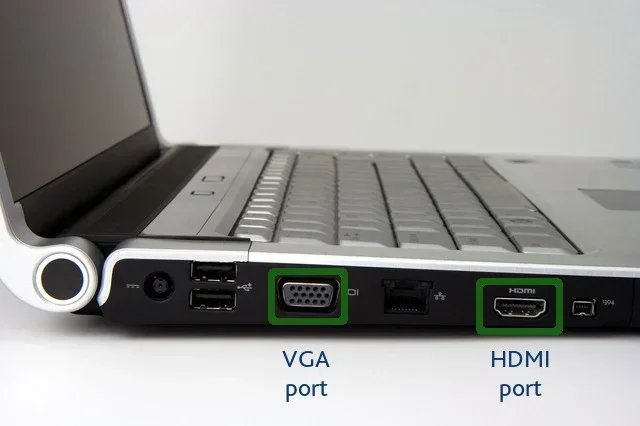
If you are wondering about your current laptop, check the ports on the side or back. If you see a blue trapezoid-shaped port, that is VGA. If you see a slim, flat port, that is HDMI. Some laptops have both. Many newer ones only have HDMI or USB-C.
Knowing what ports your laptop has helps you choose the right cables and adapters. It also tells you whether you need to carry extra accessories when you travel or present.
How to Choose the Right Connection for Your Setup
Choosing between VGA and HDMI depends on a few simple factors. Let us walk through them.
Check Your Devices
Start by looking at what ports your devices have. Does your monitor support HDMI? Does your projector only have VGA? Match the ports and choose the right cable.
Pro tip: If you are unsure about your system specs, you can check your device settings or look up your model online. Knowing your setup helps you avoid buying the wrong cable.
Consider Your Use Case
Think about what you are doing. Are you gaming? Use HDMI. Are you presenting in a boardroom with an old projector? You may need VGA. Are you watching movies on a smart TV? HDMI handles both picture and sound perfectly.
Think About Future Needs
VGA is a dying standard. New devices are moving away from it. If you are buying cables today, HDMI is the smarter long-term investment. You can always use an adapter to connect to VGA when needed.
Quick Tips for Better Connections
- Always use the shortest cable possible. Shorter cables mean better signal quality, especially for VGA.
- Clean your ports regularly. Dust can affect both VGA and HDMI connections.
- Use adapters wisely. A VGA-to-HDMI adapter can solve most compatibility issues.
- Upgrade when you can. If you still rely on VGA, consider switching to an HDMI-compatible display.
Common Mistakes People Make with VGA and HDMI
There are a few mistakes that many people make when dealing with these connections. Avoiding them can save you time and frustration.
Mistake 1: Assuming VGA gives the same quality as HDMI. It does not. VGA is limited in resolution and clarity. If you need sharp images, use HDMI.
Mistake 2: Forgetting about audio. If you use VGA, you must handle audio separately. Many people forget this and wonder why there is no sound. HDMI solves this problem.
Mistake 3: Using long VGA cables. VGA signals degrade over distance. Keep your VGA cable under 15 feet for the best results.
Mistake 4: Ignoring adapter quality. Cheap adapters can cause signal loss and display issues. Invest in a good-quality adapter if you need to convert between VGA and HDMI.
Mistake 5: Not checking your graphics card. Your graphics card must support the output you are using. Make sure your system can handle the resolution you want over HDMI or VGA.
Frequently Asked Questions
Can I use a VGA to HDMI adapter?
Yes, you can use a VGA to HDMI adapter to connect an older VGA device to a modern HDMI display. These adapters are widely available and affordable. Keep in mind that VGA only carries video, so you will need a separate audio connection in most cases.
Is HDMI better than VGA for gaming?
Absolutely. HDMI supports higher resolutions, faster refresh rates, and digital signals that reduce input lag. VGA is an analog connection that limits your gaming experience. If you are serious about gaming, always choose HDMI over VGA.
Do I need both VGA and HDMI on my laptop?
Most people do not need both. HDMI alone covers most modern setups. You only need VGA if you regularly connect to older projectors or monitors that lack HDMI ports. Check your devices and decide based on your actual needs.
Can VGA support 1080p resolution?
VGA can technically support 1080p, but the image quality may not be as sharp as HDMI at the same resolution. Because VGA is analog, signal degradation can affect the final image. For the best 1080p experience, HDMI is the better choice.
Why are laptops dropping VGA ports?
Laptops are dropping VGA because it is an older analog standard. Modern devices favor digital connections like HDMI, USB-C, and DisplayPort. These newer ports offer better quality, smaller size, and more features. VGA takes up physical space and adds little value for most users today.
What is the best cable for connecting a laptop to a TV?
HDMI is the best cable for connecting a laptop to a TV. It delivers high-quality video and audio through a single cable. Most modern laptops and TVs support HDMI, making it the easiest and most reliable option for this setup.
Final Thoughts
So, do you need both VGA and HDMI? For most people, the answer is no. HDMI handles modern setups perfectly. It delivers great video and audio through one cable. It supports high resolutions and refresh rates. It is the standard for a reason.
VGA still has a place, though. If you work with older projectors or legacy monitors, VGA remains useful. It is not the best option, but it works when you need it.
The smartest approach is to have HDMI as your primary connection and keep a VGA adapter handy for emergencies. That way, you are prepared for any situation without cluttering your setup with unnecessary cables.
Take a moment to check your devices right now. Know what ports you have. Understand what you need. That simple step saves you time, money, and frustration down the road. Make the choice that fits your setup, not someone else’s.
Frequently Asked Questions
What is Do I Need Both Vga And Hdmi?
Do I Need Both Vga And Hdmi is an important topic with many practical applications.