Does Usb B Fit Usb C
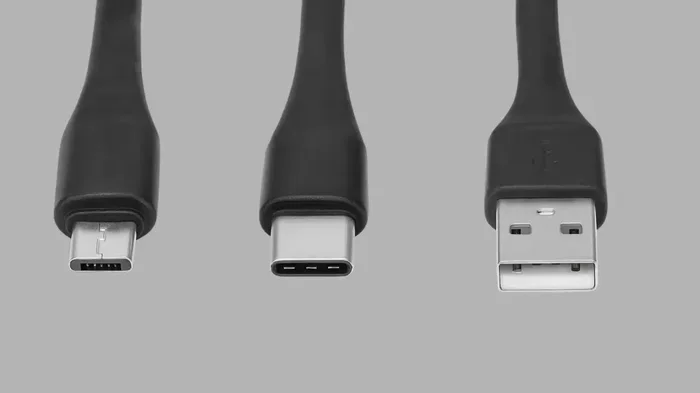
No, USB B does not fit directly into a USB C port because they have different shapes and pin configurations. USB Type B is a square-shaped connector used for printers and older devices, while USB Type C is a smaller, oval connector found on modern laptops and phones. You can use an adapter or a USB B to USB C cable to bridge the gap. Understanding these differences saves time, money, and frustration when connecting your devices.
Have you ever tried plugging in a USB B cable and wondered if it would fit into a USB C port? Maybe you grabbed the wrong cable from your drawer or bought a new device that uses a different connector. Either way, this is a common question that trips up a lot of people. The short answer is no, USB B does not fit USB C directly. But the good news is that there are simple solutions to make them work together.
In this guide, we will walk through everything you need to know about USB B and USB C compatibility. We will look at the physical differences, explain why they do not fit, and show you how adapters and cables can bridge the gap. Whether you are connecting a printer, an external drive, or another peripheral, this article has you covered.
Understanding USB connectors is more important than most people think. With so many devices using different port types, knowing what fits where can save you a lot of hassle. Let us dive in and break it all down in simple terms.
Key Takeaways
- USB B and USB C are not interchangeable without an adapter or special cable due to different shapes and sizes.
- USB Type B connectors are square-shaped and commonly found on printers, scanners, and external hard drives.
- USB Type C connectors are smaller, oval-shaped, and reversible, making them the modern standard for most devices.
- Adapters and hybrid cables make it possible to connect USB B devices to USB C ports with ease.
- USB-C supports faster data transfer and higher power delivery compared to USB B, which is an important upgrade consideration.
- Always check your device specs before buying cables or adapters to avoid compatibility issues.
📑 Table of Contents
- What Is USB B and What Is USB C?
- Can You Plug USB B Into a USB C Port?
- How USB Connectors Differ in Shape and Size
- When You Need an Adapter or Cable
- Common Devices That Use USB B and USB C
- The Future of USB Connectivity
- Common Mistakes People Make with USB Connectors
- Expert Insights on USB Compatibility
- Conclusion
What Is USB B and What Is USB C?
Before we talk about fitting connectors together, let us understand what each type actually is. USB connectors come in several shapes and sizes, and each one serves a specific purpose. Knowing the basics helps you make better decisions when buying cables or adapters.
USB Type B Explained
USB Type B is a square-shaped connector that you often see on printers, scanners, and some external hard drives. It has a sturdy, boxy design that fits snugly into the port. This connector was designed for data transfer and power delivery in larger devices that need a stable connection.
USB B connectors come in a few variations. The standard USB B is the most common. There is also a mini USB B, which was popular on older cameras and portable devices. Another version is the micro USB B, which you might still find on some older phones and gadgets. Despite these variations, they all share the same basic square shape that sets them apart from other USB types.
USB Type C Explained
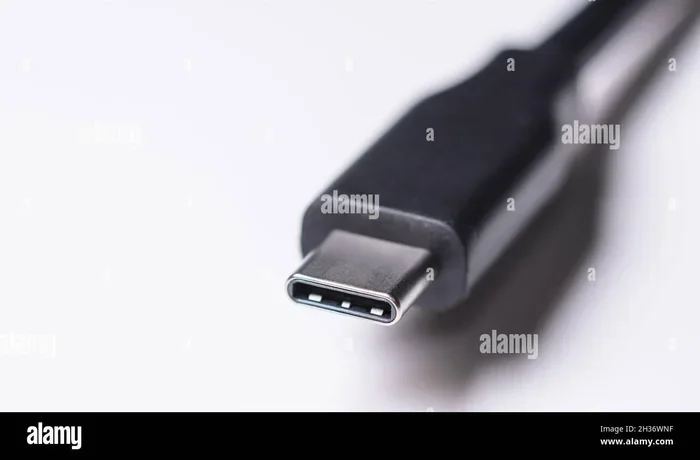
USB Type C is the modern standard for most new devices. It is smaller, oval-shaped, and reversible, which means you can plug it in either way. This is a huge improvement over older connectors that only worked one way and caused endless frustration.
USB C supports faster data transfer speeds and higher power delivery. Many laptops, tablets, smartphones, and even some monitors now use USB C. It is also the connector used in USB C docking stations and fast-charging setups. The versatility of USB C makes it the go-to choice for modern tech.
Can You Plug USB B Into a USB C Port?
The direct answer is no. You cannot plug a USB B connector into a USB C port without an adapter. The two connectors have completely different shapes, sizes, and pin layouts. A USB B plug is wide and square, while a USB C port is small and oval. They simply do not match physically.
Trying to force a USB B connector into a USB C port will not work. It will not fit, and you could damage the port or the connector if you try. Always match the right connector to the right port to keep your devices safe.
Why the Shapes Are So Different
The reason USB B and USB C look so different comes down to their design purposes. USB B was built for stationary devices like printers that sit on a desk. The square shape provides a secure fit and handles the power demands of these devices. USB C was designed for portability and versatility, which is why it is small and reversible.
These different design goals mean the two connectors are not compatible on their own. Each type has a unique number of pins and a specific wiring arrangement inside. This is why you need an adapter or a hybrid cable to connect a USB B device to a USB C port.
How USB Connectors Differ in Shape and Size
Understanding the physical differences between USB connectors helps you avoid confusion and buying the wrong accessories. Let us compare the key shapes and sizes side by side.
Size Comparison
USB Type B connectors are noticeably larger than USB Type C. A standard USB B plug is about 12 millimeters wide and 12 millimeters tall. A USB C plug is about 8.4 millimeters wide and 2.6 millimeters tall. That is a big difference in size.
The smaller size of USB C makes it ideal for slim devices like laptops and phones. The larger USB B size works well for devices that do not need to be portable, like desktop printers and scanners.
Pin Layout Differences
Inside each connector, the pin layout is different. USB B uses a specific set of pins for data and power. USB C has more pins and supports advanced features like video output and higher wattage charging. This is one reason why USB C is faster and more capable than USB B.
If you want to learn more about how different USB setups work with storage devices, check out this guide on M.2 NVMe to USB C SSD enclosures to see how modern connectors handle data transfer.
Reversible vs. Non-Reversible
One of the biggest differences is that USB C is reversible. You can flip it around and plug it in either way. USB B is not reversible. You have to align it correctly, which can be annoying, especially in low light.
This small feature makes a big difference in daily use. Once you get used to USB C, going back to USB B feels clunky and inconvenient.
When You Need an Adapter or Cable
If you have a USB B device and a USB C port, you need a bridge to connect them. This is where adapters and special cables come in handy. They let you use your older devices with newer computers and laptops.
USB B to USB C Adapters
A USB B to USB C adapter is a small device that converts the USB B plug into a USB C plug. You plug your USB B cable into the adapter, and then plug the adapter into your USB C port. It is a simple and affordable solution.
These adapters are widely available online and in electronics stores. They usually cost just a few dollars. Look for adapters from reputable brands to ensure a stable connection and safe power delivery.
Hybrid USB B to USB C Cables
Another option is a hybrid cable that has a USB B connector on one end and a USB C connector on the other. These cables are perfect for connecting USB B devices directly to USB C ports without needing a separate adapter.
Hybrid cables are especially useful for printers. Many people use a USB B to USB C cable to connect their printer to a new laptop that only has USB C ports. It is a clean and straightforward solution.
USB Hubs and Docking Stations
If you need more than just a single connection, a USB hub or docking station can help. Many docking stations offer a mix of USB A, USB C, and even USB B ports. This gives you flexibility to connect all your devices in one place.
For storage enthusiasts, an NVMe SSD to USB adapter can be a great addition to your setup, especially when paired with the right USB C connectivity for fast transfer speeds.
Quick Tips for Buying Adapters
- Always check the adapter specs before buying. Make sure it supports USB B to USB C conversion.
- Look for adapters with metal housings for better durability and heat dissipation.
- Avoid cheap, no-name adapters. They may not provide stable data transfer or safe charging.
- Read customer reviews to see real-world performance before making a purchase.
- Consider buying a cable with built-in adapter functionality for a cleaner setup.
Common Devices That Use USB B and USB C
Knowing which devices use which connector helps you prepare the right cables and adapters. Here is a quick breakdown of common devices.
Devices That Use USB B
- Desktop printers and all-in-one printers
- Scanners and photocopiers
- External hard drives with USB B ports
- Some audio interfaces and MIDI controllers
- Older external speakers and monitors
- Certain lab equipment and industrial devices
Devices That Use USB C
- Modern laptops and Chromebooks
- Smartphones like Samsung Galaxy and Google Pixel
- Tablets including iPad Pro and Android tablets
- Wireless earbuds and headphones (like best USB Type C headphones)
- Portable SSDs and flash drives
- Gaming controllers and accessories
- Modern cameras and camcorders
As you can see, USB C is everywhere in modern devices. USB B is still common in office and professional equipment. Having both types of cables and a few adapters in your toolkit is a smart move.
The Future of USB Connectivity
The tech world is moving fast, and USB connectivity is evolving too. USB Type C is becoming the universal standard, and that means fewer different cables to keep track of. But USB B still has a place in many setups, especially for stationary devices that need reliable connections.
USB4 and the Role of USB C
The newest USB standard, USB4, uses the USB C connector exclusively. This means all USB4 devices use the same port shape. USB4 offers incredible speeds of up to 40 gigabits per second and supports multiple protocols like Thunderbolt 3 and DisplayPort.
As more devices adopt USB4, USB C will become even more dominant. You will see it on monitors, laptops, phones, and even some desktop components.
Will USB B Disappear?
USB B is not going away anytime soon. Many printers and office devices still rely on it. However, as wireless printing and network connections become more common, the need for USB B may decrease over time.
For now, it is smart to keep a few USB B cables and adapters around. They still serve a purpose in many homes and offices. If you are curious about how older storage devices connect to modern systems, check out this article on M2 NVMe SSD in USB enclosures for more insights.
What This Means for You
The best approach is to stay flexible. Keep a mix of cables and a couple of adapters on hand. This way, you are ready for any device you encounter, whether it uses USB B, USB C, or something in between.
Common Mistakes People Make with USB Connectors
Even with the best intentions, people make mistakes when dealing with USB connectors. Here are some common pitfalls to avoid.
- Forcing a connector that does not fit. This can damage the port or the cable. Always match the shape correctly.
- Buying the wrong adapter. Not all adapters support the same data speeds or power levels. Check the specs carefully.
- Assuming all USB C cables are the same. Some USB C cables only support charging, not data transfer. Make sure your cable supports both if you need to transfer files.
- Ignoring cable quality. Cheap cables can cause slow transfers, overheating, or even damage your devices. Invest in quality cables from trusted brands.
- Not labeling your cables. With so many cables around, it helps to label them so you always know which one is which.
Avoiding these mistakes will keep your devices safe and your workflow smooth. A little attention to detail goes a long way when it comes to USB connectivity.
Expert Insights on USB Compatibility
We asked tech experts about the most common USB compatibility questions. Here is what they had to say.
“The most important thing people should know is that USB B and USB C are not the same,” says a senior tech specialist. “They have different shapes, different pin counts, and different purposes. Always use the right cable or an adapter to connect them safely.”
“If you are buying a new laptop, go with USB C if you can,” another expert adds. “It is faster, more versatile, and becoming the universal standard. But keep your old USB B cables for printers and other devices. You will still need them.”
These insights highlight the importance of understanding your options. Having the right tools on hand makes your tech life much easier.
Conclusion
So, does USB B fit USB C? The answer is no, not directly. They are different connectors with different shapes, sizes, and purposes. But with the right adapter or hybrid cable, you can easily connect USB B devices to USB C ports and vice versa.
The key takeaway is to understand your device needs and keep the right accessories nearby. A USB B to USB C adapter costs very little and can save you a lot of frustration. As USB C continues to become the universal standard, it is smart to start building a USB C-friendly setup while still supporting your older USB B devices.
Whether you are setting up a home office, connecting a printer, or expanding your storage with an M.2 NVMe SSD enclosure adapter, knowing your USB options puts you ahead. Stay informed, stay prepared, and your devices will always connect when you need them to.
Take a few minutes today to sort out your cables and adapters. You will thank yourself the next time you need to plug something in and it just works. That is the power of knowing your USB connectors inside and out.
Frequently Asked Questions
Can I use a USB B cable to charge a USB C device?
No, a USB B cable cannot charge a USB C device directly because the connectors are different shapes. You would need a USB B to USB C adapter or a hybrid cable that has a USB B plug on one end and a USB C plug on the other. Always check that the adapter supports power delivery before using it for charging.
Is USB B faster than USB C for data transfer?
No, USB C is generally faster than USB B. USB C supports much higher data transfer speeds, especially with USB 3.1, USB 3.2, and USB4 standards. USB B is slower and was designed for simpler data transfer needs like printing and scanning.
Do all USB C cables support data transfer?
No, not all USB C cables support data transfer. Some USB C cables are charge-only and can only deliver power. If you need to transfer data, make sure the cable you buy is labeled as supporting data transfer and check its specifications carefully.
Can I connect a USB B printer to a laptop with only USB C ports?
Yes, you can connect a USB B printer to a laptop with only USB C ports by using a USB B to USB C adapter or a USB B to USB C cable. This is a very common setup in modern offices where laptops have dropped USB A and USB B ports in favor of USB C.
Are USB B to USB C adapters expensive?
No, USB B to USB C adapters are very affordable. Most cost between a few dollars and around fifteen dollars. You can find them online or at electronics stores. It is worth spending a little extra on a quality adapter to ensure a stable and safe connection.
Will USB B become obsolete in the future?
USB B is slowly becoming less common as USB C takes over, but it is not obsolete yet. Many printers, scanners, and office devices still use USB B. It may take several more years before USB B is completely phased out of new products. For now, it is still a useful connector to have around.