Is Usb Actually a Bus
Yes, USB is actually a bus — a Universal Serial Bus that connects devices to computers and allows them to communicate. It acts as a shared pathway for data transfer, power delivery, and device communication through a single cable. Understanding this helps you choose the right USB connection and troubleshoot common issues with your devices.
You use USB every single day. You plug in your mouse, charge your phone, and transfer files without thinking twice. But have you ever stopped and asked, is USB actually a bus? The answer might surprise you. USB is not just a cable or a port. It is a full-blown bus system that manages how your devices talk to your computer. In this article, we will break down exactly what that means and why it matters to you.
Whether you are a casual user or someone who works with peripheral devices every day, understanding how USB works gives you an edge. You will know why some transfers are fast and others are slow. You will understand why your USB connection sometimes drops out. And you will be better equipped to pick the right gear. Let us dive into the world of Universal Serial Bus and clear up the confusion once and for all.
Key Takeaways
- USB stands for Universal Serial Bus: It is a standardized bus system that connects peripherals to computers.
- USB functions as a shared communication pathway: Multiple devices share the same bus to send and receive data.
- Different USB standards offer varying speeds: USB 2.0, 3.0, and newer versions each bring faster data transfer rates.
- USB carries both data and power: This dual function makes it incredibly versatile for modern devices.
- Common USB problems are easy to fix: Most issues stem from driver problems, loose connections, or outdated standards.
- Understanding USB helps you buy better accessories: Knowing what to look for saves time and money.
📑 Table of Contents
What Is a Bus in Computing?
Before we answer is USB actually a bus, let us first understand what a bus means in computing. A bus is a communication system that transfers data between components inside a computer or between devices. Think of it like a highway. Cars (data) travel on the highway (bus) to reach different destinations (devices or components).
A computer bus connects the CPU, memory, and other internal parts. It lets them share information quickly and efficiently. There are different types of buses, but they all serve the same core purpose. They move data from point A to point B. The bus is the backbone that keeps everything connected and working together.
How Does a Bus Work?
A bus uses a shared pathway. Multiple devices can send and receive data over the same path. This is called a serial bus when data moves one bit at a time. USB uses this serial approach. It sends data in a steady stream through a single cable. The host controller manages the flow of traffic on this bus. It decides which device gets to send data and when.
The beauty of a bus system is its simplicity. You do not need a separate connection for every device. One bus can handle many devices at once. This is exactly what makes USB so useful and popular.
What Is USB?
USB stands for Universal Serial Bus. It is an industry standard that defines cables, connectors, and protocols. The goal was simple. Create one universal way to connect devices to computers. Before USB, you needed different ports for different devices. Printers used parallel ports. Mice used serial ports. Keyboards had their own connections too. USB changed all of that.
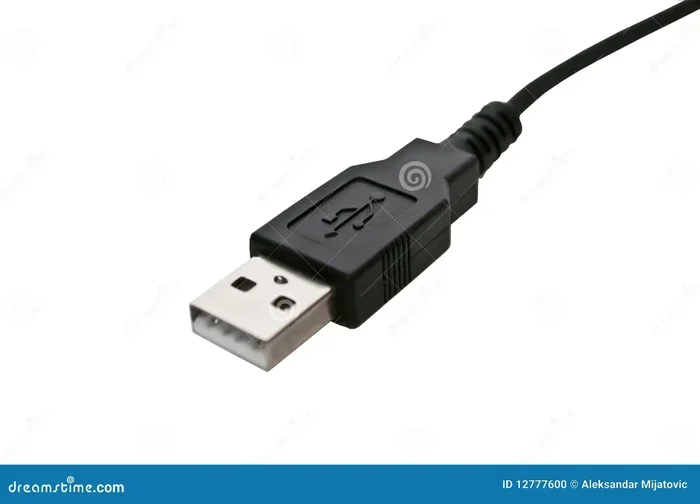
Today, USB is the most common USB connection standard in the world. It is found on laptops, desktops, tablets, and even smartphones. The USB port on your device is the physical entry point to the bus. When you plug in a cable, you are tapping into the USB bus system.
The History of USB
USB was developed in the mid-1990s by a group of companies. They wanted to simplify device connections. The first version, USB 1.0, launched in 1996. It was slow by today’s standards. But it solved a big problem. One port type for many devices. Over the years, USB evolved. USB 2.0 came out in 2000 with much faster speeds. USB 3.0 arrived in 2008 and brought even more bandwidth. Today, USB4 is pushing the boundaries further.
Is USB Actually a Bus?
So, is USB actually a bus? The answer is yes. USB is a serial bus that connects peripheral devices to a host controller, usually your computer. It follows the same principles as any other bus system. It provides a shared pathway for data and power. Multiple devices connect to the same bus and communicate through a central controller.
The term Universal Serial Bus tells you exactly what it is. Universal means it works with many devices. Serial means data moves one bit at a time. Bus means it is a shared communication pathway. Put them together and you get a system that connects almost anything to your computer through a single standard.
Why the Confusion Exists
Many people think of USB as just a cable or a port. That is understandable. You see the USB plug and the USB connector every day. But the bus goes beyond the physical cable. It includes the protocol, the driver, and the host controller. All of these work together to make device communication possible. When you plug in a USB mouse or a flash drive, the bus takes over. It identifies the device, loads the right driver, and starts the data exchange.
This is why understanding USB as a bus matters. It is not just a wire. It is a complete system that manages how your devices work together.
How Does the USB Bus Work?
The USB bus operates on a host-device model. Your computer acts as the host. Your peripherals act as devices. The host controller sits at the center of everything. It controls all communication on the bus. When you connect a device, the host controller detects it. It then assigns an address to that device. This process is called enumeration.
Once a device is enumerated, it can send and receive data. The bus uses a polling method. The host asks each device if it has data to send. This keeps things organized. No two devices try to talk at the same time, which would cause a collision.
The Role of the USB Protocol
The USB protocol is the set of rules that governs communication on the bus. It defines how devices identify themselves. It sets the rules for data packets. It manages power delivery and error checking. The protocol stack ensures that every device on the bus speaks the same language.
When you plug in a device, the protocol stack kicks in. It negotiates the speed, the power requirements, and the data format. This all happens in milliseconds. You never see it happening, but it is always working behind the scenes.
USB Hub and Device Daisy Chaining
One of the great features of the USB bus is the ability to use a USB hub. A hub lets you connect multiple devices to a single port. The hub acts as a branch on the bus. It expands the number of available connections. You can daisy-chain devices through hubs to build a network of peripherals.
However, there are limits. Each bus segment can support up to 127 devices. In practice, power limitations and cable length reduce this number. But for most users, a single hub with a few devices works perfectly fine.
USB Standards and Speeds
Not all USB connections are the same. Over the years, different USB standards have been developed. Each one brings faster speeds and better capabilities. Understanding these standards helps you make informed decisions about your gear.
| Standard | Max Speed | Year Released | Common Use |
|---|---|---|---|
| USB 1.1 | 12 Mbps | 1998 | Legacy devices |
| USB 2.0 | 480 Mbps | 2000 | Basic peripherals, storage |
| USB 3.0 (3.2 Gen 1) | 5 Gbps | 2008 | Fast storage, external drives |
| USB 3.1 (3.2 Gen 2) | 10 Gbps | 2013 | High-speed transfers |
| USB 3.2 Gen 2×2 | 20 Gbps | 2017 | Professional workflows |
| USB4 | 40 Gbps | 2019 | Thunderbolt 3 compatible devices |
The USB speed you get depends on the standard your devices support. If you plug a USB 3.0 drive into a USB 2.0 port, it will run at USB 2.0 speeds. Always check your ports and cables to get the best performance.
USB Power Delivery
USB does more than transfer data. It also delivers USB power delivery through the same cable. This is one of the reasons the bus is so versatile. Your phone charges through the same port that syncs your photos. Modern USB standards can deliver up to 240 watts of power. This is enough to charge laptops and even run monitors.
The plug and play nature of USB means you rarely need to configure anything. You plug in a device, and the bus handles the rest. It negotiates the power draw and starts communication automatically. This seamless experience is a huge part of why USB became so popular.
Common USB Problems and How to Fix Them
Even though USB is a robust system, problems do happen. Here are some of the most common issues and how to solve them.
- Device not recognized: This often happens because of a missing or outdated USB driver. Try updating your drivers through your operating system.
- Slow data transfer: You may be using the wrong USB standard. Check if your cable and port support the speed you need.
- Intermittent connection: A loose USB cable or a damaged port can cause dropouts. Try a different cable or port to isolate the problem.
- Not enough power: Some devices need more power than a single port can provide. Use a powered USB hub to solve this issue.
- Compatibility issues: Older devices may not work well with newer USB standards. Check for adapters or backward-compatible options.
If you have ever dealt with a USB mouse that stops working, you know how frustrating this can be. The issue is often a driver conflict or a loose connection. Restarting your computer or reseating the cable usually fixes it.
Quick Tips for Better USB Performance
- Always use certified cables and accessories.
- Keep your USB drivers up to date.
- Avoid daisy-chaining too many devices without a powered hub.
- Use shorter cables for faster data transfer.
- Check your device manager for error messages.
- When buying a new laptop, look for the latest USB standard available.
Taking care of your USB connection extends the life of your devices. A little maintenance goes a long way.
Why Understanding USB as a Bus Matters
Knowing that USB is a bus helps you understand your devices better. It explains why speeds vary. It explains why some ports charge faster than others. It explains why your computer recognizes some devices instantly and others take a moment.
When you shop for accessories, this knowledge becomes valuable. You can choose the right USB cable for your needs. You can pick the right hub for your setup. You can troubleshoot problems with confidence instead of guessing.
Next time you plug something in, remember that you are tapping into a sophisticated bus system. A system that has evolved over decades to make your life easier. The Universal Serial Bus is one of the most successful technologies in computing history. And now you know exactly why.
Whether you are buying a new laptop or just trying to fix a stubborn connection, understanding the bus makes all the difference. It is a small piece of knowledge that pays off every single day.
Conclusion
So, is USB actually a bus? Absolutely. The Universal Serial Bus is a serial bus that connects your devices to your computer through a shared communication pathway. It handles data transfer, power delivery, and device communication all in one system. From the USB port on your laptop to the USB protocol that governs how devices talk, every part of the bus works together to make your digital life seamless.
Understanding this concept gives you a real advantage. You will make better purchasing decisions. You will troubleshoot faster. And you will appreciate the technology that you use every single day. The next time you plug in a device, take a moment to think about the bus working behind the scenes. It is doing a lot more than you might think.
Frequently Asked Questions
What does USB stand for?
USB stands for Universal Serial Bus. It is a standard that defines how devices connect and communicate with computers through a shared bus system.
Can I connect multiple devices to one USB port?
Yes, you can use a USB hub to connect multiple devices to a single port. The hub expands the bus and lets several peripherals share the same connection.
Why is my USB device not recognized by my computer?
This is usually caused by a missing driver, a faulty cable, or a loose port connection. Try updating your drivers or using a different cable to resolve the issue.
Is USB 3.0 faster than USB 2.0?
Yes, USB 3.0 is significantly faster. USB 2.0 maxes out at 480 Mbps, while USB 3.0 can reach speeds up to 5 Gbps for much quicker data transfer.
Does USB carry power as well as data?
Yes, USB carries both data and power through the same cable. This is one of the key features that makes the bus so versatile for charging and connecting devices.
What is the difference between a USB connector and a USB port?
The USB connector is the end of the cable that plugs into a device. The USB port is the socket on your computer or hub where the connector goes. Together they form the physical connection to the bus.
=== CONCLUSION ===
Understanding that is USB actually a bus changes how you think about your devices. The Universal Serial Bus is a powerful, flexible system that has been the backbone of device connectivity for decades. From data transfer to power delivery, the bus handles it all. Keep your drivers updated, use quality cables, and choose the right USB standard for your needs. With this knowledge, you are ready to get the most out of every USB connection in your setup.
=== INTERNAL LINKS ===
If you are dealing with a USB mouse that keeps disconnecting, you are not alone. This is one of the most common issues people face with their USB connection. Check out our guide to troubleshoot the problem and get your mouse working again.
Your laptop mouse might be a trackpad or a USB peripheral. Understanding the different types of input devices helps you choose the right setup for your needs.
When you are ready to upgrade your setup, timing your laptop purchase can save you a lot of money. Look for sales during holiday seasons or back-to-school periods for the best deals on laptops with the latest USB ports.