Gaming Pc Build Under 1000
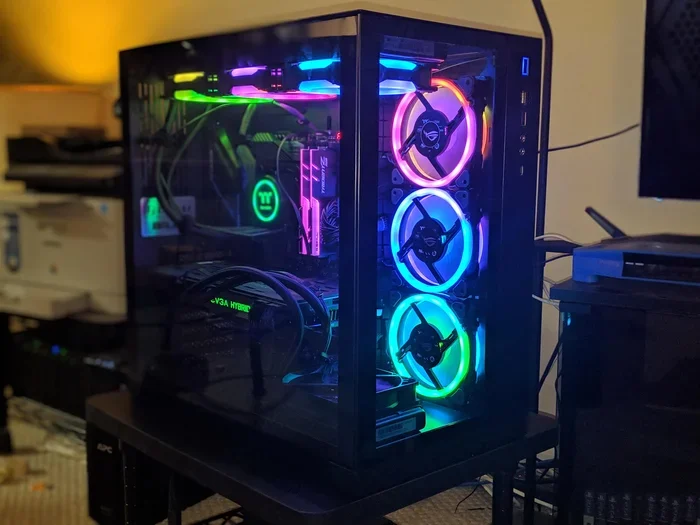
A gaming pc build under 1000 delivers solid 1080p gaming performance without breaking the bank. You get the freedom to choose every part, upgrade later, and save money compared to prebuilt options. This guide walks you through the best components, builds, and tips to create a powerful budget rig that plays today’s titles smoothly.
Building a gaming pc build under 1000 is one of the smartest moves you can make as a gamer. You get a machine that handles modern titles, offers room to grow, and saves you cash compared to buying a prebuilt gaming pc. Whether you are a casual player or someone who wants to dive into competitive gaming, this price range hits a sweet spot.
The truth is, you do not need to spend thousands to enjoy great gaming. A well-planned budget gaming build under a thousand dollars gives you solid frame rates, fast load times, and a machine you can upgrade over time. In this guide, we break down every part you need, share a few build examples, and offer tips to keep costs low without sacrificing quality.
If you have ever wondered how to build a cheap gaming pc that still plays the latest games, you are in the right place. Let us get into it.
Key Takeaways
- Affordable Power: A gaming pc build under 1000 can handle modern games at high settings and 1080p resolution with ease.
- Smart Component Choices: Choosing the right CPU, GPU, RAM, and storage makes all the difference in a budget gaming build.
- Flexibility and Upgradability: Building your own PC lets you swap parts later as budgets grow or technology advances.
- Cost Savings: DIY builds often cost less than prebuilt gaming pcs and come with better warranties on individual parts.
- No Compromise on Quality: You can find reliable, name-brand parts at great prices without sacrificing performance.
- Beginner-Friendly: With the right guide, even first-time builders can complete a cheap gaming pc build successfully.
📑 Table of Contents
- Why Build a Gaming Pc Under 1000?
- Best Components for a Gaming Pc Build Under 1000
- Step-by-Step Gaming Pc Build Under 1000 Guide
- Sample Builds: Gaming Pc Build Under 1000
- Common Mistakes to Avoid When Building a Budget Gaming Pc
- Gaming Pc Build Under 1000 vs Prebuilt Options
- Tips to Stretch Your Budget Further
- Final Thoughts on Building a Gaming Pc Under 1000
Why Build a Gaming Pc Under 1000?
There are many reasons why gamers choose to build their own rigs instead of buying one off the shelf. A gaming pc build under 1000 gives you control, value, and a real sense of accomplishment.
You Choose Every Part
When you build your own PC, you pick the exact CPU, GPU, motherboard, and more. You are not stuck with someone else’s idea of what you need. This means you can focus on the parts that matter most for gaming performance and skip the bloatware that comes with many prebuilt gaming pcs.
Better Value for Your Money
Prebuilt computers often charge a premium for assembly and branding. When you build yourself, every dollar goes toward actual hardware. A budget gaming build under 1000 dollars can outperform a similarly priced prebuilt in many cases. You also get to choose brands with better warranties and reliability.
Easy Upgrades Down the Road
One of the biggest perks of a custom build is that you can swap parts later. Need more storage? Add a new drive. Want better graphics? Upgrade the GPU. A cheap gaming pc build grows with you, which saves money in the long run.
Best Components for a Gaming Pc Build Under 1000
Picking the right parts is the heart of any gaming pc build under 1000. Below, we break down each component and what to look for. These choices balance performance and cost perfectly.
CPU (Processor)
The CPU is the brain of your computer. For a budget gaming build, the AMD Ryzen 5 5600 or Intel Core i5-12400 are excellent choices. Both offer strong gaming performance at a reasonable price. You do not need the most expensive chip to get smooth gameplay.
These processors handle today’s games with ease and give you room for future upgrades. They also use power efficiently, which keeps your electricity bill low.
GPU (Graphics Card)
The GPU matters most for gaming. In a gaming pc build under 1000, the NVIDIA GTX 1660 Super or AMD Radeon RX 6600 are top picks. They deliver great 1080p gaming at high settings for most modern titles.
If you can stretch your budget a bit, the RTX 3060 or RX 6600 XT offer even better value. These cards handle ray tracing and higher refresh rates, which makes a big difference in supported games.
RAM (Memory)
For gaming, 16GB of RAM is the sweet spot right now. Look for DDR4 3200MHz kits from trusted brands like Corsair or Kingston. This amount of memory keeps your system running smooth while gaming and multitasking.
Some builders try to save money with 8GB, but that will hold you back in 2024 and beyond. Spend the extra cash on RAM and enjoy a much better experience.
Storage
Go with a 500GB or 1TB NVMe SSD as your main drive. It loads games fast and makes your whole system feel quick. You can add a larger HDD later if you need more space for games and media.
An SSD is a must-have for any affordable gaming pc build. The speed difference compared to an old hard drive is night and day.
Motherboard and Power Supply
Pick a B550 or B660 motherboard to match your CPU choice. These boards offer everything you need without extra features you will not use. For the power supply, a 550W or 650W unit from a reliable brand keeps your system safe and stable.
Do not cheap out on the power supply. A bad PSU can damage your other parts. This is one area where spending a little extra really matters.
Step-by-Step Gaming Pc Build Under 1000 Guide
Now that you know which parts to buy, let us walk through the build process. Do not worry if you have never built a PC before. It is easier than you think.
Step 1: Prepare Your Workspace
Find a clean, flat table with good lighting. Gather your tools, a screwdriver, and your parts. Lay everything out so you can see what you are working with. Working on a non-carpeted surface helps prevent static damage.
Step 2: Install the CPU
Open the CPU socket on your motherboard. Carefully place the processor in, matching the notches or triangle marker. Do not force it. Then, attach the included cooler according to the instructions that come with it.
Step 3: Install the RAM
Push the RAM sticks into the correct slots. Check your motherboard manual for the best slots to use for dual-channel performance. Press down firmly until the clips click into place.
Step 4: Mount the Motherboard in the Case
Install the I/O shield first, then carefully place the motherboard into the case. Screw it in using the standoffs. Make sure no screws are loose and the board sits flat.
Step 5: Add Storage and Cables
Mount your SSD or HDD in the drive bays. Connect the SATA or NVMe cables to the motherboard. Then, route your power cables from the PSU to the motherboard, CPU, and GPU.
Step 6: Install the GPU
Remove the necessary PCIe slot covers from the case. Slide the graphics card in firmly until it clicks. Secure it with a screw and connect any needed power cables.
Step 7: Power On and Test
Double-check all your connections. Plug in your monitor, keyboard, and mouse. Turn on the power supply and press the case power button. If everything lights up and the BIOS screen appears, you are in business.
Install your operating system and drivers, then download your favorite games. You now have a fully built gaming pc under 1000 that is all yours.
Sample Builds: Gaming Pc Build Under 1000
Not sure where to start? Here are a few ready-to-use budget gaming pc configurations that fit under a thousand dollars. Each one targets a different play style and budget range.
Build 1: The Value Champion (Around 700 Dollars)
This build focuses on the essentials and delivers great 1080p gaming at medium to high settings. It uses an AMD Ryzen 5 5600, a GTX 1660 Super, 16GB of RAM, and a 500GB NVMe SSD. It is perfect for gamers who want solid performance without spending extra.
If you want to save even more, check out our guide on best gaming pc for under 500 dollars for even tighter budgets.
Build 2: The Balanced Performer (Around 900 Dollars)
This configuration steps up the GPU to an RX 6600 and adds a 1TB SSD. It handles modern titles at high settings and 60+ FPS in most games. The Intel i5-12400 paired with this graphics card makes for a well-rounded budget gaming build.
For more ideas on what parts to choose, you can also explore our best budget build gaming pc guide for additional inspiration.
Build 3: The Future-Proof Option (Around 1000 Dollars)
This build uses an RTX 3060 and a Ryzen 5 5600X. It gives you ray tracing support, strong 1080p performance, and enough power to handle 1440p gaming at medium settings. It is the best gaming pc build under 1000 if you want a rig that stays relevant for years.
Looking for a prebuilt alternative? Our best prebuilt gaming pc under 1000 article covers ready-to-buy options if building is not your thing.
Common Mistakes to Avoid When Building a Budget Gaming Pc
Even experienced builders make mistakes. Here are some common pitfalls to watch out for when planning your gaming pc build under 1000.
Skipping the Power Supply Quality
A cheap, no-name power supply can fry your entire system. Always buy from a reputable brand with an 80 Plus rating. This is not the place to cut corners.
Buying Too Much or Too Little RAM
8GB is not enough for modern gaming. But 64GB is overkill at this budget. Stick with 16GB of DDR4 RAM and you will be set for years.
Forgetting Case Airflow
A good case with proper ventilation keeps your parts cool and quiet. Do not pick a case just because it looks cool. Check that it has enough fans and room for airflow.
Ignoring Compatibility
Make sure your motherboard supports your CPU socket. Check that your case fits your GPU length. Compatibility issues can delay your build and cause frustration.
Overlooking Storage Speed
An old hard drive will slow down your whole system. Always use an SSD as your primary drive. The speed boost is massive and worth every penny.
Gaming Pc Build Under 1000 vs Prebuilt Options
Many gamers wonder whether they should build or buy. Let us compare both options side by side so you can make the best decision for your situation.
| Feature | Custom Build | Prebuilt PC |
|---|---|---|
| Cost | Lower for same parts | Higher due to markup |
| Customization | Full control over parts | Limited choices |
| Upgradability | Easy to swap parts | Often limited by design |
| Warranty | Individual part warranties | One system warranty |
| Setup Time | Requires assembly time | Ready to use out of box |
| Bloatware | None | Often includes unwanted software |
For most gamers, a custom build wins on value and flexibility. But if you do not want to deal with assembly, a prebuilt option is a fine choice. Just make sure you research the brand and read reviews before buying.
If you prefer a prebuilt route, our article on best affordable gaming pc build covers some excellent prebuilt options that deliver great value.
Tips to Stretch Your Budget Further
Building a gaming pc build under 1000 does not mean you have to spend every dollar. Here are practical tips to save money without losing performance.
- Buy during sales: Wait for holidays or flash sales on sites like Amazon or Newegg. You can save 10 to 20 percent on key parts.
- Check open box deals: Many retailers sell open box hardware at steep discounts. These parts are often like new and come with a warranty.
- Reuse old parts: If you have an old keyboard, mouse, or storage drive, reuse them in your new build. This frees up budget for the important components.
- Skip RGB if you do not need it: RGB lighting looks cool but adds cost. A simple case with good airflow works just as well.
- Compare prices across stores: Use price comparison tools to find the best deal on each part. Small savings add up fast.
For more tips on finding deals and saving money, check out our best buy build a pc guide for smart shopping strategies.
Final Thoughts on Building a Gaming Pc Under 1000
A gaming pc build under 1000 is one of the best investments a gamer can make. You get a powerful, customizable machine that plays modern games with confidence. The process is fun, educational, and rewarding in ways that buying a prebuilt simply cannot match.
Start with the right parts, follow a clear plan, and take your time during assembly. You do not need to be an expert. Thousands of beginners build their first PC every month and love the experience. The budget gaming build community is huge, and there are plenty of resources to help you along the way.
Remember, your first build does not need to be perfect. You can always upgrade parts later as your budget allows. The beauty of a custom PC is that it grows with you. Start small, play hard, and enjoy every moment of your new gaming pc build under 1000.
Now that you have all the knowledge you need, it is time to pull the trigger on your parts list and start building. Happy gaming!
Frequently Asked Questions
Can I build a good gaming pc for under 1000 dollars?
Absolutely. A gaming pc build under 1000 can handle modern games at 1080p with high settings and smooth frame rates. By choosing the right balance of CPU, GPU, and RAM, you get excellent gaming performance without overspending.
Is it cheaper to build a gaming pc or buy one prebuilt?
Building your own PC is usually cheaper because you avoid assembly fees and brand markups. A budget gaming build often delivers better specs for the same price as a prebuilt option from a major retailer.
What is the best GPU for a gaming pc under 1000?
The NVIDIA GTX 1660 Super and AMD RX 6600 are top picks for this budget. They offer great 1080p gaming and can be upgraded to an RTX 3060 if your budget allows. Both deliver strong value for cheap gaming pc builds.
Do I need experience to build a gaming pc?
No. Building a PC is much easier than most people think. With a step-by-step guide and a little patience, anyone can assemble a gaming pc build under 1000 successfully. Many beginners complete their first build in just a few hours.
How long does a gaming pc build under 1000 last?
A well-built budget PC can last 4 to 6 years with regular upgrades. Starting with 16GB of RAM and an SSD gives you a solid foundation. You can swap out the GPU or add storage later to keep up with new games.
Where should I buy parts for my gaming pc build?
Major retailers like Amazon, Newegg, and Best Buy offer competitive prices. Always check for open box deals and seasonal sales. Comparing prices across stores helps you get the most value for your budget gaming build under 1000 dollars.