Is Usb C Wall Charger Faster
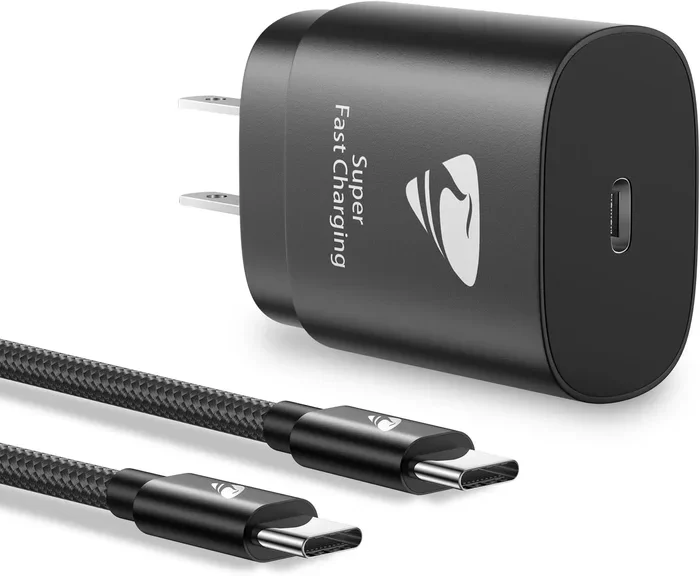
A USB C wall charger is significantly faster than older USB A chargers, thanks to USB Power Delivery technology that delivers up to 100W or more. USB C fast charging works by negotiating higher voltage and amperage between your device and the charger. Whether you need a 20W, 65W, or 100W USB C wall charger, choosing the right wattage and a GaN-based fast charger makes all the difference.
You plug in your phone at night and wake up to a full battery. But what if it only took 30 minutes instead of two hours? That is the promise of a USB C wall charger. In this guide, we will break down everything you need to know about USB C wall charger speed, how fast charging actually works, and whether upgrading your charger is worth it.
Most of us own at least two devices that charge through a USB port. Your phone, your tablet, maybe your earbuds or even your laptop. And chances are, you have a drawer full of tangled cables and old chargers that barely get the job done. The shift from traditional USB A to USB C has changed the game entirely. But here is the real question: is a USB C wall charger faster than what you are already using?
The short answer is yes, absolutely. But the full answer is more interesting than a simple yes. The speed of your USB C wall charger depends on several factors. These include wattage, the charging protocol your device supports, the quality of your cable, and even the technology inside the charger itself. Let us dive into all of it.
Key Takeaways
- USB C wall chargers are faster: USB Power Delivery delivers up to 100W, far outpacing standard USB A chargers.
- Wattage matters: Matching your charger wattage to your device ensures the fastest possible charge.
- GaN chargers are the future: They are smaller, cooler, and more efficient than traditional silicon chargers.
- Not all USB C cables are equal: The cable you use can limit your charging speed significantly.
- Fast charging is safe: Modern devices and chargers regulate power to prevent overheating and battery damage.
- Check your device first: Your phone or laptop must support USB C PD to benefit from a faster charger.
📑 Table of Contents
What Makes a USB C Wall Charger Faster
The speed of any USB C wall charger comes down to how much power it can push into your device. But power is not just about one number. It is a combination of voltage and amperage working together. Understanding this helps you make smarter buying decisions.
USB Power Delivery Explained
USB Power Delivery, commonly called USB PD, is the protocol that allows a USB C wall charger to communicate with your device. Instead of pushing a fixed amount of power, USB PD negotiates the right amount of voltage and current in real time. Your device tells the charger exactly what it needs, and the charger delivers it safely.
This is a huge upgrade over older charging standards. Traditional USB A chargers typically output 5 watts or 7.5 watts at most. A modern USB C PD charger can deliver anywhere from 18 watts to 240 watts depending on the charger and cable. That is a massive difference.
Wattage and Why It Matters
Wattage is the total power output of your charger. Higher wattage means faster charging, but only if your device can handle it. Here is a simple breakdown:
- 18W USB C charger: Great for most smartphones. Charges a typical phone from 0 to 50 percent in about 30 minutes.
- 30W to 45W USB C charger: Ideal for tablets and larger phones. Also works well with some ultrabooks.
- 65W USB C charger: Perfect for most laptops. Can charge a MacBook Air or Dell XPS in under two hours.
- 100W USB C charger: The heavyweight option. Charges laptops, tablets, and phones at full speed simultaneously.
The key takeaway is that you should match your charger wattage to your device. Using a 100W charger on a phone that only supports 20W will not make it charge faster. The device simply takes what it needs.
USB C vs USB A Wall Chargers
If you have been using the same USB A wall charger for years, you might be wondering what the difference really is. Let us compare them side by side.
Speed Comparison
A standard USB A wall charger usually outputs 5 to 12 watts. It uses an older protocol that was designed for a different era of devices. A USB C wall charger uses USB Power Delivery, which supports much higher power levels and smarter energy management.
In real-world testing, a USB C wall charger can charge a phone up to three times faster than a basic USB A charger. For laptops, the difference is even more dramatic. A USB A charger simply cannot deliver enough power to charge most modern laptops while they are in use.
Connector and Cable Differences
The USB C connector is reversible, meaning you never have to flip it to plug it in. It is also more durable than the older USB A design. But the real speed advantage comes from the cable. USB C cables can handle higher current and support data transfer speeds up to 40 Gbps with Thunderbolt 4.
Using a cheap or damaged cable can severely limit your USB C charging speed. Always use cables that are rated for the wattage of your charger. A 65W charger paired with a low-quality 10W cable will only charge at 10W. The cable becomes the bottleneck.
How GaN Chargers Make USB C Charging Even Faster
If you have been shopping for USB C wall chargers, you have probably seen the term “GaN” thrown around a lot. GaN stands for gallium nitride, and it is a semiconductor material that is replacing traditional silicon in charger design.
What Is a GaN Charger
A GaN USB C wall charger uses gallium nitride transistors instead of silicon. These transistors switch faster and generate less heat. The result is a charger that is smaller, more efficient, and capable of delivering higher wattage without overheating.
Traditional silicon chargers at 65W tend to be bulky and run warm. A GaN fast charger at the same wattage can be half the size and stay noticeably cooler. This is why GaN has become the go-to technology for premium USB C wall chargers.
Are GaN Chargers Worth It
For most people, yes. GaN chargers offer better efficiency, which means less energy wasted as heat. Less heat means your device charges faster and stays cooler. They also tend to last longer because the components run at lower temperatures.
If you travel often, the compact size of a GaN USB C charger is a huge bonus. You can replace a heavy brick and a bunch of cables with a single small charger that handles your phone, tablet, and laptop.
Common Myths About USB C Wall Charger Speed
There is a lot of misinformation floating around about USB C charging. Let us clear up some of the most common myths.
Myth 1: A Bigger Charger Will Damage Your Device
This is probably the most common fear people have. The truth is that a USB C wall charger cannot force power into your device. Your device controls how much it draws. A 100W charger will simply sit idle if your phone only needs 15W. The charger delivers what the device asks for, nothing more.
Myth 2: Fast Charging Ruins Your Battery
Modern devices have built-in battery management systems that regulate fast charging. Your phone slows down charging as it nears full capacity to protect battery health. Using a fast USB C charger will not noticeably reduce your battery lifespan compared to a slower charger.
Myth 3: All USB C Chargers Are the Same
Not even close. A cheap USB C wall charger from an unknown brand might not support USB Power Delivery at all. It could be a basic 5W charger hiding inside a USB C shell. Always buy from reputable brands and look for USB PD certification on the label.
How to Choose the Best USB C Wall Charger
Shopping for a USB C wall charger can feel overwhelming with so many options on the market. Here is a practical guide to help you pick the right one.
Step 1: Check Your Device Requirements
Look up the charging specifications for your phone, tablet, or laptop. You will usually find the recommended wattage and charging protocol in the user manual or on the manufacturer website. This tells you the minimum wattage you should target.
Step 2: Decide on Portability vs. Power
If you want something for your desk at home, a larger GaN charger with multiple ports and high wattage is a great choice. If you travel, look for a compact single-port charger that still supports fast USB C charging.
Step 3: Check for Multiple Ports
Many USB C wall chargers now come with two or three ports, including a mix of USB C and USB A. This lets you charge multiple devices at once. Just make sure the total wattage is shared across ports, so charging two laptops simultaneously might not be possible.
Step 4: Look for Safety Certifications
Always choose a charger that has been tested and certified by a recognized safety organization. Look for UL, CE, or FCC marks on the product. These certifications mean the charger has passed rigorous safety tests and will not pose a fire or electrical hazard.
Quick Tips for Faster USB C Charging
- Use a high-quality USB C cable rated for the wattage of your charger.
- Remove thick phone cases while charging to reduce heat buildup.
- Avoid using your device while it charges on a fast USB C wall charger.
- Keep your charger and device in a cool, well-ventilated area.
- Enable airplane mode or turn off your device for the fastest charge.
The Future of USB C Wall Charging
The USB C ecosystem is growing fast. More devices are adopting USB C as their standard charging port, and the technology keeps getting better. USB Power Delivery 3.1 now supports up to 240 watts, which is enough to power desktop monitors and even some desktop computers.
You might also notice that devices like monitors and e-readers now come with USB C charging built in. Even some USB Type C headphones and peripherals are moving toward USB C connectivity, which means one charger and one cable could eventually power all your gear.
The push toward a universal USB C charging standard is also being driven by regulations in the European Union and other regions. This means that in the near future, you will likely need just one USB C wall charger for everything from your phone to your camera to your gaming console.
For now, the best thing you can do is invest in a quality USB C fast charger that meets your current needs and has some room to grow. A 65W GaN charger with two USB C ports is a versatile choice that works well for most people today and will handle most devices for years to come.
Final Thoughts
So, is a USB C wall charger faster? Without a doubt. The combination of USB Power Delivery, higher wattage options, and GaN technology makes modern USB C wall chargers dramatically faster than older USB A chargers. The key is to choose the right wattage for your devices, use quality cables, and buy from trusted brands.
Upgrading to a fast USB C wall charger is one of the simplest and most affordable ways to improve your daily tech routine. You will spend less time waiting for your devices to charge and more time doing the things you enjoy. It is a small change that makes a big difference.
If you have been using an old charger for a while, it is time to make the switch. Your devices will thank you.
Frequently Asked Questions
Is a USB C wall charger faster than a regular charger?
Yes, a USB C wall charger is significantly faster than a standard USB A charger. USB Power Delivery supports much higher wattages, which means your device charges in a fraction of the time compared to older charging standards.
Does a higher wattage USB C charger charge devices faster?
A higher wattage charger will charge faster, but only if your device supports that wattage. Your device controls how much power it draws, so a 100W charger will not force extra power into a phone that only accepts 20W.
Can I use any USB C cable with my wall charger?
Not all USB C cables are created equal. To get the fastest charging speeds, use a cable rated for the wattage of your charger. A low-quality cable can limit your USB C charging speed significantly, even if your charger supports high wattage.
Are GaN USB C chargers worth the extra cost?
Yes, GaN chargers are smaller, cooler, and more efficient than traditional silicon chargers. They deliver the same or higher wattage in a much more compact form factor, making them ideal for travel and everyday use.
Will fast charging damage my phone battery?
Modern devices have smart battery management systems that regulate fast charging safely. Your phone slows down charging as it reaches full capacity to protect battery health. Using a fast USB C wall charger will not noticeably shorten your battery lifespan.
What should I look for when buying a USB C wall charger?
Look for USB Power Delivery support, the right wattage for your devices, GaN technology for efficiency, and safety certifications like UL or CE. Buying from reputable brands ensures you get a reliable and safe USB C fast charger.
=== INTERNAL LINKS ===
If you are building a complete USB C ecosystem for your workspace, you might also want to check out the best USB Type C headphones available right now. They connect directly through USB C and pair perfectly with a fast USB C wall charger setup.
Experiencing connectivity issues with your USB devices? Sometimes a loose connection or a faulty cable can cause problems similar to what you might face when a USB mouse stops working on your laptop. Always make sure your cables and ports are clean and undamaged.
For those who use their laptop as a primary workstation, understanding how peripherals and power delivery interact matters. If you have ever wondered whether pushing your display beyond its limits helps productivity, you might find our guide on whether overclocking your monitor is worth it helpful for optimizing your entire setup.