Are Some Usb Chargers Faster Than Others
Yes, some USB chargers are significantly faster than others. The difference comes down to USB standards, wattage output, cable quality, and the device you are charging. Understanding these factors helps you charge your devices quicker and protect your battery health over time.
Have you ever plugged in your phone and noticed it charges way faster with one charger than another? You are not imagining things. Some USB chargers are genuinely faster than others, and the reasons behind this are simpler than you might think. The speed of your charge depends on a mix of the charger itself, the cable you use, the port on your device, and the technology built into both the charger and your gadget.
In this guide, we break down exactly why some chargers win the speed race and others fall behind. Whether you are trying to fast-charge your phone, tablet, or laptop, understanding USB charging basics will save you time and maybe even money. Let us dive into what makes a USB charger fast and how you can get the most out of every charge.
Key Takeaways
- USB standards matter: USB 3.0, USB 3.1, and USB-C deliver different power levels and charging speeds.
- Wattage is king: A higher-wattage charger charges your device faster than a low-power one.
- Cable quality affects speed: Cheap or damaged cables can slow down your charging significantly.
- Quick Charge and Power Delivery are game-changers: These technologies negotiate the best power rate for your device automatically.
- Not all chargers are equal: Brand name and certified chargers tend to be safer and faster than cheap knockoffs.
- Heat affects charging speed: Overheating can cause your device to slow down charging to protect the battery.
📑 Table of Contents
How USB Charging Works
USB charging is all about moving power from the charger to your device. The charger converts AC power from your wall outlet into DC power your device can use. Then, that power travels through the cable and into your device’s battery. The speed of this process depends on how much power the charger can push and how much power your device is willing to accept.
Think of it like a water hose. A wider hose with more pressure fills a bucket faster. Similarly, a charger with higher wattage and better technology fills your battery faster. But if your device or cable acts like a narrow nozzle, the flow slows down no matter how powerful the charger is.
USB Standards Explained
USB standards define the rules for how power and data move through a connection. Over the years, these standards have evolved to support faster charging and quicker data transfer. Here are the key standards you will encounter:
- USB 2.0: The older standard. It supports up to 2.5 watts of power. Charging with USB 2.0 is slow by today’s standards.
- USB 3.0: A big step up. It supports up to 4.5 watts and also offers faster data transfer rates.
- USB 3.1: Even better. This standard can deliver up to 10 watts or more, depending on the setup.
- USB-C: The newest and most versatile connector. It supports USB Power Delivery, which can go well beyond 100 watts for laptops and tablets.
Each new standard brings improvements in both speed and power delivery. If you have an older device with USB 2.0 or 3.0, your charging speed will naturally be limited compared to newer USB-C setups.
USB Charger Types and Speed Differences
Not all USB chargers look the same, and they definitely do not perform the same. The type of charger you use plays a huge role in how fast your device charges. Let us look at the most common types you will find on the market.
Standard Wall Chargers
These are the basic plug-in chargers that come with most phones and tablets. They usually output 5 watts or 10 watts. They get the job done, but they are not speed demons. If you have a large phone battery, a standard wall charger can take hours to fill it up completely.
For overnight charging or when you are not in a rush, these work fine. But if you need a quick boost before heading out the door, you will want something faster.
Fast Charging Wall Chargers
Fast chargers use advanced technology to push more power to your device safely. They typically output 18 watts, 20 watts, or more. Brands like Qualcomm with their Quick Charge technology and USB Implementers Forum with USB Power Delivery (PD) have made fast charging widely available.
These chargers detect what your device can handle and deliver the maximum safe power. This means you get a faster charge without risking damage to your battery. Most modern smartphones and tablets now support fast charging out of the box.
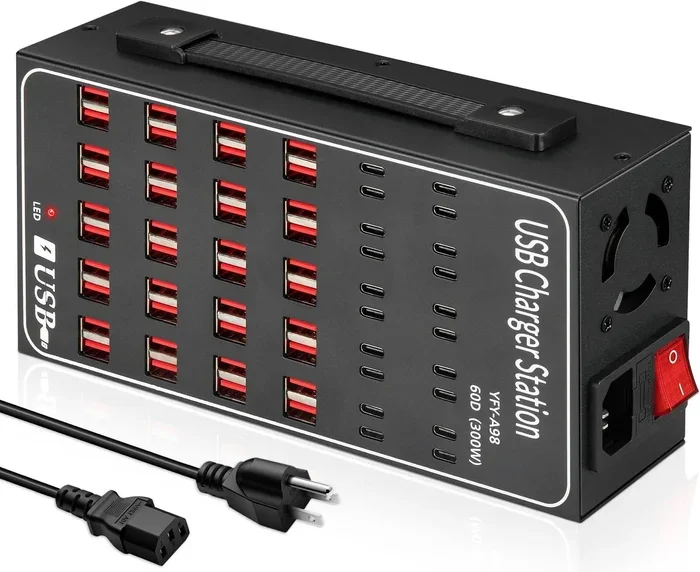
Multi-Port Chargers
Multi-port chargers let you charge several devices at once. They come in 2-port, 4-port, and even 6-port versions. The catch is that the total power output is shared among all connected devices. A 60-watt charger split between two devices gives each device 30 watts, which is still pretty fast.
If you charge multiple devices at home or in the office, a quality multi-port charger is a smart investment. Just make sure the charger supports smart power distribution so each port gets the right amount of juice.
Portable and Travel Chargers
Portable chargers are perfect for travel or emergencies. Many now support fast charging technology, so you are not stuck with slow speeds on the go. Some portable chargers even feature USB-C ports with Power Delivery, giving you laptop-level charging power in a compact package.
When shopping for a portable charger, look at the wattage and port types. A higher wattage means faster charging for all your devices. And if you want to use the charger with a laptop, make sure it supports USB-C Power Delivery.
What Determines USB Charging Speed
Several factors work together to determine how fast your device charges. Understanding these will help you troubleshoot slow charging and choose the right equipment.
Charger Wattage and Amperage
Wattage is the most important factor in charging speed. It is calculated by multiplying voltage by amperage. A charger rated at 5 volts and 3 amps delivers 15 watts of power. A charger rated at 9 volts and 3 amps delivers 27 watts. Higher wattage means faster charging, as long as your device supports it.
Here is a quick comparison of common charger outputs:
- 5W charger (5V / 1A): Basic charging. Good for small devices like earbuds or fitness trackers.
- 10W charger (5V / 2A): Standard fast charging for most phones. Charges a typical phone in about 2 hours.
- 18W charger (9V / 2A): Fast charging. Charges most phones from 0 to 50% in about 30 minutes.
- 30W+ charger: Super fast charging. Ideal for tablets and laptops that support higher power input.
Cable Quality and Length
A great charger paired with a cheap cable will still charge slowly. The cable is the bridge between the charger and your device, and poor-quality cables limit the power flow. Thicker cables with higher gauge wiring carry more power efficiently.
Cable length also matters. Longer cables tend to lose more power through resistance. If you want the fastest charge, use a short, high-quality cable that is rated for the wattage your charger provides.
Device Compatibility
Your device also plays a role in charging speed. Even if you use a 65-watt charger, a device that only supports 18 watts will cap out at 18 watts. The device and charger communicate to agree on the safest and fastest charging rate. This is called power negotiation, and it is built into USB Power Delivery and Quick Charge standards.
Some older devices do not support fast charging at all. In these cases, no charger in the world will charge them faster than their built-in limit. Always check your device specifications to know what it can handle.
Heat and Temperature
Heat is the enemy of fast charging. When your device gets too hot, it slows down the charging process to protect the battery. This is a safety feature, not a flaw. If you notice your phone or tablet getting warm while charging, try removing the case or moving it to a cooler spot.
Charging in a cool environment helps maintain optimal charging speeds. Avoid charging your device under a pillow or in direct sunlight, as both situations trap heat and slow things down.
USB-C vs USB-A: Which Charges Faster?
The port type on your charger and device makes a big difference in charging speed. USB-A is the older, rectangular connector that has been around for years. USB-C is the newer, smaller, reversible connector that is taking over the industry.
USB-A ports are limited in the power they can deliver. Most USB-A chargers max out at 10 to 15 watts. USB-C ports, on the other hand, can handle much more power thanks to the USB Power Delivery standard. A USB-C charger can deliver 30 watts, 65 watts, or even 100 watts for laptops.
Here is where things get interesting. If you have a USB-C device and a USB-C charger, you can take full advantage of fast charging. But if you use a USB-A to USB-C cable with a USB-A charger, your speed drops significantly. The port type acts as a bottleneck.
For the fastest possible charging, make sure your charger, cable, and device all support USB-C with Power Delivery. This combination gives you the best results by far.
It is worth noting that USB technology also plays a role in data transfer speeds. For example, an M.2 NVMe SSD to USB 3.1 adapter can push data at speeds that USB 2.0 simply cannot match. Similarly, a M.2 NVMe to USB-C SSD enclosure takes advantage of the USB-C port’s higher bandwidth to deliver fast file transfers and efficient power delivery. These examples show how the USB standard directly impacts performance across different use cases.
Quick Charge Technologies Explained
Several fast-charging technologies have emerged to push USB charging speeds beyond the basic standards. Here are the most important ones to know about.
Qualcomm Quick Charge
Quick Charge is Qualcomm’s proprietary fast-charging technology found in many Android phones and tablets. It works by increasing the voltage or amperage beyond the standard USB limits. Quick Charge 3.0 and 4.0 are the most common versions today, offering speeds up to 18 watts or more depending on the device.
Quick Charge is smart. It adjusts the power output based on what your device needs. If your phone can handle 18 watts, Quick Charge delivers 18 watts. If it can only handle 9 watts, Quick Charge steps it down to stay safe.
USB Power Delivery (USB-PD)
USB Power Delivery is an open standard supported by most modern devices, including iPhones, Androids, tablets, and laptops. USB-PD can deliver up to 100 watts through USB-C, making it versatile enough to charge everything from earbuds to gaming laptops.
USB-PD uses power negotiation to find the perfect balance between speed and safety. The charger and device communicate and agree on the best power profile automatically. This is why a single USB-PD charger can work with so many different devices.
Proprietary Fast Charging
Some brands have their own fast-charging technologies. OnePlus has Warp Charge, Oppo has VOOC, and Samsung has Adaptive Fast Charging. These are often customized versions of standard fast-charging protocols, tuned for specific devices.
These proprietary technologies can be very fast, but they usually work best with the brand’s own charger and cable. Using a third-party charger may limit the speed or disable the fast-charging feature entirely.
How to Choose the Right USB Charger
Choosing the right charger does not have to be confusing. Here are some practical tips to help you make the best choice for your needs.
Check Your Device’s Charging Requirements
Start by checking what your device supports. Look at the manufacturer’s website or the user manual for the recommended wattage and charging standard. This tells you the maximum speed your device can handle, so you do not waste money on a charger that is too powerful.
Look for Certified Chargers
Certified chargers meet safety and performance standards set by organizations like USB-IF (USB Implementers Forum). Look for the USB-IF certification logo on the packaging. Certified chargers are tested for safety and are less likely to damage your devices or charge slowly.
Avoid cheap, uncertified chargers from unknown brands. They may promise fast charging but deliver inconsistent power that can harm your battery or even pose a fire risk. A reliable charger from a reputable brand is always worth the investment.
Consider Your Charging Needs
Think about how and where you charge your devices most often. Do you need a charger for your desk at work? A portable one for travel? A multi-port charger for your entire family?
For desk use, a high-wattage USB-C charger with Power Delivery is ideal. For travel, a compact fast charger with multiple ports covers all your bases. And for family use, a multi-port charger with smart power sharing keeps everyone’s devices charged up.
Buy the Right Cables Too
Do not overlook the importance of a good cable. A high-quality USB-C cable rated for the wattage of your charger ensures you get the full speed benefit. Look for cables that are e-marked, which means they have been tested to handle higher power levels.
Keep a few spare cables in your bag, at home, and at the office. A good cable lasts a long time, but wear and tear eventually takes a toll. Replacing a worn cable can instantly improve your charging speed.
Common Charging Mistakes to Avoid
Even with the best charger, some habits can slow down your charging or damage your battery over time. Here are a few mistakes to watch out for.
- Using a damaged cable: Frayed or bent cables reduce power delivery and can be a safety hazard. Replace them immediately.
- Charging through your computer: USB ports on computers usually deliver only 2.5 to 5 watts, which is much slower than a wall charger.
- Using the wrong charger: A charger that does not support your device’s fast-charging standard will charge much more slowly.
- Charging in hot environments: Heat triggers your device’s thermal throttling, which slows down charging to protect the battery.
- Using ultra-long cables: Longer cables lose more power, reducing the effective wattage that reaches your device.
Avoiding these simple mistakes can make a noticeable difference in your daily charging routine. A few small changes can lead to faster, safer, and more efficient charging.
Final Thoughts
The answer to whether some USB chargers are faster than others is a clear yes. Charging speed depends on the charger’s wattage, the USB standard it uses, the cable quality, and your device’s compatibility. By choosing the right charger and accessories, you can cut your charging time significantly and keep your devices running longer between charges.
Investing in a good fast charger is one of the easiest upgrades you can make. Whether you pick a USB-C Power Delivery charger or a Quick Charge wall brick, the difference in speed is immediate and noticeable. Take a few minutes to check your device’s charging specs, pick a certified charger that matches, and enjoy the benefit of faster, safer charging every day.
Frequently Asked Questions
Do all USB-C chargers charge at the same speed?
No, not all USB-C chargers are the same. Some support USB Power Delivery at higher wattages, while others only offer basic 5-watt charging. Always check the wattage and power delivery specs before buying a USB-C charger.
Can a faster charger damage my device?
No, modern devices and certified chargers communicate with each other to deliver the safest and fastest charge possible. The device controls how much power it accepts, so a faster charger will not push too much power into your device.
Why does my phone charge slowly even with a fast charger?
Several factors can slow down charging. A low-quality cable, a hot device, or a background app using battery power can all reduce charging speed. Try using a different cable or closing apps while charging to see if the speed improves.
Is wireless charging slower than USB charging?
Yes, wireless charging is generally slower than wired USB charging. Wireless chargers typically deliver 5 to 15 watts, while a good USB-C fast charger can deliver 30 watts or more. For the fastest charging, use a wired connection.
Do I need a special charger for my laptop?
Most modern laptops use USB-C with Power Delivery. A USB-C charger rated at 45 watts or higher should work for most laptops. Check your laptop’s charging requirements to find the right wattage and connector type.
Can I use a 65-watt charger on a phone that only supports 18 watts?
Yes, you can safely use a higher-wattage charger on a device that supports less power. The device and charger negotiate the best power level automatically. Your phone will only draw the 18 watts it can handle, so there is no risk of damage.