Is Hdmi 1 4 Better Than 2 0 for 4k
HDMI 1.4 vs 2.0 for 4K is a question many tech users ask when setting up their display devices. The version of HDMI you choose directly impacts your 4K resolution, refresh rate, and overall video quality. HDMI 2.0 offers double the bandwidth of HDMI 1.4, making it the clear winner for true 4K at 60Hz. If you are into 4K gaming, streaming, or video editing, the difference is noticeable and important. This guide breaks down everything you need to know about HDMI 1.4 vs 2.0 for 4K so you can make the right choice with confidence.
When you are setting up a home theater or a gaming station, the cable you choose can make or break your experience. Many people wonder whether HDMI 1.4 vs 2.0 for 4K really makes a difference. The short answer is yes, it does. But the full picture is more interesting than you might think.
HDMI versions have evolved over the years, and each one brings new capabilities. If you are trying to decide between HDMI 1.4 and HDMI 2.0 for your 4K display, this guide will walk you through everything you need to know. We will cover bandwidth, refresh rates, color depth, and real-world performance so you can make a confident choice.
Whether you are a casual viewer, a hardcore gamer, or a video editor, understanding these differences matters. Let us dive into the details and find out which HDMI version fits your setup best.
Key Takeaways
- HDMI 2.0 wins for 4K: It supports 4K at 60Hz while HDMI 1.4 is limited to 30Hz.
- Bandwidth matters: HDMI 2.0 provides 18 Gbps compared to HDMI 1.4’s 10.2 Gbps.
- HDR support differs: HDMI 2.0 handles High Dynamic Range better than HDMI 1.4.
- Check your devices: Both the source and display need to support the same HDMI version.
- Cable compatibility is key: Using the right High Speed HDMI cable makes a big difference.
- Most users need HDMI 2.0: For 4K gaming, streaming, and editing, HDMI 2.0 is the standard.
📑 Table of Contents
What Is HDMI and Why Does the Version Matter?
HDMI stands for High-Definition Multimedia Interface. It is the most common cable used to connect devices like TVs, monitors, laptops, and gaming consoles to display devices. The version of HDMI you use determines what features are available and how much data the cable can carry.
Think of HDMI versions like roads. A wider road can handle more traffic at once. Similarly, a newer HDMI version has more bandwidth, which means it can carry more data. This directly affects the resolution, refresh rate, and color quality you get on your screen.
HDMI 1.4 came out in 2009, and HDMI 2.0 arrived in 2013. Both can handle 4K, but they do so very differently. The pixel count stays the same at 4K, but how smoothly those pixels update on your screen depends entirely on the version you are using.
HDMI 1.4: What It Brings to 4K
4K Support at 30Hz
HDMI 1.4 was the first version to introduce 4K support. However, it only supports 4K at 30Hz. This means your display updates the image 30 times per second. For movies and slow-moving content, this is fine. But for gaming or fast action scenes, you may notice some choppiness.
If you are mainly watching 4K films or browsing content, HDMI 1.4 gets the job done. The video quality is still excellent for passive viewing. You will enjoy crisp images and vibrant colors.
Key Features of HDMI 1.4
- 4K resolution at 30Hz: Good for movies and static content.
- 3D support: HDMI 1.4 was a pioneer in bringing 3D over HDMI.
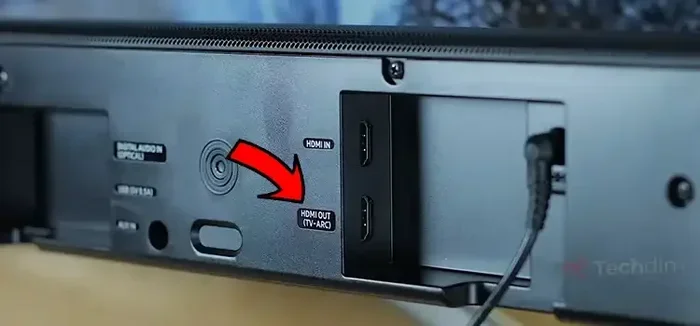
- Audio Return Channel (ARC): This lets your TV send audio back to your sound system through a single cable.
- Ethernet over HDMI: You can share an internet connection between devices without a separate cable.
- Color depth: Supports up to 8-bit color, which covers most standard content.
For many users, these features are more than enough. HDMI 1.4 remains popular in older TVs, projectors, and budget setups. If you already have an HDMI 1.4 cable and your needs are basic, there is no urgent reason to upgrade.
HDMI 2.0: What It Brings to 4K
4K Support at 60Hz
This is where HDMI 2.0 shines. It supports 4K at 60Hz, which means your display refreshes twice as fast as HDMI 1.4. The result is smoother motion, better gaming, and a more responsive experience overall.
If you play 4K gaming on a console or PC, HDMI 2.0 is almost essential. The extra refresh rate makes fast-moving games feel much more natural. You will see less motion blur and fewer frame drops.
Key Features of HDMI 2.0
- 4K at 60Hz: Smooth motion for gaming, sports, and action movies.
- Higher bandwidth: HDMI 2.0 offers 18 Gbps, nearly double the 10.2 Gbps of HDMI 1.4.
- Better color support: HDMI 2.0 handles 10-bit and even 12-bit color depth, giving you richer, more lifelike images.
- HDR support: High Dynamic Range is better supported, with wider color gamuts and improved contrast.
- Simultaneous audio and video: HDMI 2.0 can handle multiple audio streams at once.
- Chroma subsampling improvements: Better handling of color information for more accurate hues.
If you are building a modern home theater or a 4K streaming setup, HDMI 2.0 is the clear choice. The extra bandwidth opens the door to features that simply are not available with HDMI 1.4.
HDMI 1.4 vs 2.0 for 4K: Head-to-Head Comparison
Let us put the two versions side by side so you can see the differences clearly.
- Maximum 4K Refresh Rate: HDMI 1.4 caps at 30Hz while HDMI 2.0 reaches 60Hz.
- Bandwidth: HDMI 1.4 provides 10.2 Gbps. HDMI 2.0 doubles that to 18 Gbps.
- Color Depth: HDMI 1.4 handles up to 8-bit color. HDMI 2.0 supports 10-bit and 12-bit.
- HDR: HDMI 2.0 has native HDR support. HDMI 1.4 has limited or no HDR capability.
- 3D Support: HDMI 1.4 supports 3D. HDMI 2.0 dropped official 3D support but focuses on higher resolution.
- ARC and Ethernet: Both versions include Audio Return Channel and Ethernet over HDMI.
If you want the best video quality for 4K content, HDMI 2.0 is the clear winner. The higher bandwidth and refresh rate make a noticeable difference in everyday use.
For storing large 4K video files on a media server, consider pairing your setup with a fast M.2 NVMe PCIe 4.0 SSD. This ensures smooth playback and quick file transfers. Similarly, if you are editing 4K video on a laptop, having adequate memory is crucial. Check out whether 4 GB RAM is good for a laptop before starting your editing workflow.
Which HDMI Version Do You Actually Need?
The answer depends on what you plan to do with your setup. Let us break it down by use case.
For Casual Movie Watching
If you mostly watch movies and TV shows at 4K, HDMI 1.4 is perfectly fine. At 30Hz, the difference is barely noticeable for filmed content. You will enjoy excellent picture quality without spending extra on cables or equipment.
However, if you plan to keep your setup for several years, HDMI 2.0 is a safer investment. Technology moves fast, and having a future-proof connection is always a smart move.
For Gaming
Gamers should strongly consider HDMI 2.0. Playing a fast-paced game at 4K and 30Hz feels laggy and unresponsive. HDMI 2.0’s 60Hz support makes a huge difference in gameplay quality.
If you are building a compact media center or a small form factor gaming PC, a M.2 2242 SSD can provide fast storage without taking up much space. For even higher performance, look into a Gen 4 NVMe M.2 SSD to handle large game libraries and 4K assets.
For Content Creators and Video Editors
If you edit 4K video or work with high-resolution media, HDMI 2.0 is a must. The better color depth and higher refresh rate help you see your work more accurately. You need every advantage when color grading or mastering content.
Remember that your entire workflow matters. A powerful display device means nothing if your cable bottlenecks the signal. Always check that your source device, cable, and display all support the same HDMI version for the best results.
For 4K Streaming
Streaming services like Netflix and Disney+ deliver 4K content. HDMI 2.0 ensures you get the full quality these platforms offer. With HDR and better color accuracy, your streaming experience becomes much more immersive.
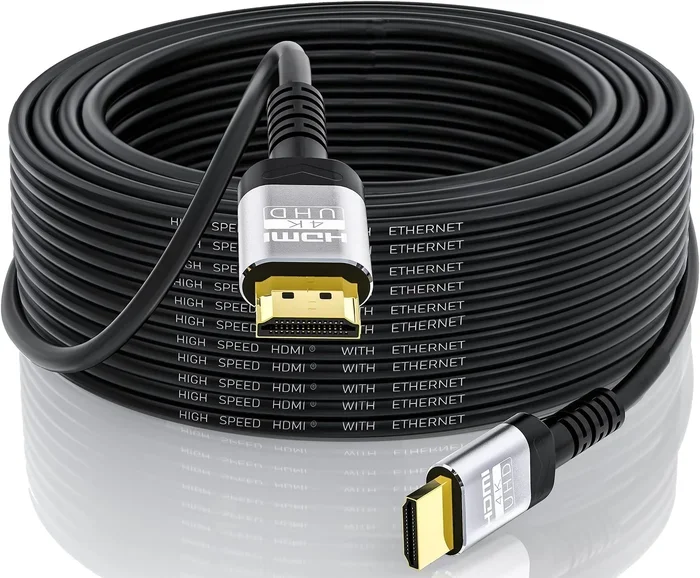
For the best 4K streaming experience, pair your HDMI 2.0 connection with a high-quality High Speed HDMI cable. This ensures the full bandwidth reaches your display without any bottlenecks.
Common Mistakes When Choosing HDMI Cables
Many people make avoidable mistakes when picking an HDMI cable for their 4K setup. Here are the most common ones to watch out for.
Mistake 1: Assuming all HDMI cables are the same. Not all cables support the same features. A standard HDMI cable may not handle 4K at all. Look for “High Speed HDMI” or “Premium High Speed” labels to ensure cable compatibility.
Mistake 2: Ignoring the source and display versions. Even if you buy an HDMI 2.0 cable, it will not deliver 4K at 60Hz if your source device or TV only supports HDMI 1.4. Check all parts of your chain.
Mistake 3: Overpaying for unnecessary features. Expensive cables do not always mean better performance. As long as the cable meets the High Speed standard, you are good to go. Save your money for better equipment instead.
Mistake 4: Neglecting cable length. Longer HDMI cables can suffer from signal loss. If you need a cable longer than 10 feet, consider an active HDMI cable or a signal booster to maintain quality.
Mistake 5: Forgetting about firmware updates. Some devices need firmware updates to fully support newer HDMI features. Always check for updates on your TV, console, or PC before troubleshooting your setup.
Quick Tips for Getting the Best 4K Experience
- Always check the HDMI version on both your source device and your display.
- Use High Speed or Premium High Speed HDMI cables for 4K content.
- Keep your cables as short as possible to reduce signal loss.
- Update your device firmware regularly for the best compatibility.
- If you are unsure, go with HDMI 2.0. It is the safer and more future-proof choice.
- For small setups, consider compact storage solutions like an M.2 2242 SSD to store your 4K media files efficiently.
Conclusion
The debate between HDMI 1.4 vs 2.0 for 4K comes down to what you need from your setup. HDMI 1.4 works well for basic 4K viewing at 30Hz. It is a solid choice for movie watchers and casual users. But if you want smooth 4K at 60Hz, better color, and full HDR support, HDMI 2.0 is the way to go.
For gamers, content creators, and anyone serious about 4K quality, the investment in HDMI 2.0 pays off quickly. The extra bandwidth and improved features make a real difference in everyday use. You will notice smoother motion, richer colors, and a more immersive experience.
Take a moment to check your current setup. Make sure your cables, devices, and display all work together. With the right HDMI version and a good cable, your 4K experience will be exactly what you expect.
Do not let an outdated cable hold you back. Upgrade to HDMI 2.0 if you have not already, and enjoy the full potential of your 4K display. Your eyes will thank you.
Frequently Asked Questions
Can HDMI 1.4 Do 4K?
Yes, HDMI 1.4 can handle 4K resolution. However, it is limited to 30Hz refresh rate. This is fine for watching movies and browsing content. But for gaming or fast action, the lower refresh rate may feel choppy.
What Is the Main Difference Between HDMI 1.4 and HDMI 2.0?
The biggest difference is bandwidth. HDMI 1.4 offers 10.2 Gbps, while HDMI 2.0 provides 18 Gbps. This means HDMI 2.0 can handle 4K at 60Hz, while HDMI 1.4 is capped at 30Hz. HDMI 2.0 also supports better color depth and HDR.
Do I Need HDMI 2.0 for 4K Gaming?
Yes, for a good 4K gaming experience, HDMI 2.0 is highly recommended. The 60Hz refresh rate makes fast-paced games feel much smoother. HDMI 1.4 at 30Hz can cause noticeable lag and motion blur during gameplay.
Can I Use an HDMI 1.4 Cable with an HDMI 2.0 Port?
Yes, HDMI cables are backward compatible. You can plug an HDMI 1.4 cable into an HDMI 2.0 port. However, the connection will only work at the capabilities of the lower version. You will get 4K at 30Hz instead of 60Hz.
Does HDMI 2.0 Support HDR?
Yes, HDMI 2.0 has native support for High Dynamic Range. This means you get wider color gamuts, better contrast, and more vivid images. HDMI 1.4 has very limited or no HDR support, so for HDR content, HDMI 2.0 is essential.
Are HDMI 2.0 Cables Backward Compatible?
Absolutely. HDMI 2.0 cables work with older devices that use HDMI 1.4 or earlier versions. The connection will simply operate at the capabilities of the older device. This makes upgrading your cable a safe and easy change.