Is Usb Over Network Free
USB over Network allows you to share USB devices across computers remotely, and yes, several free options exist. This guide breaks down how it works, which free tools are worth your time, and what limitations you should expect. You will learn about setup, paid vs. free options, and practical use cases for everyday users.
Have you ever wanted to use a USB device that is plugged into another computer? Maybe you have a printer in the office but need to print from your desk. Or perhaps you have a USB security dongle sitting on one machine, but you need to access it from a different room. USB over Network makes this possible, and the big question on everyone’s mind is: Is USB over Network free?
The short answer is yes, but with some important caveats. Free software exists, and it works well for basic needs. However, paid options offer more features, better performance, and stronger security. In this guide, we will walk you through everything you need to know about sharing USB devices over a network without spending a dime.
Whether you are a student, a remote worker, or a small business owner, understanding USB over Network can save you time and money. Let us break it all down in simple terms.
Key Takeaways
- USB over Network is real: You can share USB devices like printers, drives, and dongles across a network without physical cables.
- Free options exist: Several free and open-source tools let you share USB devices over a network at no cost.
- Free tools have limits: Free versions often come with fewer features, slower speeds, or device restrictions compared to paid solutions.
- Setup is manageable: With the right guide, most users can set up USB over Network in under 30 minutes.
- Security matters: Sharing USB devices over a network introduces security risks you should understand before diving in.
- Use cases vary: From remote work to server management, USB over Network solves real problems for many people.
- Paid versions offer more: If you need reliability and advanced features, paid USB over Network software may be worth the investment.
📑 Table of Contents
- What Is USB Over Network?
- Is USB Over Network Free? Here Is the Breakdown
- How to Set Up USB Over Network for Free
- Paid vs. Free USB Over Network Software
- Common Uses for USB Over Network
- Security Considerations for USB Over Network
- Tips for Getting the Best Performance
- Frequently Asked Questions
- Final Thoughts
What Is USB Over Network?
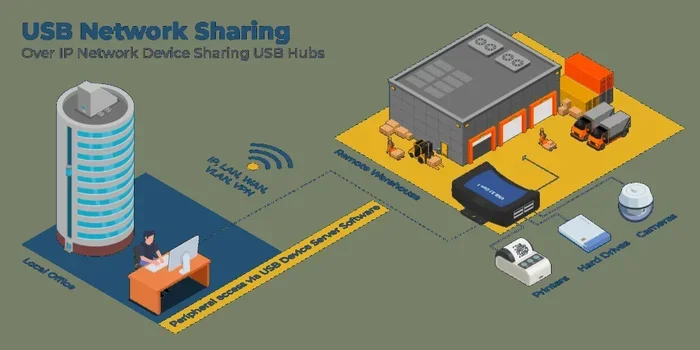
USB over Network is a technology that lets you access USB devices from a different computer through a network connection. Instead of plugging a device directly into your machine, you connect to it remotely. The device appears as if it is physically attached to your computer.
This technology works over local networks (like your home Wi-Fi) and even across the internet. You can share printers, external hard drives, USB dongles, webcams, and more. The concept is similar to how network-attached storage works, but it applies to any USB device.
How Does It Work?
USB over Network uses a client-server model. One computer acts as the server. It has the USB device physically plugged in. The other computer acts as the client. It connects to the server and accesses the device remotely.
The software creates a virtual USB connection between the two machines. Data flows back and forth just like it would with a direct plug-in. The difference is that the data travels through your network instead of a cable.
For example, if you share a USB flash drive from your desktop computer, you can access it from your laptop in the same room or even from another city. The speed depends on your network connection and the software you use.
Is USB Over Network Free? Here Is the Breakdown
So, is USB over Network free? The answer depends on the software you choose. Multiple free solutions exist, but they come with trade-offs. Let us look at what you can expect.
Free USB Over Network Options
Several free tools allow you to share USB devices over a network. Here are some of the most popular ones:
- USB Network Gate: Offers a free version for non-commercial use. It supports Windows and Linux and covers basic USB sharing needs.
- VirtualHere: Provides a free version with limited device sharing. It works on Windows, macOS, Linux, and even Raspberry Pi.
- Donglify: Has a free trial period. It is popular for sharing software dongles over a network.
- Open-source alternatives: Some community-built tools offer free USB sharing, though they may require more technical knowledge to set up.
These free options work well for personal use and small teams. They let you share printers, external drives, and simple USB peripherals without spending a penny.
Limitations of Free Solutions
Free USB over Network software is not perfect. Here are common limitations you should know about:
- Device limits: Free versions often restrict the number of devices you can share simultaneously.
- Speed constraints: Some free tools throttle data transfer speeds, especially over long distances.
- No advanced features: Encryption, load balancing, and multi-platform support are often reserved for paid plans.
- Limited support: Free tools usually lack dedicated customer support. You rely on community forums instead.
- Security gaps: Free versions may not offer the same level of encryption as paid alternatives.
If you only need to share one or two devices on a home network, free software will likely meet your needs. But if you run a business or need reliable performance, a paid solution might be better.
How to Set Up USB Over Network for Free
Setting up USB over Network is easier than most people think. You do not need to be a tech expert. Here is a general overview of the process.
Step 1: Choose Your Software
Pick a free USB sharing tool that fits your needs. Consider these factors:
- Which operating systems do you use?
- How many devices do you need to share?
- Do you need encryption or advanced security?
- Will you use it over a local network or the internet?
Once you pick your software, download and install it on both the server computer (the one with the USB device) and the client computer (the one you want to access the device from).
Step 2: Connect the Device
Plug the USB device into the server computer. Open the software and select the device you want to share. The software will make the device available on the network.
On the client computer, open the same software and look for shared devices. You should see the USB device listed. Click connect, and the device will appear on your machine as if it were plugged in directly.
Step 3: Test and Use
Try using the device from the client computer. Print a test page if it is a printer. Copy a file if it is a flash drive. Make sure everything works smoothly before you rely on it for important tasks.
Quick Tip: If you are sharing an external USB drive and experience slow speeds, try connecting both computers to the same Wi-Fi band (5 GHz is faster than 2.4 GHz). Also, check if your router supports gigabit Ethernet for the best performance.
Paid vs. Free USB Over Network Software
Choosing between free and paid USB over Network software depends on your needs. Let us compare the two approaches.
When Free Works Great
- You only need to share one or two USB devices.
- You use the setup for personal or home use.
- Your network is local and stable.
- You do not need advanced security features.
- You are comfortable with basic troubleshooting.
When Paid Makes Sense
- You need to share many devices simultaneously.
- You require high-speed data transfer.
- You need strong encryption for sensitive data.
- You are using the setup for business or commercial purposes.
- You want dedicated customer support and regular updates.
For most home users, free software handles the job just fine. But businesses with critical operations should consider investing in a paid solution for reliability and security.
Common Uses for USB Over Network
USB over Network is not just a tech novelty. It solves real problems in everyday situations. Here are some common use cases.
Sharing Printers in a Home Office
Do you have a USB printer on one desk but need to print from another room? Share the printer over your network and print from any computer. This works great for small offices and home setups.
Accessing USB Dongles Remotely
Many software licenses use USB dongles for protection. If you work remotely, you can share the dongle from your office computer to your home computer. This saves you from carrying the dongle back and forth.
Using External Storage Across Devices
Need to access files from an external hard drive that is plugged into another computer? Share it over the network and access your files without unplugging anything. This is especially useful if you have a USB enclosure with an NVMe SSD connected to a server.
For example, if you use an M.2 NVMe SSD in a USB enclosure, you can share that drive over the network and access it from any device. This is a great way to build a low-cost network storage solution.
Remote Work and Server Management
IT professionals often need to access USB devices on remote servers. USB over Network software makes this possible without physical access. You can manage devices, transfer files, and troubleshoot issues from anywhere.
Security Considerations for USB Over Network
Sharing USB devices over a network introduces security risks. You should understand these before you set anything up.
- Unauthorized access: If your network is not secure, others might access your shared USB devices.
- Data interception: Without encryption, data traveling over the network can be intercepted.
- Malware spread: A compromised USB device on one computer can potentially spread to others through the network.
- Privacy concerns: Shared webcams and microphones raise privacy issues if not properly secured.
To stay safe, use strong passwords, enable encryption if your software supports it, and keep your network firewall active. If you are using USB over Network over the internet (not just a local network), encryption becomes even more critical.
Expert Insight: Always treat a shared USB device with the same caution as a directly connected one. If the device is compromised, the risk extends to every computer that accesses it over the network.
Tips for Getting the Best Performance
Want to get the most out of your free USB over Network setup? Follow these practical tips:
- Use a wired connection when possible. Ethernet is faster and more stable than Wi-Fi for USB device sharing.
- Keep your software updated. Updates often include performance improvements and security patches.
- Avoid sharing high-bandwidth devices over Wi-Fi. Things like webcams and audio interfaces work better on a wired connection.
- Restart your router regularly. A fresh router connection can improve network stability and speed.
- Close unnecessary applications. Free up bandwidth on both the server and client computers for better performance.
- Check compatibility. Make sure your USB device is supported by the sharing software before you commit to it.
Frequently Asked Questions
Is USB over Network completely free?
Some USB over Network software offers free versions for personal use. However, most free versions have limitations like device caps or reduced features. Fully free and open-source options exist, but they may require more technical setup.
Can I use USB over Network over the internet?
Yes, you can share USB devices over the internet, not just local networks. However, this requires proper configuration, port forwarding, and strong security measures like encryption. Free tools often limit internet sharing capabilities.
Is USB over Network slow?
Speed depends on your network and the software you use. On a fast local network, performance is usually good. Over the internet, speeds can drop significantly. Free tools may also throttle speeds more than paid options.
Can I share any USB device over a network?
Most USB devices work with USB over Network software, including printers, drives, dongles, and webcams. However, some devices with proprietary drivers or high bandwidth requirements may not work well. Always check compatibility before relying on it for critical tasks.
Do I need special hardware for USB over Network?
No special hardware is needed. You just need a network connection (Wi-Fi or Ethernet) and a computer on each end. Some people use dedicated USB server hardware for more advanced setups, but that is not required for basic use.
Is USB over Network safe?
It can be safe if you take proper precautions. Use strong passwords, enable encryption, and keep your network secure. Avoid sharing USB over Network on public or untrusted networks. Treat shared devices with the same care as directly connected ones.
Final Thoughts
So, is USB over Network free? Yes, you can get started without spending a dollar. Free software options let you share USB devices across your network with minimal setup. Whether you want to share a printer, access an external drive, or use a USB dongle remotely, the technology works and it is accessible to everyone.
That said, free solutions come with trade-offs. Limited device support, slower speeds, and fewer security features are common. If your needs grow beyond basic sharing, consider upgrading to a paid plan for a smoother experience.
The best approach is to start with a free tool, test it with your devices, and see if it meets your needs. Most free trials and versions let you evaluate the software before committing. This way, you get the benefits of USB over Network without any financial risk.
Give it a try today. You might be surprised how much easier your workflow becomes when your USB devices are just a network connection away.