Is Usb Still Useful
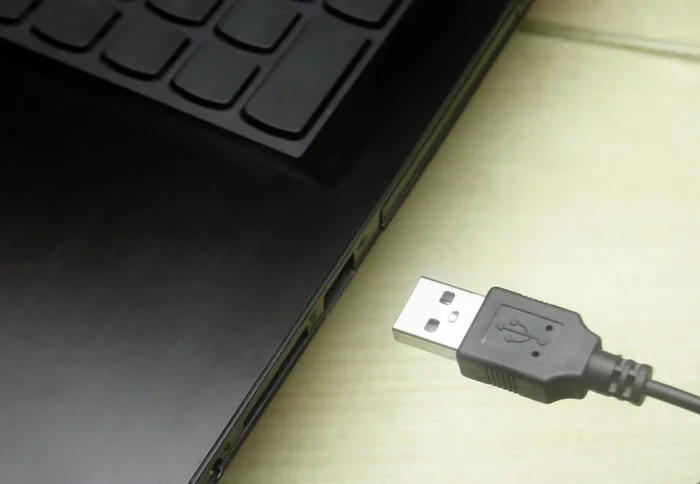
USB is far from obsolete. Despite wireless trends, USB ports remain the backbone of data transfer, charging, and connecting peripheral devices. From USB-C connectors to USB flash drives, this universal standard keeps evolving and staying relevant.
You might have heard people say that USB is dying. Wireless technology is everywhere now. Bluetooth connects our headphones. Wi-Fi transfers files between phones. Cloud storage lives in the cloud. So why do we still plug cables into our devices?
The truth is, USB is still incredibly useful. It has not gone away. In fact, it has gotten better. The USB-C connector is faster, more versatile, and more convenient than ever before. Whether you are charging a phone, backing up files, or connecting a mouse, USB is still the go-to standard. Let us break down why this old technology refuses to become obsolete.
Key Takeaways
- USB is still widely used: Nearly every device relies on USB for charging, data transfer, and connectivity.
- USB-C is the future: The reversible connector offers faster speeds and more power delivery than older versions.
- USB serves many purposes: From connecting external storage to charging laptops and linking peripheral devices, its uses are vast.
- Wireless has not replaced USB: Bluetooth and Wi-Fi complement USB but cannot fully replicate its speed and reliability.
- USB adapters keep it relevant: Tools like M.2 NVMe SSD to USB 3.1 adapters extend USB functionality for modern storage needs.
📑 Table of Contents
- What Is USB and Why Does It Still Matter?
- The Evolution of USB: From USB-A to USB-C
- Common Uses for USB in Everyday Life
- Is Wireless Replacing USB?
- How USB Adaptors Keep the Standard Alive
- When USB Might Not Be Enough
- Common Mistakes People Make with USB
- Expert Insights: Why Industry Leaders Still Bet on USB
- Conclusion
What Is USB and Why Does It Still Matter?
USB stands for Universal Serial Bus. It is a standard that lets devices talk to each other. It also delivers power through a single cable. Think about how many things you plug into a USB port every week. Your phone. Your keyboard. Your external hard drive. Maybe even your coffee mug warmer.
The reason USB remains relevant is simple. It works. It is universal. You do not need special drivers or complicated setups. You plug it in, and it works. That simplicity has kept USB connectivity at the center of our tech lives for over two decades.
Wireless options are great for convenience. But they have limits. Bluetooth is slower for large files. Wi-Fi needs a network. USB wired connections give you direct, fast, and reliable transfer every single time. That is why USB flash drives and external storage devices are still popular.
The Evolution of USB: From USB-A to USB-C
USB has changed a lot since the late 1990s. The original USB-A port was bulky and only worked one way. You had to flip the cable three times to get it in right. We have all been there.
Then came USB 2.0, which was faster. Then USB 3.0 brought real speed improvements. Now we have USB 3.1 and USB 3.2, which offer blazing fast data transfer rates. And the connector shape changed too. USB-C is small, reversible, and works with many devices.
USB Speed Comparison
Each version of USB brought better performance. Here is a quick look at how far we have come:
- USB 1.0: 12 Mbps — basic file transfers
- USB 2.0: 480 Mbps — good for USB flash drives and simple peripheral devices
- USB 3.0: 5 Gbps — fast enough for external hard drives
- USB 3.1: 10 Gbps — great for M.2 NVMe SSD to USB 3.1 adapter setups
- USB 3.2 and USB4: Up to 40 Gbps — handles external storage and video output
As you can see, USB speeds have improved dramatically. This is why professionals still rely on USB cables for heavy data work. A M.2 NVMe to USB-C SSD enclosure can deliver near-internal SSD speeds through a USB port. That kind of performance is hard to beat wirelessly.
Common Uses for USB in Everyday Life
You might not realize how often you use USB every day. It is baked into so many parts of modern life. Let us look at the most common uses.
Charging Devices
USB charging is the most widespread use of this technology. Your phone charges through USB. Your tablet does too. Many laptops now use USB-C as their main charging port. Even some electric toothbrushes and flashlights use USB power delivery.
The beauty of USB charging is standardization. You can use one USB cable to charge multiple devices. You do not need a special charger for each gadget. This convenience keeps USB ports essential on every new device.
Data Transfer and Backup
Need to move photos from your camera to your computer? USB does that. Need to back up important files? A USB flash drive handles that easily. Professionals use external storage powered by USB connections to store massive projects.
USB data transfer is direct and fast. You do not need an internet connection. You do not need to wait for uploads. Just plug in the cable and move your files. For large projects like video editing or machine learning datasets, wired USB transfer is still the fastest option.
Connecting Peripheral Devices
Keyboards, mice, printers, webcams, and external speakers all use USB. These peripheral devices depend on reliable USB connectivity. A USB mouse may stop working sometimes, but that is a separate issue — the USB port itself remains the standard way to connect these tools.
Gamers love USB too. Controllers, headsets, and even racing wheels connect through USB ports. The low latency of a wired USB connection gives gamers a real advantage over wireless options.
Is Wireless Replacing USB?
This is a fair question. Wireless technology has come a long way. Bluetooth 5.0 and Wi-Fi 6 offer decent speeds. Cloud services let you access files from anywhere. So why do we still need USB?
Wireless and USB serve different purposes. They work best together, not as replacements. Here is why USB still wins in many situations:
- Speed: Wired USB transfer is much faster than Bluetooth or Wi-Fi for large files.
- Reliability: A USB cable gives a stable connection with no interference.
- Power delivery: USB charging through a cable is more efficient than wireless charging.
- Compatibility: Almost every device still has at least one USB port.
- Security: A direct wired connection is harder to intercept than a wireless signal.
Think of it this way. Wireless is like a highway with traffic. USB is like a private road. Both get you there, but the direct route is faster and more predictable. That is why USB remains indispensable.
How USB Adaptors Keep the Standard Alive
One of the smartest reasons USB stays useful is adaptors. The USB ecosystem has grown to support new formats and technologies. You can bridge old and new devices easily.
For example, an M.2 NVMe SSD to USB 3.1 adapter lets you turn a modern M.2 NVMe SSD into a portable external drive. You plug it into a USB port and get near-internal speeds. This is perfect for professionals who need fast external storage on the go.
Similarly, an M.2 NVMe SSD in a USB enclosure turns a tiny internal drive into a portable powerhouse. You get USB-C connectivity with speeds that rival internal setups. These adaptors show how USB continues to evolve and support new technology.
You can also find USB hubs that add extra ports to your laptop. This solves the problem of limited USB ports on thin modern devices. Without USB adaptors and hubs, many people would struggle to connect all their gear.
When USB Might Not Be Enough
Let us be honest. USB is not perfect for everything. There are situations where other options make more sense.
For short-range file sharing between phones, Bluetooth or AirDrop is more convenient. For streaming large media files across a home, Wi-Fi with NAS storage works well. And for truly wireless freedom, Bluetooth peripherals like keyboards and mice are great.
But even in these cases, USB often plays a supporting role. Your wireless keyboard still needs to be charged via USB. Your Wi-Fi router has a USB port for shared storage. USB is quietly working behind the scenes even when you are using wireless tech.
Quick Tips for Getting the Most Out of USB
- Always use USB 3.0 or higher cables for fast data transfer.
- Invest in a good USB-C hub if your laptop has limited ports.
- Label your USB flash drives so you do not mix up files.
- Use braided USB cables for durability and longer lifespan.
- Keep USB adapters handy for connecting older devices to new ports.
Common Mistakes People Make with USB
Even though USB is simple, people still make mistakes that reduce its lifespan or performance.
One common mistake is using cheap USB cables. A poor-quality cable can cause slow transfers, charging issues, or even damage your device. Always buy cables from reputable brands or trusted sellers.
Another mistake is forcing a USB-A plug in the wrong way. While USB-C is reversible, the older USB-A port only works one direction. Take a moment to align the connector properly.
Some people also ignore USB port maintenance. Dust and lint can build up inside USB ports and cause connection problems. A quick clean with compressed air can save you a lot of frustration.
Finally, do not underestimate the value of USB power delivery. Not all USB ports deliver the same amount of power. Using a low-power USB port to charge a laptop may result in slow charging or no charging at all. Check your USB port specifications before relying on it for power.
Expert Insights: Why Industry Leaders Still Bet on USB
USB is not just a consumer standard. It is an industry-wide protocol backed by major tech companies. Apple, Microsoft, Samsung, and countless others support USB in their devices. This broad backing ensures USB compatibility for years to come.
The USB Implementers Forum (USB-IF) continues to develop new versions of the standard. USB4 is the latest iteration, offering speeds up to 40 Gbps. It also supports DisplayPort video output and USB power delivery through a single USB-C port. This convergence of functions into one connector is exactly why USB remains so useful.
Industry experts agree that USB will remain relevant for at least another decade. Wireless technology will grow, but USB will keep pace. The standard adapts. It evolves. It stays useful. That is the real power of universal serial bus.
Conclusion
So, is USB still useful? Absolutely. USB is not just surviving — it is thriving. From USB-C connectors to USB flash drives, from charging to data transfer, USB touches almost every part of our digital lives.
Wireless technology has its place, but it cannot replace the speed, reliability, and versatility of a USB wired connection. Whether you are a student, a professional, or a casual user, USB serves you every day. The next time someone tells you USB is outdated, you can tell them otherwise.
USB is not going anywhere. It is adapting, improving, and staying essential. And that is good news for all of us who rely on our devices every single day.
Frequently Asked Questions
Is USB still used in 2024 and beyond?
Yes, USB is still widely used in 2024 and will remain relevant for years. Nearly every device, from phones to laptops to printers, relies on USB ports for charging, data transfer, and connecting peripheral devices. The introduction of USB-C and USB4 ensures the standard keeps evolving.
Is USB-C better than USB-A?
USB-C is smaller, reversible, and supports faster speeds and more power delivery than USB-A. It is the newer standard and is becoming the default on modern laptops, phones, and tablets. However, USB-A ports are still found on many older devices and accessories.
Can USB be replaced by wireless technology?
Wireless tech like Bluetooth and Wi-Fi complement USB but cannot fully replace it. Wired USB connections offer faster speeds, more reliable power delivery, and lower latency. For large file transfers and heavy-duty tasks, USB remains the better choice.
How fast is USB 3.1 compared to older versions?
USB 3.1 offers data transfer speeds up to 10 Gbps, which is twice as fast as USB 3.0 and over 20 times faster than USB 2.0. This makes it ideal for fast external storage, especially when used with an M.2 NVMe SSD to USB 3.1 adapter.
Do I need a special cable for USB-C?
Not necessarily, but you should use quality USB-C cables that support the speeds and power delivery you need. Not all USB-C cables are equal. Some only support basic charging, while others handle fast data transfer and high-wattage USB power delivery. Look for cables rated for your specific needs.
Is USB still useful for gaming?
Yes, USB is very useful for gaming. Controllers, headsets, racing wheels, and even some gaming mice and keyboards connect through USB ports. A wired USB connection offers lower latency than wireless options, which can give gamers a competitive edge. For storage, fast USB 3.1 or USB 3.2 ports make loading games from external storage quick and seamless.