Mini Pc Vs Laptop the Ultimate Guide with Pros Cons
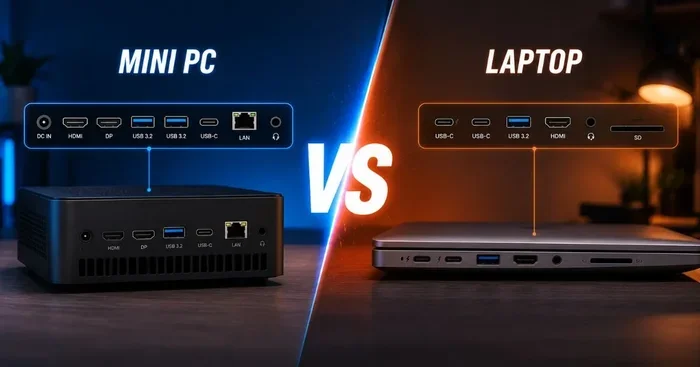
Choosing between a mini PC and a laptop can be tough. This ultimate guide breaks down the mini PC vs laptop debate with clear pros and cons. You will learn which device fits your budget, workflow, and lifestyle best.
When you need a new computer, the choices can feel overwhelming. A mini PC vs laptop comparison is one of the most common dilemmas buyers face today. Both devices pack real computing power into small packages, but they serve very different needs. This guide walks you through every angle so you can make a confident choice.
Maybe you want a compact setup for your home office. Or perhaps you need something you can carry to coffee shops and meetings. Whatever your situation, understanding the strengths and weaknesses of each option matters. Let us dive deep into the mini PC vs laptop debate and find out which one deserves a spot on your desk.
Key Takeaways
- Mini PCs offer powerful performance in a tiny footprint: They are ideal for desk setups and media centers.
- Laptops win on portability: You can take them anywhere and work untethered.
- Upgradability favors mini PCs in most cases: Many models let you swap RAM and storage easily.
- Budget varies widely for both: You can find options under $300 or go premium above $2000.
- Cooling and noise differ greatly: Mini PCs may run quieter than laptops under load.
- Your use case decides the winner: Remote workers, gamers, and students each have a clear best pick.
📑 Table of Contents
What Is a Mini PC?
A mini PC is a small desktop computer designed to take up minimal space. It plugs directly into your monitor and uses external peripherals like a keyboard and mouse. Despite its small size, a compact desktop can handle everyday tasks, creative work, and even light gaming with ease.
Mini PCs come in many shapes. Some look like small boxes that slide behind your monitor. Others resemble a pack of cards in thickness. Popular brands like Intel NUC, Beelink, and Minisforum have made these machines very popular. They appeal to people who want a clean, cable-free workspace.
Who Benefits Most from a Mini PC?
Home office workers love the tidy setup a mini PC provides. Digital media enthusiasts use them as home theater PCs because they connect easily to TVs. Students on a budget also appreciate the affordability of many mini PC models. If desk space is limited, a tiny form factor computer is a game changer.
What Is a Laptop?
A laptop is a portable personal computer with a built-in screen, keyboard, and trackpad. It runs on battery power, which gives you wireless freedom wherever you go. Laptops come in all sizes, from ultraportable 11-inch models to large 17-inch workstations.
Modern laptops are incredibly capable. A laptop with 16GB RAM can handle multitasking, video editing, and software development smoothly. Many professionals rely on laptops as their primary machine because they can work from anywhere without being tied to a desk.
Who Benefits Most from a Laptop?
Remote workers need laptops to attend virtual meetings from any location. College students carry them between classes and libraries. Freelancers and creatives value the ability to work on location. Anyone who moves around frequently will find a laptop indispensable.
Mini Pc Vs Laptop: Head-to-Head Comparison
Let us compare the two device types across the categories that matter most to buyers. This side-by-side look helps you see the real differences clearly.
Performance and Power
Both mini PCs and laptops now offer powerful processors like Intel Core i5 and i7 chips. A laptop with an i7 processor and 16GB RAM can match or exceed a mini PC in raw speed. However, laptops sometimes throttle performance to save battery, while mini PCs can sustain peak power on a wall outlet.
For demanding tasks like video rendering or 3D modeling, a laptop with an i7 processor and 16GB RAM touchscreen model often provides a better experience. The touchscreen adds versatility for design work and presentations.
Portability and Mobility
This is where laptops clearly take the lead. A laptop weighs between 2 and 5 pounds and fits in a backpack. You can work from a park, a plane, or a couch. A mini PC stays on your desk and connects to external devices.
If you need on-the-go computing, a laptop is the obvious choice. Mini PCs are not designed for travel, even though they are small.
Upgradability and Repair
One of the biggest advantages of a mini PC is that many models allow easy upgrades. You can often swap out RAM modules and add a larger SSD without special tools. A laptop with expandable RAM up to 64GB gives you room to grow, but many laptops have soldered memory that cannot be changed.
When something breaks, fixing a mini PC is usually simpler. You can replace individual parts like a power supply or storage drive. Laptops often require specialized repair services, especially for screen or motherboard issues.
Display and Peripherals
A laptop includes a built-in screen, which is convenient for travel. But a mini PC lets you choose any monitor size you want. You can connect a 27-inch 4K display for a stunning workspace experience.
Mini PCs also support multiple external displays easily. Many professionals use a mini PC with two or three monitors for a powerful multitasking setup. Laptops can do this too, but it often requires a docking station.
Price and Value
Mini PCs tend to be more affordable than equally spec’d laptops. You can find a capable mini PC for under $400 that handles office work and streaming beautifully. Laptops with similar specs often cost more because of the portable design and built-in display.
Budget-conscious buyers should compare options carefully. A cheap laptop with 16GB RAM can sometimes match a mini PC in price while adding portability.
Cooling and Noise
Mini PCs benefit from larger internal space for heat dissipation. Many models use passive cooling with no fans at all, making them completely silent. Laptops pack components tightly together, which can lead to fan noise under heavy loads.
If you need a quiet machine for calls or media consumption, a fanless mini PC is hard to beat. Laptops have improved a lot, but they still generate more noise during intensive tasks.
Pros and Cons of Each Device Type
Mini PC Pros and Cons
Pros:
- Very compact and saves desk space
- Often more affordable than laptops
- Easy to upgrade RAM and storage
- Can connect to multiple large monitors
- Silent operation with fanless designs
- Low power consumption saves on electricity
Cons:
- Not portable or mobile
- Requires external monitor, keyboard, and mouse
- No built-in battery for power outages
- Limited to desk-based use
- Graphics performance may lag behind gaming laptops
Laptop Pros and Cons
Pros:
- Fully portable and lightweight
- Built-in screen, keyboard, and trackpad
- Battery power for untethered work
- Great for travel and remote work
- Wide range of sizes and configurations
- All-in-one convenience
Cons:
- Harder to upgrade internal components
- Heavier and bulkier than mini PCs
- Screen size is fixed and limited
- Battery degrades over time
- Fan noise can be distracting
- Higher price for equivalent specs
Which One Should You Choose?
The right choice depends entirely on how you plan to use your computer. Let us break it down by use case.
Choose a Mini PC If…
You want a permanent, powerful setup for your home or office. Mini PCs shine for people who work at a desk all day and want a clean, organized space. They are also excellent for media streaming and as home servers. Gamers who already own a quality external monitor will appreciate the value a mini PC offers.
Another strong reason to pick a mini PC is longevity. Because you can upgrade parts like RAM and storage, a mini PC can stay relevant for many years. Check out guides on how to upgrade the RAM of a laptop to understand the difference in upgrade flexibility between devices.
Choose a Laptop If…
You need to work from multiple locations throughout the day. Students, business travelers, and remote workers all benefit from the freedom a laptop provides. A laptop with 16GB RAM gives you plenty of memory for multitasking on the go.
Laptops also make sense if you do not have a dedicated workspace at home. The built-in screen and keyboard mean you can set up anywhere, from a kitchen table to a park bench. For those who want both portability and power, a laptop with an i9 processor and 32GB RAM delivers desktop-class performance in a portable package.
Common Mistakes to Avoid
Many buyers make avoidable mistakes when choosing between these two device types. Here are the most common ones to watch out for.
- Ignoring upgradability needs: Buying a laptop with soldered RAM means you cannot upgrade later. Think about whether you might need more memory down the road.
- Overlooking peripheral costs: A mini PC requires a monitor, keyboard, and mouse. Factor in these costs when comparing prices.
- Choosing portability when you do not need it: If you never leave your desk, paying extra for a laptop’s portability is wasted money.
- Underestimating power needs: Check the processor and RAM specs carefully. A weak mini PC will frustrate you just as much as a weak laptop.
- Skipping the battery test for laptops: If battery life matters to you, read real-world reviews before buying. Some laptops last only 4 hours while others stretch to 12.
Expert Insights on the Mini PC vs Laptop Debate
Industry experts agree that both categories have matured significantly in recent years. Mini PCs now rival mid-range laptops in processing power while costing less. Laptops continue to push the envelope with thinner designs and longer battery life.
One trend worth watching is the rise of mini PCs with dedicated GPUs. These compact machines can now handle light gaming and AI workloads that were once reserved for larger systems. At the same time, laptops are becoming more versatile with 2-in-1 designs that fold into tablets.
The key takeaway is simple. Neither device is universally better. Your best choice depends on your specific workflow, budget, and how you like to work. Test both types in a store if possible. See which one feels right for your hands and your life.
Final Thoughts
The mini PC vs laptop comparison is not about finding a winner. It is about finding the right tool for your life. A mini PC delivers a powerful, clean desktop experience at a great price. A laptop gives you the freedom to work from anywhere in the world.
Think about your daily routine. Do you stay at a desk all day, or do you move around constantly? Your answer will point you toward the right device. Both options offer excellent value in 2024 and beyond, so you really cannot go wrong either way.
Take your time, compare the specs that matter to you, and pick the computer that fits. Whichever you choose, you will enjoy a powerful and reliable machine that meets your needs.
Frequently Asked Questions
Is a mini PC better than a laptop for gaming?
A mini PC can handle casual and mid-range gaming very well, especially models with dedicated graphics cards. However, a gaming laptop typically offers better performance because it has a larger chassis for cooling and a more powerful GPU. If you are a serious gamer who plays on the go, a laptop is the better choice.
Can I use a mini PC as my only computer?
Absolutely. Many people use a mini PC as their primary machine by connecting it to a monitor, keyboard, and mouse. Modern mini PCs with 16GB of RAM and an SSD provide smooth performance for browsing, office work, streaming, and video calls. They make excellent daily drivers.
Are mini PCs more reliable than laptops?
Mini PCs often have a longer lifespan because they run cooler and are easier to repair or upgrade. Laptops experience more wear and tear from being moved around frequently. However, build quality varies by brand, so choose a reputable manufacturer regardless of device type.
What is the best RAM for a mini PC?
Most mini PCs benefit from at least 8GB of RAM for everyday use. For multitasking and creative work, 16GB is the sweet spot. Check your specific mini PC model for supported RAM types and maximum capacity before purchasing upgrades.
Do mini PCs come with Wi-Fi and Bluetooth?
Yes, nearly all modern mini PCs include built-in Wi-Fi and Bluetooth connectivity. You can connect wireless peripherals, printers, and headsets without any extra adapters. Some models also support the latest Wi-Fi 6 standard for faster wireless speeds.
How long does a laptop battery typically last?
Battery life varies widely depending on the model and usage. Ultraportable laptops can last 10 to 15 hours on light tasks like browsing and document editing. Power laptops with high-performance processors may last only 4 to 6 hours under heavy workloads. Always check real-world battery tests before buying.