Ram For Programming How Much Memory You Really Need
Ram For Programming depends on your specific coding tasks and development environment. Most programmers need between 8GB and 16GB of memory to work comfortably. Heavy tasks like machine learning or architecture design demand even more RAM for smooth performance.
Ram For Programming is one of the most important decisions you will make for your development setup. Whether you are a beginner learning to code or a seasoned developer working on complex projects, the right amount of memory can make or break your productivity. Too little RAM and your laptop slows to a crawl. Too much and you waste money on specs you do not actually need.
This guide breaks down exactly how much memory you need for programming. We cover everything from basic coding tasks to heavy workloads like machine learning and software development. By the end, you will know exactly what to look for when choosing or upgrading your setup.
Key Takeaways
- 8GB RAM works for basic coding: Simple web development and scripting tasks run fine on 8GB.
- 16GB is the sweet spot for most programmers: It handles multitasking, IDEs, and light data work with ease.
- 32GB matters for specialized workloads: Machine learning, game dev, and architecture need serious memory.
- RAM type and speed matter too: DDR4 and DDR5 offer different performance levels for programming tasks.
- Upgrading RAM is affordable and easy: You can boost your laptop performance without buying a new machine.
- Check your workload first: Match your RAM to the tools and projects you actually use every day.
📑 Table of Contents
Why Ram Matters So Much For Programming
Your computer uses RAM as short-term memory while you work. Every time you open an IDE, run a browser with multiple tabs, or compile code, it all lives in RAM. When your memory fills up, your system starts swapping data to your hard drive, and everything slows down dramatically.
For programming, this means laggy code editors, slow build times, and frustrated debugging sessions. The right programming laptop memory keeps everything running smoothly so you can focus on writing code instead of waiting on your machine.
What Happens When You Do Not Have Enough Memory
Low memory causes real problems for developers. Your IDE might freeze when you open a large project. Your browser tabs crash because you kept too many documentation pages open. Even your operating system can start sluggish when memory gets tight.
Here are common signs you need more RAM:
- Your laptop fans spin up constantly
- Apps take a long time to switch between
- You experience frequent freezing or crashing
- Your code editor feels slow when typing
- Build and compile times drag on forever
If you notice these issues, your developer RAM requirements are probably not being met. The good news is that fixing this is usually straightforward and affordable.
How Much Ram Do You Actually Need
The answer depends on what kind of programming you do. A front-end web developer has very different memory needs than someone training neural networks. Let us break it down by workload type.
8GB RAM: Fine for Basic Coding Tasks
If you are just starting out with programming, 8GB can work well. Simple web development, learning Python or JavaScript, and writing small scripts all run fine on 8GB of memory. This is a solid starting point for beginners who want to dip their toes into coding.
However, 8GB has limits. If you keep many browser tabs open while coding, run a local server, and use an IDE simultaneously, you will start feeling the strain. For a student or hobbyist, 8GB is enough. For a professional working full-time, it may hold you back.
Want to know if 8GB is truly enough for your setup? Check out our detailed guide on Is 8GB of RAM Enough for a Laptop for more insights.
16GB RAM: The Sweet Spot for Most Programmers
For most developers, 16GB hits the perfect balance. It gives you enough headroom to run an IDE, a browser with documentation tabs, a local database, and a code server all at once. You will not experience slowdowns during your normal workflow.
16GB also handles more demanding tasks reasonably well. You can run virtual machines, test mobile apps, and work with moderate-sized datasets without breaking a sweat. This is why most professional developers recommend 16GB as the standard for programming workstations.
If you are unsure about your total memory needs, our article on How Much RAM Do You Need for a Laptop can help you figure out the right amount for your specific situation.
32GB RAM and Beyond: For Heavy Workloads
Some programming tasks demand serious memory. If you work in machine learning, game development, or architectural design, 32GB becomes essential. Training models, rendering 3D scenes, and running complex simulations all eat up RAM fast.
For example, machine learning tasks require significant memory to process datasets and train models efficiently. Our breakdown of Is 8GB RAM Enough for Machine Learning explains why developers in this field need much more than the baseline.
Similarly, architecture professionals need substantial memory to handle large design files and rendering software. You can read more about this in our piece on Is 16GB RAM Enough for Architecture.
Here is a quick comparison of RAM needs by programming field:
- Web Development: 8GB to 16GB
- Mobile App Development: 16GB
- Data Science and ML: 32GB or more
- Game Development: 32GB or more
- Architecture and CAD: 32GB or more
- General Software Development: 16GB
Types of Ram For Programming Laptops
Not all RAM is the same. The type of memory you choose affects both performance and compatibility. Understanding the basics helps you make the right decision for your programming laptop.
DDR4 vs DDR5 RAM
DDR4 has been the standard for several years and still serves most programmers well. It offers reliable performance at an affordable price. If you are building or upgrading a budget programming machine, DDR4 is a solid choice.
DDR5 is the newer generation and brings faster speeds and better efficiency. It handles heavy multitasking and large datasets more gracefully. However, DDR5 systems cost more, and the performance jump is not always noticeable for everyday coding tasks.
RAM Speed and Timing
RAM speed is measured in megahertz (MHz). Higher MHz means faster data transfer. For programming, the difference between 2666MHz and 3200MHz is noticeable but not dramatic. What matters more is having enough total capacity.
Our guide on 8GB DDR4 2666MHz RAM for Laptop covers how speed affects your programming experience in more detail.
Single Channel vs Dual Channel
Dual channel RAM setups offer better performance because they allow data to flow through two pathways instead of one. For programming, dual channel can improve responsiveness, especially when running multiple applications at once.
If your laptop supports it, always opt for two smaller RAM sticks instead of one large one. This simple change can boost your programming workflow without costing much more.
Can You Upgrade Ram For Programming
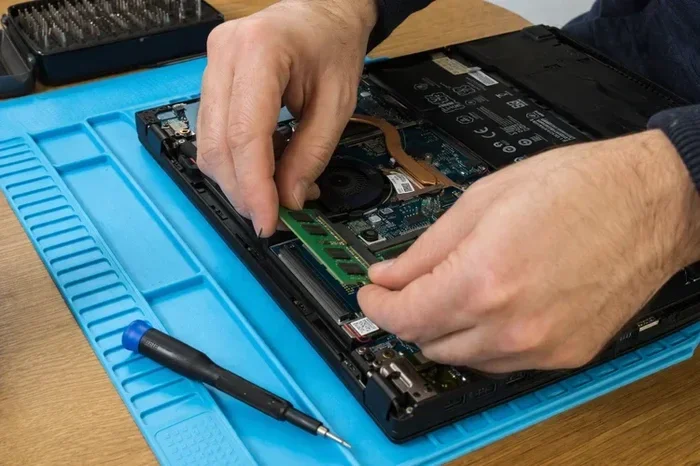
One of the best things about laptops is that many allow RAM upgrades. This means you can start with a lower amount and add more memory later as your needs grow. Upgrading is also much cheaper than buying a whole new machine.
How to Upgrade Your Laptop Ram
Upgrading RAM on a laptop is easier than most people think. Here is a simple process you can follow:
- Check your laptop manual to find compatible RAM type
- Determine how many memory slots your laptop has
- Purchase the right RAM sticks for your model
- Power off your laptop and unplug it
- Open the back panel and locate the RAM slots
- Remove old RAM (if needed) and insert new sticks
- Close the panel and power on your laptop
Need a more detailed walkthrough? Our RAM Upgrade for My Laptop guide walks you through each step with clear instructions and helpful tips.
When Upgrading Makes Sense
Upgrading RAM makes sense when your current memory is holding back your productivity. If you find yourself closing apps just to free up space, it is time for an upgrade. The cost of adding 8GB or 16GB of RAM is a fraction of what you would spend on a new laptop.
Before you buy, check what your laptop supports. Some older models have maximum memory limits. Others may have soldered RAM that cannot be upgraded at all. Always verify compatibility before making a purchase.
Common Mistakes Programmers Make With Ram
Many programmers make avoidable mistakes when it comes to memory. These pitfalls can waste money or lead to frustrating performance issues.
Buying More Ram Than You Need
It is tempting to go all out and buy 64GB of RAM. But if you only write basic scripts and browse documentation, that is overkill. Match your RAM to your actual workload and save your money for other upgrades.
Ignoring RAM Speed
Capacity is not the only factor. Slow RAM can bottleneck your system even if you have plenty of it. When possible, choose faster RAM speeds for a smoother programming experience.
Forgetting About Your Operating System
Your operating system uses a chunk of RAM just to run. Windows 11, for example, uses around 3-4GB on idle. That means your 16GB laptop only has about 12GB available for your actual programming work. Keep this in mind when planning your setup.
Best Practices for Optimizing Ram For Programming
Getting the right RAM is only half the battle. You can also optimize how you use memory to get the best performance from your programming setup.
Close Unnecessary Applications
Every open app uses RAM. Close browsers, music players, and other programs you are not actively using while you code. This frees up memory for your IDE and development tools.
Use Lightweight Alternatives
Some code editors are heavier than others. Visual Studio Code is popular but can use a lot of memory. Consider lighter alternatives like Sublime Text or Vim for simpler projects to save RAM.
Monitor Your Memory Usage
Keep an eye on how much memory you are using. Both Windows and Mac have built-in tools to check RAM usage. If you consistently see usage above 80%, it is time to consider an upgrade.
Add More Ram When Possible
If you find your current setup limiting your work, adding RAM is one of the best upgrades you can make. It is affordable, easy to install, and delivers immediate performance improvements. Our guide on How to Increase RAM for Laptop offers practical steps to get started.
Final Thoughts on Ram For Programming
Choosing the right Ram For Programming comes down to understanding your workload and matching it to the right amount of memory. For most programmers, 16GB provides the perfect balance of performance and value. Beginners can start with 8GB and upgrade as their needs grow. Heavy workloads in machine learning, game development, or architecture demand 32GB or more.
Remember that RAM is just one piece of the puzzle. A good processor, fast storage, and a quality display all contribute to a great programming setup. But memory is the foundation that everything else runs on. Get it right, and your coding experience will be smoother and more productive every single day.
Take some time to evaluate your current setup. Identify your bottlenecks and plan your upgrade accordingly. Whether you are buying a new laptop or upgrading your existing one, the right RAM will make a real difference in how you work and create.
Frequently Asked Questions
Is 8GB RAM enough for programming?
8GB RAM is enough for basic programming tasks like learning to code, writing simple scripts, and light web development. However, if you run multiple applications at once or work on larger projects, you may experience slowdowns. Most professional developers recommend at least 16GB for comfortable day-to-day coding.
How much RAM do I need for programming as a beginner?
As a beginner, 8GB to 16GB of RAM will serve you well. You will be running code editors, a browser for documentation, and maybe a local server. 8GB works if you keep your workflow simple. 16GB gives you more room to grow as you take on bigger projects and learn more advanced tools.
Does RAM speed matter for programming?
RAM speed has a modest impact on programming performance. Faster RAM helps with multitasking and loading large projects. However, capacity matters more than speed for most developers. Focus on getting enough total memory first, then consider speed as a secondary factor.
Can I upgrade RAM on my laptop for programming?
Many laptops allow RAM upgrades, but it depends on the model. Some laptops have soldered RAM that cannot be changed. Others have accessible slots where you can add or replace memory sticks. Check your laptop specifications before purchasing RAM to ensure compatibility.
Is 32GB RAM overkill for programming?
32GB is not overkill if you work with demanding tasks like machine learning, game development, or running virtual machines. For standard web or software development, 16GB is usually sufficient. Match your RAM to the specific demands of your programming projects.
What type of RAM is best for programming laptops?
DDR4 RAM is the most common and affordable option for programming laptops. DDR5 offers better performance but comes at a higher cost. For most programmers, DDR4 at 3200MHz provides excellent value and reliable performance for coding and development work.