Rog Crosshair X870e Hero Ram SSD Reviews and Guide
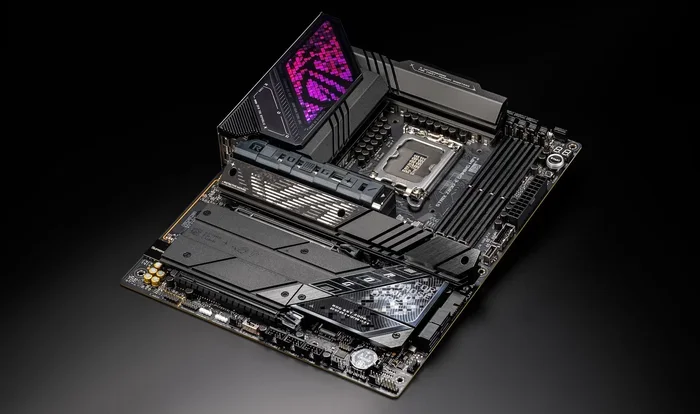
The Rog Crosshair X870e Hero is a premium AMD AM5 motherboard built for enthusiasts who want top-tier DDR5 RAM and PCIe 5.0 SSD support. It delivers blazing speeds, excellent VRM cooling, and a feature-rich BIOS that makes PC building a breeze for both beginners and pros.
If you are building a high-performance PC and wondering whether the Rog Crosshair X870e Hero is worth your money, you have come to the right place. This motherboard sits at the top of ASUS’s ROG lineup for the AM5 platform. It is designed for gamers, creators, and anyone who demands the best from their hardware. In this guide, we will break down everything you need to know about RAM compatibility, SSD support, and overall performance.
The Rog Crosshair X870e Hero is not just another motherboard. It is a carefully engineered platform that brings together cutting-edge memory support and blazing-fast storage options. Whether you are pairing it with an AMD Ryzen 7000 or Ryzen 9000 series processor, this board is built to handle demanding workloads. From DDR5 RAM speeds to PCIe 5.0 NVMe SSD performance, we will cover it all in detail.
Many builders struggle with choosing the right components for their system. RAM speed, capacity, and SSD type can make or break your experience. That is exactly why we created this guide. By the end, you will know exactly what to look for and how to get the most out of your Rog Crosshair X870e Hero setup.
Key Takeaways
- DDR5 RAM Support: The board handles high-speed DDR5 memory with ease, supporting overclocking for serious performance gains.
- PCIe 5.0 SSD Slots: Multiple M.2 slots let you install ultra-fast NVMe drives for lightning-quick load times.
- Robust VRM Design: The cooling system keeps temperatures low even under heavy workloads, ensuring stable performance.
- User-Friendly BIOS: ASUS ROG BIOS makes tweaking settings simple, whether you are a novice or an experienced builder.
- Premium Build Quality: Durable components and a sleek design make this board a long-lasting investment for your system.
📑 Table of Contents
What Is the Rog Crosshair X870E Hero?
The Rog Crosshair X870e Hero is a flagship motherboard from ASUS designed for the AMD AM5 socket. It uses the X870E chipset, which is one of the most advanced options available for AMD processors. This board is part of the Republic of Gamers (ROG) family, known for premium components and top-tier performance.
Key Features at a Glance
- Socket: AM5 for AMD Ryzen 7000 and 9000 series processors
- Chipset: X870E for maximum bandwidth and connectivity
- RAM Support: DDR5 with multiple slots for high-capacity configurations
- Storage: Multiple M.2 slots with PCIe 5.0 support
- Networking: Wi-Fi 7 and 2.5G Ethernet for fast connectivity
- Audio: Premium integrated audio with high signal-to-noise ratio
This motherboard is built for people who do not want to compromise. The Rog Crosshair X870e Hero offers a perfect balance of features, performance, and aesthetics. It looks great in any build and performs even better under pressure.
RAM Compatibility and Performance
One of the most important aspects of any motherboard is its RAM support. The Rog Crosshair X870e Hero excels in this area. It supports DDR5 memory, which is the current standard for high-performance computing. DDR5 offers faster speeds, better power efficiency, and higher bandwidth compared to older DDR4 modules.
DDR5 RAM Support Details
The board supports DDR5 RAM across multiple slots, allowing you to configure your system for dual-channel performance. Dual-channel memory setups can significantly improve bandwidth, which helps in gaming, video editing, and multitasking. The Rog Crosshair X870e Hero supports memory overclocking, so you can push your RAM beyond its default speeds for even better performance.
When choosing RAM for this board, look for modules rated for high speeds, such as 6000 MHz or 7200 MHz. These speeds take full advantage of the AM5 platform’s capabilities. Brands like Corsair, G.Skill, and Kingston offer excellent DDR5 kits that work seamlessly with this motherboard.
For those building a powerful system, you might want to check out options like a 16GB RAM and 1TB SSD configuration or explore 32GB RAM with 1TB SSD setups for inspiration on balanced system builds. While these are laptop configurations, the principles of matching RAM speed and storage capacity apply to desktop builds as well.
Best RAM Configurations for the X870E Hero
Here are some recommended RAM configurations for the Rog Crosshair X870e Hero:
- Basic Setup: 2 x 16GB DDR5-5600 MHz (32GB total) — Great for everyday use and gaming
- Enthusiast Setup: 2 x 32GB DDR5-6000 MHz (64GB total) — Ideal for content creation and heavy multitasking
- Extreme Setup: 2 x 32GB DDR5-7200 MHz (64GB total) — Maximum performance for competitive gaming and rendering
Each configuration offers a different balance of capacity and speed. For most users, the 32GB DDR5-6000 MHz setup hits the sweet spot between performance and value. If you run demanding applications or want to future-proof your system, consider the 64GB option.
SSD Support and Storage Options
The Rog Crosshair X870e Hero is a powerhouse when it comes to storage. It features multiple M.2 slots that support PCIe 5.0 NVMe SSDs. These drives offer read speeds that can exceed 10,000 MB/s, making them incredibly fast for booting your operating system, loading games, and transferring large files.
PCIe 5.0 NVMe SSD Speeds
PCIe 5.0 is the latest standard for SSD connectivity, and it doubles the bandwidth of PCIe 4.0. This means your storage devices can transfer data at unprecedented speeds. With a PCIe 5.0 NVMe SSD installed in the Rog Crosshair X870e Hero, you will experience near-instant boot times and lightning-fast game loading.
For example, a 1TB SSD with 16GB RAM configuration on a similar platform demonstrates how fast modern storage can be. On the desktop X870E Hero, these speeds are even more impressive because of the full PCIe 5.0 bandwidth available.
M.2 Slot Layout and Configuration
The Rog Crosshair X870e Hero provides multiple M.2 slots, giving you flexibility to install several SSDs. This is perfect for users who want a fast boot drive and additional storage for games and media. Here is how the slots are typically arranged:
- M.2 Slot 1: Connected directly to the CPU for maximum PCIe 5.0 bandwidth
- M.2 Slot 2: Connected via the chipset for additional storage expansion
- M.2 Slot 3: Optional slot for extra storage, depending on the configuration
When selecting an SSD, look for models that support PCIe 5.0 and NVMe protocol. Popular choices include the Samsung 990 PRO, WD Black SN850X, and Crucial T700. These drives pair perfectly with the X870E chipset and deliver outstanding real-world performance.
Build Quality and Design
The Rog Crosshair X870e Hero feels premium from the moment you unbox it. ASUS has always been known for its attention to detail, and this board is no exception. The PCB is sturdy, the components are high-quality, and the heatsinks are designed to keep everything cool under load.
VRM and Cooling System
The voltage regulator module (VRM) on this motherboard is robust. It uses premium power stages that deliver clean, stable power to your processor. This is especially important when you are running high-end AMD Ryzen CPUs or pushing your system through heavy workloads like rendering or compiling code.
The cooling system includes large heatsinks spread across the VRM and M.2 slots. These heatsinks draw heat away from critical components and keep temperatures in check. Even during extended gaming sessions or stress tests, the Rog Crosshair X870e Hero stays cool and stable.
BIOS and Software Features
ASUS ROG BIOS is one of the best in the business. It is intuitive, visually appealing, and packed with features. Whether you want to adjust memory overclocking settings, configure RAID arrays, or monitor system temperatures, the BIOS makes it easy. The BIOS also supports Q-Flash, which lets you update the firmware without installing a CPU, saving you time and effort.
The Armoury Crate software adds another layer of control. You can manage RGB lighting, fan speeds, and system profiles from a single application. This makes customizing your build simple and fun.
Who Should Buy the Rog Crosshair X870E Hero?
The Rog Crosshair X870e Hero is not for everyone. It is a premium motherboard with a premium price tag. However, for the right user, it is an excellent investment. Here are some ideal use cases:
- Gamers: If you want the best performance from your AMD Ryzen processor and fast storage, this board delivers
- Content Creators: Video editors and 3D artists benefit from the high RAM capacity and fast SSD speeds
- PC Enthusiasts: If you love building premium systems and want top-tier components, this board fits the bill
- Future-Proofers: The AM5 platform is AMD’s long-term socket, meaning this board will support future processor generations
If you are on a tighter budget, there are other X870 boards available that offer fewer features at a lower price. But if you want the best of the best, the Rog Crosshair X870e Hero is hard to beat.
Common Mistakes to Avoid
When building a system around the Rog Crosshair X870e Hero, there are a few common mistakes you should watch out for:
- Skipping BIOS Updates: Always update your BIOS before installing a new processor. This ensures compatibility and stability from day one.
- Mismatching RAM Speeds: If you mix RAM sticks with different speeds, your system will default to the slowest speed. Always use matched kits.
- Ignoring Thermal Limits: Even with good cooling, pushing your RAM and CPU to extreme overclocks can cause instability. Test stability after each change.
- Not Using the Right SSD: Make sure your SSD supports PCIe 5.0 if you want to take full advantage of the board’s storage bandwidth.
Avoiding these simple mistakes will save you headaches and help you get the most out of your Rog Crosshair X870e Hero build.
Final Thoughts
The Rog Crosshair X870e Hero is an outstanding motherboard that delivers on every front. Its DDR5 RAM support, PCIe 5.0 SSD compatibility, and premium build quality make it a top choice for serious PC builders. Whether you are a gamer, a creator, or an enthusiast, this board gives you the tools you need to build a powerful and reliable system.
If you are ready to start your build, consider pairing the Rog Crosshair X870e Hero with a high-speed DDR5 RAM kit and a PCIe 5.0 NVMe SSD. You will be amazed at how fast and responsive your system feels. This motherboard is an investment that will serve you well for years to come, especially as AMD continues to support the AM5 platform with future processor generations.
Take your time, choose the right components, and enjoy the process of building something great. The Rog Crosshair X870e Hero is ready to be the foundation of your next powerful PC.
Frequently Asked Questions
What RAM speeds does the Rog Crosshair X870E Hero support?
The Rog Crosshair X870e Hero supports DDR5 RAM at speeds up to 8000 MHz and beyond when overclocked. The exact speed depends on the processor you use and the BIOS settings you configure. Always check the QVL (Qualified Vendor List) on the ASUS website for tested and compatible RAM kits.
Can I use PCIe 4.0 SSDs with this motherboard?
Yes, the Rog Crosshair X870e Hero is backward compatible with PCIe 4.0 NVMe SSDs. However, you will not get the full speed benefits of PCIe 5.0 drives. If you want the fastest possible storage, choose a PCIe 5.0 NVMe SSD for the best results.
How many M.2 slots does the X870E Hero have?
The Rog Crosshair X870e Hero features three M.2 slots. One slot connects directly to the CPU for PCIe 5.0 speeds, while the other slots connect through the chipset. This layout gives you flexibility to mix and match storage devices based on your needs.
Is the Rog Crosshair X870E Hero worth the price?
If you are building a high-end system with an AMD Ryzen 7000 or 9000 series processor, the Rog Crosshair X870e Hero is absolutely worth it. The premium build quality, excellent VRM cooling, and top-tier features justify the cost for enthusiasts and professionals who need the best performance.
Does this motherboard support memory overclocking?
Yes, the Rog Crosshair X870e Hero fully supports DDR5 memory overclocking. The ROG BIOS makes it easy to adjust memory frequencies, timings, and voltages. Just be sure to test stability after each overclock to ensure your system runs reliably.
What processor works best with the Rog Crosshair X870E Hero?
The Rog Crosshair X870e Hero works best with AMD Ryzen 7000 and Ryzen 9000 series processors. These processors are designed for the AM5 socket and take full advantage of the board’s DDR5 and PCIe 5.0 capabilities. Popular choices include the Ryzen 7 7800X3D and Ryzen 9 9950X.
=== CONCLUSION ===
The Rog Crosshair X870e Hero stands out as one of the best motherboards available for the AM5 platform. Its combination of DDR5 RAM support, PCIe 5.0 SSD compatibility, and premium build quality makes it a top pick for anyone serious about their PC build. Whether you are chasing the highest frame rates in games or rendering complex 3D scenes, this motherboard delivers the performance you need. Choose the right RAM and SSD, update your BIOS, and enjoy a system that is fast, reliable, and built to last.