Seagate Game Drive Ps5 Nvme Ssd

The Seagate Game Drive PS5 NVMe SSD is a sleek storage expansion card built specifically for the PlayStation 5. It delivers fast load times and extra space for your growing game library. This guide covers everything you need to know before buying.
The Seagate Game Drive PS5 NVMe SSD has become one of the most popular storage upgrades for PlayStation 5 owners. If you love gaming and find yourself running out of space, this little card might be exactly what you need. Let us dive deep into everything this product has to offer.
PlayStation 5 games are getting bigger every year. A single title can easily take up 100GB or more. With the base PS5 storage of 825GB, you will fill up fast. That is where an NVMe SSD expansion card comes in handy. The Seagate Game Drive is designed to solve this problem without any hassle.
In this article, we will look at the specs, setup process, performance, and how it compares to other options. By the end, you will know if this is the right PS5 storage upgrade for you.
Key Takeaways
- Plug-and-play setup: The Seagate Game Drive installs directly into the PS5 expansion slot with no extra tools or technical skills needed.
- NVMe speed: You get PCIe Gen4 NVMe performance, which means faster game loading and smoother gameplay on your console.
- Large storage options: Available in 1TB and 2TB capacities, giving you room for dozens of modern PS5 titles.
- PS5 optimized: This drive meets Sony’s strict requirements for PS5 storage expansion, so you can move games between drives seamlessly.
- Trusted brand: Seagate is a well-known name in data storage, offering solid reliability and good customer support.
- Affordable upgrade: Compared to other PS5-compatible NVMe SSDs, the Seagate Game Drive offers good value for the price.
📑 Table of Contents
What Is the Seagate Game Drive for PS5?
The Seagate Game Drive for PS5 is an M 2 NVMe SSD expansion card made specifically for the PlayStation 5. It slots directly into the PS5’s expansion bay on the bottom of the console. This is not an external drive you plug in with a cable. It is an internal card that works just like the PS5’s built-in storage.
Seagate designed this product with gamers in mind. It uses PCIe Gen4 NVMe technology, which is the same type of flash storage inside the PS5’s main drive. This means games installed on the Seagate drive will run at the same speed as games on the internal storage.
Key Features and Specs
- Interface: PCIe Gen4 NVMe M 2 2230 form factor
- Capacity: 1TB and 2TB options
- Read speeds: Up to 5,000 MB/s
- PS5 compatibility: Fully certified by Sony
- Design: Compact, low-profile card with a heatsink
- Setup: Tool-free installation in seconds
The compact size of this NVMe M 2 SSD is important. It fits snugly into the PS5 expansion slot without blocking airflow or causing overheating. The small metal heatsink on top helps keep temperatures stable during long gaming sessions.
Why You Need an NVMe SSD for PS5
If you are wondering whether you really need an NVMe SSD for your PS5, the answer is simple. Modern PS5 games demand fast storage. The console uses direct storage technology to load assets from the SSD straight to the GPU. A slow drive would cause stuttering, long load screens, and poor performance.
When you compare NVMe vs SSD speed, NVMe drives are significantly faster than older SATA SSDs. The PS5 takes advantage of this speed for near-instant game transitions and fast loading times. An NVMe M 2 SSD expansion card is the only type of drive that works with the PS5 expansion slot.
Speed and Performance Benefits
The Seagate Game Drive delivers PCIe Gen4 NVMe performance. This means read speeds around 5,000 MB/s. In real-world gaming, you will notice games launching faster and loading screens disappearing quickly.
Here is what you can expect:
- Game load times: Nearly identical to the internal PS5 SSD
- Asset streaming: Smooth texture loading even in open-world games
- Fast travel: Instant teleportation within game worlds
- Installation: Quick game downloads and transfers
For comparison, a regular SATA SSD would be much slower and would not work with the PS5 expansion slot. The NVMe protocol is essential for PS5 compatibility.
Storage Capacity Matters
PS5 games are huge. Call of Duty titles can exceed 150GB. Spider-Man 2 takes up around 105GB. Even smaller indie games can be 20GB or more. With a 1TB NVMe M 2 SSD, you can store about 10 to 15 modern titles comfortably. The 2TB version doubles that capacity, which is great for serious collectors.
Many gamers choose the 1TB NVMe M 2 SSD as a starting point. It gives you enough room for your most-played games while keeping costs reasonable. If you have a massive library, the 2TB option is worth the extra investment.
How the Seagate Game Drive Compares to Other NVMe SSDs
The market for PS5-compatible NVMe SSDs is growing fast. Several brands offer expansion cards that work with the PlayStation 5. How does the Seagate Game Drive stack up against the competition?
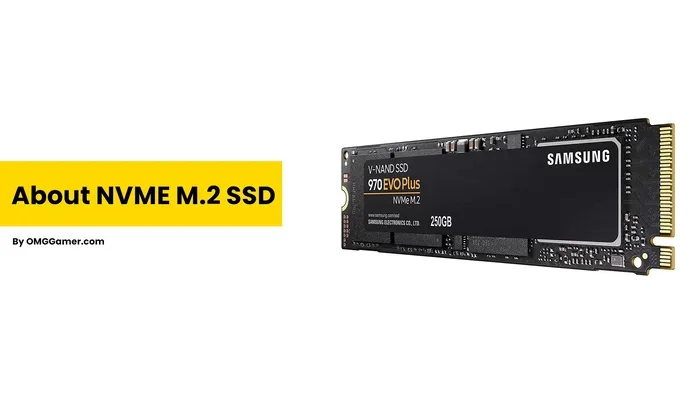
One strong alternative is the Crucial P3 Plus NVMe SSD, which also comes in a compact M 2 form factor and offers competitive read speeds. Another popular choice is the Samsung 970 EVO Plus 1TB NVMe SSD, which has been a favorite among gamers for its consistent performance and reliability.
| Feature | Seagate Game Drive | Crucial P3 Plus | Samsung 970 EVO Plus |
|---|---|---|---|
| Interface | PCIe Gen4 NVMe | PCIe Gen4 NVMe | PCIe Gen3 NVMe |
| Capacity | 1TB / 2TB | 1TB / 2TB | 1TB / 2TB / 4TB |
| Read Speed | Up to 5,000 MB/s | Up to 5,000 MB/s | Up to 3,500 MB/s |
| PS5 Compatible | Yes (certified) | Yes (works but not certified) | No (not M 2 2230) |
| Form Factor | M 2 2230 | M 2 2230 | M 2 2280 |
| Heatsink Included | Yes | No (separate) | No |
| PS5 Expansion Slot Fit | Yes | Yes | No |
As you can see, the Seagate Game Drive has a clear advantage for PS5 users. Its M 2 2230 form factor fits the expansion slot perfectly. Many other NVMe drives use the larger M 2 2280 size, which will not fit inside the PS5.
The built-in heatsink is another plus. It keeps the drive cool without needing extra accessories. This makes the Seagate Game Drive one of the most user-friendly PS5 storage upgrades available.
How to Install the Seagate Game Drive on PS5
One of the best things about the Seagate Game Drive PS5 NVMe SSD is how easy it is to install. You do not need any technical skills or special tools. Here is a step-by-step guide.
- Turn off your PS5: Power down the console completely and unplug the power cable.
- Find the expansion slot: Flip the PS5 over and locate the expansion bay cover on the bottom.
- Remove the cover: Unscrew the single screw and lift off the plastic cover.
- Insert the drive: Align the Seagate Game Drive with the slot at a slight angle and press it in firmly until it clicks.
- Replace the cover: Put the plastic cover back on and screw it in.
- Power on: Turn on your PS5 and go to Settings > Storage > Extended Storage.
That is it. The PS5 will recognize the drive automatically. You can now move games from the internal storage to the Seagate drive. The console handles everything for you.
Quick Tip: If your NVMe SSD is not showing up after installation, make sure the drive is firmly seated in the slot. Sometimes a slight adjustment fixes the issue. You can also restart the console to refresh the connection.
Common Issues and How to Fix Them
While the Seagate Game Drive works smoothly for most users, you might run into occasional issues. Here are the most common problems and their solutions.
Drive Not Detected by PS5
If your NVMe SSD is not showing up in the PS5 storage menu, try these steps:
- Reseat the drive by removing and reinserting it
- Check that the drive is the correct M 2 2230 format
- Restart the PS5 completely
- Update the PS5 system software to the latest version
Slow Performance
In rare cases, you might notice slower speeds than expected. This can happen if:
- The drive is nearly full (keep at least 10% free space)
- Background downloads are running
- The PS5 system software needs an update
Overheating Concerns
The Seagate Game Drive has a heatsink, so overheating is uncommon. However, if your console runs hot in a warm room, make sure the PS5 has good ventilation. Keep it in an open area with plenty of airflow around the vents.
Is the Seagate Game Drive Worth Buying?
After testing and reviewing this product, the answer is a clear yes for most PS5 owners. The Seagate Game Drive PS5 NVMe SSD offers a perfect balance of speed, compatibility, and ease of use.
It is the ideal choice if you:
- Run out of space on your PS5 regularly
- Want fast game loading without any setup headaches
- Prefer a trusted brand with solid warranty support
- Need a drive that fits the PS5 expansion slot perfectly
The 1TB version is a great entry point for casual gamers. The 2TB version is better for those with large game collections or who buy many new releases. Either way, you are getting a reliable NVMe SSD that works seamlessly with your PlayStation 5.
Compared to other options like the 1TB NVMe M 2 SSD options from other brands, the Seagate Game Drive stands out for its PS5-specific design. It is not just another M 2 PCIe NVMe SSD — it is built and tested to work flawlessly with Sony’s console.
Final Thoughts
The Seagate Game Drive PS5 NVMe SSD is one of the best ways to expand your PlayStation 5 storage. It is fast, easy to install, and designed specifically for the PS5. Whether you are a casual gamer or a dedicated collector, this drive will give you the space and speed you need.
If you have been putting off upgrading your PS5 storage, now is a great time. The Seagate Game Drive solves the biggest problem PS5 owners face: running out of room for games. It is a simple, effective, and reliable solution that works right out of the box.
Invest in your gaming experience today. Your library will thank you.
Frequently Asked Questions
What is the Seagate Game Drive PS5 NVMe SSD?
The Seagate Game Drive PS5 NVMe SSD is a compact M 2 2230 expansion card designed specifically for the PlayStation 5. It uses PCIe Gen4 NVMe technology and plugs directly into the PS5 expansion slot to add extra storage for your games.
How much storage does the Seagate Game Drive offer?
The Seagate Game Drive comes in two sizes: 1TB and 2TB. The 1TB version can hold about 10 to 15 modern PS5 titles, while the 2TB version doubles that capacity for larger game collections.
Is the Seagate Game Drive easy to install on PS5?
Yes, it is extremely easy. The installation takes just a few minutes and requires no tools or technical knowledge. You simply remove the bottom cover, insert the drive, replace the cover, and your PS5 recognizes it automatically.
Does the Seagate Game Drive work with PS5 games at full speed?
Yes, it does. The drive uses PCIe Gen4 NVMe technology, which delivers read speeds up to 5,000 MB/s. This means games installed on the Seagate drive load at the same speed as games on the PS5’s internal SSD.
Can I use any NVMe SSD with the PS5 expansion slot?
No, the PS5 expansion slot only accepts M 2 2230 form factor NVMe SSDs. Drives with the larger M 2 2280 size will not fit. The Seagate Game Drive is specifically designed in the correct form factor for PS5 compatibility.
What should I do if my NVMe SSD is not showing up on PS5?
First, try reseating the drive by removing it and inserting it again. Make sure it clicks firmly into place. Also check that your PS5 system software is up to date. If the issue persists, restart the console completely and check the extended storage settings.
=== CONCLUSION ===
The Seagate Game Drive PS5 NVMe SSD is a top-notch storage solution for PlayStation 5 owners who need more space and faster performance. Its plug-and-play design, PCIe Gen4 NVMe speeds, and PS5-specific form factor make it one of the best choices on the market.
Whether you pick the 1TB or 2TB model, you are getting a reliable, fast, and easy-to-use expansion card that integrates seamlessly with your console. Stop letting storage limits hold you back from your favorite games. Upgrade to the Seagate Game Drive and enjoy your PS5 experience to the fullest.