Should I Buy a Usb 2 0 or 3 0 Flash Drive
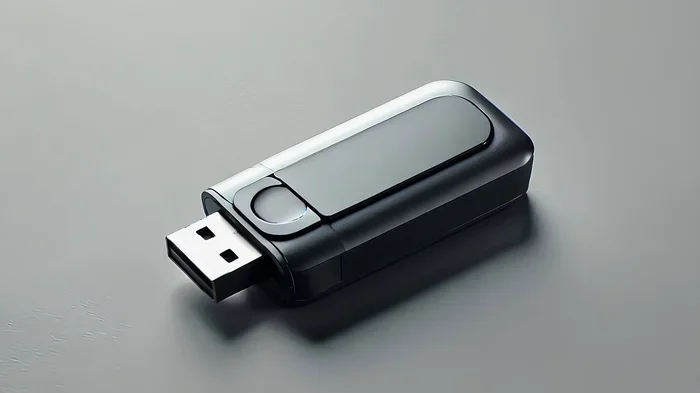
Choosing between a USB 2.0 and USB 3.0 flash drive comes down to speed, budget, and what you plan to do with it. USB 3.0 drives offer significantly faster data transfer rates, making them ideal for large files and everyday use. USB 2.0 flash drives still work fine for basic tasks like storing documents or small media files. This guide breaks down everything you need to know so you can make the right choice without wasting money.
You are standing in front of a shelf full of flash drives. One says USB 2.0. The other says USB 3.0. You want to save your photos, move your files around, and maybe even back up your laptop. But which one do you actually need? This is a question many people ask, and the answer is simpler than you think.
The difference between USB 2.0 and USB 3.0 flash drives comes down to speed, price, and what you plan to use them for. USB 3.0 is the newer standard and offers much faster data transfer. USB 2.0 has been around for a long time and still gets the job done for simple tasks. In this article, we will walk you through everything you need to know. By the end, you will feel confident about your choice.
Key Takeaways
- USB 3.0 is much faster: Transfer speeds jump from about 480 Mbps on USB 2.0 to 5 Gbps on USB 3.0, a huge difference for large files.
- USB 2.0 is still useful: It works well for small files, basic storage, and older devices that lack USB 3.0 ports.
- Backward compatibility matters: USB 3.0 drives work in USB 2.0 ports, but you lose the speed advantage.
- Price gap is small: USB 3.0 drives are only slightly more expensive now, making them the better long-term value.
- Check your device ports first: Knowing what ports your computer or laptop has helps you decide which drive to buy.
- Future-proof your setup: USB 3.0 is the standard today, so investing in it now saves you from upgrading later.
📑 Table of Contents
- What Is a USB Flash Drive?
- USB 2.0 vs USB 3.0: The Speed Difference
- When Should You Buy a USB 2.0 Flash Drive?
- When Should You Buy a USB 3.0 Flash Drive?
- Price Comparison: USB 2.0 vs USB 3.0
- Compatibility and Backward Support
- Which One Should You Choose?
- Tips for Getting the Most Out of Your Flash Drive
- Final Thoughts
What Is a USB Flash Drive?
A USB flash drive is a small portable storage device. You plug it into a computer’s USB port. It lets you store, carry, and transfer files quickly. These drives come in many sizes, from a few gigabytes to over 1 terabyte. They are also called thumb drives, jump drives, or memory sticks.
Flash drives use flash memory to store data. This means there are no moving parts. They are durable, quiet, and very portable. You can slip one into your pocket or hang it on a keychain. That is what makes them so popular for everyday use.
How Do Flash Drives Connect to Computers?
Flash drives connect through a USB connector. The USB port on your computer or laptop is the socket you plug into. Over the years, USB technology has improved. Each new version brought faster speeds and better power delivery. Today, the two most common versions you will see are USB 2.0 and USB 3.0.
Here is a quick look at how they differ:
- USB 2.0: Released in the year 2000. It was a big step up from older ports. It became the standard for many devices for over a decade.
- USB 3.0: Released in 2008. It brought a massive speed boost. It is now the most common standard on modern computers and laptops.
USB 2.0 vs USB 3.0: The Speed Difference
This is the biggest difference between the two types. Speed is where USB 3.0 really shines. When you are moving large files like videos or backups, speed matters a lot.
USB 2.0 Transfer Speeds
USB 2.0 has a maximum theoretical speed of about 480 Mbps. In real life, you will see speeds around 30 to 40 megabytes per second. That is fine for small files. But if you try to move a 5-gigabyte video file, it will take a while. You might be waiting several minutes.
Here are some rough estimates for USB 2.0:
- A 1-gigabyte file takes about 30 to 40 seconds.
- A 10-gigabyte file takes around 5 minutes.
- A 64-gigabyte file could take over 30 minutes.
USB 3.0 Transfer Speeds
USB 3.0 has a maximum theoretical speed of 5 Gbps. Real-world speeds typically range from 100 to 150 megabytes per second. That is a huge jump. You can move large files in seconds instead of minutes.
Here is a quick comparison:
- A 1-gigabyte file takes about 7 to 10 seconds.
- A 10-gigabyte file takes around 1 minute.
- A 64-gigabyte file takes under 7 minutes.
As you can see, the speed difference is massive. If you work with large files regularly, USB 3.0 is the clear winner.
When Should You Buy a USB 2.0 Flash Drive?
USB 2.0 is not useless. In fact, it still has a place in many situations. Here are some cases where a USB 2.0 flash drive makes sense:
You Only Need to Store Small Files
If you are just saving documents, spreadsheets, or small images, USB 2.0 works perfectly fine. The transfer time is short for small files. You will not notice the speed difference at all.
Your Device Only Has USB 2.0 Ports
Some older computers and laptops only have USB 2.0 ports. In this case, buying a USB 3.0 drive will not help. It will work, but it will run at USB 2.0 speeds. So a USB 2.0 drive is the right choice here.
You Want a Budget Option
USB 2.0 drives are often cheaper. If you just need a basic drive for occasional use, the savings can be worth it. You can find small USB 2.0 drives for just a few dollars.
You Are Using It for Simple Backup
If you are backing up text files or small projects, USB 2.0 gets the job done. The slower speed does not matter much for simple backup tasks.
When Should You Buy a USB 3.0 Flash Drive?
For most people today, a USB 3.0 flash drive is the better choice. Here are the situations where it really pays off:
You Work with Large Files
If you deal with videos, high-resolution photos, or large project files, USB 3.0 saves you a ton of time. The faster transfer speed means less waiting and more productivity.
You Use a Modern Computer
Most modern laptops and desktops come with USB 3.0 ports. If your device has USB 3.0, a USB 3.0 flash drive will run at full speed. You will get the most out of your purchase.
You Want to Future-Proof Your Setup
USB 3.0 is the current standard. Even if your device has USB 2.0 ports now, upgrading later is easy. Buying a USB 3.0 drive now means you are ready for whatever comes next.
You Want to Use External Storage Regularly
If you plan to use your flash drive often, the speed difference adds up. Over time, USB 3.0 saves you many hours of waiting. It is a small investment that pays off quickly.
Some people even use their flash drive with an M.2 NVMe SSD to USB 3.1 adapter for even faster external storage. This is a great option if you want maximum speed on the go.
Price Comparison: USB 2.0 vs USB 3.0
One of the most common concerns is price. People worry that USB 3.0 drives cost a lot more. The truth is, the gap has narrowed a lot over the years.
How Much Do USB 2.0 Drives Cost?
A basic USB 2.0 flash drive with 32 or 64 gigabytes usually costs between $5 and $15. These are great for simple storage and everyday use. They are affordable and easy to find.
How Much Do USB 3.0 Drives Cost?
A USB 3.0 flash drive with the same capacity typically costs between $8 and $20. The price difference is small, usually just a few dollars more. Given the speed improvement, this extra cost is well worth it.
Is the Price Difference Worth It?
Absolutely. For just a few extra dollars, you get a much faster drive. Over time, the time you save adds up. It is one of those small upgrades that makes a big difference in daily use.
Compatibility and Backward Support
One great thing about USB 3.0 is backward compatibility. This means a USB 3.0 flash drive works in a USB 2.0 port. You can plug it in and use it without any problems. The only catch is that the speed will drop to USB 2.0 levels.
Here are a few things to keep in mind:
- USB 3.0 drives work in USB 2.0 ports. But you will not get the faster speeds.
- USB 2.0 drives work in USB 3.0 ports. They will run at USB 2.0 speeds, even though the port is faster.
- Check your device ports before buying. If your computer has USB 3.0, you can take full advantage of a USB 3.0 drive.
- Some older devices may not recognize USB 3.0 drives properly. This is rare, but it is worth checking your device manual.
If you are looking for a versatile external storage solution, some users pair a USB flash drive with an M.2 NVMe SSD enclosure adapter USB 3.1 for even more flexibility and speed. This setup is perfect for professionals who need fast, reliable portable storage.
Which One Should You Choose?
So, which one is right for you? Let us break it down by use case.
Choose USB 2.0 If:
- You only need to store small files like documents and photos.
- Your computer or laptop only has USB 2.0 ports.
- You are on a tight budget and need the cheapest option.
- You use the drive rarely and only for simple tasks.
Choose USB 3.0 If:
- You work with large files like videos or high-resolution images.
- Your device has USB 3.0 ports.
- You want faster transfer speeds and less waiting time.
- You plan to use the drive regularly for work or school.
- You want to future-proof your storage setup.
For most people, a USB 3.0 flash drive is the smarter buy. The speed difference is huge, and the price gap is small. You get more value for your money. Even if you only use the drive occasionally, the faster speeds make the experience much better.
Some users also explore options like M.2 NVMe SSD USB solutions for even more storage and speed. These are great if you need a lot of space and fast transfer rates in one device.
Tips for Getting the Most Out of Your Flash Drive
No matter which type you choose, here are some tips to keep your flash drive working well:
- Always safely eject your drive. Do not just pull it out. This can corrupt your files.
- Keep your drive dry and clean. Moisture can damage the internal components.
- Do not store files you care about only on a flash drive. Use it as a backup, not your only copy.
- Check your drive’s speed occasionally. If it slows down a lot, it might be time for a replacement.
- Format your drive regularly. This keeps it running smoothly and frees up space.
These simple habits will help your flash drive last longer and perform better. Whether you have a USB 2.0 or USB 3.0 drive, taking care of it makes a big difference.
Final Thoughts
The decision between a USB 2.0 and USB 3.0 flash drive is easier than it seems. USB 3.0 offers much faster speeds, and the price difference is small. USB 2.0 still works fine for basic tasks and older devices.
If you are buying a new flash drive today, go with USB 3.0. It is the better choice for almost everyone. You get faster speeds, better future-proofing, and a better overall experience. The few extra dollars you spend are worth every penny.
Think about how you will use your drive. If you just need to carry a few documents, USB 2.0 works. But if you want speed and reliability, USB 3.0 is the way to go. Make the smart choice today, and you will not regret it tomorrow.
Frequently Asked Questions
Is a USB 3.0 flash drive backward compatible?
Yes, it is. A USB 3.0 flash drive works in a USB 2.0 port. However, the speed will be limited to USB 2.0 levels. So you will not get the faster transfer speeds in an older port.
Can I use a USB 2.0 flash drive in a USB 3.0 port?
You can. The drive will work, but it will run at USB 2.0 speeds. The port cannot make the drive faster than its own standard allows. It is like putting a slow car on a highway.
How much faster is USB 3.0 than USB 2.0?
USB 3.0 is about 10 times faster than USB 2.0 in real-world use. USB 2.0 maxes out around 480 Mbps, while USB 3.0 can reach up to 5 Gbps. This means much shorter wait times when transferring files.
Are USB 2.0 flash drives still worth buying?
They can be. If you have an older device with only USB 2.0 ports, or if you only need to store small files, a USB 2.0 drive is fine. They are also cheaper, which makes them a good budget option.
What should I look for when buying a flash drive?
Check the USB version first. Then consider the storage capacity you need. Also look at read and write speeds. A reliable brand and a good warranty are also important factors to consider.
Can a USB 3.0 flash drive damage a USB 2.0 port?
No, it cannot. USB 3.0 drives are designed to be safe in USB 2.0 ports. The connection is fully compatible. There is no risk of damage to your device or the drive.