Should I Buy a Usb or C Adapter

Choosing between a USB and USB-C adapter depends on your device, speed needs, and budget. USB-C adapters offer faster data transfer, reversible plugs, and future-proof compatibility, while traditional USB adapters remain widely supported and affordable. This guide walks you through everything you need to make the right choice.
So you need an adapter. Maybe your new laptop only has USB-C ports, and your old flash drive uses USB-A. Or perhaps you want to connect your external drive but are not sure which cable or adapter to grab. The question is simple: should I buy a USB or C adapter?
The answer is not as straightforward as you might think. Both types of adapters serve a purpose, and both have strengths and weaknesses. In this guide, we break everything down in plain language. You will learn about speed differences, compatibility, price points, and which adapter fits your setup best. By the end, you will know exactly what to buy.
USB adapters have been around for decades. They connect to USB-A ports, which you have likely seen on computers, printers, and routers for years. USB-C adapters are newer, smaller, and faster. They are becoming the standard on modern laptops, phones, and tablets. Understanding the difference between these two is the first step toward making a smart purchase.
Key Takeaways
- USB-C is the future: It delivers faster speeds, reversible design, and broader device support.
- USB-A still matters: Many devices rely on USB-A ports, so adapters remain essential.
- Check your ports first: Knowing what your laptop or device supports saves money and frustration.
- Speed varies by standard: USB 3.0 and USB-C offer very different transfer rates.
- Budget plays a role: USB adapters cost less, but USB-C adapters offer better long-term value.
- Compatibility is key: Not every adapter works with every device or operating system.
📑 Table of Contents
What Is a USB Adapter?
A USB adapter is a small device that lets you connect USB-A peripherals to a port or system that might not have one. Most USB adapters plug into a standard USB-A port on your computer. From there, you can connect flash drives, keyboards, mice, printers, and more.
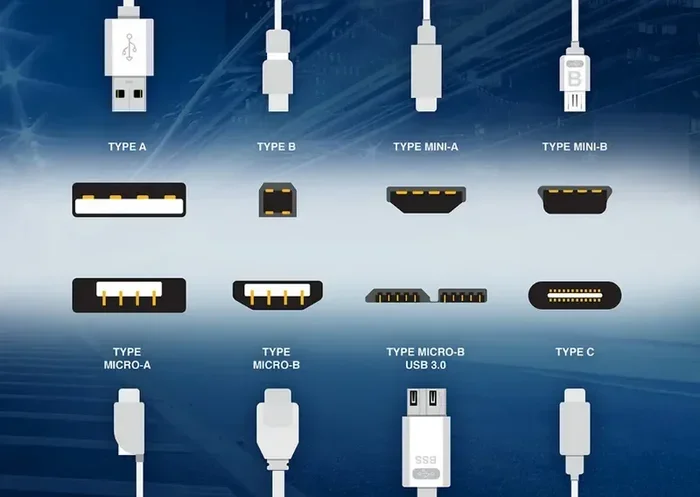
USB adapters come in many forms. Some are simple cables with different connectors on each end. Others are dongles or hubs that add extra ports. The most common types include USB-A to USB-B, USB-A to USB-C, and USB-A to micro-USB. Each serves a specific purpose.
One of the biggest advantages of a traditional USB adapter is price. You can find a reliable USB-A adapter for just a few dollars. They are everywhere — at grocery stores, electronics shops, and online marketplaces. If you need a quick, no-fuss connection, a USB adapter often does the job perfectly.
When a USB Adapter Makes Sense
There are many situations where a USB adapter is the right call. Here are a few common ones:
- Older devices: If your printer, external hard drive, or camera uses a USB-A cable, a simple adapter keeps it working.
- Budget setups: When you are building a PC on a budget or setting up a basic office, USB adapters save money.
- Quick fixes: Need to plug in a USB-A device right now? A USB adapter solves the problem in seconds.
- Legacy equipment: Many industrial and office machines still use USB-A connections exclusively.
You can also find specialized adapters like the M.2 NVMe SSD to USB 3.1 adapter, which lets you turn an internal NVMe drive into an external portable drive. This is a great option if you want affordable external storage without buying a full enclosure.
What Is a USB-C Adapter?
A USB-C adapter connects to the USB-C port, which is smaller, reversible, and much faster than USB-A. USB-C has become the go-to port on modern laptops, smartphones, and tablets. A USB-C adapter lets you connect older devices, add extra ports, or expand your connectivity options.
USB-C is not just one thing. It supports different protocols and standards. For example, USB-C can carry data at USB 3.0 or USB 3.1 speeds. It can also support Thunderbolt 3 or Thunderbolt 4, which are even faster. Some USB-C ports can deliver up to 100 watts of power, which means they can charge your laptop too.
When you buy a USB-C adapter, you are investing in a more versatile and future-proof solution. A single USB-C hub can give you HDMI output, Ethernet, USB-A ports, SD card slots, and more. This makes USB-C adapters incredibly useful for people who work on the go.
When a USB-C Adapter Is the Better Choice
USB-C adapters shine in several scenarios:
- Modern laptops: Many newer laptops, like MacBooks and ultrabooks, only have USB-C ports. A USB-C adapter is essential.
- Faster data transfer: If you move large files often, USB-C delivers much higher speeds than USB-A.
- Charging and data: A single USB-C cable can charge your device and transfer data at the same time.
- Docking stations: USB-C adapters work beautifully with docking stations for a clean, organized workspace.
For example, an M.2 NVMe to USB-C SSD enclosure lets you use your NVMe drive with a USB-C connection. You get blazing fast speeds and a compact, portable design. This is a huge upgrade over older USB-A external enclosures.
USB vs USB-C: Head-to-Head Comparison
Let us put both types side by side. This comparison table covers the key factors you should consider before buying.
| Feature | USB (USB-A) | USB-C |
|---|---|---|
| Port Shape | Rectangular, not reversible | Oval, reversible |
| Max Data Speed | Up to 5 Gbps (USB 3.0) | Up to 40 Gbps (Thunderbolt 4) |
| Power Delivery | Up to 15W standard | Up to 100W with USB PD |
| Common Devices | Printers, flash drives, keyboards | Modern laptops, phones, tablets |
| Price Range | $2 to $15 | $5 to $50+ |
| Future-Proofing | Being phased out | Becoming the universal standard |
As you can see, USB-C wins in almost every category. However, USB-A adapters still hold value because of their wide compatibility and low cost. The right choice depends on your specific situation.
How to Choose the Right Adapter for Your Needs
Not sure where to start? Follow these steps to pick the perfect adapter.
Step 1: Check Your Device Ports
Look at the ports on your laptop, phone, or tablet. Do you see USB-A, USB-C, or both? If your device has USB-C, a USB-C adapter gives you the most flexibility. If it only has USB-A, a traditional USB adapter or a USB-C to USB adapter is what you need.
Step 2: Identify What You Want to Connect
Think about the devices you use regularly. Do you need to connect an external hard drive, a monitor, a printer, or a flash drive? Each device may require a different adapter or cable type. Make a quick list before you shop.
Step 3: Consider Speed Requirements
If you work with large video files or back up huge amounts of data, speed matters. USB-C adapters with USB 3.1 or Thunderbolt support deliver much faster transfer rates. For simple tasks like printing or browsing, a basic USB adapter works just fine.
Step 4: Set a Budget
USB adapters are generally cheaper than USB-C adapters. But remember, a USB-C adapter often replaces multiple cables and dongles. Think of it as an investment in a cleaner, more efficient workspace.
One popular option is the NVMe SSD to USB adapter, which works with both USB-A and USB-C connections depending on the model. This gives you flexibility if you are not sure which port your system uses.
Common Mistakes People Make When Buying Adapters
Avoid these common pitfalls so you do not waste money or time.
- Buying without checking compatibility: Not every USB-C adapter works with every device. Check your device specs before purchasing.
- Choosing the cheapest option: Very cheap adapters may not support the speeds or power delivery they claim. Stick with reputable brands.
- Ignoring power delivery: Some USB-C adapters only support data transfer, not charging. Make sure yours supports USB Power Delivery if you need to charge your laptop.
- Assuming all USB-C is the same: USB-C is a connector shape, not a speed standard. A USB-C port can run at USB 2.0 speeds, which is very slow. Always check the USB standard supported.
- Overlooking the M.2 NVMe SSD enclosure route: If you need external storage, an M.2 NVMe SSD enclosure adapter can be more practical than a generic adapter. It protects your drive and offers better performance.
Expert Tips for Getting the Most Out of Your Adapter
Here are some quick tips from tech experts to help you get the best experience.
- Firmware matters: Keep your device firmware updated. Sometimes a simple firmware update improves USB-C compatibility and speed.
- Use quality cables: Even the best adapter will underperform with a cheap cable. Invest in good-quality USB-C cables that support the speeds you need.
- Label your adapters: If you have multiple adapters, label them. It saves time and prevents confusion when you need a specific connection.
- Test before you trust: Always test a new adapter with your actual workflow. Run a speed test or transfer a few files to make sure everything works as expected.
- Think about your setup long-term: USB-C is the direction the industry is moving. Investing in a USB-C adapter now saves you from buying another one later.
For people who work with external NVMe drives, using an M.2 NVMe SSD USB enclosure is one of the smartest moves you can make. It gives you fast, reliable external storage that connects through USB-C for maximum speed.
Final Verdict: Should You Buy a USB or C Adapter?
The answer comes down to your devices and your needs. If you use a modern laptop or phone with USB-C ports, a USB-C adapter is the clear winner. It is faster, more versatile, and more future-proof. You get better data speeds, higher power delivery, and a reversible connector that is easy to use.
If you are working with older devices or on a tight budget, a traditional USB adapter still gets the job done. It is affordable, widely available, and compatible with a huge range of equipment. For basic tasks like printing, file transfers, and connecting peripherals, it works perfectly.
Many people actually need both. A USB-C adapter for your daily workflow and a USB-A adapter for older devices covers all your bases. Think of it as building a small adapter collection that handles every situation.
Before you click “buy,” take a moment to check your device ports, list the devices you need to connect, and decide on your speed and budget requirements. A little planning goes a long way toward finding the right USB or C adapter for your setup.
Ultimately, the best adapter is the one that fits your workflow. Whether you choose USB or USB-C, the right adapter makes your devices work better together. It is a small purchase that makes a big difference in your daily tech life.
Conclusion
So, should you buy a USB or C adapter? Both have a place in today’s tech world. USB adapters offer simplicity and affordability for older or basic setups. USB-C adapters bring speed, versatility, and future-proofing for modern devices. The key is understanding what your devices need and choosing accordingly.
Take a look at your current setup, think about where you want to be in a year or two, and make your choice. A good adapter solves problems, saves time, and keeps your devices connected. That is a win no matter which type you pick.
Frequently Asked Questions
Can I use a USB-C adapter with a USB-A port?
Yes, you can use a USB-C to USB-A adapter to connect a USB-C device to a USB-A port. This is a common setup for people who have a mix of old and new devices. Just make sure the adapter supports the speed and power standards you need.
Is USB-C faster than USB 3.0?
USB-C is a connector type, while USB 3.0 is a speed standard. A USB-C port can support USB 3.0 speeds or faster, like USB 3.1 or Thunderbolt. In most modern devices, USB-C offers significantly faster data transfer than a standard USB-A 3.0 connection.
Do I need a special adapter for NVMe SSDs?
Yes, you need a specific adapter or enclosure to use an NVMe SSD externally. Options include an M.2 NVMe SSD to USB 3.1 adapter or an M.2 NVMe to USB-C SSD enclosure. These devices connect your NVMe drive to your computer through a USB port.
Can a USB-C adapter charge my laptop?
Many USB-C adapters support USB Power Delivery, which can charge laptops and other devices. However, not all USB-C adapters include power delivery. Check the product specs to confirm that the adapter can charge while you use it for data transfer.
Are USB adapters still worth buying in 2024?
Absolutely. USB adapters remain essential for connecting older devices, peripherals, and accessories that use USB-A connections. They are affordable, widely available, and still very much in demand. Even as USB-C becomes more common, USB adapters continue to serve an important role.
What is the difference between a USB-C adapter and a USB-C hub?
A USB-C adapter typically converts one connection type to another, like USB-C to USB-A. A USB-C hub adds multiple ports, such as HDMI, Ethernet, USB-A, and SD card slots, through a single USB-C connection. Hubs offer more versatility, while adapters are simpler and often cheaper.