Are All Usb C Cables Otg
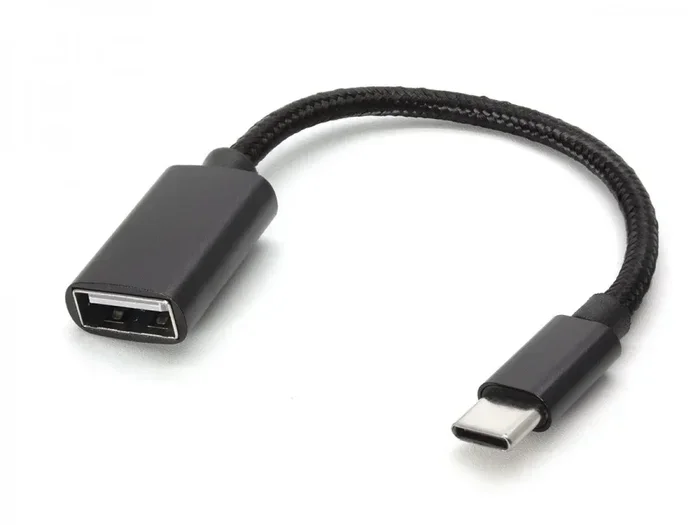
Not all USB C cables support OTG (On-The-Go) functionality. Many people assume every USB C cable can connect phones to external drives, keyboards, or other peripherals, but that is not always true. OTG support depends on the cable’s wiring, chipset, and the device’s capabilities. This guide explains exactly what you need to know to avoid buying the wrong cable.
You plug in a USB C cable, connect your phone to a flash drive, and… nothing happens. Frustrating, right? You assumed any USB C cable would let you transfer files or connect peripherals. But here is the truth: not all USB C cables are OTG capable. This is one of the most misunderstood topics in the world of mobile accessories, and it costs people time, money, and a lot of headaches.
USB C has become the universal connector for phones, tablets, laptops, and countless accessories. Its reversible design and fast data transfer speeds made it a favorite. But the connector type does not tell the whole story. OTG support depends on the cable’s internal design, the device you are using, and the protocol it supports. In this article, we will break down everything you need to know about USB C OTG cables, how they work, and how to choose the right one.
Key Takeaways
- OTG is not automatic: USB C cables do not all support On-The-Go, even if they look identical.
- Check the specs: Always verify OTG compatibility on the cable packaging or product description before buying.
- Device matters too: Your phone or tablet must also support OTG for the connection to work.
- Wiring differences exist: Some USB C cables only carry power and lack the data pins needed for OTG.
- Adapters solve problems: USB C adapters and enclosures can bridge OTG gaps for external storage and peripherals.
- Look for certified cables: Certified USB C cables are more likely to support full OTG functionality.
📑 Table of Contents
What Does OTG Mean on a USB C Cable?
OTG stands for On-The-Go. It is a technology standard that lets USB devices act as both a host and a peripheral. Without OTG, your phone is just a slave device. It can receive files from a computer but cannot initiate connections to external drives or keyboards on its own.
With OTG enabled, your phone becomes the host. It can read files from a USB flash drive, connect to a Bluetooth adapter, or even hook up a mouse and keyboard. This is incredibly useful for people who work on the go or need to transfer large files without a computer.
How OTG Works with USB C
USB C OTG relies on a specific wiring configuration inside the cable. A standard USB C cable may only have the power pins wired. It can charge your device but cannot send or receive data signals needed for OTG. An OTG-compatible cable has the correct data and ID pins connected so the device can recognize and communicate with peripherals.
When you plug an OTG cable into your phone and then connect a USB device, the phone detects the peripheral and prompts you with options. You can browse files, install apps from a drive, or use external input devices. Without OTG, the phone simply ignores the connected device.
Are All USB C Cables OTG Compatible?
The short answer is no. Many USB C cables are not OTG capable. This surprises a lot of people because the USB C connector looks the same regardless of what is inside. Here is why some cables support OTG and others do not.
Manufacturers produce different types of USB C cables for different purposes. Some cables are designed purely for charging. These cables have thicker wires for power delivery but skip the data pins. Other cables support USB 3.1 or USB 3.2 data transfer and may also include OTG functionality. The difference comes down to the internal wiring and the chipsets used.
Types of USB C Cables You Will Encounter
- Charging-only cables: These cables can power your device but lack the data pins needed for OTG. They are common with wall chargers and power banks.
- Standard data cables: These support basic data transfer but may not include OTG functionality. They work for connecting to computers but not necessarily for host-mode connections.
- OTG-enabled cables: These are specifically wired to support On-The-Go mode. They allow your phone or tablet to act as a host and connect to external USB devices.
- USB C to USB C cables: Not all of these support OTG. Some are designed only for charging or data transfer between two devices in a peer-to-peer setup.
The key takeaway is that you cannot tell if a cable supports OTG just by looking at it. You need to check the specifications, packaging, or product listing. If it does not mention OTG support, assume it does not have it.
How to Tell If Your USB C Cable Supports OTG
Figuring out whether your cable supports OTG does not have to be guesswork. There are several ways to check, and most of them take only a few minutes.
Check the Cable Packaging or Product Listing
The easiest way is to look at the original packaging or the online product listing. Reputable brands will clearly state OTG support if the cable has it. Look for terms like “OTG compatible,” “On-The-Go,” or “host mode supported.” If you see any of these, you are good to go.
If you bought a generic or unbranded cable from a marketplace, the listing might not mention OTG at all. In that case, it is safer to assume the cable does not support it, especially if the price was very low. Cheap cables often cut corners on wiring and omit the ID pin that OTG requires.
Test the Cable with a Peripheral
You can also test OTG functionality yourself. Plug the cable into your phone, then connect a USB flash drive or a small USB peripheral. If your phone recognizes the device and you can access its files, the cable supports OTG. If nothing happens or the device is not detected, the cable likely does not have OTG capability.
Use a USB C Hub or Adapter as a Test
Another reliable method is to use a USB C hub or adapter. If you connect a hub to your cable and the hub works with peripherals, your cable supports OTG. If the hub does not get recognized, the cable is probably just a charging or data-only cable.
Some people also use apps on Android devices to check OTG support. Apps like “USB OTG Checker” scan your device and tell you whether OTG is enabled and whether your cable is properly configured. This is a quick and free way to verify things.
Why OTG Support Matters for Everyday Use
You might wonder why OTG support matters so much. The answer is simple: it expands what your mobile devices can do. Without OTG, your phone is limited to its built-in storage and the apps you have installed. With OTG, the possibilities open up significantly.
For example, OTG cables let you connect external storage drives directly to your phone. This is a lifesaver when you need to move large video files or backups without a computer. You can also connect wireless adapters, game controllers, and even external monitors in some cases.
People who travel frequently find OTG cables especially valuable. You can plug a USB flash drive into your phone at an airport or a hotel and transfer files without needing a laptop. It is a small cable that solves a big problem.
Photographers and videographers also benefit greatly. They can pull files directly from a camera’s memory card using a USB C card reader and an OTG cable. No computer needed. This workflow saves time and keeps things simple on location shoots.
Common Mistakes People Make with USB C OTG Cables
Even with the best intentions, people make mistakes when using USB C OTG cables. Here are the most common ones and how to avoid them.
Assuming Any USB C Cable Works
This is the number one mistake. People buy a USB C cable, plug it into their phone with a flash drive, and expect it to work. When it does not, they blame the phone or the drive. In most cases, the cable simply does not support OTG. Always verify OTG compatibility before purchasing.
Ignoring Device Compatibility
Even if you have the right cable, your device must also support OTG. Most modern Android phones do, but some budget models and older devices may not. iPhones do not use OTG in the traditional sense because Apple uses its own ecosystem for accessories. Always check your device’s manual or specifications for OTG support.
Using Low-Quality or Damaged Cables
A damaged or poorly made cable can cause OTG connections to fail. Frayed wires, loose connectors, and cheap materials all lead to unreliable performance. Invest in quality cables from reputable brands to ensure consistent OTG functionality.
Not Powering the Peripheral
Some USB devices, like external hard drives, need more power than a phone can supply through OTG. In these cases, you may need a powered USB C hub or a cable with an additional power input. Without enough power, the device may not be recognized or may disconnect frequently.
Best Practices for Choosing the Right USB C OTG Cable
Now that you understand the basics, here are some practical tips for choosing the right USB C OTG cable for your needs.
- Look for certified cables: USB IF certified cables meet strict standards for data transfer and compatibility. They are more likely to support OTG properly.
- Check the data transfer speed: If you plan to transfer large files, look for cables that support USB 3.0 or higher speeds for faster performance.
- Consider cable length: Longer cables can cause signal degradation. For OTG connections, a shorter cable (around 1 to 3 feet) often works best.
- Read user reviews: Before buying, check reviews from other users who have tested OTG functionality with the same cable.
- Buy from reputable sellers: Avoid unknown brands with suspiciously low prices. They are more likely to sell cables that do not meet OTG standards.
If you need to connect external storage to your devices, consider using a dedicated M 2 Nvme To Usb C Ssd Enclosure for reliable high-speed transfers. These enclosures turn internal NVMe drives into portable USB C storage that works seamlessly with OTG-enabled devices.
Similarly, a M2 Nvme Ssd In Usb Enclosures setup gives you a compact and fast way to access large files on the go. These enclosures connect directly via USB C and provide excellent performance for file transfers, backups, and media editing on mobile devices.
For those who need to connect NVMe drives to older or non-USB C devices, an Nvme Ssd To Usb Adapter is a practical solution. These adapters bridge the gap between modern NVMe storage and standard USB connections, making your storage devices more versatile across different platforms.
Final Thoughts
The question “Are all USB C cables OTG?” has a clear answer: no, they are not. USB C is a connector type, not a guarantee of OTG functionality. The internal wiring, chipset, and device compatibility all play a role in whether OTG works with a given setup.
By understanding what OTG is, how to check for it, and what to look for when buying cables, you can save yourself a lot of frustration. Always verify OTG support before purchasing, test your setup before relying on it, and invest in quality cables from trusted brands. A small bit of knowledge goes a long way in making your mobile devices more versatile and productive.
Whether you are transferring files, connecting peripherals, or expanding your device’s capabilities, the right USB C OTG cable makes all the difference. Choose wisely, and your cable will serve you well for years to come.
Frequently Asked Questions
Can I use any USB C cable for OTG on Android?
No, not every USB C cable supports OTG. You need a cable that is specifically wired for On-The-Go functionality. Check the packaging or product listing for OTG compatibility before buying. If it does not mention OTG, it likely will not work for host-mode connections.
How do I enable OTG on my Android phone?
Most modern Android phones support OTG by default and do not require any settings changes. Simply plug in the OTG cable and connect a peripheral. Your phone should detect the device automatically. If it does not, check your phone’s specifications to confirm OTG support, or try a different cable.
Can USB C OTG cables charge your device while connected?
Yes, most USB C OTG cables can charge your device while also supporting OTG connections. However, some OTG cables may not pass through charging if they are designed solely for data and peripheral connections. Check the cable specifications to confirm it supports both charging and OTG simultaneously.
Do iPhones support USB C OTG?
iPhones do not use OTG in the traditional Android sense. Apple uses its own MFi certification program for accessories. While newer iPhones with USB C ports can connect to some peripherals, they do not support the same open OTG standard as Android devices. You will need Apple-certified cables and adapters for reliable connections.
What is the difference between a USB C data cable and a USB C OTG cable?
A standard USB C data cable allows file transfer between two devices, like a phone and a computer. A USB C OTG cable goes further by allowing your phone to act as the host and connect to external USB peripherals like drives, keyboards, or adapters. The internal wiring differs, with OTG cables including the ID pin needed for host-mode detection.
Can a damaged USB C cable lose OTG functionality?
Yes, a damaged or worn-out USB C cable can lose its OTG capability. Frayed wires, bent connectors, or internal damage can break the specific pins needed for OTG communication. If your OTG setup suddenly stops working, try a different cable before assuming the problem is with your phone or peripheral.