The Purpose Of Computer Networking And Why It Matters
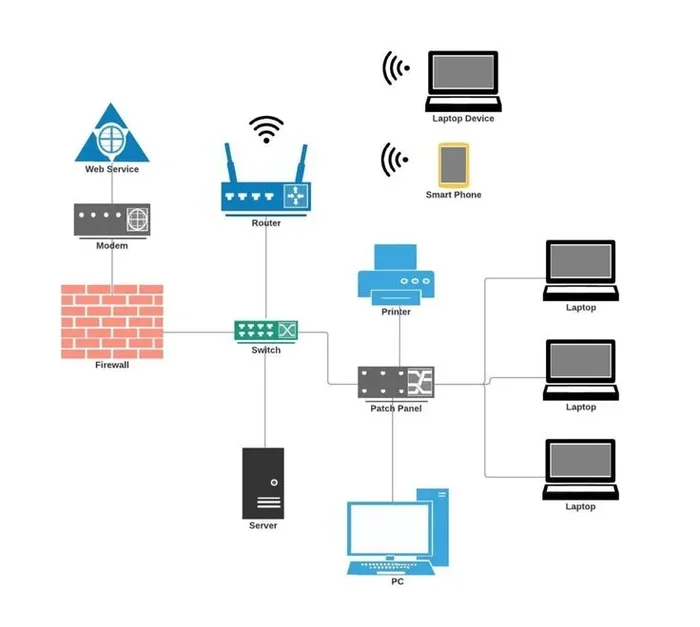
The purpose of computer networking is to connect devices so they can share data, resources, and communication channels efficiently. Whether you are at home, in an office, or running a global business, networking forms the backbone of modern digital life. This guide covers what computer networking does, how it works, and why it is essential for everyone who uses connected devices.
Key Takeaways
- Resource Sharing: Networking lets multiple devices share files, printers, and internet connections seamlessly.
- Communication Power: Email, video calls, and messaging all depend on computer networking to function.
- Data Security: A well-designed network includes security measures that protect sensitive information from threats.
- Scalability: Networks grow with your needs, from a single home setup to enterprise-level infrastructure.
- Cloud and SaaS Reliance: Modern cloud services and SaaS platforms depend entirely on strong network connections.
- Performance Matters: Understanding your network helps you troubleshoot slowdowns and keep things running smoothly.
📑 Table of Contents
- What Is the Purpose of Computer Networking?
- How Computer Networking Enables Resource Sharing
- The Role of Networking in Communication
- Why Networking Matters for Security
- Types of Computer Networks
- Networking and the Cloud
- How to Build a Better Network
- The Future of Computer Networking
- Common Networking Mistakes to Avoid
- Quick Tips for Better Network Performance
- Final Thoughts
What Is the Purpose of Computer Networking?
At its core, the purpose of computer networking is simple: connect devices so they can talk to each other. When you send a photo to a friend, stream a movie, or print a document from your phone, you are using a network. These connections happen behind the scenes, often without us even thinking about them.
But networking is about much more than just sending files. It enables organizations to operate, people to communicate, and systems to work together across vast distances. Without networks, the digital world as we know it would simply stop.
Think of networking like a highway system. Roads connect cities, allowing people and goods to move freely. Similarly, network infrastructure connects devices, allowing data to flow between them. The better the roads, the smoother the traffic. The same goes for your network setup.
So why does all of this matter? Because nearly everything we do online relies on some form of networking. From checking email to running a multinational corporation, data communication is the engine that drives modern life.
How Computer Networking Enables Resource Sharing
One of the biggest reasons networks exist is to share resources. In a home setting, this might mean multiple devices sharing one internet connection. In an office, it could mean dozens of computers sharing a single printer or file server.
Sharing Files and Data
Without networking, every computer would be an island. You would need USB drives or email attachments to move files between devices. A network eliminates that friction. Team members can access shared folders, collaborate on documents in real time, and store backups centrally.
This is especially important for businesses. When everyone can access the same data, workflows become faster and mistakes become fewer. Shared resources also save money. Instead of buying a printer for every desk, a single network printer serves everyone.
Sharing Internet Connections
Most home networks use a router to share a single internet connection among all devices. Your laptop, phone, smart TV, and gaming console all connect through that one gateway. This is a basic but powerful example of network devices working together.
If your connection feels slow, it might be a network performance issue. Sometimes the problem comes from your ISP, and other times it is caused by too many devices competing for bandwidth. Understanding this helps you troubleshoot better.
The Role of Networking in Communication
Communication is at the heart of the purpose of computer networking. Every message you send, every video call you make, and every notification you receive travels through a network. Let us break down how this works.
Email and Messaging
Email was one of the first applications built on networking. Today, instant messaging platforms have taken over for quick conversations. Whether you use Slack, WhatsApp, or traditional email, all of these tools rely on network protocols to deliver messages instantly.
These protocols are like the rules of the road. They ensure that data packets reach the right destination without getting lost. Without standardized protocols, sending a message to someone on the other side of the world would be impossible.
Video Conferencing and Voice Calls
Video conferencing exploded during the pandemic, and it has stayed popular. Tools like Zoom, Microsoft Teams, and Google Meet all require stable networks to work well.
When your video call freezes or your voice breaks up, it is usually a bandwidth problem. Wireless networking has improved a lot, but wired connections still offer the most reliable performance for video calls.
Social Media and Streaming
Scrolling through social media or watching your favorite show on Netflix might feel simple, but it involves complex networking behind the scenes. Data travels from servers around the world to your device in milliseconds. Wide area networks make this possible by connecting local networks across cities and countries.
Why Networking Matters for Security
Networking does not just help devices talk to each other. It also plays a critical role in keeping data safe. Network security is a huge part of why businesses invest in proper network design.
Firewalls and Access Control
A firewall acts as a gatekeeper for your network. It monitors incoming and outgoing traffic and blocks anything suspicious. Most routers come with basic firewall features, but larger organizations use advanced solutions to protect their data.
Access control is another key security layer. Not everyone on a network should have the same permissions. Network administrators set rules about who can access what, which helps prevent unauthorized users from reaching sensitive information.
Protecting Against Threats
Cyber threats are a real and growing concern. Malware, phishing attacks, and ransomware can all enter a network through a single vulnerable device. This is why network troubleshooting and regular security audits are so important.
Keeping your devices updated, using strong passwords, and monitoring network activity are all simple steps that make a big difference. A well-maintained network is far harder to attack than a neglected one.
Types of Computer Networks
Not all networks are the same. They come in different sizes and serve different purposes. Understanding the types helps you see the full picture of the purpose of computer networking.
Local Area Network (LAN)
A local area network connects devices in a small area, like a home or office. Most home networks are LANs. They are fast, easy to set up, and perfect for sharing resources among nearby devices.
Wide Area Network (WAN)
A wide area network spans a large geographic area. The internet itself is the biggest WAN in the world. Companies use WANs to connect offices in different cities or countries.
Wireless Networks
Wireless networking has become the standard for most users. Wi-Fi lets devices connect without cables, offering flexibility and convenience. However, wired connections still win when it comes to speed and stability.
Networking and the Cloud
Modern cloud computing and SaaS platforms would not exist without networking. When you use a cloud service, your device communicates with remote servers through the internet. This is why a strong, stable connection is so important.
The impact of AI on SaaS platforms has grown significantly, and all of that depends on fast, reliable networks. Cloud applications need constant data flow between your device and the server. If your network is slow, the entire experience suffers.
If you ever notice your computer slowing down while using cloud services, it could be a network issue or a hardware limitation. Sometimes checking your RAM helps, since memory directly affects how well your device handles network-heavy tasks. You can check your laptop RAM to see if upgrades might help your overall performance.
Networking also plays a role in fixing common computer issues. For instance, if your system starts running slow and freezing, a network problem could be the culprit. Learning how to fix a computer that is running slow and freezing often involves checking your network settings and bandwidth usage.
Understanding the relationship between your hardware and your network is key. Your device’s components, including its RAM, work together with your network to deliver a smooth experience. If you want to learn more about what RAM does in your system, check out this guide on what the RAM of a laptop does.
How to Build a Better Network
Whether you are setting up a home network or managing a business one, a few best practices go a long way. Here are some tips to improve your setup.
- Use a quality router: Your router is the brain of your network. Invest in one that supports the latest Wi-Fi standards.
- Position your router wisely: Place it in a central location, away from walls and electronic interference.
- Update firmware regularly: Router manufacturers release updates that fix bugs and improve security.
- Set a strong password: Never leave your network open. Use a complex password to prevent unauthorized access.
- Monitor connected devices: Keep track of what is on your network. Unrecognized devices could be a security risk.
- Consider wired connections for critical devices: Desktops, gaming consoles, and smart TVs benefit from Ethernet cables.
These steps might seem small, but they add up. A well-planned network runs faster, stays safer, and causes fewer headaches over time.
The Future of Computer Networking
Networking is always evolving. New technologies are shaping how devices connect and communicate. Here is a glimpse of what is coming.
5G networks are pushing wireless speeds to new heights. This means faster downloads, smoother video calls, and better performance for remote work. As 5G coverage expands, more devices will benefit from lightning-fast connections.
Edge computing is another trend gaining traction. Instead of sending all data to distant cloud servers, edge computing processes data closer to where it is generated. This reduces latency and improves response times for applications that need real-time performance.
Artificial intelligence is also entering the networking space. AI-powered tools can detect anomalies, predict failures, and automatically optimize network settings. This makes networks smarter and more self-sufficient over time.
The purpose of computer networking will only grow as more devices come online. From smart homes to smart cities, networks will form the connective tissue of our increasingly digital world.
Common Networking Mistakes to Avoid
Even with the best intentions, people make networking mistakes that cause problems. Here are a few to watch out for.
- Ignoring firmware updates: Outdated router firmware can leave your network vulnerable to attacks.
- Using default passwords: Default admin passwords are easy targets for hackers. Always change them.
- Overloading a single router: Too many devices on one router can kill performance. Consider mesh systems for larger homes.
- Neglecting network monitoring: Without monitoring, you will not know when something goes wrong until it is too late.
- Skipping backups: A network failure can wipe out data. Regular backups protect you from this risk.
Avoiding these mistakes keeps your network healthy and your data safe. Prevention is always easier than fixing problems after they happen.
Quick Tips for Better Network Performance
- Restart your router once a month to clear its memory and refresh connections.
- Use an Ethernet cable for devices that need the most stable connection.
- Separate your 2.4 GHz and 5 GHz Wi-Fi bands to reduce interference.
- Place your router on a high shelf for better signal coverage.
- Limit bandwidth-heavy activities during peak usage hours if needed.
Small changes can lead to big improvements. Try one or two of these tips and see the difference for yourself.
Final Thoughts
The purpose of computer networking goes far beyond plugging in a cable or connecting to Wi-Fi. It is about enabling communication, sharing resources, keeping data safe, and powering the tools we use every day. From a simple home setup to a complex enterprise network, the principles remain the same: connect, communicate, and protect.
As technology continues to advance, networking will become even more central to our lives. Understanding the basics gives you an edge, whether you are a home user or a business owner. Take the time to learn your network, optimize it, and keep it secure. The digital world runs on connections, and your network is the foundation of yours.
Frequently Asked Questions
What is the main purpose of computer networking?
The main purpose of computer networking is to connect devices so they can share data, resources, and communication channels. It enables file sharing, internet access, email, video calls, and much more across personal and professional environments.
Why is networking important for businesses?
Networking allows businesses to share resources, communicate efficiently, and access cloud services. It supports collaboration among team members, protects sensitive data through security measures, and scales as the business grows.
What are the basic types of computer networks?
The three basic types are LAN (Local Area Network), which covers small areas like homes or offices; WAN (Wide Area Network), which spans large geographic regions; and wireless networks, which use Wi-Fi to connect devices without cables.
How does networking affect internet speed?
Your network setup directly impacts internet speed. A quality router, proper placement, and minimal interference all contribute to faster speeds. If your network is overloaded or outdated, your internet experience will suffer.
Can networking problems cause a computer to run slowly?
Yes, networking problems can cause slowdowns. If your device is constantly trying to reconnect or resolve DNS issues, it uses processing power and bandwidth. Checking your network settings and bandwidth usage is a good first step when troubleshooting slow performance.
What skills do I need to manage a network?
Basic network management requires understanding routers, IP addresses, security protocols, and troubleshooting techniques. For home networks, most of this is handled automatically. Business networks may require a dedicated network administrator with deeper technical knowledge.
=== CONCLUSION ===
The purpose of computer networking is clear: it connects us, empowers us, and protects us in an increasingly digital world. From sharing a printer at home to running global cloud services, networks are the invisible force behind modern technology. By understanding how networks work and taking steps to optimize them, you get more out of every connected device you own.
Start with the basics, follow the tips in this guide, and keep learning. The world of networking is vast, but even a little knowledge goes a long way. Your network is only as good as your understanding of it, so invest the time to make it work for you.