What Are The Advantages Of Adding More RAM To A PC
Adding more RAM to your PC delivers faster performance, smoother multitasking, and a noticeably better computing experience. Whether you are a gamer, a creative professional, or a casual user, more memory helps your computer handle demanding tasks without slowdowns. This guide covers every advantage of a RAM upgrade, from speed gains to extended hardware lifespan, and shows you exactly how to get started.
Your computer relies on memory to do almost everything you ask it to do. Every time you open a browser tab, launch a game, or edit a photo, your system pulls data from its RAM — short for Random Access Memory. Think of RAM as your computer’s short-term workspace. The more space you have in that workspace, the easier and faster your PC can handle the tasks you throw at it.
Many people wonder whether adding more RAM is worth the effort and cost. The short answer is yes — and the benefits go far beyond just making things a bit faster. From eliminating annoying freezes to giving your older machine a second life, a memory upgrade is one of the simplest and most affordable ways to improve your computing experience.
In this article, we will walk you through every major advantage of adding more RAM to your PC. We will also cover how much you actually need, how to check your current setup, and step-by-step tips for upgrading. Whether you use a laptop or a desktop computer, this guide has you covered.
Key Takeaways
- Faster Multitasking: More RAM lets you run multiple apps simultaneously without freezing or lag.
- Smoother Gaming: A memory upgrade reduces stuttering and improves frame rates in demanding games.
- Quicker Load Times: Your system boots faster and opens applications almost instantly with extra memory.
- Better Creative Work: Video editing, graphic design, and 3D rendering perform much better with additional RAM.
- Future-Proofing: Upgrading now keeps your PC ready for newer software and operating system updates.
- Cost-Effective Upgrade: Adding RAM is one of the cheapest ways to breathe new life into an older computer.
📑 Table of Contents
What Does More RAM Actually Do For Your PC?
Before diving into the benefits, it helps to understand what RAM does in the first place. When you open a program or file, your computer loads it from your storage drive into RAM. This is because RAM is incredibly fast compared to even the best solid-state drives. Your processor can access data from RAM almost instantly, which is why your system feels snappy when you have plenty of free memory.
When your RAM fills up, your computer starts using your storage drive as a temporary backup — a process called virtual memory or swap space. This is much slower, and it causes the frustrating lag and freezing that everyone hates. By adding more RAM, you give your system a bigger workspace, which means less reliance on slower storage and a much smoother overall experience.
To see how much RAM your current system has, you can check your current RAM in just a few minutes. This is the first step before deciding on an upgrade.
The Top Advantages Of Adding More RAM
1. Smoother Multitasking
Do you keep dozens of browser tabs open while working in a spreadsheet and listening to music? If so, you have felt the sting of insufficient memory. Each open application uses a portion of your computer memory. When you run out, your system struggles to keep everything active at once.
Adding more RAM gives your PC the headroom it needs to juggle multiple tasks without breaking a sweat. You can switch between apps instantly, and nothing will freeze or crash in the middle of your workflow. This is one of the most noticeable advantages of a RAM upgrade for everyday users.
2. Faster Application Load Times
Applications load their data into RAM when you open them. More memory means larger programs can load quickly and run without constantly swapping data to your storage drive. You will notice that your favorite apps — from Microsoft Word to Adobe Photoshop — open almost immediately after a memory upgrade.
This speed boost applies to boot times too. Your PC will start up faster and be ready to use in seconds rather than minutes. For anyone who values efficiency, this alone is a compelling reason to upgrade.
3. Better Gaming Performance
Modern games are memory-intensive. They load huge textures, complex environments, and detailed character models into RAM. If your system does not have enough memory, you may experience stuttering, long loading screens, or even crashes mid-game.
A RAM upgrade can significantly improve your gaming experience. You will enjoy smoother frame rates, faster level loading, and fewer interruptions. Pairing more memory with a solid graphics setup creates a much more enjoyable and immersive gaming session.
4. Improved Video Editing And Creative Work
Video editing, 3D rendering, and graphic design demand a lot from your system. These memory-intensive tasks require constant access to large files and complex data sets. Without enough RAM, your software will lag, preview playback will stutter, and export times will drag on forever.
With additional memory, creative applications can handle large project files with ease. You can preview your work in real time, apply effects without waiting, and finish exports much faster. For anyone working in content creation, this is a game-changer.
5. Extended Hardware Lifespan
One of the hidden advantages of adding more RAM is that it can extend the useful life of your entire system. As software becomes more demanding with each update, older computers with limited memory start to feel sluggish. A memory upgrade can make a three-year-old PC feel almost new again.
Instead of spending hundreds of dollars on a brand-new computer, a simple RAM upgrade costs a fraction of the price and delivers immediate results. It is one of the smartest investments you can make for your tech setup.
6. Better Virtual Machine And Server Performance
If you run virtual machines or use your PC for light server tasks, RAM is absolutely critical. Each virtual machine needs its own dedicated memory to function properly. Adding more RAM allows you to run multiple virtual environments simultaneously without performance drops.
This benefit also applies to developers and IT professionals who test software in isolated environments. More memory means faster testing, smoother operation, and fewer bottlenecks during development work.
How Much RAM Do You Really Need?
The right amount of RAM depends on how you use your computer. Here is a simple breakdown of what different memory levels can handle:
- 4GB: Basic web browsing and document editing. This is the bare minimum and is becoming outdated for most users.
- 8GB: Sufficient for everyday tasks, light multitasking, and casual gaming. Many budget laptops come with this amount.
- 16GB: The sweet spot for most users. Handles heavy multitasking, modern gaming, and moderate creative work with ease.
- 32GB and above: Ideal for professional creators, developers, and power users who run demanding applications daily.
If you are unsure whether your current setup is holding you back, you can learn more about whether 8GB of RAM is enough for your specific needs. This helps you decide exactly how much of an upgrade makes sense.
Signs Your PC Needs More RAM
Not sure if your computer would benefit from a memory upgrade? Watch for these common warning signs:
- Your system takes forever to open apps or files.
- Your browser crashes when you have multiple tabs open.
- You hear your hard drive working constantly, even during simple tasks.
- Games stutter, freeze, or crash during gameplay.
- Your PC slows down noticeably when you switch between programs.
- You see messages about low memory or virtual memory usage.
If several of these sound familiar, adding more RAM will likely make a dramatic difference. It is one of the easiest ways to bring new life into a sluggish system.
How To Add More RAM To Your Computer
Upgrading your RAM is simpler than most people think. Here is a quick overview of the process:
- Check compatibility: Find out what type of RAM your motherboard supports. Look at your system specifications or consult your PC or laptop manual.
- Determine how many free slots you have: You need an available memory slot to install new modules. Some computers have all slots occupied, which means you may need to replace existing sticks with higher-capacity ones.
- Purchase the right RAM: Buy matching RAM sticks that fit your system’s specifications, including speed and type (DDR4, DDR5, etc.).
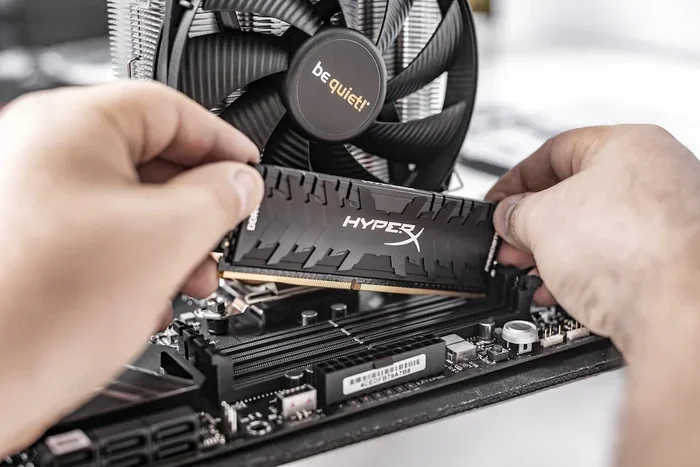
- Install the modules: Open your computer case, locate the memory slots, and gently press the new sticks in at a 45-degree angle until they click into place.
- Verify the upgrade: Restart your PC and confirm the new memory is recognized. You can follow a detailed guide on upgrading laptop RAM if you need step-by-step instructions.
Always ground yourself before touching internal components to avoid static damage. If you are uncomfortable opening your computer, a local repair shop can usually handle the installation for a small fee.
Common Mistakes To Avoid When Upgrading RAM
Even a simple upgrade can go wrong if you are not careful. Here are a few mistakes to watch out for:
- Buying the wrong RAM type: Not all RAM is compatible with all systems. Always verify the DDR generation and form factor before purchasing.
- Mixing mismatched sticks: While it sometimes works, mixing different RAM brands, speeds, or sizes can cause instability. Try to use matching pairs.
- Ignoring your motherboard limits: Every motherboard has a maximum RAM capacity. Check your manual before buying more memory than your system can use.
- Forgetting to update your BIOS: In some cases, a BIOS update is needed to fully recognize new, higher-capacity memory modules.
Avoiding these pitfalls ensures your upgrade goes smoothly and delivers the performance gains you expect.
Expert Insights On RAM Upgrades
Tech professionals consistently recommend RAM upgrades as one of the best ways to improve system performance. According to industry experts, a memory upgrade often provides more noticeable real-world improvement than swapping out other components — especially in systems that are a few years old.
The reason is straightforward. Storage drives and processors have advanced rapidly over the years, but RAM technology remains the key bottleneck for everyday computing tasks. Even a modest increase in capacity can transform how your system feels during daily use. For budget-conscious users, this makes RAM the highest-value upgrade available.
If you are considering a broader system improvement, you might also want to explore what a GPU upgrade could do for your setup. Different components serve different purposes, and understanding each one helps you build the best system for your needs.
Conclusion
The advantages of adding more RAM to your PC are clear and compelling. From faster multitasking and quicker load times to better gaming performance and an extended system lifespan, a RAM upgrade delivers real, tangible benefits. It is one of the most cost-effective ways to improve your computer, whether you are using a sleek laptop or a powerful desktop.
If your system is struggling to keep up with your demands, do not rush to buy a new machine. A simple memory upgrade might be all you need. Check your current setup, find compatible RAM, and enjoy the difference a little extra memory can make.
Frequently Asked Questions
What are the main advantages of adding more RAM to a PC?
The main benefits include smoother multitasking, faster application load times, better gaming performance, improved creative workflow, and an extended lifespan for your computer. A RAM upgrade is one of the simplest and most affordable ways to boost your system’s speed and responsiveness.
How much RAM should I add to my computer?
This depends on your usage. For everyday tasks, 8GB to 16GB is usually sufficient. If you game heavily or do video editing, 32GB or more may be ideal. Check your current memory first by checking your RAM to determine how much room you have to grow.
Can adding RAM damage my computer?
No, adding compatible RAM will not damage your system. Just make sure you purchase the correct type for your motherboard and handle the modules carefully to avoid static discharge. Always power off and unplug your computer before installing new memory.
Is it better to add RAM or replace my computer?
For most users, adding RAM is far more cost-effective than replacing an entire computer. A memory upgrade costs a fraction of a new system and can make an older machine feel brand new. It is the smart first step before considering a full replacement.
How do I know if my computer needs more RAM?
Common signs include slow app loading, browser crashes with multiple tabs, stuttering during gaming, and constant hard drive activity during simple tasks. If your system struggles with everyday workloads, it is likely time for a RAM upgrade.
Does adding RAM help with laptop performance?
Yes, adding RAM to a laptop delivers the same advantages as a desktop. Laptops benefit from faster multitasking, smoother application switching, and better performance in memory-heavy tasks. Just make sure your laptop supports RAM upgrades before purchasing new modules.