What Can You Do with Microsoft Sql
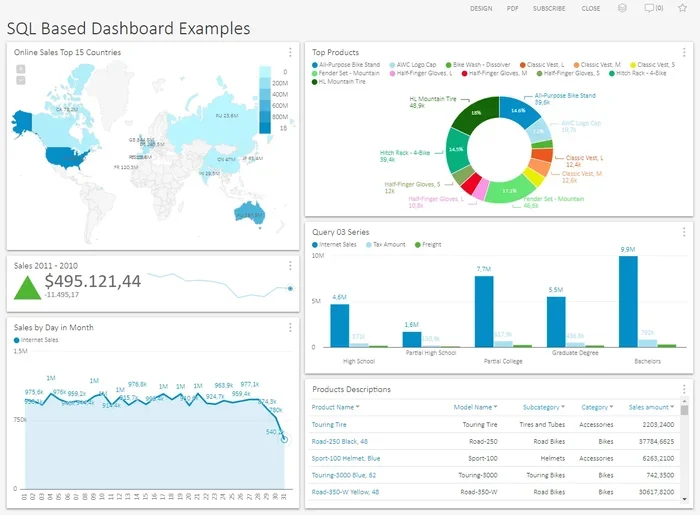
Microsoft SQL is a powerful database platform that lets you store, retrieve, and manage data for businesses of all sizes. You can use it to run complex queries, build reports, analyze trends, and keep your data safe and organized. Whether you are a beginner or a seasoned developer, Microsoft SQL gives you the tools to turn raw data into real insights.
Microsoft SQL is one of the most widely used database platforms in the world. Companies rely on it every single day to store customer records, track inventory, run financial reports, and much more. If you have ever wondered what you can actually do with this tool, you are in the right place.
In this guide, we will walk through everything you can do with Microsoft SQL. From basic data storage to advanced business intelligence, the possibilities are huge. Let us break it all down in a way that is easy to follow.
Key Takeaways
- Data Storage and Management: Microsoft SQL lets you organize and store massive amounts of structured data efficiently.
- Query Power: You can write SQL queries to retrieve, filter, and manipulate data with precision.
- Business Intelligence: SQL Server Reporting Services and Analysis Services help you build dashboards and reports.
- Security and Compliance: Microsoft SQL offers robust tools to protect sensitive data and meet regulatory needs.
- Scalability: It works for small projects and enterprise-level systems alike.
- Integration: SQL Server connects easily with other Microsoft tools like Excel, Power BI, and Azure.
📑 Table of Contents
What Is Microsoft SQL?
Microsoft SQL refers to a family of database products built by Microsoft. The most popular one is SQL Server, which is a relational database management system, or RDBMS. Think of it as a giant digital filing cabinet where you can store, organize, and pull out data whenever you need it.
SQL stands for Structured Query Language. It is the language used to talk to databases. With Microsoft SQL, you use this language to create tables, insert records, update information, and run searches. The system handles millions of rows of data without breaking a sweat.
There are several editions of SQL Server available. You have the free SQL Server Express for learning and small projects. Then there is the SQL Server Developer Edition, which is also free but meant for development and testing. For larger organizations, the Enterprise Edition offers advanced features like high availability and advanced security.
Core Things You Can Do With Microsoft SQL
So, what can you do with Microsoft SQL on a daily basis? The short answer is a lot. Let us look at the core tasks that make this platform so valuable.
Storing and Organizing Data
The most fundamental thing you can do is store data in an organized way. You create databases and tables inside them. Each table holds specific types of information. For example, you might have a Customers table and an Orders table.
You define columns for each table. A Customers table might have columns like Name, Email, Phone, and Address. Each row represents one record. This structure makes it easy to keep data clean and consistent.
Before you install SQL Server on your machine, make sure your hardware can handle it. If you are working on a laptop, check whether you can upgrade the RAM in your laptop first. Running a database server needs memory, and having enough RAM makes a big difference in performance.
Writing Queries to Retrieve Data
Once your data is stored, you need a way to get it back. This is where SQL queries come in. A query is basically a request for data. You write it in SQL, and the database engine finds the matching records.
Here is a simple example:
SELECT Name, Email FROM Customers WHERE City = 'New York'
This query pulls the names and emails of all customers in New York. You can get as complex as you want. You can join multiple tables, filter results, sort data, and aggregate numbers. The SQL query language is incredibly flexible.
You can also update records, delete old data, and insert new rows. These operations keep your database current and accurate. Over time, you will write hundreds of queries, and they will become second nature.
Creating Views and Stored Procedures
As you get more comfortable, you can start using advanced features. Views are saved queries that act like virtual tables. They let you simplify complex queries and reuse them without rewriting the code.
Stored procedures are pre-written sets of SQL statements stored in the database. You call them by name, and they run automatically. This saves time and reduces errors. Many companies use stored procedures to enforce business rules and keep data operations consistent.
Using Microsoft SQL for Data Analysis and Reporting
One of the biggest reasons people use Microsoft SQL is for data analysis. Raw data alone is not very useful. You need tools to make sense of it.
Running Aggregations and Calculations
SQL has built-in functions that let you crunch numbers right inside the database. You can calculate sums, averages, counts, minimums, and maximums. For example, you could find the total sales for each month or the average order value for a specific product.
These calculations happen fast, even on large datasets. The database engine is optimized for this kind of work. You do not need to export data to another tool just to run basic numbers.
Building Reports with SQL Server Reporting Services
SQL Server Reporting Services, or SSRS, is a built-in tool that lets you design and share reports. You can create pixel-perfect reports with charts, tables, and images. These reports can be scheduled to run automatically and delivered by email.
Many businesses use SSRS for monthly financial reports, inventory summaries, and performance dashboards. The reports pull data directly from the database, so they are always up to date.
If you are presenting your findings to a team, you might want to use a good setup. Having a reliable setup on your device matters when you are sharing data visually. For instance, if you are using a touchscreen device, you may want to check how you can use a mouse with a touchscreen laptop to navigate your reporting tools more comfortably.
Exporting Data to Other Tools
Microsoft SQL plays well with other tools. You can export data to Excel, CSV files, or directly into Power BI for interactive dashboards. Power BI connects to SQL Server natively, which makes building visual reports a breeze.
This integration is a huge advantage. You store your data in SQL Server, and then you visualize it in Power BI. The two tools work together seamlessly. Many organizations build their entire data pipeline around this combination.
Microsoft SQL for Database Administration
Every database needs someone to manage it. That is where database administration comes in. Microsoft SQL gives administrators powerful tools to keep everything running smoothly.
Managing Users and Permissions
Not everyone should have access to all data. SQL Server has a detailed permissions system. You can create logins, assign roles, and control who can read, write, or modify data.
For example, your sales team might need to view customer records but not delete them. Your finance team might need access to salary data. You can set these permissions precisely. This keeps your data secure and compliant with company policies.
Backing Up and Restoring Databases
Data loss can be catastrophic. SQL Server makes it easy to back up your databases regularly. You can schedule full backups, differential backups, and transaction log backups.
If something goes wrong, you can restore the database to a specific point in time. This is called point-in-time recovery. It is a lifesaver when mistakes happen or when hardware fails.
Many organizations store important data that might also relate to surveillance and security systems. For instance, if your company uses cameras and stores footage metadata in a database, you might also need to request security camera footage for compliance or incident review purposes.
Monitoring Performance
SQL Server includes tools to monitor how well your database is performing. You can track slow queries, check disk usage, and watch for bottlenecks. SQL Server Management Studio, or SSMS, is the main tool you use for this.
Performance monitoring helps you catch problems early. You can optimize queries, add indexes, or adjust server settings before users even notice an issue. It is all about keeping things fast and responsive.
Microsoft SQL for Business Intelligence
Business intelligence, or BI, is all about turning data into decisions. Microsoft SQL has a full suite of BI tools built right in.
SQL Server Analysis Services
SQL Server Analysis Services, or SSAS, lets you build analytical models called cubes. These cubes let you slice and dice data from every angle. You can drill down from yearly totals to daily transactions in seconds.
Cubes are especially useful for financial analysis, sales forecasting, and inventory planning. They pre-calculate aggregations, which makes queries lightning fast even on huge datasets.
SQL Server Integration Services
SQL Server Integration Services, or SSIS, handles data extraction, transformation, and loading, also known as ETL. You use SSIS to move data between different sources and destinations.
For example, you might pull data from a CSV file, clean it up, and load it into a SQL Server database. SSIS packages automate this process. You can schedule them to run every night so your data is always fresh.
When you are working on your laptop or workstation for long hours managing databases, you want your hardware to be reliable. Make sure your device is running well and that your input devices, like your mouse, are working properly. If you ever need to troubleshoot, you can learn how to unlock your mouse on your laptop to keep your workflow uninterrupted.
Connecting with Power BI
Power BI is Microsoft’s flagship BI tool. It connects directly to SQL Server and lets you build interactive dashboards. You can create charts, maps, and KPIs that update in real time.
Power BI is popular because it is user-friendly. Business users who do not know SQL can still build meaningful reports. Meanwhile, advanced users can write custom queries and DAX formulas for deeper analysis.
Getting Started with Microsoft SQL
Ready to dive in? Here is how you can start using Microsoft SQL today.
Step 1: Download and Install SQL Server
Go to the Microsoft website and download SQL Server. Choose the edition that fits your needs. For beginners, SQL Server Express is free and more than enough to learn on. During installation, select the Database Engine services option.
Step 2: Install SQL Server Management Studio
SSMS is the free tool you use to interact with SQL Server. It gives you a visual interface to manage databases, write queries, and monitor performance. Download it from the Microsoft website and connect to your server instance.
Step 3: Create Your First Database
Open SSMS and connect to your server. Right-click on Databases and select New Database. Give it a name and click OK. You now have a blank database ready to go.
Next, create your first table. Define your columns and data types. Start inserting some sample data. Write your first SELECT query to retrieve it. Within an hour, you will have a working database.
Step 4: Learn the Key SQL Commands
Focus on learning these commands first:
- SELECT – to retrieve data
- INSERT – to add new records
- UPDATE – to modify existing records
- DELETE – to remove records
- CREATE TABLE – to build new tables
- JOIN – to combine data from multiple tables
Master these basics, and you will be well on your way to using Microsoft SQL effectively. From there, you can explore advanced topics like indexing, stored procedures, and triggers.
Common Mistakes to Avoid
Even experienced users make mistakes with SQL. Here are a few to watch out for.
- Not backing up your database: Always schedule regular backups. Data loss happens more often than you think.
- Writing inefficient queries: Avoid SELECT * when you only need a few columns. It slows things down.
- Ignoring security: Never give everyone admin access. Use the principle of least privilege.
- Skipping indexes: Indexes speed up queries. But too many indexes slow down inserts and updates. Find the right balance.
- Not testing in a development environment: Always test your changes on a copy of the database first.
Avoiding these mistakes saves you hours of troubleshooting and keeps your databases running smoothly.
Final Thoughts
Microsoft SQL is an incredibly versatile platform. You can store and manage data, run powerful queries, build reports, and create business intelligence dashboards. It serves small businesses and large enterprises alike. The skills you learn with SQL transfer across many industries and roles.
Whether you are a developer building applications, a data analyst exploring trends, or an administrator keeping systems running, Microsoft SQL gives you the tools you need. Start with the basics, practice regularly, and gradually tackle more advanced topics. The investment pays off quickly.
Now that you know what you can do with Microsoft SQL, it is time to take the first step. Download SQL Server Express, install SSMS, and create your first database. You will be surprised how fast you get up to speed.
Frequently Asked Questions
What is Microsoft SQL used for?
Microsoft SQL is used for storing, managing, and retrieving data. It powers databases for businesses of all sizes. You can use it for everything from simple data storage to advanced business intelligence and reporting.
Is Microsoft SQL free?
Yes, there are free editions. SQL Server Express is a free version with core features. SQL Server Developer Edition is also free but is intended for development and testing, not production use.
How is Microsoft SQL different from MySQL?
Microsoft SQL is developed by Microsoft and works best with Windows and other Microsoft tools. MySQL is open source and works across many platforms. Both are relational databases, but they use different syntax and features.
Can I use Microsoft SQL on a laptop?
Yes, you can install SQL Server on a laptop. Make sure your laptop has enough RAM and storage. You may want to check if you have enough RAM for your laptop to run the database server smoothly alongside other applications.
Do I need to know programming to use Microsoft SQL?
You do not need to be a programmer. SQL uses a straightforward English-like syntax. Beginners can learn the basics in a few days. However, knowing some programming concepts helps when writing advanced queries and stored procedures.
What careers use Microsoft SQL?
Many careers use SQL. Database administrators, data analysts, business intelligence developers, software engineers, and data scientists all rely on it. It is one of the most in-demand skills in the tech industry today.
=== CONCLUSION ===
Microsoft SQL opens up a world of possibilities for managing and analyzing data. From basic storage to complex business intelligence, it is a tool that delivers real value. The skills you build with SQL stay with you throughout your career.
Start small, stay consistent, and keep exploring new features. The more you work with Microsoft SQL, the more powerful and confident you will become. Your data has a lot to say, and SQL gives you the voice to share it.