What Is a Garmin Basemap
A Garmin basemap is the foundational map layer that comes preloaded on every Garmin GPS device. It provides essential road networks, trails, and basic terrain data so you can navigate right out of the box. Understanding your basemap helps you choose the right add-on maps and get the most from your GPS navigation experience.
If you own a Garmin GPS device, you have probably seen the term “basemap” pop up on your screen or in the settings menu. But what exactly is a Garmin basemap, and why does it matter? Whether you use your Garmin for driving, hiking, cycling, or boating, the basemap is the starting point for all your navigation.
In this guide, we will break down everything you need to know about Garmin basemaps. We will cover what they are, how they work, why they matter, and how to get the most out of them. By the end, you will feel confident navigating with your Garmin device and know exactly which maps to add for your needs.
Key Takeaways
- Basemap is the default map: Every Garmin device ships with a basic basemap that shows roads, trails, and essential navigation data.
- It is not detailed enough alone: The basemap provides a foundation but lacks the depth of specialized maps like TopoActive or City Navigator.
- You can customize your maps: Garmin allows you to add custom maps, download updates, and choose map styles for different activities.
- Memory matters: Basemaps take up space, and adding more maps requires sufficient device storage or a microSD card.
- Updates are free: Garmin offers free basemap updates through Garmin Express and the Garmin Connect app.
- Activity-specific maps exist: Different basemaps serve different needs, from driving to hiking to off-road exploration.
📑 Table of Contents
What Is a Garmin Basemap?
A Garmin basemap is the default map that comes preloaded on every Garmin GPS device. Think of it as the foundation or the starting layer of all your navigation. When you turn on your Garmin for the first time, the basemap is what you see. It shows basic roads, highways, trails, rivers, lakes, and coastlines.
The basemap gives you enough detail to start navigating right away, without needing to download or purchase additional maps. However, it is intentionally kept simple and lightweight. It does not include detailed turn-by-turn directions, satellite imagery, or specialized terrain data. Instead, it provides a clean, easy-to-read overview that works in almost any location.
What Does a Basemap Include?
A standard Garmin basemap includes the following essentials:
- Major roads and highways
- Secondary roads and streets
- Trail networks for hiking and biking
- Waterways like rivers, lakes, and coastlines
- Basic points of interest like gas stations and restaurants
- Political boundaries like city and state lines
- Elevation contours in some versions
While this sounds like a lot, the basemap is designed to be a lightweight starting point. For detailed street-level navigation or topographic trail maps, you will need to add specialized map packages.
How Does a Garmin Basemap Work?
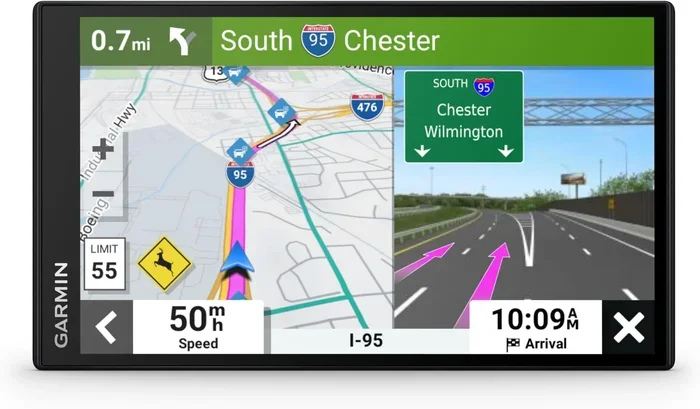
The basemap lives on your device’s internal memory or on a microSD card, depending on your Garmin model. When you open your device, the GPS receiver locks onto satellites to determine your location. The basemap then displays your position as a blue dot or arrow against the map data stored on the device.
Your Garmin uses the basemap to calculate routes, show your progress, and display nearby points of interest. The device does not need an internet connection to use the basemap. Everything is stored locally, which is one of the biggest advantages of a Garmin GPS over using your phone for navigation.
For fleet management and safety tracking, devices that use GPS navigation technology similar to Garmin basemaps are essential. You can learn more about how GPS cameras enhance safety by checking out what a fleet safety camera does.
The Role of GPS in Basemap Functionality
Your Garmin device receives signals from multiple GPS satellites. These signals tell the device exactly where you are on the basemap. The basemap then renders the surrounding roads, trails, and terrain based on that location. This all happens in real time, which is why the map moves smoothly as you walk, drive, or ride.
The basemap also works alongside other Garmin features like breadcrumb trails, track logging, and route planning. These features rely on the basemap as their visual foundation. Without it, your device would know your coordinates but could not show you where you are in relation to the world around you.
Why Is the Basemap Important?
The basemap matters because it is always there. You do not need internet, cell service, or a data plan to use it. This makes it incredibly reliable for outdoor adventures, road trips, and any situation where you might lose connectivity.
For outdoor enthusiasts who use GPS devices alongside trail cameras, understanding how mapping works can enhance your overall experience. For instance, if you use a trail camera with time-lapse features, knowing how your Garmin maps your location helps you log and revisit spots more effectively. You can read more about time-lapse features on trail cameras here.
Reliability Without Internet
One of the best things about a Garmin basemap is that it works offline. Smartphones depend on cellular data to load maps, which can be a problem in remote areas. Your Garmin basemap does not have this issue. Whether you are in the mountains, on a deserted road, or crossing a national park, your basemap is ready to go.
Camera technology also plays a role in modern navigation and mapping. For example, WDR camera technology is used in many surveillance and mapping applications. You can learn more about what a WDR camera is and how it relates to imaging in navigation systems.
Foundation for Add-On Maps
The basemap also serves as the base layer when you add more detailed maps. When you download a TopoActive map or a City Navigator map, it overlays on top of the basemap. The basemap provides the basic structure, and the add-on maps fill in the details. This layered system is one of the reasons Garmin devices are so flexible.
Types of Garmin Basemaps
Not all Garmin basemaps are the same. Garmin offers different basemap styles depending on the device and the intended use. Here are the most common types you will encounter.
Global Basemap
The global basemap is the default on most Garmin devices. It covers the entire world with basic roads, trails, and waterways. It is perfect for international travel because you do not need to download region-specific maps. The trade-off is that it lacks detail, so you will still want to add local maps for serious navigation.
Regional Basemaps
Some Garmin devices come with regional basemaps that are more detailed than the global version. These basemaps focus on specific areas like North America, Europe, or Australia. They include more roads, trails, and points of interest within that region.
Activity-Specific Basemaps
Certain Garmin devices offer activity-specific basemaps tailored for hiking, cycling, marine, or off-road use. These basemaps highlight features relevant to the activity, such as contour lines for hiking or depth contours for marine navigation.
How to Update Your Garmin Basemap
Keeping your basemap up to date is important for accuracy. Roads change, trails get rerouted, and new points of interest get added. Garmin makes updating easy through Garmin Express, a free desktop application.
Here is how to update your basemap:
- Connect your Garmin device to your computer using a USB cable.
- Open Garmin Express and wait for it to recognize your device.
- Click on “Device” and then select “Map updates.”
- Choose the basemap update you want to download.
- Wait for the download to finish and sync to your device.
The basemap update is free and can make a big difference in map accuracy. It is a good habit to check for updates before any major trip.
Tips for Managing Basemap Storage
Basemaps take up space on your device. If your Garmin has limited internal memory, you may need to manage your storage carefully. Here are some quick tips:
- Use a microSD card to expand storage for additional maps.
- Remove maps for regions you no longer visit.
- Keep your basemap updated to avoid storing outdated versions.
- Check your device manual for maximum storage capacity.
Basemap vs. Add-On Maps: What Is the Difference?
Understanding the difference between the basemap and add-on maps is key to getting the most from your Garmin. The basemap is the free, preloaded foundation. Add-on maps are optional downloads that add detailed information for specific activities or regions.
Here is a quick comparison:
- Basemap: Free, preloaded, basic detail, global coverage, no internet required.
- Add-On Maps: Paid or free downloads, detailed roads or terrain, regional or activity-specific, may require internet to purchase and download.
For example, if you are a hiker, the basemap shows you the general trail network. But adding a TopoActive map gives you contour lines, elevation profiles, and more detailed trail markings. Similarly, if you are a driver, the basemap shows major roads, but City Navigator gives you turn-by-turn directions with voice prompts.
Some Garmin devices also support custom map uploads. You can download map files from third-party sources or create your own maps using Garmin BaseCamp or Garmin Explore. This flexibility is one of the biggest strengths of the Garmin ecosystem.
Just as inspection cameras rely on clear imaging technology, your Garmin relies on clear map data. For instance, understanding different camera types like a gully camera helps you appreciate how imaging and mapping technologies work together in modern navigation and infrastructure systems.
Common Mistakes People Make with Garmin Basemaps
Avoid these common pitfalls to get the best experience from your Garmin device.
- Assuming the basemap is detailed enough for all activities: The basemap is a starting point, not a replacement for specialized maps.
- Forgetting to update the basemap: Outdated maps can lead to missed roads, closed trails, and incorrect routing.
- Ignoring storage limits: Adding too many maps without enough storage can slow down your device or prevent updates.
- Not using a microSD card: If your device supports it, a microSD card gives you room for more maps and data.
- Relying solely on GPS without checking the map: Always glance at your basemap periodically to confirm your route and surroundings.
Final Thoughts
A Garmin basemap is the essential foundation that makes your GPS device useful right out of the box. It provides basic navigation data that works anywhere in the world, even without an internet connection. While it is not as detailed as add-on maps, it serves as the reliable base layer for all your navigation needs.
The best part is that the basemap is free, easy to update, and customizable. Whether you are a casual driver, a weekend hiker, or a dedicated outdoor adventurer, understanding your basemap helps you navigate with confidence. Take the time to explore your basemap settings, download updates regularly, and add specialized maps when needed. Your Garmin device will reward you with accurate, dependable navigation every time you head out.
Frequently Asked Questions
Do I need to pay for a Garmin basemap?
No, the basemap comes free and preloaded on every Garmin device. You do not need to purchase or download it separately. It is always ready to use right out of the box.
Can I use my Garmin basemap without internet?
Yes, the basemap is stored directly on your device. It does not require any internet connection or cellular data to function. This makes it ideal for remote areas and offline navigation.
How often should I update my Garmin basemap?
Garmin recommends checking for basemap updates at least once a year or before any major trip. Updates are free and can improve road accuracy and add new trail data.
Can I delete the basemap to save space?
You should not delete the basemap. It is the foundational map layer that all other maps and navigation features depend on. Instead, use a microSD card to expand storage for additional maps.
What is the difference between a basemap and a TopoActive map?
The basemap provides basic roads, trails, and waterways at a glance. A TopoActive map adds detailed contour lines, elevation data, and terrain features for more precise outdoor navigation. The TopoActive map overlays on top of the basemap.
Can I create my own custom basemap for Garmin?
Yes, you can use tools like Garmin BaseCamp or Garmin Explore to create custom maps and upload them to your device. These custom maps work alongside your basemap to add personalized navigation data.