What Is a Paypal Email Address
A PayPal email address is the email you use to sign up for and access your PayPal account. It serves as your unique identifier for sending and receiving money online. Your PayPal email is different from your regular email because it links directly to your digital wallet and payment history. In this guide, we walk you through everything you need to know about finding, setting up, and managing your PayPal email address with ease.
Key Takeaways
- Your PayPal email is your login ID: It is the email you use to sign in and manage your account.
- You can add multiple emails: PayPal lets you link more than one email to a single account for convenience.
- Email verification is required: You must confirm your email before you can send or receive payments.
- Your PayPal email is public-facing: People need it to send you money, but you should still keep it secure.
- You can change your PayPal email anytime: Just go to your account settings and update it.
- PayPal is a SaaS platform: It works like a software service that runs in a SaaS environment, meaning you access it through your browser or app.
📑 Table of Contents
What Is a PayPal Email Address?
A PayPal email address is simply the email account you use to create and log into your PayPal profile. When you sign up for PayPal, you pick an email address. That email becomes your account name. Every time you want to send money, receive money, or check your balance, you log in with that email.
Think of it like a mailing address, but for money. Just as people need your home address to send you a package, they need your PayPal email to send you funds. It is that simple. But there is a bit more to it than just signing up. Your PayPal email connects to your bank account, your credit cards, and your payment history. It is the central hub for all your digital transactions.
If you are new to PayPal, understanding how your email works with the platform is the first step to using it safely and effectively. Let us break it all down.
How Does a PayPal Email Work?
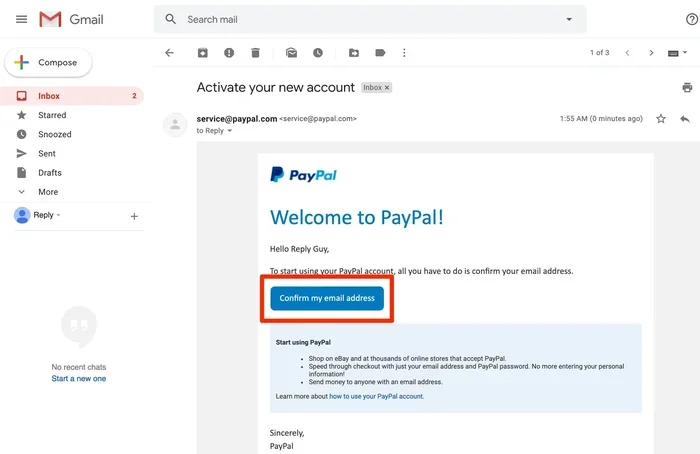
When you register for PayPal, you choose an email address. PayPal sends a confirmation link to that email. You click the link, and your account is verified. From that point on, that email is tied to your PayPal profile.
Here is how the process works step by step:
- You sign up with your email and create a password.
- PayPal sends a verification email to that address.
- You click the link in the email to confirm ownership.
- Your account is now active and ready to use.
Once your account is set up, your PayPal email acts as your identity on the platform. When someone wants to send you money, they type in your PayPal email. The payment goes straight to your account. You get a notification, and the money appears in your PayPal balance.
Why Your PayPal Email Matters
Your PayPal email is more than just a login. It is tied to your financial security. If someone gains access to your email, they could potentially reset your PayPal password. This is why protecting your email is just as important as protecting your PayPal password. Use a strong, unique password for your email account. Enable two-factor authentication whenever possible.
Also, your PayPal email is what other people see when they send you money. It is your public-facing ID on the platform. You can share it freely, but always make sure you are sending it to the right person. A simple typo could send your payment to the wrong inbox.
How to Find Your PayPal Email Address
If you have forgotten your PayPal email or just need to double-check it, finding it is easy. Here are the steps to locate your PayPal email on both desktop and mobile.
On a Computer
- Go to the PayPal website and log in.
- Click on your profile name in the top right corner.
- Select “Settings” from the dropdown menu.
- Click on “Business Information” or “Personal Information.”
- Your PayPal email will be listed there.
On the PayPal Mobile App
- Open the PayPal app and log in.
- Tap the gear icon for Settings.
- Tap “Business Information” or “Account Settings.”
- Your email address will be displayed at the top of the screen.
Pro tip: If you have multiple email addresses linked to your account, PayPal will show all of them. The one marked as “Primary” is the one you use to log in. You can change which email is primary at any time in your settings.
Can You Use Any Email for PayPal?
Yes, you can use most any email address to create a PayPal account. Whether it is Gmail, Yahoo, Outlook, or a custom domain email, PayPal accepts them all. The key requirement is that the email must be active and accessible to you.
However, there are a few things to keep in mind:
- Use an email you check regularly: PayPal sends important notifications to this email. If you never check it, you might miss payment alerts or security warnings.
- Avoid shared emails: If you use a work email or a family email, other people might see your PayPal notifications. This could be a privacy concern.
- Use a dedicated email for financial accounts: Having a separate email just for PayPal and banking adds an extra layer of security.
Some people wonder if their PayPal email needs to match their bank email. It does not. They can be completely different. PayPal just needs a valid email that you own and can access.
What About the RAM on Your Device?
While your PayPal email has nothing to do with your device hardware, you do need a reasonably capable device to access PayPal safely. If you are using an older laptop, make sure your RAM on a laptop is sufficient to run a modern browser smoothly. Low memory can cause slow loading times, which might lead to frustration when managing your account.
How to Change Your PayPal Email Address
Need to switch to a new email? You can change your PayPal email at any time. Here is how to do it:
- Log in to your PayPal account.
- Go to Settings.
- Click on “Business Information” or “Personal Information.”
- Find the “Email” section.
- Click “Add Email” and enter your new address.
- PayPal will send a confirmation email to the new address.
- Click the link in that email to verify it.
- Once verified, set the new email as your primary address.
- Remove the old email if you no longer need it.
It is important to note that you cannot remove your last remaining email. You must always have at least one email linked to your account. Also, changing your email does not affect your transaction history or your balance. Everything stays exactly where it is.
PayPal Email Security Best Practices
Security is critical when it comes to financial accounts. Your PayPal email is a gateway to your money, so you need to treat it with care. Here are some best practices to keep your account safe.
Use Strong, Unique Passwords
Do not reuse passwords across sites. If one site gets breached, hackers will try that same password on your PayPal. Use a password manager to generate and store complex passwords for both your email and PayPal accounts.
Enable Two-Factor Authentication
Two-factor authentication adds a second layer of protection. Even if someone gets your password, they cannot log in without a code sent to your phone or email. Both PayPal and your email provider should offer this feature. Turn it on in your security settings.
Watch for Phishing Emails
Scammers often send fake emails that look like they come from PayPal. These emails ask you to click a link and “verify” your account. Always check the sender’s email address carefully. PayPal will never ask for your password in an email. When in doubt, go directly to the PayPal website instead of clicking any links in emails.
Keep Your Device Updated
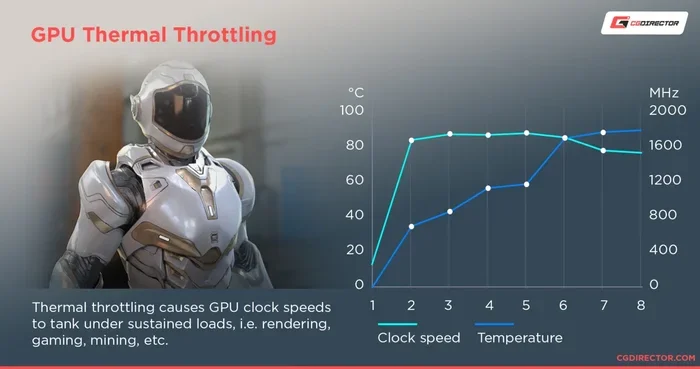
Regular updates patch security vulnerabilities. Make sure your operating system, browser, and apps are always up to date. If your computer runs slowly, it might be time to check your system specs. For example, an older machine might benefit from checking its idle GPU temperature and overall health to make sure it is running safely for online banking tasks.
Common PayPal Email Mistakes to Avoid
Even experienced users make mistakes with their PayPal email. Here are some common errors and how to avoid them:
- Using an old email address: If you stop checking an email, you could miss important PayPal alerts or lose access to your account entirely.
- Sharing your PayPal email publicly: While it is safe to share for receiving payments, posting it on social media can attract spam and phishing attempts.
- Not verifying your email: An unverified email limits what you can do on PayPal. You may not be able to send or receive money until verification is complete.
- Ignoring security notifications: If PayPal emails you about a login attempt you did not make, take it seriously. Change your password immediately.
- Forgetting to update your email after a change: If you switch email providers, update your PayPal email right away to avoid losing access.
Frequently Asked Questions
Can I have more than one email address on my PayPal account?
Yes, PayPal allows you to add multiple email addresses to a single account. You can add up to several emails, but only one can be your primary login email. All linked emails will receive notifications and payment alerts.
Is my PayPal email the same as my PayPal username?
Not necessarily. Your PayPal email is your email address, while your PayPal username is a separate name you choose during registration. However, your email is what other people use to send you money. The username is more for your internal identification within the platform.
Can I use a work email for PayPal?
You can, but it comes with risks. If you leave your job, you might lose access to your work email. This could lock you out of your PayPal account. It is safer to use a personal email that you control long-term.
What happens if I delete my PayPal email?
You cannot delete your only email address on PayPal. At least one email must remain linked to your account. If you want to remove an email, you need to add a new one first and set it as primary before removing the old one.
How long does it take to verify a new PayPal email?
Verification is usually instant. You receive a confirmation email within seconds. Click the link in that email, and your new address is verified immediately. If you do not see the email, check your spam or junk folder.
Can someone hack my PayPal account through my email?
If a hacker gains access to your email, they could try to reset your PayPal password. This is why securing your email is just as important as securing PayPal itself. Use strong passwords and two-factor authentication on both accounts.
Final Thoughts
Your PayPal email address is the key to your entire PayPal experience. It is how you log in, how people find you, and how you stay connected to your money. Taking a few minutes to set it up correctly and keep it secure will save you a lot of trouble down the road.
Whether you are just getting started with PayPal or you have been using it for years, understanding your email setup matters. Add a secondary email for backup. Enable two-factor authentication. And never ignore a security alert from PayPal or your email provider.
Your digital wallet is only as secure as the email that protects it. Treat your PayPal email with the same care you treat your bank account, and you will enjoy a safe and smooth payment experience every time.