What Is an Sftp Cable
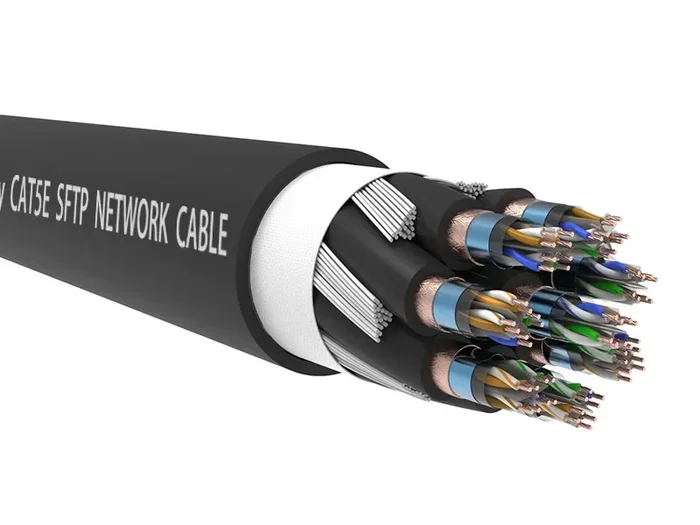
An SFTP cable, or Shielded Foiled Twisted Pair cable, is a type of network cable that uses extra shielding to protect data signals from interference. It keeps your internet connection stable, especially in busy environments with lots of electronic devices. If you want reliable and fast data transfer, understanding SFTP cables helps you make smarter choices for your setup.
When you set up a network, the cables you choose make a huge difference. One cable type that keeps coming up in networking conversations is the SFTP cable. But what exactly is it, and why should you care?
An SFTP cable stands for Shielded Foiled Twisted Pair. It is a type of network cable designed to protect data signals from outside interference. The shielding wraps around the twisted pairs inside the cable, keeping electromagnetic noise from messing with your connection. This makes SFTP cables a popular choice for environments where signal quality matters a lot.
Whether you are setting up a home office or managing a large business network, knowing your cable options helps you pick the right one. In this guide, we will break down everything you need to know about SFTP cables. You will learn how they work, where to use them, and how they compare to other cable types.
Key Takeaways
- SFTP stands for Shielded Foiled Twisted Pair: It combines foil and braid shielding to block interference.
- SFTP cables reduce crosstalk and EMI: This means cleaner signals and fewer network errors.
- They are ideal for enterprise and high-interference environments: Factories, offices, and data centers benefit most.
- SFTP cables come in different categories: Cat5e, Cat6, and Cat6a are common options.
- Proper installation matters: Grounding and handling the shielding correctly ensures peak performance.
- They cost more than UTP cables: But the reliability and performance gains are worth it in demanding setups.
📑 Table of Contents
What Is an SFTP Cable?
An SFTP cable is a shielded network cable that contains twisted wire pairs wrapped in both foil and braid shielding. The word SFTP breaks down like this:
- S = Shielded (overall braid shielding)
- F = Foil (individual foil wrapping around each pair)
- TP = Twisted Pair (the wires twisted together in pairs)
The double layer of shielding is what sets SFTP cables apart. The foil shielding wraps around each individual twisted pair. The braid shielding wraps around all the pairs together. This two-layer approach gives excellent protection against electromagnetic interference, also known as EMI. It also reduces crosstalk, which is when signals from one pair leak into another pair.
SFTP cables typically use an RJ45 connector on each end, just like most Ethernet cables. They fit into standard network ports on computers, routers, switches, and access points. You do not need special equipment to use them. They look and work like regular Ethernet cables, but with extra protection built in.
How SFTP Shielding Works
The shielding in an SFTP cable acts like a force field around the wires. When electrical signals travel through the twisted pairs, outside sources of interference can distort those signals. This includes things like motors, fluorescent lights, and other cables running nearby.
The foil layer blocks high-frequency interference. The braid layer blocks low-frequency interference. Together, they cover a wide range of frequencies. This dual shielding keeps your data clean and your connection stable. Think of it like wearing earplugs and noise-canceling headphones at the same time. You block out almost everything that could distract you.
How Does an SFTP Cable Work?
SFTP cables transmit data using electrical pulses through copper wires. The twisted pair design helps cancel out interference internally. Each pair twists at a different rate, which reduces signal degradation. The shielding adds another layer of defense against external noise.
Data travels from one device to another through the cable. Your computer sends a signal into one end. The shielding keeps that signal pure as it travels. The receiving device at the other end gets a clean, undistorted signal. This process happens incredibly fast, often at speeds of 1 gigabit per second or more.
The Role of Twisted Pairs
Inside every SFTP cable, you will find four twisted pairs of wires. That is eight wires total. Each pair twists at a specific number of twists per inch. The different twist rates prevent the pairs from interfering with each other. This is called pair-to-pair crosstalk reduction.
The tighter the twist, the better the performance. Higher category cables like Cat6 and Cat6a have tighter twists. This is why they support faster speeds and longer distances without signal loss.
Signal Integrity and Bandwidth
One of the main jobs of SFTP cable shielding is to maintain signal integrity. Signal integrity means the signal stays strong and clear from start to finish. Without shielding, signals can degrade over distance or pick up noise from nearby electronics.
Bandwidth is another important factor. Bandwidth determines how much data the cable can carry at once. SFTP cables in higher categories support wider bandwidths. This means faster downloads, smoother video calls, and more reliable connections for all your devices.
SFTP Cable vs Other Cable Types
Not all network cables are the same. Understanding the differences helps you choose the right cable for your needs. Let us compare SFTP cables to the most common alternatives.
SFTP vs UTP
UTP stands for Unshielded Twisted Pair. UTP cables are the most common type of Ethernet cable. They do not have any shielding at all. The twisted pair design alone handles most interference.
UTP cables are cheaper and easier to install. They work great for home networks and office environments with few electronic devices. But in areas with heavy electromagnetic interference, UTP cables can struggle. Signals may degrade, and data errors can increase.
SFTP cables solve this problem. The shielding blocks interference that UTP cables cannot handle. If you work in a busy office with lots of electronics, or near industrial equipment, SFTP is the better choice.
SFTP vs STP
STP stands for Shielded Twisted Pair. STP cables have shielding around the pairs, but they do not have the individual foil wrapping that SFTP cables have.
Here is a quick comparison:
- SFTP: Foil on each pair + braid around all pairs
- STP: Braid shielding around each pair only
- UTP: No shielding at all
SFTP provides better overall protection than STP. The foil layer adds a level of defense that STP cables lack. However, SFTP cables are also thicker and stiffer. They can be harder to route through tight spaces. The extra protection comes with a trade-off in flexibility.
SFTP vs FTP
FTP stands for Foiled Twisted Pair. FTP cables have foil shielding around each pair, but they lack the overall braid shielding that SFTP cables have.
FTP cables offer good protection against crosstalk between pairs. But they do not block external interference as well as SFTP cables. If your environment has lots of outside noise from motors or power lines, SFTP is the stronger option.
| Feature | SFTP | STP | FTP | UTP |
|---|---|---|---|---|
| Individual Pair Foil | Yes | No | Yes | No |
| Overall Braid Shielding | Yes | Yes | No | No |
| EMI Protection | Excellent | Good | Moderate | Poor |
| Crosstalk Reduction | Excellent | Good | Good | Moderate |
| Flexibility | Lower | Medium | Medium | High |
| Cost | Higher | Medium | Medium | Low |
When Should You Use an SFTP Cable?
SFTP cables shine in specific situations. They are not always necessary for every setup. Knowing when to use them saves you money and ensures the best performance.
High-Interference Environments
If your network runs near heavy machinery, elevators, or large power lines, SFTP cables are a smart choice. These environments generate a lot of electromagnetic interference. Regular UTP cables may suffer from signal loss in these conditions. The shielding in SFTP cables keeps your data safe from this noise.
Enterprise and Office Networks
Large office buildings often have dozens of network cables running through walls and ceilings. All those cables close together create a lot of potential for interference. SFTP cables help keep each connection clean and reliable. They are a standard choice in enterprise network infrastructure setups.
Data Centers and Server Rooms
Data centers pack tons of equipment into small spaces. The electromagnetic activity from all those servers is intense. SFTP cables handle this environment well. They maintain strong signal quality even in crowded server racks. If you are building or managing a data center, SFTP cables should be on your shortlist.
Industrial Settings
Factories and warehouses have plenty of sources of interference. Motors, welding equipment, and heavy machinery all create electromagnetic noise. SFTP cables keep your network running smoothly in these tough conditions. They are built to handle the demands of industrial environments.
Home and Small Office Use
For most home networks, SFTP cables are overkill. A standard UTP Cat5e or Cat6 cable works perfectly fine. But if your home office is near a home theater system, a microwave, or other electronics, SFTP can add peace of mind. It is always better to have extra shielding you do not need than to deal with connection problems.
How to Choose the Right SFTP Cable
Not all SFTP cables are created equal. Several factors determine which one is right for your setup. Here is what you need to consider.
Cable Category
The cable category tells you the speed and bandwidth capabilities. Here are the most common categories:
- Cat5e SFTP: Supports speeds up to 1 Gbps at 100 MHz. Good for basic networking needs.
- Cat6 SFTP: Supports speeds up to 10 Gbps at 250 MHz. A solid choice for most modern networks.
- Cat6a SFTP: Supports speeds up to 10 Gbps at 500 MHz. Great for high-performance setups.
- Cat7 SFTP: Supports speeds up to 10 Gbps at 600 MHz. Designed for advanced networking environments.
For most users, a Cat6 SFTP cable strikes the best balance between performance and cost. It handles everyday tasks with ease and supports future upgrades.
Cable Length
SFTP cables work best at shorter distances. Ethernet cables generally perform best at 100 meters or less. Beyond that distance, signal strength drops. If you need to run a cable longer than 100 meters, consider using a switch or repeater to boost the signal.
Connector Quality
The connectors on your SFTP cable matter just as much as the cable itself. Look for gold-plated RJ45 connectors. They resist corrosion and provide a snug fit. Poor connectors can undo all the benefits of a high-quality shielded cable.
Flexibility and Bend Radius
SFTP cables are thicker and stiffer than UTP cables. This is because of the shielding layers. Make sure you choose a cable with a suitable bend radius for your installation. Bending the cable too sharply can damage the shielding and reduce its effectiveness.
Budget Considerations
SFTP cables cost more than their unshielded counterparts. A Cat6 SFTP cable might cost 20 to 40 percent more than a Cat6 UTP cable. But for environments where reliability is critical, the extra cost is a worthy investment. Think of it as protecting your network from downtime and data errors.
Installation Tips for SFTP Cables
Installing SFTP cables requires a bit more care than installing UTP cables. The shielding adds protection, but it also adds complexity. Follow these tips to get the best results.
Proper Grounding
SFTP cables need to be properly grounded to work at their best. The shielding should connect to earth ground at both ends of the cable. This directs any interference away from your data signals. If you skip grounding, the shielding can actually make things worse by acting as an antenna for interference.
Avoid Sharp Bends
Do not bend SFTP cables too sharply. A sharp bend can damage the internal shielding and the twisted pairs. Always follow the manufacturer’s recommended bend radius. Usually, this is about four times the cable diameter.
Keep Away from Power Cables
Even with shielding, it is best to keep SFTP cables away from power cables. Run them on separate paths whenever possible. If they must cross, do so at a 90-degree angle. This minimizes the chance of interference.
Proper cable management also helps. Use cable trays and raceways to keep your SFTP cables organized. This protects the shielding from physical damage and keeps your installation clean and professional.
Do Not Strip the Shielding
When terminating an SFTP cable, be careful not to cut or strip the shielding. The foil and braid layers need to stay intact. Use connectors and tools designed specifically for shielded cables. This preserves the shielding and ensures the cable performs as intended.
Common Mistakes to Avoid
Even experienced network builders sometimes make mistakes with SFTP cables. Here are a few to watch out for.
- Skipping grounding: Ungrounded shielding does more harm than good.
- Using the wrong connectors: Standard RJ45 connectors may not make proper contact with the shielding.
- Bending too tightly: This damages the internal structure and reduces performance.
- Mixing cable types: Combining SFTP with UTP cables in the same run can create grounding issues.
- Ignoring cable length limits: Running cables beyond 100 meters causes signal loss.
Avoiding these mistakes keeps your SFTP network running smoothly for years. If you are unsure about any part of the installation, consult a professional. A proper setup today prevents headaches tomorrow.
Final Thoughts
An SFTP cable is a powerful tool for keeping your network fast and reliable. The double shielding protects your data from interference and crosstalk. This makes SFTP cables ideal for busy environments, enterprise networks, and industrial settings.
For most home users, a standard UTP cable works just fine. But if you need the extra protection, SFTP is worth the investment. Choose the right category, install it properly, and your network will thank you.
Just like investing in the right PC components extends the life of your computer, choosing quality cables extends the life of your network. If you are building or upgrading your setup, do not overlook the importance of good cabling. The right cable today saves you from network problems tomorrow.
Take the time to understand your options. Pick the cable that fits your environment and your needs. Your network will run faster, more reliably, and with fewer interruptions. That is a win for everyone.
Frequently Asked Questions
What does SFTP stand for in networking?
SFTP stands for Shielded Foiled Twisted Pair. It describes a network cable that has both foil shielding around each twisted pair and a braid shield around all the pairs together. This double shielding protects the cable from electromagnetic interference and crosstalk.
Is an SFTP cable the same as an Ethernet cable?
SFTP cables are a type of Ethernet cable. They use the same RJ45 connectors and fit into standard Ethernet ports. The difference is the added shielding that protects the signal from outside interference. Not all Ethernet cables are SFTP, but all SFTP cables are Ethernet cables.
Can I use an SFTP cable for home internet?
Yes, you can use an SFTP cable for home internet. However, most home setups do not need the extra shielding. A standard UTP Cat5e or Cat6 cable works perfectly for home networks. SFTP cables are more useful in environments with lots of electronic interference.
How is an SFTP cable different from an FTP cable?
An FTP cable has foil shielding around each twisted pair but no overall braid shield. An SFTP cable has both the foil shielding around each pair and a braid shield around the entire cable. This makes SFTP cables more protective against external interference than FTP cables.
Do SFTP cables support faster speeds than UTP cables?
The speed depends on the cable category, not just the shielding. A Cat6 SFTP cable and a Cat6 UTP cable can support the same speeds. The shielding in SFTP cables does not make them faster. It makes them more reliable in noisy environments by protecting the signal from interference.
What is the maximum length for an SFTP cable?
The maximum recommended length for an SFTP cable is 100 meters, or about 328 feet. Beyond this distance, signal strength can drop and data errors may increase. If you need to cover longer distances, use network switches or repeaters to boost the signal along the way.