What Is Analog Rgb
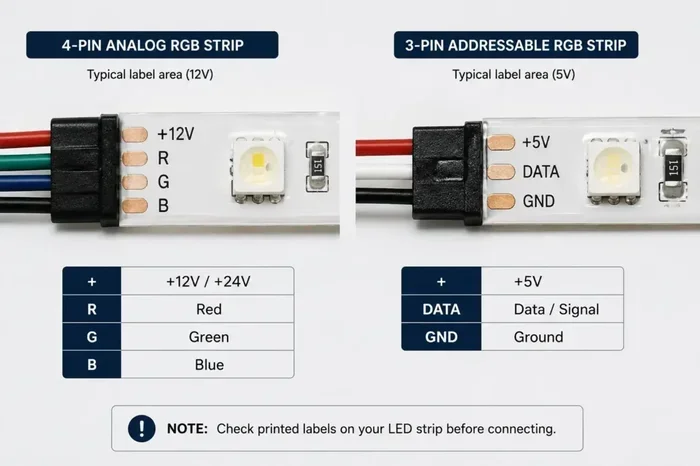
Analog RGB refers to the way red, green, and blue color signals are transmitted as continuous electrical waves rather than digital data. Understanding analog RGB helps you choose better monitors, cables, and display setups for work and play. This guide breaks down how analog RGB works, its pros and cons, and how it compares to modern digital signals.
You have probably seen the term analog RGB floating around in tech discussions, monitor specs, or cable descriptions. But what does it actually mean? Simply put, analog RGB is a method of sending color information through continuous electrical signals. Each color channel — red, green, and blue — travels as a separate waveform that your display interprets to create the image you see on screen.
Even though digital technology has taken over, analog RGB still plays a role in many setups. Whether you are using older monitors, troubleshooting a display issue, or just curious about how your screen produces color, understanding analog RGB gives you a real advantage. Let us walk through everything you need to know.
Key Takeaways
- Analog RGB uses continuous voltage signals to represent red, green, and blue color channels for display output.
- It has been the foundation of display technology for decades, from CRT monitors to early LCD panels.
- Analog RGB signals are more prone to interference and quality loss over longer cable runs compared to digital alternatives.
- Understanding analog RGB helps you troubleshoot display issues like color shifts, ghosting, and signal degradation.
- Many modern devices have moved to digital RGB or other protocols, but analog RGB still exists in legacy and niche applications.
- The RGB color model in analog form delivers a wide color gamut when paired with quality cables and hardware.
- Knowing the difference between analog and digital RGB empowers you to make smarter purchasing decisions.
📑 Table of Contents
What Is Analog RGB?
Analog RGB stands for analog Red, Green, Blue. It is a color signal format where each primary color is sent as a smooth, continuous voltage rather than as discrete digital bits. Think of it like a wave on the ocean — the signal rises and falls smoothly to represent different shades and intensities of each color.
Your monitor or display receives these three separate signals and combines them to produce the full range of colors on your screen. The more precise the voltage, the more accurate the color reproduction becomes.
How Analog RGB Signals Work
Each color channel in analog RGB gets its own dedicated wire or signal path. A red channel carries only the red information, the green channel carries green, and the blue channel carries blue. These three signals are sent simultaneously from the source — like a computer graphics card — to the display device.
Inside your monitor, a signal conversion circuit reads the voltage level of each channel and maps it to the correct brightness and hue for that pixel. When all three channels work together, they create the full RGB spectrum that your eyes perceive as a complete color image.
The Role of Color Depth in Analog RGB
Color depth refers to how many shades each color channel can produce. In analog RGB, the signal is continuous, which means it can theoretically represent an infinite number of shades. This is one of the big advantages over early digital formats that were limited by bit depth.
However, real-world analog RGB setups face noise and interference. These factors can reduce the effective color depth you actually see on screen. A clean signal path makes a huge difference in final image quality.
A Brief History of Analog RGB Technology
Analog RGB has been around for a very long time. It was the standard way to connect computers to displays for decades. From the earliest CRT monitors to the transition into flat-panel displays, analog RGB was the go-to method for color output.
The CRT Era
Cathode ray tube monitors relied entirely on analog RGB signals. Three electron guns inside the CRT fired at phosphor dots coated on the inside of the screen. Each gun was responsible for one color channel — red, green, or blue. The strength of each electrical signal controlled how bright each dot glowed.
This is where the term analog RGB truly comes alive. The signal was pure, continuous voltage, and the display translated it directly into visible light. CRT monitors produced rich, warm images that many enthusiasts still miss today.
The Transition to Digital
As display technology evolved, manufacturers started moving toward digital RGB and other digital protocols. DVI, HDMI, and DisplayPort all carry digital signals that are less prone to degradation. The shift happened because digital signals offer sharper images, no ghosting, and better color gamut consistency over long distances.
Still, analog RGB did not disappear overnight. Many graphics cards continued to include VGA ports well into the 2010s. Some professional and industrial displays still use analog RGB connections for specific compatibility needs.
Analog RGB vs Digital RGB: Key Differences
Understanding the difference between analog RGB and digital RGB is essential for anyone dealing with display setup or troubleshooting. The two formats handle color information very differently.
Signal Transmission
Analog RGB sends color data as continuous voltage waves. Digital RGB sends color data as binary code — ones and zeros. This fundamental difference affects everything from cable quality requirements to image sharpness.
With analog RGB, even small voltage fluctuations can cause visible artifacts. Digital signals, on the other hand, either reproduce the data perfectly or fail entirely. There is no in-between with digital, which makes it more reliable in most situations.
Cable and Connector Types
The most common connector for analog RGB is the VGA connector. It uses a 15-pin D-sub design that carries the three color channels plus horizontal and vertical sync signals. Other less common analog connectors include SCART and component video cables.
Digital connections like HDMI and DisplayPort use different protocols entirely. They encode RGB color channel data into digital packets that the display decodes. This is why you cannot plug a VGA cable into an HDMI port without an active converter.
Signal Degradation and Interference
One of the biggest weaknesses of analog RGB is its vulnerability to interference. Electromagnetic interference from nearby power cables, radio signals, or even internal computer components can distort the analog waveform. This leads to color shifts, ghosting, or a blurry image.
Digital RGB signals are far more resistant to this type of interference. As long as the digital data arrives correctly, the image reproduces perfectly every time. This is why digital connections have become the standard for modern displays.
| Feature | Analog RGB | Digital RGB |
|---|---|---|
| Signal Type | Continuous voltage waves | Binary data packets |
| Common Connector | VGA | HDMI, DisplayPort |
| Interference Resistance | Low | High |
| Signal Degradation | Yes, over distance | No (until threshold) |
| Color Accuracy | Good with quality cables | Excellent |
| Compatibility | Legacy devices | Modern devices |
| Setup Complexity | Simple plug-and-play | Simple plug-and-play |
Common Uses for Analog RGB Today
You might think analog RGB is outdated, but it still has practical uses in several scenarios. Let us look at where you will encounter it today.
Legacy Monitor and Projector Setups
Many older monitors and projectors only support analog RGB input through VGA ports. If you work in environments with legacy equipment — like schools, offices, or studios — you may still rely on analog RGB connections daily.
Some vintage computing enthusiasts prefer analog RGB for its warm, natural color rendering on CRT displays. The smooth gradient transitions that analog signals provide can be difficult to replicate with early digital formats.
Industrial and Medical Displays
Certain industrial monitors and medical imaging equipment use analog RGB for specialized compatibility reasons. These devices may require precise voltage control that analog RGB can deliver in ways that early digital formats could not.
RGB Lighting in Peripherals
While not the same as display analog RGB, the RGB color model is widely used in lighting for peripherals. Gaming keyboards, mice, and speakers often feature RGB lighting that uses the same red-green-blue color mixing principles. If you have RGB speakers, the frequency response and RMS power of the speaker system can affect how the lighting interacts with the audio output. Similarly, the treble range and impedance (ohm) ratings of your speakers matter when setting up an immersive RGB-lit audio environment.
How to Get the Best Analog RGB Signal
If you are working with analog RGB equipment, there are steps you can take to get the best possible signal quality. These tips will help you minimize interference and get sharper, more accurate colors.
Use High-Quality Cables
The single most important factor in analog RGB signal quality is the cable you use. Cheap VGA cables with thin shielding will pick up interference and degrade your image. Look for cables with proper shielding, gold-plated connectors, and thick copper conductors.
Keep your analog RGB cable runs as short as possible. The longer the cable, the more opportunity for signal loss and interference to creep in. If you must run a long cable, consider using a signal booster or a higher-quality shielded cable.
Keep Cables Away from Power Sources
Analog RGB cables are sensitive to electromagnetic interference. Never run a VGA or analog RGB cable parallel to power cords or near heavy machinery. Cross power cables at right angles if they must intersect.
Check Your Monitor Settings
Many monitors with analog RGB input have settings for brightness, contrast, and color temperature. Adjusting these correctly can compensate for minor signal imperfections. Some monitors also have a “digital” filtering option that helps clean up analog RGB signals before displaying them.
Ensure Proper Driver Installation
Your graphics card driver plays a big role in how analog RGB signals are generated. Make sure you have the latest drivers installed for your GPU. Outdated drivers can cause incorrect voltage output, leading to washed-out colors or flickering on your display.
Common Analog RGB Problems and How to Fix Them
Even with the best setup, analog RGB connections can develop issues. Here are the most common problems and what you can do about them.
Flickering or Unstable Image
Flickering usually means the sync signals in your analog RGB cable are weak or intermittent. Try a different VGA cable first. If the problem persists, check that your monitor and graphics card are both set to the correct refresh rate and resolution.
Color Tint or Shift
A persistent color tint — often red, green, or blue — suggests that one of the color channels in your analog RGB signal is weaker than the others. This can happen from a damaged cable, a bent pin in the VGA connector, or a failing port on your graphics card. Inspect the connector pins carefully and try a different cable or port.
Blurry or Ghosted Image
Ghosting occurs when the analog RGB signal is not clean. This is often caused by interference from nearby electronics or a low-quality cable. Moving your setup away from power sources and using a better-shielded cable usually fixes this issue.
Frequently Asked Questions About Analog RGB
Is Analog RGB the Same as VGA?
Not exactly, but they are closely related. VGA is a connector type that commonly carries analog RGB signals. So when you plug a VGA cable into a monitor, you are typically using analog RGB to transmit the color information. However, VGA specifically refers to the physical connector and standard, while analog RGB refers to the signal format itself.
Can You Convert Analog RGB to Digital?
Yes, you can. Active VGA-to-HDMI converters take the analog RGB signal and convert it into a digital format that modern displays can understand. These converters contain a signal conversion chip that samples the analog waveform and translates it into digital data. The quality of the conversion depends heavily on the converter hardware and the original analog RGB signal quality.
Why Did Analog RGB Fall Out of Favor?
Analog RGB lost popularity because digital signals offer superior reliability and image quality. Digital connections do not suffer from the interference and degradation issues that plague analog RGB. As display technology advanced, manufacturers shifted to digital protocols like HDMI and DisplayPort for their many advantages over analog formats.
Does Analog RGB Support High Resolutions?
Analog RGB can support high resolutions, but with limitations. The bandwidth of a VGA cable restricts the maximum resolution and refresh rate you can achieve. For standard resolutions like 1080p, a quality analog RGB cable works fine. For higher resolutions, digital connections are a much better choice.
Is Analog RGB Still Used in Modern Setups?
In most consumer setups, analog RGB has been replaced by digital connections. However, it still finds use in legacy equipment, industrial applications, and certain niche scenarios. If you are maintaining older hardware or working with specialized equipment, knowing analog RGB is still valuable knowledge.
What Is the Difference Between Analog RGB and Component Video?
Both analog RGB and component video transmit color as analog signals, but they do it differently. Analog RGB uses three separate channels for red, green, and blue. Component video uses a different color space called YPbPr, which separates luminance from chrominance. Analog RGB generally offers better color accuracy for computer displays, while component video was designed more for video equipment like TVs and DVD players.
Final Thoughts on Analog RGB
Analog RGB is a foundational technology that shaped the display industry for decades. From the glow of CRT monitors to the early days of flat-panel LCDs, analog RGB delivered the color signals that made our screens come alive. While digital technology has largely taken over, understanding analog RGB remains useful for troubleshooting, legacy setups, and appreciating how far display technology has come.
Whether you are a tech enthusiast, a professional working with older equipment, or simply someone who wants to understand how their display works, analog RGB is a concept worth knowing. The principles behind it — separate color channels, continuous voltage signals, and signal conversion — are the building blocks of color reproduction in displays.
Keep these tips in mind for your next display setup. Use quality cables, keep your signal paths clean, and always check your connections first when something goes wrong. With the right knowledge, you can get the most out of any analog RGB setup you encounter.