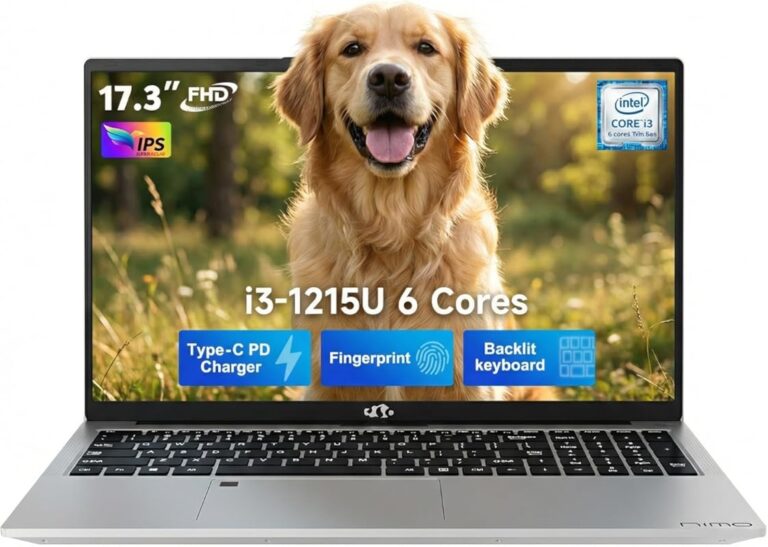
What Is Emmc in Laptops
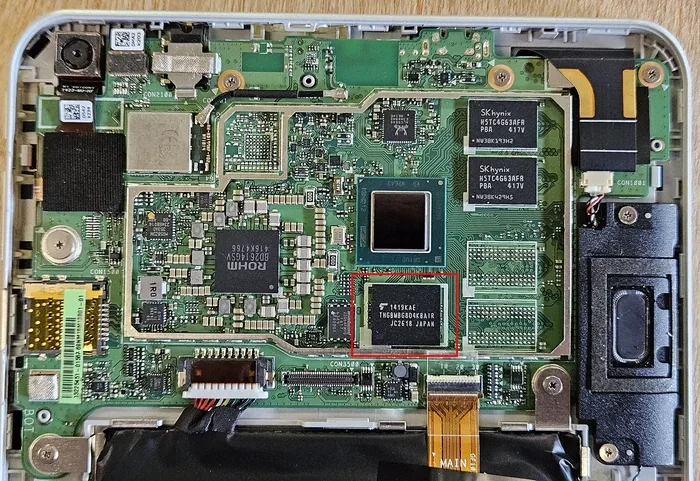
eMMC stands for embedded MultiMediaCard, a type of flash storage built directly into laptops. It serves as the primary internal storage for many budget and mid-range devices. Understanding eMMC in laptops helps you choose the right machine for your needs.
If you have ever shopped for a budget laptop, you may have noticed the term eMMC printed on the spec sheet. But what does it actually mean? And more importantly, how does it affect your daily computing experience?
eMMC in laptops is one of those technical terms that sounds complicated but is actually quite simple. It refers to a small flash storage chip embedded directly onto the laptop’s motherboard. Think of it as the built-in memory where your operating system, apps, and files live.
This storage type powers many affordable laptops, Chromebooks, and budget tablets. While it is not as fast as a modern solid state drive, it gets the job done for basic tasks. In this guide, we will break down everything you need to know about eMMC storage in plain, easy-to-understand language.
Key Takeaways
- What eMMC Is: eMMC is embedded flash storage soldered onto the laptop motherboard, commonly found in budget and entry-level devices.
- Speed and Performance: eMMC is slower than SSDs but faster than traditional hard drives, making it suitable for everyday tasks.
- Storage Capacity: Most eMMC modules range from 32GB to 256GB, which may limit heavy users.
- Cost Advantage: Laptops with eMMC storage are significantly cheaper than those with SSDs.
- Upgrade Limitations: eMMC is typically non-upgradeable since it is soldered to the motherboard.
- Ideal Use Cases: Best for web browsing, document editing, and light multimedia tasks.
- Know Your Specs: Check your laptop storage type before purchasing to avoid disappointment.
📑 Table of Contents
What Is eMMC in Laptops?
eMMC stands for embedded MultiMediaCard. It is a type of non-volatile flash storage that is permanently attached inside your laptop. Unlike a traditional hard drive or a removable SSD, eMMC is soldered directly to the motherboard. This means you cannot swap it out or upgrade it easily.
The technology behind eMMC is similar to what you find inside smartphones and SD cards. It uses NAND flash memory to store data even when the laptop is turned off. A controller chip manages the reading and writing of data, which keeps things simple and cost-effective.
How eMMC Storage Works
eMMC modules contain both flash memory and a built-in controller. The controller handles tasks like wear leveling and error correction. This all-in-one design is what keeps the cost low. Your laptop simply communicates with the eMMC chip through a standard interface, usually MMC or HS400.
Because everything is packaged into a single tiny chip, manufacturers can save space inside the laptop. This is why many thin and lightweight budget laptops use eMMC instead of a bulkier storage option. The trade-off is speed and capacity.
eMMC vs SSD: What Is the Difference?
This is the most common question people ask when they learn about eMMC in laptops. Both eMMC and SSDs serve the same purpose, but they work very differently under the hood.
Speed Comparison
SSD storage is significantly faster than eMMC. A typical SATA SSD delivers read speeds of around 500 to 550 MB/s. An eMMC module usually maxes out at 200 to 400 MB/s. In real-world use, this means your laptop will feel snappier with an SSD.
Boot times, app launches, and file transfers all benefit from higher speeds. If you open a large document or load a heavy webpage, an SSD handles it with less delay. eMMC storage can still manage these tasks, but you will notice a lag on bigger files.
Capacity Differences
eMMC modules commonly come in 32GB, 64GB, 128GB, and 256GB sizes. SSDs, on the other hand, are widely available in 256GB, 512GB, 1TB, and even 2TB capacities. If you plan to store lots of photos, videos, or games, a larger SSD is a much better choice.
For light users who mostly browse the web and write documents, 128GB of eMMC may be enough. But keep in mind that your operating system and pre-installed apps already take up a chunk of that space.
Cost and Value
The biggest advantage of eMMC is its low cost. Laptops with eMMC storage are often hundreds of dollars cheaper than their SSD counterparts. This makes them attractive for students, children, and anyone who needs a basic machine on a tight budget.
However, you get what you pay for. The slower speeds and limited capacity can become frustrating if your needs grow over time. Before buying, consider what you will use the laptop for and how long you plan to keep it.
Pros and Cons of eMMC in Laptops
Like any technology, eMMC has its strengths and weaknesses. Here is a clear breakdown to help you decide.
Advantages of eMMC Storage
- Lower cost: Laptops with eMMC are budget-friendly and accessible to more buyers.
- Compact design: The small size helps manufacturers build thinner and lighter devices.
- Low power consumption: eMMC uses less energy, which can slightly improve battery life.
- No moving parts: Like SSDs, eMMC has no mechanical components, making it more durable than a traditional hard drive.
- Good for basic tasks: Web browsing, email, and document editing work perfectly fine on eMMC.
Disadvantages of eMMC Storage
- Slower speeds: File transfers and app loading take longer compared to SSDs.
- Limited capacity: Most eMMC options cap out at 256GB, which fills up quickly.
- Non-upgradeable: Since eMMC is soldered to the board, you cannot replace or expand it.
- Shorter lifespan: eMMC flash memory typically has a lower endurance rating than modern SSDs.
- Performance drops over time: As storage fills up, eMMC speeds can decrease noticeably.
Who Should Choose a Laptop with eMMC?
Not everyone needs a high-speed SSD. eMMC in laptops makes a lot of sense for certain users and use cases.
Ideal Users for eMMC Laptops
- Students: A child doing homework and browsing educational websites does not need a blazing-fast drive.
- Senior users: Email, video calls, and light reading work great on eMMC storage.
- Chromebook users: Chrome OS is lightweight and runs well even on slower storage.
- Backup or secondary machines: If you already own a powerful laptop, an eMMC device works as a simple spare.
- Budget-conscious buyers: Anyone who needs a functional laptop without spending extra money.
Who Should Avoid eMMC?
If you edit videos, play modern games, run engineering software, or store large media libraries, eMMC will hold you back. In these cases, investing in a laptop with SSD storage is a much smarter move. You will get better performance and a smoother experience every single day.
Also, if you plan to use your laptop for several years, consider how your storage needs might grow. A laptop with 64GB of eMMC may feel cramped within a year or two.
How to Check if Your Laptop Has eMMC
If you already own a laptop and want to know what type of storage it uses, checking is very simple.
Method 1: Check System Settings
On Windows, go to Settings > System > Storage. Look for your drive details. If it says something like “Internal Storage” without mentioning SSD or HDD, it is likely eMMC. You can also open Device Manager and look under “Disk Drives” for the model name.
Method 2: Use a Third-Party Tool
Free tools like CrystalDiskInfo or HWiNFO can tell you exactly what type of storage your laptop has. These programs read the drive’s specifications and display them clearly. This is a quick way to confirm whether you have eMMC storage or something else.
Method 3: Check the Original Specs
Look up your laptop model number online. The manufacturer’s website will list the storage type in the full specifications. This is the most reliable method if you still have your laptop’s model name or serial number.
Knowing your storage type also helps when troubleshooting slow performance. If your laptop feels sluggish and it has eMMC, upgrading your RAM might help more than replacing the storage. You can learn more about what RAM is good for in a laptop in our detailed guide.
Can You Upgrade eMMC Storage?
The short answer is no. eMMC is soldered onto the laptop motherboard, which means it is permanently fixed in place. Unlike a standard SSD that you can unscrew and replace, eMMC chips are glued and connected directly to the board.
This is a major limitation for many users. If you buy a laptop with 64GB of eMMC and quickly run out of space, your options are limited. You can try using cloud storage or an external drive, but the internal storage itself cannot be swapped out.
Some tech-savvy users attempt to replace the eMMC module, but this requires advanced soldering skills and exact part matching. It is not a practical or recommended solution for most people. This is why it is so important to choose the right storage size when you first buy the laptop.
Tips for Getting the Most Out of eMMC Storage
If you already have a laptop with eMMC, there are several things you can do to keep it running smoothly.
- Keep at least 20% of storage free: eMMC performs best when it has free space available. Avoid filling it to the brim.
- Use cloud storage: Services like Google Drive or OneDrive let you store files online and free up local space.
- Uninstall unused apps: Remove programs you no longer need to reclaim valuable gigabytes.
- Disable hibernation: This feature creates large sleep files that eat into your limited storage.
- Regularly clear temporary files: Use Windows Disk Cleanup or a trusted cleaner tool to remove junk data.
- Avoid filling the drive during updates: System updates need breathing room. Make sure you have enough free space before running them.
Following these simple tips can help extend the life and performance of your eMMC drive. While it may not match the speed of a modern SSD, proper maintenance makes a real difference.
The Future of eMMC in Laptops
As laptop technology evolves, the role of eMMC is slowly changing. Higher-capacity SSDs are becoming more affordable every year. This means the price gap between eMMC and SSD storage is shrinking. In the near future, even budget laptops may skip eMMC entirely and use low-cost SSDs instead.
For now, eMMC still holds a strong position in the entry-level market. Manufacturers love it because it keeps production costs low. As long as there is demand for affordable laptops, eMMC will remain a relevant option. However, if you are shopping today, we recommend spending a little extra for an SSD whenever possible.
Understanding your laptop’s storage type also connects to other specs. For example, the amount of RAM in your system works hand-in-hand with storage to determine overall performance. If you want to learn more about choosing the right memory, check out our article on what amount of RAM is good on a laptop and how to know what RAM is compatible with your laptop.
Conclusion
eMMC in laptops is a practical and affordable storage solution for basic computing needs. It is compact, reliable, and perfect for users who do not require high-speed performance or massive storage space. However, it does come with limitations in speed, capacity, and upgradeability.
If you are buying a laptop for simple everyday tasks and want to save money, eMMC is a perfectly fine choice. Just go in with realistic expectations. On the other hand, if you need speed, large storage, or long-term usability, an SSD-based laptop is the better investment.
Always check the storage type before you buy. Knowing what you are getting helps you avoid frustration and ensures your laptop matches your actual needs. With the right expectations and a little maintenance, an eMMC laptop can serve you well for years to come.
Frequently Asked Questions
Is eMMC the same as a hard drive?
No, eMMC is not the same as a traditional hard drive. A hard drive uses spinning magnetic disks to read and write data, while eMMC uses flash memory with no moving parts. This makes eMMC more durable and faster than a hard drive, but slower than an SSD.
Can I add external storage to a laptop with eMMC?
Yes, you can. Since eMMC storage is often limited, many users add external hard drives or USB flash drives for extra space. Cloud storage services are another popular option for expanding your available storage without any extra hardware.
Does eMMC affect laptop battery life?
Not significantly. eMMC actually uses slightly less power than traditional hard drives and comparable SSDs. However, the difference in battery life is small and usually not noticeable in everyday use.
Why are Chromebooks often built with eMMC storage?
Chromebooks are designed for lightweight tasks like web browsing and document editing. Since Chrome OS does not require a lot of storage or speed, eMMC is a cost-effective choice that keeps the overall price of the device low.
How long does eMMC storage last?
eMMC storage typically lasts several years under normal use. However, it has a lower write endurance than modern SSDs. If you frequently write large amounts of data, the eMMC module may wear out faster than an SSD would.
What laptop brands use eMMC storage?
Many budget-friendly brands use eMMC, including Acer, HP, Lenovo, and Samsung in their entry-level models. Chromebook manufacturers like Acer, ASUS, and Samsung also commonly use eMMC to keep prices competitive.