What Is Gb and Ram
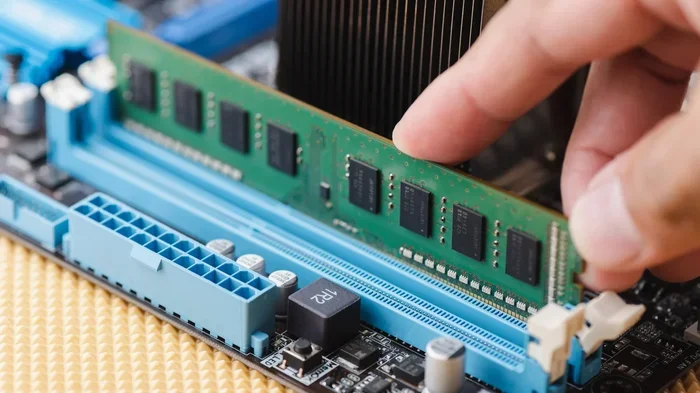
Gb stands for gigabyte, a unit of digital storage that measures how much data your laptop can hold. Ram, or random access memory, is the short-term memory your laptop uses to run apps and tasks quickly. Understanding both helps you choose the right laptop, upgrade wisely, and avoid slow performance. This guide breaks down what is gb and ram in plain, easy-to-follow language.
Have you ever wondered what people mean when they say a laptop has 8 gb of ram or 256 gb of storage? These numbers matter a lot. They shape how fast your laptop works, how many apps you can open, and how long you can use it before running out of space. If you have ever felt confused by these terms, you are in the right place.
In this guide, we will break down what is gb and ram in the simplest way possible. You do not need to be a tech expert to understand this. By the end, you will know exactly how both gb and ram affect your laptop and how to choose the right setup for your needs.
Key Takeaways
- Gb measures storage: It tells you how many files, apps, and programs your laptop can hold long-term.
- Ram is temporary memory: It handles active tasks and directly impacts how fast your laptop runs.
- More ram means smoother multitasking: Running multiple apps at once needs enough memory to stay fluid.
- Gb and ram work together: Storage keeps your files safe, while ram keeps your system responsive.
- Upgrading ram is often easy: Many laptops let you add more memory without replacing the whole device.
- Know your needs: Basic tasks need less ram, while gaming or video editing demands more.
📑 Table of Contents
- What Does Gb Mean?
- What Is Ram and Why Does It Matter?
- How Gb and Ram Work Together
- Common Mistakes People Make About Gb and Ram
- Quick Tips for Choosing the Right Laptop
- Can You Upgrade Ram After Buying a Laptop?
- How Gb and Ram Affect Everyday Tasks
- What the Future Holds for Gb and Ram
- Final Thoughts
What Does Gb Mean?
Gb stands for gigabyte. It is a unit used to measure digital storage. Think of it like a big box where all your files live. Every photo, video, document, and app you save takes up space in that box. The more gb your laptop has, the more stuff you can store.
Here is a simple way to picture it:
- 1 gb can hold about 500 photos or a couple of short videos.
- 128 gb is enough for basic use but fills up fast.
- 256 gb works well for most everyday users.
- 512 gb gives you plenty of room for games and large files.
- 1 tb (1000 gb) is a lot of space for heavy users.
Storage is measured in smaller units too. A byte is the smallest unit. Kilobytes, megabytes, and gigabytes build up from there. Each step is 1000 times bigger than the one before it. So a gigabyte is a really big chunk of space.
Gb vs Ram: What Is the Difference?
People often mix up storage (gb) and ram. They are not the same thing. Storage holds your files permanently. Ram only works while your laptop is on. When you turn off your laptop, everything in ram disappears. Storage stays.
Think of it this way. Storage is like a filing cabinet. It keeps everything safe even when you are not using it. Ram is like your desk. It holds the documents you are working on right now. A bigger desk lets you spread out more papers at once. A bigger filing cabinet holds more files overall.
This difference is key to understanding what is gb and ram. One stores things long-term. The other helps your laptop work right now.
What Is Ram and Why Does It Matter?
Ram stands for random access memory. It is the short-term memory your laptop uses to handle active tasks. When you open a browser, a game, or a video editor, that app loads into ram. Your laptop then pulls information from ram very fast to keep everything running smoothly.
Ram is much faster than your storage drive. It can read and write data in tiny fractions of a second. That is why your laptop feels quick when you have enough ram. When ram runs low, your laptop slows down. It starts shuffling data to your storage drive, which is much slower.
How Much Ram Do You Really Need?
The right amount of ram depends on what you do. Here is a simple breakdown:
- 4 gb ram: Good for basic tasks like web browsing and word processing.
- 8 gb ram: The sweet spot for most users. It handles multitasking well.
- 16 gb ram: Great for gaming, photo editing, and light video work.
- 32 gb ram or more: Best for professionals who run heavy software.
If you are not sure what you need, What Is A Good Ram For A Laptop is a great question to ask. Most people do well with 8 gb. Power users should look at 16 gb or more. If you want to learn more about 8 gb specifically, check out Is 8 Gb Ram Enough For Laptop for a detailed look.
Types of Ram You Will See in Laptops
Laptops use different types of ram. The most common ones today are DDR4 and DDR5. DDR stands for double data rate. Each new version is faster and more efficient than the last.
- DDR4 ram: Still very common. It offers solid performance at a good price.
- DDR5 ram: The newer standard. It is faster and uses less power.
Not all laptops let you upgrade ram. Some have memory soldered to the motherboard. Others have open slots where you can add more. Before buying a laptop, check if the ram is upgradeable. This can save you money in the long run.
How Gb and Ram Work Together
Gb and ram are not competitors. They work as a team. Storage (gb) keeps your files, apps, and operating system safe. Ram gives your laptop the short-term boost it needs to run those apps quickly.
Here is a real-world example. Imagine you open a large spreadsheet. The file loads from your storage drive into ram. Your laptop then edits the file using ram. When you save, the changes go back to storage. Without enough ram, this process gets sluggish. Without enough storage, you cannot even save the file in the first place.
Both parts matter. A laptop with tons of storage but very little ram will feel slow. A laptop with lots of ram but almost no storage will run out of room quickly. You need a good balance of both.
Finding the Right Balance
So how do you find the right balance? Start with your needs. Ask yourself what you use your laptop for most often.
- Students: 256 gb storage and 8 gb ram is a solid combo.
- Office workers: 512 gb storage and 8 to 16 gb ram works great.
- Gamers: Look for 1 tb storage and at least 16 gb ram.
- Content creators: 512 gb or 1 tb storage with 16 to 32 gb ram.
If you are curious about higher storage options, laptops with 16Gb Ram And Ssd configurations are popular for a reason. They offer a great mix of speed and space.
Common Mistakes People Make About Gb and Ram
Many buyers make mistakes when choosing a laptop. They focus on one number and ignore the other. Here are the most common pitfalls to avoid.
Mistake 1: Thinking More Gb Always Means a Faster Laptop
Having more storage does not make your laptop faster. A laptop with 1 tb of storage but only 4 gb of ram will still feel slow when you open multiple apps. Storage size affects how much you can keep. Ram size affects how fast you can work.
Mistake 2: Ignoring Future Needs
Laptops last several years. Software gets heavier over time. An 8 gb ram laptop that feels fine today may struggle in two years. Think ahead. If you can afford 16 gb now, it is often worth the extra cost. Check Is 16 Gb Ram Enough For Laptop to see if 16 gb fits your long-term plans.
Mistake 3: Confusing Gb and Gb/s
Sometimes you see gb/s on ram packaging. That stands for gigabytes per second. It measures speed, not capacity. Do not confuse storage size (gb) with data transfer speed (gb/s). Both matter, but they measure different things.
Mistake 4: Skipping the Ram Check Entirely
Some shoppers only look at the processor or the screen size. They forget about ram entirely. But ram has a huge impact on daily performance. Always check how much memory a laptop has before you buy.
Quick Tips for Choosing the Right Laptop
Not sure where to start? Use these tips to make a smart choice:
- Write down your needs. List the apps you use most. Note how many you usually have open at once.
- Set a budget. More ram and storage cost more. Decide what you can afford before shopping.
- Check if ram is upgradeable. Some laptops let you add more later. This gives you flexibility.
- Look at the storage type. Ssd drives are much faster than old hdd drives. Always prefer ssd storage.
- Read reviews. Real users share honest feedback about speed and performance.
For more guidance on choosing the right setup, What Is A Good Amount Of Ram For A Laptop covers this topic in depth. It helps you match your usage to the right memory size.
Can You Upgrade Ram After Buying a Laptop?
The short answer is: sometimes. It depends on your laptop model. Many older laptops have extra ram slots. You can open the back panel and add a new memory stick. This is an affordable way to boost performance.
Newer ultrabooks and thin laptops are different. They often have ram soldered directly to the motherboard. This means you cannot add or swap it. That is why it is so important to get enough ram from the start.
If you are unsure about your options, check your laptop manual or the manufacturer’s website. Look for details about memory slots and maximum supported ram. This small step can save you from buying a laptop that cannot grow with your needs.
Also, keep in mind that mixing different ram sizes or types can cause issues. Try to match the existing ram in speed, type, and size when adding new modules. This ensures the best compatibility and performance.
How Gb and Ram Affect Everyday Tasks
Let us look at how gb and ram impact real tasks you do every day. This helps make the concepts feel more concrete.
Web browsing: Opening 20 browser tabs uses a decent amount of ram. Each tab holds a webpage in memory. With 8 gb of ram, this works fine for most people. With only 4 gb, your laptop may start to lag.
Streaming videos: Watching Netflix or YouTube does not need much ram. But downloading large video files takes up storage space. A 4 k movie file can be 15 gb or more. You need enough gb to hold all your downloads.
Gaming: Modern games are hungry for both ram and storage. They need at least 8 gb of ram to run well. They also need several hundred gb of space for installation. A laptop with 16 gb ram and 1 tb storage is ideal for gamers.
Photo and video editing: These tasks are some of the most demanding. Editing software loads large files into ram. The more ram you have, the smoother the editing experience. Storage matters too because raw video and photo files are huge.
Office work: Word, Excel, and email use very little ram. Even 4 gb is enough for basic office tasks. But if you work with large spreadsheets or many open documents, 8 gb or more feels much better.
What the Future Holds for Gb and Ram
Technology keeps moving forward. Laptops are getting faster and more efficient. Ram speeds continue to improve with each new generation. Storage options are expanding too. Solid state drives are becoming larger and more affordable every year.
In the near future, we may see even faster ram standards and larger storage capacities become standard. Laptops with 32 gb of ram and 2 tb of storage may become common for everyday users. But for now, understanding the basics of gb and ram puts you ahead of the curve.
Knowing what each term means helps you make smarter buying decisions. You will not be swayed by marketing jargon. Instead, you can focus on what actually matters for your daily use.
Final Thoughts
Understanding what is gb and ram is one of the most useful skills for any laptop buyer. Gb tells you how much you can store. Ram tells you how fast you can work. Together, they define your laptop experience.
Take your time when choosing a laptop. Think about what you do each day. Consider your future needs too. A little planning goes a long way. With the right balance of storage and memory, your laptop will feel fast and responsive for years to come.
Keep these tips in mind. Share them with friends who are shopping for a new laptop. The more you know about gb and ram, the better decisions you will make. Happy computing.
Frequently Asked Questions
What is the difference between GB and RAM?
GB stands for gigabyte and measures storage capacity. It tells you how much data your laptop can hold long-term. RAM stands for random access memory and handles active tasks. It is temporary memory that disappears when you turn off your laptop.
Is 8 GB of RAM enough for a laptop?
For most everyday users, 8 GB of RAM is the sweet spot. It handles web browsing, office work, and light multitasking with ease. If you game or edit videos, you may want 16 GB or more for the best experience.
Can I increase my laptop’s RAM?
Some laptops allow RAM upgrades while others do not. Check your laptop model to see if it has open memory slots. If it does, adding more RAM is an affordable way to boost performance.
How much storage (GB) do I need in a laptop?
It depends on your usage. 256 GB works for basic tasks. 512 GB is comfortable for most users. 1 TB or more is ideal for gamers, creators, and anyone who stores lots of large files.
Does more GB make a laptop faster?
More storage GB does not directly make your laptop faster. It just gives you more room to save files. Faster performance comes from having enough RAM and a solid-state drive (SSD).
What happens when RAM is full?
When RAM is full, your laptop slows down. It starts using your storage drive as temporary memory, which is much slower. You may experience lag, freezing, or apps crashing. Closing unused programs helps free up RAM.