What Is Nvlink
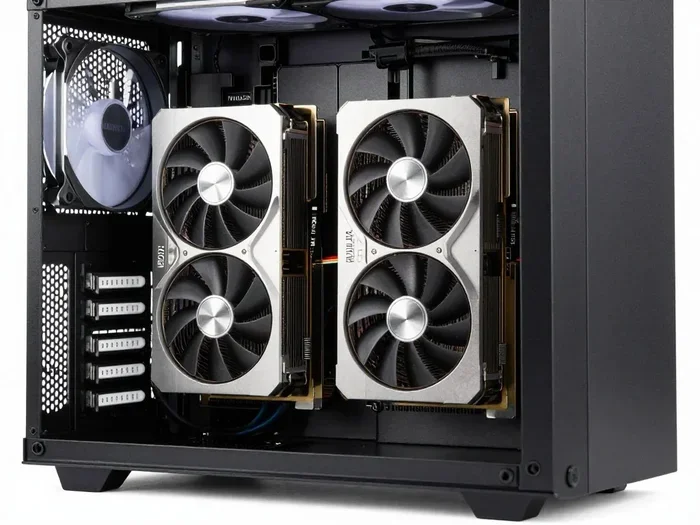
NVLink is NVIDIA’s advanced interconnect technology that lets multiple GPUs communicate at incredibly fast speeds. It replaces the older SLI standard and delivers much higher bandwidth for data sharing between graphics cards. Whether you are a gamer, 3D renderer, or AI developer, understanding NVLink helps you make smarter hardware decisions.
If you have been shopping for a powerful laptop or desktop GPU, you have probably seen the term NVLink thrown around. Maybe you saw it on a spec sheet for a sleek gaming laptop or read about it in a tech forum. Either way, it sounds impressive. But what exactly is NVLink, and does it actually matter for your setup?
NVLink is NVIDIA’s proprietary high-speed interconnect technology. It lets two or more GPUs talk to each other directly, sharing data at speeds that far exceed what older connection methods could handle. Think of it as a superhighway between graphics cards, where the old roads were narrow and full of traffic jams.
This technology matters because modern workloads like AI training, video editing, and high-end gaming demand massive amounts of data to move quickly between processors. Without NVLink, GPUs have to go through the CPU and system memory, which slows things down. With NVLink, they skip the bottleneck and communicate almost instantly.
In this guide, we will break down everything you need to know about NVLink. We will cover how it works, how it compares to older tech, and why it is especially relevant for laptops and mobile workstations. By the end, you will know whether NVLink is worth your money.
Key Takeaways
- What NVLink does: It connects two or more GPUs with a direct high-speed link for faster data sharing.
- NVLink vs SLI: NVLink is significantly faster and more efficient than the older SLI technology.
- Laptop relevance: Some high-end laptops use NVLink to boost performance for gaming, rendering, and AI tasks.
- Bandwidth boost: NVLink offers up to 5x more bandwidth compared to traditional PCIe connections.
- Who benefits most: Content creators, machine learning engineers, and serious gamers see the biggest gains.
- Not for everyone: You need compatible GPUs and a supported motherboard or laptop chassis to use NVLink.
📑 Table of Contents
What Is NVLink?
NVLink stands for NVIDIA Link. It is a communication bridge developed by NVIDIA that connects multiple GPUs together inside a single system. The goal is simple: let GPUs share data faster and work together more efficiently.
Before NVLink existed, NVIDIA used a technology called SLI (Scalable Link Interface). SLI was okay for its time, but it had serious limitations. The bandwidth was low, and the performance gains were often inconsistent. NVLink was introduced to solve these problems and provide a much better experience.
Here are some key facts about NVLink:
- Developed by: NVIDIA Corporation
- First introduced: 2016 (with the Tesla P100 GPU)
- Primary purpose: High-speed GPU-to-GPU communication
- Used in: Data center GPUs, professional workstation cards, and select high-end consumer GPUs
- Latest version: NVLink 4.0 (found in NVIDIA’s Ada Lovelace architecture GPUs)
In simple terms, NVLink is like giving two GPUs their own private conversation line. They no longer have to wait in line behind other system tasks. This direct connection is what makes NVLink so powerful for demanding workloads.
How Does NVLink Technology Work?
NVLink uses a series of high-bandwidth interconnects that are built directly into the GPU package or placed on a dedicated bridge board. These interconnects create multiple pathways for data to travel between GPUs simultaneously.
Here is how the process works in simple terms:
- Two or more compatible GPUs are connected using NVLink bridges or integrated links.
- Data is split into small packets and sent across these dedicated pathways.
- The receiving GPU processes the data and sends back results.
- All of this happens at incredibly high speeds, often measured in hundreds of gigabytes per second.
One of the biggest advantages of NVLink is that it bypasses the PCIe bus entirely. The PCIe bus is the standard connection used by most expansion cards, but it has limited bandwidth. NVLink creates its own fast lane, which means GPUs can share large datasets without slowing down the rest of the system.
For laptop users, this is especially important. A well-optimized NVLink setup can turn a powerful laptop into a workstation-grade machine capable of handling complex rendering and AI tasks.
NVLink vs SLI: What Is the Difference?
If you have been around PC hardware for a while, you might remember SLI. SLI was NVIDIA’s original multi-GPU technology. It allowed two GPUs to work together by splitting the rendering workload. But NVLink has made SLI largely obsolete, and here is why.
| Feature | SLI | NVLink |
|---|---|---|
| Bandwidth | Up to 2 GB/s | Up to 300 GB/s (NVLink 4.0) |
| Data Sharing | Limited to frame buffers | Full memory pooling |
| Scalability | 2 GPUs max | Up to 4 GPUs (varies by generation) |
| Power Efficiency | Lower | Higher |
| Modern Support | Discontinued | Active in professional and consumer GPUs |
| Use Cases | Basic multi-GPU gaming | AI, rendering, simulation, high-end gaming |
The difference in bandwidth alone tells you a lot. SLI was capped at around 2 GB/s, while NVLink can push hundreds of gigabytes per second depending on the version. This means NVLink can handle much more complex tasks without breaking a sweat.
Another big difference is memory pooling. With SLI, each GPU kept its own memory separate. With NVLink, GPUs can share their memory pools. This is a game-changer for workloads that need access to large datasets, such as training machine learning models or rendering massive 3D scenes.
SLI was also discontinued by NVIDIA in 2021, so if you are building a new system today, NVLink is the way to go. It is the current standard for multi-GPU communication.
NVLink in Laptops: What You Need to Know
When most people think of NVLink, they picture massive desktop workstations with multiple full-sized GPUs. But NVLink has made its way into laptops too, and this is where things get interesting.
Laptop NVLink implementations are slightly different from desktop setups. Because laptops have limited space and thermal budgets, manufacturers have to be creative with how they integrate multi-GPU connections. Here is what you should know:
How NVLink Works in Laptop Configurations
Some high-end laptops feature two mobile GPUs connected via NVLink. This setup doubles the graphical processing power available for demanding tasks. The two GPUs share memory and work together to render graphics, process AI workloads, or handle complex simulations.
Laptop NVLink configurations are most commonly found in:
- Mobile workstations: Used by designers, engineers, and architects for 3D rendering and CAD work.
- Gaming laptops: High-end models that push maximum frame rates at 4K resolution.
- AI development laptops: Portable machines for machine learning experimentation and model training.
One thing to keep in mind is that not all GPUs support NVLink. You need specific NVIDIA GPU models that include the NVLink bridge connector. Common laptop GPUs that support this include certain versions of the RTX 3000 and RTX 4000 mobile series.
Thermal Considerations for NVLink Laptops
Running two GPUs in a laptop chassis generates a lot of heat. This is why thermal design is so important for NVLink laptops. A good cooling system keeps the GPUs running at optimal temperatures, which directly impacts performance.
If you are considering a laptop with NVLink, pay attention to the cooling solution. Look for laptops with vapor chamber cooling, multiple heat pipes, and robust fan designs. You should also monitor your GPU temperatures regularly. A good idle GPU temperature is essential for maintaining long-term performance and hardware longevity.
For more tips on keeping your GPU cool, check out our guide on what is a good idle GPU temperature. Proper thermal management can make or break your NVLink experience.
Benefits of NVLink Technology
Why should you care about NVLink? There are several compelling benefits that make this technology worth understanding, especially if you are investing in a high-performance laptop or workstation.
Massive Bandwidth for Data Sharing
The most obvious benefit of NVLink is the enormous bandwidth it provides. When two GPUs need to share large amounts of data, NVLink handles the transfer with ease. This means smoother frame rates in games, faster rendering times in creative applications, and quicker training cycles for AI models.
Unified Memory Access
With NVLink, GPUs can pool their memory together. This unified memory access means that applications can use the combined VRAM of all connected GPUs. For example, two 16 GB GPUs connected via NVLink can present a 32 GB memory pool to the application. This is incredibly useful for working with large datasets or high-resolution textures.
Better Scalability
NVLink scales much better than older technologies. You can connect multiple GPUs and see near-linear performance improvements for many workloads. This makes NVLink ideal for professional environments where every bit of performance counts.
Future-Proofing Your Investment
Investing in a laptop or system with NVLink support helps future-proof your setup. As software continues to leverage multi-GPU capabilities, having NVLink ensures you are ready. For advice on making smart long-term hardware investments, check out our guide on what is the best investment for the lifespan of a PC.
Who Benefits Most from NVLink?
NVLink is not for everyone, but certain users will see tremendous value from it. Here are the groups that benefit the most:
- 3D Artists and Designers: Rendering complex scenes in software like Blender or Maya becomes significantly faster with multi-GPU NVLink support.
- Machine Learning Engineers: Training neural networks requires massive memory and compute. NVLink provides both.
- Video Editors: Working with 4K or 8K footage in DaVinci Resolve or Premiere Pro benefits from the extra GPU power.
- Hardcore Gamers: Running games at high resolutions with max settings is smoother when two GPUs share the workload.
- Scientists and Researchers: Simulations and data processing tasks that rely on GPU compute see major speedups.
If you fall into any of these categories, a laptop or system with NVLink could be a worthwhile investment. The performance gains are real and noticeable.
Common Mistakes to Avoid with NVLink
Even though NVLink is powerful, there are some common mistakes that users make. Avoiding these pitfalls will help you get the most out of your setup.
- Assuming all GPUs are compatible: Not every NVIDIA GPU supports NVLink. Always check the specifications before buying a bridge or building a system.
- Ignoring power supply requirements: Multi-GPU setups draw a lot of power. Make sure your power supply can handle the load.
- Overlooking thermal limits: Two GPUs in a small space generate significant heat. Poor cooling leads to thermal throttling and reduced performance.
- Expecting double the performance: NVLink does not always deliver a perfect 2x speedup. Real-world gains depend on the workload and software optimization.
- Using outdated drivers: Keeping your NVIDIA drivers up to date is essential for NVLink stability and performance.
One mistake that catches many people off guard is not checking whether their laptop BIOS supports NVLink. Some laptops have the hardware but the BIOS is configured to disable multi-GPU features. Always verify this before purchasing.
Is NVLink Worth It in 2026?
The short answer is: it depends on your workload. If you are a casual gamer or a general laptop user, NVLink might not be necessary. But if you are pushing your hardware to its limits with creative or professional tasks, NVLink can make a meaningful difference.
As of 2026, NVIDIA continues to refine NVLink technology. The latest versions offer even higher bandwidth and better power efficiency. This makes multi-GPU setups more practical than ever, even in compact laptop form factors.
When evaluating whether NVLink is right for you, consider these factors:
- What kind of tasks do you run regularly?
- Do your software applications support multi-GPU acceleration?
- Is your laptop or system compatible with NVLink?
- Are you willing to invest in the extra hardware and cooling?
If you answered yes to most of these questions, NVLink is definitely worth exploring. It represents one of the best ways to squeeze maximum performance out of your NVIDIA GPUs.
Final Thoughts
NVLink is a powerful technology that has transformed how multiple GPUs communicate and share data. From replacing the outdated SLI standard to enabling real-time AI processing in laptops, NVLink continues to push the boundaries of what is possible with multi-GPU computing.
For laptop users, NVLink opens the door to workstation-level performance in a portable form factor. Whether you are rendering 3D scenes, training AI models, or chasing the highest frame rates in your favorite games, NVLink delivers the bandwidth and efficiency you need.
Just remember to do your homework before diving in. Make sure your hardware is compatible, your cooling is adequate, and your software can take advantage of the technology. With the right setup, NVLink can truly elevate your computing experience to the next level.
Stay curious, keep learning, and always make sure your hardware choices align with your actual needs. The world of GPU technology moves fast, and staying informed is the best way to get the most out of your investment.
Frequently Asked Questions
What does NVLink stand for?
NVLink stands for NVIDIA Link. It is a high-speed interconnect technology developed by NVIDIA to connect multiple GPUs together for faster data sharing and improved performance.
Is NVLink the same as SLI?
No, NVLink is not the same as SLI. NVLink is the newer technology that replaced SLI. It offers much higher bandwidth, better memory sharing, and more efficient multi-GPU communication compared to the older SLI standard.
Can I use NVLink in a laptop?
Yes, some high-end laptops support NVLink with dual mobile GPUs. However, you need to make sure your specific laptop model and GPU are compatible. Not all laptops with NVIDIA GPUs support NVLink.
Do I need NVLink for gaming?
You do not strictly need NVLink for gaming. Many modern games do not scale well with multiple GPUs. However, if you are gaming at 4K resolution with max settings or using VR, NVLink can provide a noticeable performance boost in supported titles.
How much bandwidth does NVLink provide?
NVLink bandwidth depends on the version. NVLink 4.0, found in the latest NVIDIA GPUs, can provide up to 300 GB/s of bandwidth per GPU pair. This is a massive improvement over the older PCIe and SLI connections.
What GPUs support NVLink?
Most professional NVIDIA GPUs and many high-end consumer GPUs support NVLink. This includes RTX 3000 series, RTX 4000 series, and certain data center GPUs. Always check the specific GPU model’s specifications to confirm NVLink compatibility.