What Is the Difference Between Laptop and Desktop
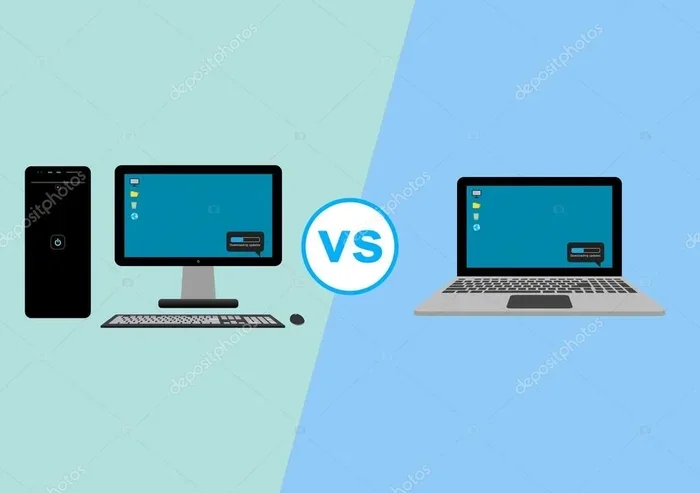
The difference between laptop and desktop computers comes down to portability, performance, and upgradeability. A laptop is a compact, all-in-one device built for mobility and convenience. A desktop offers more power, expandability, and value for the same price. Whether you need a portable computer for work on the go or a stationary workstation for heavy tasks, understanding these differences helps you make the right choice.
When you are shopping for a new computer, one of the first big decisions is choosing between a laptop and a desktop. Both serve the same basic purpose. They let you browse the web, run apps, play games, and get work done. But the way they do it is very different.
A laptop is a portable all-in-one device. It has a built-in screen, keyboard, trackpad, and battery. You can carry it anywhere. A desktop is a tower or all-in-one unit that sits on or under a desk. It needs a separate monitor, keyboard, and mouse. Each type has its own strengths. And each fits a different kind of user.
This guide walks you through every major difference. We will cover performance, portability, upgradeability, cost, and more. By the end, you will know exactly which one fits your life.
Key Takeaways
- Portability: Laptops are lightweight and easy to carry. Desktops stay in one place but deliver more raw power.
- Performance: Desktops generally outperform laptops in processing speed, graphics, and multitasking.
- Upgradeability: Desktops let you swap parts easily. Laptops have limited upgrade options.
- Cost Value: Desktops offer better performance per dollar. Laptops cost more for the same specs.
- Cooling: Desktops handle heat better. Laptops can throttle under heavy loads.
- Use Case: Choose a laptop for mobility. Choose a desktop for gaming, editing, or heavy workloads.
📑 Table of Contents
What Is a Laptop?
A laptop is a portable personal computer designed to be lightweight and mobile. It packs all the essential components into a single clamshell unit. The screen folds shut to protect the keyboard. You can open it and use it almost anywhere.
Key Features of a Laptop
- Built-in battery: You can use it without being plugged in. Most laptops last between 5 and 12 hours on a single charge.
- Integrated display: The screen is part of the device. You do not need to buy a separate monitor.
- Built-in keyboard and trackpad: Everything you need to input data is right in front of you.
- Compact form factor: A laptop weighs between 2 and 5 pounds. It fits easily in a backpack.
- Wireless connectivity: Laptops come with Wi-Fi and Bluetooth built in. You can connect to networks and peripherals without cables.
Laptops are perfect for students, remote workers, and anyone who needs to move around. They are also great for casual browsing, streaming, and light office work. But they do come with trade-offs. The compact size means less power and fewer upgrade options.
What Is a Desktop?
A desktop computer is a stationary workstation designed to stay in one place. It usually consists of a separate tower that holds the main components. You connect it to an external monitor, keyboard, and mouse. Some desktops come in an all-in-one design where the computer is built into the monitor.
Key Features of a Desktop
- Separate components: The tower holds the processor, memory, storage, and graphics card. You can upgrade each part independently.
- No battery: Desktops must stay plugged into a power outlet. They do not offer any portability.
- Larger displays: You can connect a monitor of any size. Many desktop users prefer 27-inch or larger screens.
- Better cooling: Tower cases have big fans and open layouts. This keeps components cool under heavy load.
- More ports: Desktops offer plenty of USB, HDMI, and audio jacks. Connecting peripherals is easy and convenient.
Desktops are the go-to choice for gamers, video editors, 3D modelers, and anyone who needs serious computing power. They also make great family computers or home office setups. The trade-off is that you cannot easily move them from room to room.
Key Differences Between Laptop and Desktop
Now let us break down the major differences. Each category affects your daily experience in a real way.
Portability
This is the most obvious difference. A laptop is built to go with you. You can work from a coffee shop, a library, or a different room in your house. A desktop stays on your desk. Moving it requires unplugging cables and carefully packing components.
If mobility matters to you, a laptop wins easily. If you do not need to move your computer, a desktop works just fine.
Performance
Desktops generally deliver better performance than laptops at the same price point. Here is why:
- Bigger processors: Desktop CPUs have more cores and higher clock speeds. They handle heavy tasks with ease.
- Dedicated graphics cards: Desktop towers can hold powerful GPUs. These are essential for gaming and video editing.
- More RAM: Desktops can hold much more memory. Many support 64 GB or more. Most laptops max out at 16 GB or 32 GB.
- Faster storage: Desktop users can install multiple SSDs or large HDDs. Storage expansion is simple and affordable.
A laptop uses smaller, power-efficient versions of these parts. They are still capable. But they cannot match the raw power of a desktop setup.
Upgradeability
This is where desktops really shine. Want to add more RAM? Just open the case and pop in a new stick. Need a faster graphics card? Swap it out in minutes. Want more storage? Install another drive.
Laptops are much more limited. Most laptops let you upgrade the RAM and storage. Some allow you to replace the battery. But you cannot swap out the processor or graphics card. What you buy is what you get for the life of the device.
If you like to tinker and keep your system current, a desktop gives you far more flexibility.
Cost and Value
Desktops offer better value for your money. The same budget that buys a mid-range laptop can get you a much more powerful desktop. Here is a simple comparison:
| Feature | Laptop | Desktop |
|---|---|---|
| Average Price Range | $400 – $2,000 | $500 – $2,500 |
| Performance per Dollar | Lower | Higher |
| Upgrade Cost | Limited and expensive | Affordable and easy |
| Peripherals Included | Built-in | Sold separately |
| Long-Term Value | Moderate | Excellent |
Keep in mind that a desktop setup also requires you to buy a monitor, keyboard, and mouse. These add to the total cost. But even with those extras, a desktop often delivers more power for the money.
Cooling and Noise
Heat is the enemy of computer performance. Desktops have large cases with multiple fans. Air flows freely around the components. This keeps everything running cool and quiet.
Laptops pack components tightly together. They use small fans and heat pipes to manage temperature. Under heavy load, a laptop can get warm. The fans may also get loud. Some laptops even throttle their performance to prevent overheating. This is something to keep in mind if you plan to run demanding tasks on the go.
Screen Size and Ergonomics
A laptop screen typically ranges from 13 to 17 inches. It is convenient but small for long work sessions. You are also hunched over the keyboard, which can strain your neck and back over time.
A desktop lets you choose any monitor size. Many professionals prefer a large 27-inch or 32-inch display. You can also use dual or triple monitors for multitasking. An external keyboard and mouse improve your posture and comfort. For long hours of work or gaming, a desktop setup is far more ergonomic.
Which One Should You Choose?
The right choice depends on your lifestyle and needs. Let us look at a few common scenarios.
Choose a Laptop If:
- You need to work from different locations throughout the day.
- You are a student who carries your computer to classes.
- You travel frequently for work or leisure.
- You have limited desk space at home.
- You mainly do light tasks like browsing, email, and document editing.
If you are shopping for a laptop, think about what you really need. A budget-friendly model is fine for everyday tasks. But if you need serious power, look for a high-performance laptop with a dedicated graphics card and plenty of RAM. You can also check what the RAM on a laptop means for your overall experience. More memory means smoother multitasking.
Choose a Desktop If:
- You need maximum performance for gaming or creative work.
- You work from a fixed home office setup.
- You want the ability to upgrade parts over time.
- You need a large, high-resolution display.
- You want the best performance for the lowest price.
Desktops are also a great choice when you buy during the right season. The best time to purchase a laptop or desktop is often during major sales events. Check out when the best time to purchase a laptop to save money on your next computer.
Quick Tips for Making Your Decision
- Write down your needs. List the tasks you do most often. Gaming, video editing, and programming need more power.
- Set a budget. Include the cost of any peripherals you need for a desktop setup.
- Think about your space. A small apartment or dorm room favors a laptop. A dedicated home office suits a desktop.
- Consider the mouse. Desktops use an external laptop mouse or a dedicated desktop mouse for better precision and comfort.
- Plan for the future. If you want your computer to last several years, a desktop is easier to upgrade and maintain.
Can You Have Both?
Many people end up with both a laptop and a desktop. This is a great setup for power users. You get the portability of a laptop for travel and the performance of a desktop for heavy work at home.
Some users even connect their laptop to a desktop monitor, keyboard, and mouse at home. This turns the laptop into a temporary desktop. It is a smart way to get the best of both worlds without spending twice on two full setups.
If you are trying to decide, start with one device. Think about where and how you will use it most. You can always add the other later as your needs grow.
Final Thoughts
The difference between laptop and desktop comes down to your lifestyle and priorities. A laptop gives you freedom and flexibility. You can work from anywhere. A desktop gives you power, upgradeability, and better value over time. Neither is objectively better. They are just different tools for different jobs.
Take your time. Think about what you really need. Consider your budget, your workspace, and your daily habits. The right computer is the one that fits your life best. And now that you understand the key differences, you are well equipped to make a confident choice.
Frequently Asked Questions
Is a laptop or desktop better for gaming?
A desktop is generally better for gaming. It supports powerful dedicated graphics cards, better cooling, and higher refresh rate monitors. However, high-end gaming laptops can also deliver great performance if you need portability.
Can I upgrade a laptop like a desktop?
Not really. Laptops have limited upgrade options. You can usually add more RAM or replace the storage drive. But you cannot swap out the processor or graphics card like you can with a desktop.
Are laptops more expensive than desktops?
Yes, laptops tend to cost more for the same level of performance. The compact design and built-in battery add to the manufacturing cost. Desktops offer better value when raw power is your priority.
How long do laptops and desktops last?
A well-maintained desktop can last 7 to 10 years or more because you can replace parts. A laptop typically lasts 4 to 7 years. Battery degradation and limited upgrade options shorten its lifespan.
Do I need a separate mouse for a desktop?
Yes, a desktop requires an external mouse and keyboard. These are essential input devices. A good mouse improves your productivity and comfort, especially during long work sessions.
Which is better for students, a laptop or desktop?
A laptop is usually the better choice for students. It is portable, lightweight, and easy to carry to classes and the library. However, a desktop can be a great option if you have a fixed study space and need more power for demanding coursework.