What Is Ext4
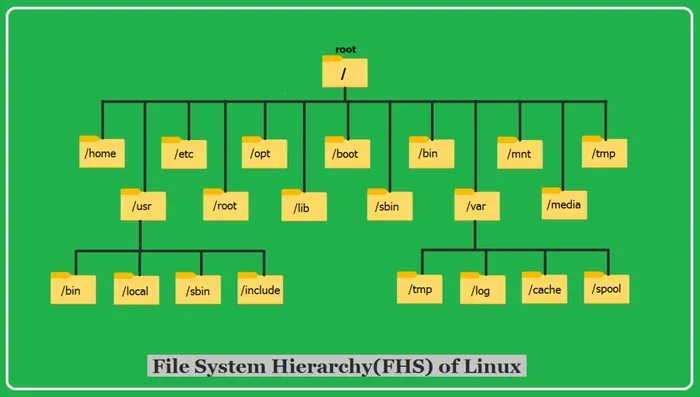
Ext4 is the fourth extended file system, a journaling file system widely used in Linux laptops and desktops. It offers better performance, reliability, and larger storage support compared to older file systems like Ext3. If you use or plan to use a Linux-based laptop, understanding Ext4 helps you manage your storage and data integrity more effectively.
Ext4 is the fourth version of the extended file system, and it is one of the most widely used file systems in the Linux world. If you have ever used a Linux laptop or a system that runs on Linux, there is a very good chance that Ext4 is the file system managing your files behind the scenes. It handles everything from storing your documents to keeping your system files organized and safe.
So, what makes Ext4 so popular? The answer lies in its balance of speed, reliability, and simplicity. Unlike some complex file systems designed for enterprise servers, Ext4 is practical and efficient. It works well on everything from a powerful desktop to a lightweight laptop. Whether you are a student, a developer, or just someone who uses Linux, understanding Ext4 helps you get the most out of your machine.
In this article, we will break down everything you need to know about Ext4. We will cover how it works, why it is a great choice for laptop storage, and how it compares to other file systems. By the end, you will have a clear picture of why Ext4 has become the go-to file system for millions of Linux users worldwide.
Key Takeaways
- Ext4 is a journaling file system: It keeps track of changes before committing them, reducing the risk of data loss during crashes.
- It supports massive storage sizes: Ext4 handles volumes up to 1 exabyte and individual files up to 16 terabytes.
- Ext4 is the default file system for most Linux distributions: If you use Linux on a laptop, chances are Ext4 is already running.
- It offers faster performance than Ext3: Improved journaling and delayed allocation make file operations quicker.
- Ext4 is backward compatible with Ext3: You can upgrade from Ext3 to Ext4 without reformatting.
- Data integrity is a core strength: Features like checksums and journal checksums protect your files from corruption.
- It works well with laptop SSDs and HDDs alike: Ext4 performs reliably on both types of laptop storage.
📑 Table of Contents
What Is Ext4 and How Does It Work?
At its core, a file system is the way an operating system organizes and stores data on a storage device. Ext4 stands for Fourth Extended File System. It was introduced in 2008 and quickly became the standard for Linux distributions. It replaced the older Ext3 file system and brought significant improvements.
One of the most important features of Ext4 is that it is a journaling file system. Journaling means the file system keeps a log, or journal, of changes before they are written to the main file system. This log helps the system recover quickly if something goes wrong, like a sudden power loss or a system crash. Instead of scanning the entire disk to find errors, the system simply checks the journal and finishes any incomplete tasks.
How Journaling Protects Your Data
Imagine you are saving a large file on your laptop, and suddenly the power goes out. Without journaling, the file system might be left in an inconsistent state. Your file could be corrupted, and you might lose data. With Ext4 journaling, the system records what it was doing in the journal. When you restart, it checks the journal and completes or rolls back any unfinished operations.
This process is incredibly fast and effective. It means fewer corrupted files and less downtime. For laptop users who often work on battery power or in unstable power environments, this is a huge advantage. Your data integrity stays intact even when things go wrong unexpectedly.
Delayed Allocation for Better Performance
Another clever feature of Ext4 is delayed allocation. When you save a file, Ext4 does not immediately write it to the disk. Instead, it waits a short time and groups multiple writes together. This reduces the number of times the disk head has to move, which speeds up file operations significantly.
Think of it like batching your errands. Instead of driving to the store for every single item, you make one trip for everything. This simple change makes a big difference in how fast your laptop feels when copying, moving, or saving files. If you have ever noticed that Linux laptops feel snappy during file operations, Ext4’s delayed allocation is one of the reasons why.
Key Features of Ext4
Ext4 comes packed with features that make it a strong choice for both casual and power users. Let us look at some of the most important ones.
Support for Large Storage Volumes
Ext4 supports volumes up to 1 exabyte in size and individual files up to 16 terabytes. To put that in perspective, 1 exabyte is one billion gigabytes. Even the biggest laptop storage drives today are nowhere near that limit. This means Ext4 is built to handle future storage needs without any issues.
Whether you are using a small SSD or a large external hard drive, Ext4 can manage it with ease. This scalability is one reason why it remains the default choice for most Linux distributions.
Extents for Efficient File Storage
Older file systems like Ext3 used a mapping method called indirect block mapping. Ext4 replaced this with a system called extents. Extents track contiguous blocks of data, which reduces fragmentation and speeds up file access.
Fragmentation happens when files are broken into small pieces scattered across the disk. This slows down read and write speeds. Ext4’s extent-based approach keeps files more organized, which means faster file access and better overall performance. This is especially noticeable on laptops with traditional hard drives.
Backward Compatibility with Ext3
One of the smartest design decisions in Ext4 is its backward compatibility with Ext3. You can upgrade an Ext3 file system to Ext4 without having to back up your data, reformat the drive, and restore everything. The conversion process is smooth and preserves all your existing files.
This makes Ext4 an easy upgrade path for users who were still on Ext3. It also means that Ext4 can mount and read Ext3 file systems, adding to its flexibility. If you ever switch between Linux distributions or use multiple machines, this compatibility is a real lifesaver.
Checksums for Data Integrity
Ext4 uses checksums in its journal to verify the accuracy of data. This means the file system can detect and correct errors that might occur during write operations. Checksums add an extra layer of protection that was not available in Ext3.
For laptop users, this is especially important. Laptops are mobile devices that experience more movement and potential hardware stress. The checksum feature helps ensure that your files remain intact and uncorrupted over time. It is one of those background features that you do not notice until you need it.
Ext4 vs Other File Systems
To really understand Ext4, it helps to compare it with other file systems. Here is a quick look at how Ext4 stacks up against some common alternatives.
| Feature | Ext4 | Ext3 | NTFS | FAT32 |
|---|---|---|---|---|
| Journaling | Yes | Yes | Yes | No |
| Max File Size | 16 TB | 2 TB | 256 TB | 4 GB |
| Max Volume Size | 1 EB | 32 TB | 256 TB | 2 TB |
| Default for Linux | Yes | No | No | No |
| Fragmentation Resistance | High | Medium | Medium | Low |
| Cross-Platform Support | Limited | Limited | Windows Only | Universal |
As you can see, Ext4 offers a significant step up from Ext3 in nearly every area. Compared to NTFS, which is the default file system for Windows, Ext4 is lighter and more efficient for Linux environments. FAT32 is outdated and has severe file size limits, making it unsuitable for modern laptop storage needs.
If you are wondering what kind of storage setup works best with Ext4, the answer is simple. It works great with both SSDs and HDDs. For the best laptop performance, pairing Ext4 with a fast NVMe SSD is an excellent choice. You can learn more about the biggest NVMe SSDs available on the market by checking out our guide on the topic.
Why Ext4 Is Great for Laptops
Ext4 is not just a server-grade file system. It is designed to work efficiently on personal computers, including laptops. Here is why it is a great fit for portable machines.
First, Ext4 is lightweight. It does not consume a lot of system resources, which means your laptop battery lasts longer and your system stays responsive. This is crucial for laptop users who need portability and efficiency. Unlike heavier file systems designed for enterprise environments, Ext4 keeps things simple and fast.
Second, Ext4 handles power interruptions well. Laptops are used on the go, and unexpected shutdowns happen. Whether your battery dies or you accidentally close the lid without shutting down properly, Ext4’s journaling ensures your data stays safe. You will spend less time worrying about file corruption and more time getting work done.
Third, Ext4 is universally supported across Linux distributions. Whether you are running Ubuntu, Fedora, Debian, or any other popular Linux OS, Ext4 is likely the default file system. This broad support means you get consistent performance and compatibility no matter which distribution you choose.
If you are building or upgrading a Linux laptop, paying attention to your RAM and storage choices matters. Having enough RAM helps your system manage file operations more efficiently. You can find detailed guidance on how much RAM is good for a laptop in our dedicated article.
Common Uses of Ext4
Ext4 is everywhere in the Linux ecosystem. Here are some of the most common places you will encounter it.
- Desktop Linux distributions: Ubuntu, Fedora, Mint, and Debian all use Ext4 as their default file system.
- Laptop operating systems: Many Linux laptops come pre-installed with Ext4 for reliable daily use.
- External drives: Users often format external hard drives with Ext4 for use with Linux systems.
- Dual-boot setups: Some users set up a Linux partition using Ext4 alongside Windows on the same laptop.
- Embedded systems: Routers, smart TVs, and other devices running Linux often rely on Ext4 for storage.
One thing to keep in mind is that Ext4 is primarily a Linux file system. While Windows can read Ext4 partitions with third-party tools, it does not natively support writing to them. If you frequently share files between Windows and Linux, you might want to consider a file system with better cross-platform support for shared partitions.
For users who want to keep their laptops running smoothly for years, choosing the right file system is part of a broader strategy. Investing in quality components and maintaining your system properly goes a long way. Our article on the best investment for the lifespan of a PC covers this topic in more detail.
How to Check If Your Laptop Uses Ext4
If you are curious whether your laptop is already using Ext4, checking is easy. Open a terminal on your Linux system and type the following command:
df -T
This command displays the file system type for all mounted partitions. Look for entries that show ext4. You can also use the command mount | grep ext4 to specifically filter for Ext4 partitions.
If you are setting up a new Linux installation, the installer will typically ask you to choose a file system. Selecting Ext4 is the recommended choice for most users. It provides the best balance of performance, reliability, and compatibility.
Limitations of Ext4
No file system is perfect, and Ext4 has its limitations too. Understanding these helps you make informed decisions about your storage setup.
Ext4 is not a cross-platform file system. If you need to share drives between Linux and Windows regularly, Ext4 can be inconvenient. You would need third-party software on Windows to write to Ext4 partitions. For users who need seamless cross-platform access, formats like exFAT or FAT32 might be better suited for shared drives.
Another limitation is that Ext4 does not have built-in encryption. While you can encrypt Ext4 partitions using Linux encryption tools like LUKS, the file system itself does not handle encryption natively. If data security is a top priority for your laptop, you will need to set up additional encryption layers.
Finally, Ext4 is not designed for high-end enterprise workloads that require advanced features like clustering or real-time replication. For those use cases, file systems like Btrfs or ZFS offer more advanced capabilities. But for everyday laptop use, Ext4 is more than sufficient.
How to Format a Drive with Ext4
If you want to format a drive with Ext4 on your Linux laptop, the process is straightforward. You can use the mkfs.ext4 command in the terminal. Here is a basic example:
sudo mkfs.ext4 /dev/sdX1
Replace /dev/sdX1 with the actual device identifier of the partition you want to format. Be very careful with this command, as selecting the wrong device can erase data on your wrong drive. Always double-check the device name before running the command.
For a safer approach, you can use graphical tools like GParted or the Disks utility that comes pre-installed with most Linux distributions. These tools provide a visual interface and help you avoid mistakes.
Before formatting, always back up your important data. Formatting erases everything on the partition. Once the drive is formatted with Ext4, it will be ready for use with any Linux system. Your laptop storage will benefit from Ext4’s journaling, performance optimizations, and reliability features.
The Future of Ext4
Ext4 has been the default Linux file system for over a decade, and it shows no signs of losing its position. While newer file systems like Btrfs and ZFS offer advanced features, Ext4 remains the most stable and widely supported option. The Linux kernel community continues to maintain and improve Ext4 with minor updates and optimizations.
For most laptop users, Ext4 is all you need. It is proven, reliable, and efficient. Unless you have very specific requirements that demand a more advanced file system, Ext4 will serve you well for years to come.
If you are interested in learning more about laptop components and how they work together, our article on what the RAM on a laptop does provides helpful insights. Understanding your laptop’s internals helps you make smarter decisions about upgrades and maintenance.
Conclusion
Ext4 is a powerful, reliable, and efficient file system that forms the backbone of most Linux laptops. Its journaling capabilities, support for large storage volumes, and backward compatibility with Ext3 make it an excellent choice for everyday users. Whether you are storing documents, running applications, or managing system files, Ext4 handles the job with ease.
The performance optimizations in Ext4, like delayed allocation and extent-based storage, ensure that your laptop runs smoothly even under heavy workloads. And the built-in data integrity features protect your files from corruption during unexpected shutdowns or power failures.
If you are using or considering a Linux laptop, Ext4 is the file system you want. It is the default for a reason. It works silently in the background, keeping your data safe and your system responsive. Understanding Ext4 gives you a better grasp of how your laptop manages storage, and that knowledge helps you use your machine more effectively.
Take some time to explore your laptop’s file system. Check if Ext4 is running, and appreciate the robust foundation it provides for your Linux experience. With Ext4, your data is in good hands.
Frequently Asked Questions
What does Ext4 stand for?
Ext4 stands for Fourth Extended File System. It is the fourth version of the extended file system family used in Linux. It was released in 2008 and quickly became the default file system for most Linux distributions.
Is Ext4 the same as Ext3?
No, Ext4 is the successor to Ext3. While Ext4 is backward compatible with Ext3, it offers significant improvements in performance, storage support, and data integrity. You can upgrade from Ext3 to Ext4 without reformatting your drive.
Can Windows read Ext4 partitions?
Windows cannot natively read or write to Ext4 partitions. You would need third-party software like Ext2Fsd or DiskInternals Linux Reader to access Ext4 drives from Windows. For full read and write access, using a Linux system is the best approach.
What is the maximum file size supported by Ext4?
Ext4 supports individual files up to 16 terabytes in size. It also supports volume sizes up to 1 exabyte. These limits are far beyond what any current laptop storage device can reach, making Ext4 future-proof for years to come.
Is Ext4 a journaling file system?
Yes, Ext4 is a journaling file system. It maintains a journal of pending changes, which allows the system to recover quickly from crashes or power failures. This journaling feature significantly reduces the risk of data corruption and speeds up recovery time.
Can I use Ext4 on an external hard drive with my laptop?
Yes, you can format an external hard drive with Ext4 and use it with your Linux laptop. Just keep in mind that Windows does not natively support writing to Ext4. If you need to share the drive between Linux and Windows, consider using a file system like exFAT for better cross-platform compatibility.
=== CONCLUSION ===
Ext4 is a reliable, fast, and efficient file system that powers millions of Linux laptops around the world. Its journaling capabilities, large storage support, and performance optimizations make it the ideal choice for everyday computing. Whether you are a student, a professional, or a Linux enthusiast, Ext4 provides the stable foundation your laptop needs to run smoothly.
Understanding how your file system works helps you take better care of your laptop and your data. With Ext4, you get a proven solution that balances simplicity with power. Next time someone asks you about Linux file systems, you will know exactly what to tell them.