What Is Radeon Super Resolution
What Is Radeon Super Resolution is an essential topic that provides valuable insights and practical knowledge for anyone interested in learning more about this subject.
What Is Radeon Super Resolution
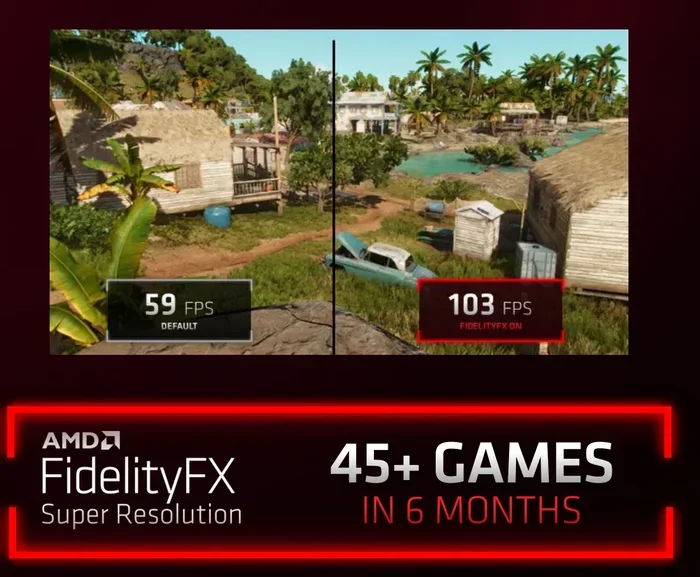
Radeon Super Resolution is AMD’s built-in upscaling technology designed to boost your frame rates and make games look sharper without breaking your hardware. If you have ever struggled with choppy gameplay on a laptop or desktop, this feature can be a real game-changer. It works by rendering your game at a lower resolution and then using smart algorithms to scale the image up to your monitor’s native resolution. The result? Smooth visuals and solid performance, even on systems that are not exactly top-of-the-line.
Many gamers assume they need an expensive graphics card to enjoy modern titles at high settings. That is simply not true anymore. With Radeon Super Resolution, you can get surprisingly good image quality and frame rates on modest hardware. Whether you are gaming on a budget laptop or a mid-range desktop, this tool helps you squeeze more out of your setup. In this guide, we will break down everything you need to know about how it works, when to use it, and how it compares to other upscaling options on the market.
Key Takeaways
- RSR is AMD’s upscaling technology that boosts frame rates by rendering games at lower resolutions.
- RSR works in virtually all DirectX 12 games without requiring developer support or special integration.
- Enable RSR through the AMD Radeon Software settings panel for instant performance improvements.
- Higher RSR scaling factors deliver sharper visuals but may reduce the performance gains you experience.
- RSR competes directly with DLSS and XeSS as a leading upscaling solution for gamers.
- Combine RSR with other optimization settings to maximize both visual quality and smooth gameplay.
📑 Table of Contents
- What Exactly Is Radeon Super Resolution
- How Radeon Super Resolution Works
- Radeon Super Resolution vs Other Upscaling Technologies
- How to Enable Radeon Super Resolution
- Benefits and Limitations of Radeon Super Resolution
- Who Should Use Radeon Super Resolution
- Final Thoughts on Radeon Super Resolution
What Exactly Is Radeon Super Resolution
Radeon Super Resolution, often abbreviated as RSR, is a feature built into AMD Radeon graphics cards and software. It uses spatial upscaling, which means it analyzes each frame and intelligently enhances the image quality while scaling it up to your display resolution. Think of it like zooming in on a photo and having the software fill in the missing details in a way that looks natural and clear.
This technology is part of the AMD Radeon Software suite, which means you do not need any extra downloads or paid subscriptions. If you own an AMD GPU, the feature is already there waiting for you. It is one of the simplest ways to improve your gaming experience without spending a single dollar on new hardware.
How It Differs From Other Upscaling Methods
There are several upscaling technologies available today. Nvidia has its own version called DLSS, and AMD has FSR as well. What makes Radeon Super Resolution unique is that it works across a wider range of games, even those that do not have built-in support for other upscaling features. RSR operates at the driver level, so it applies to almost any DirectX or Vulkan game you play. This broad compatibility is a huge advantage for gamers who want a plug-and-play solution.
How Radeon Super Resolution Works
Understanding how Radeon Super Resolution works does not require a computer science degree. The process is straightforward and happens in real time while you game.
Here is a simple breakdown of what happens behind the scenes:
- The game renders each frame at a lower resolution, which takes less processing power from your GPU.
- RSR then applies its upscaling algorithm to stretch and enhance that lower-resolution image.
- The final output is displayed at your monitor’s native resolution, looking sharper and running smoother than it would without upscaling.
The beauty of this approach is that your graphics card does not have to work as hard. Rendering at a lower resolution frees up resources, which translates directly into higher frame rates. You get the visual quality of a higher resolution without the heavy performance cost.
The Role of Your Graphics Card
To use Radeon Super Resolution, you need an AMD Radeon graphics card. This includes most Radeon RX series GPUs, from older models to the latest releases. Your GPU handles the upscaling process, so the stronger your card, the better the final image will look. However, even older Radeon cards can benefit from RSR, making it a great way to extend the life of your current hardware.
Pairing RSR with a solid amount of RAM also helps overall system performance. If you want to learn more about what RAM is good for in a laptop, check out our guide on what RAM is good for in a laptop. Having enough memory ensures your system can handle upscaling and gaming simultaneously without slowdowns.
Radeon Super Resolution vs Other Upscaling Technologies
The upscaling landscape can feel confusing with so many options. Let us compare Radeon Super Resolution with the two main competitors so you can see where it stands.
| Feature | Radeon Super Resolution | NVIDIA DLSS | AMD FSR |
|---|---|---|---|
| GPU Compatibility | AMD Radeon GPUs only | NVIDIA RTX GPUs only | Most AMD and NVIDIA GPUs |
| Game Compatibility | Almost all games | Games with built-in DLSS support | Games with built-in FSR support |
| Setup Difficulty | Very easy (driver level) | Easy (in-game setting) | Easy (in-game setting) |
| Image Quality | Good to very good | Excellent | Good |
| Performance Boost | Significant | Very significant | Moderate to significant |
| Cost | Free | Free | Free |
As you can see, Radeon Super Resolution offers one of the widest levels of compatibility. While DLSS often produces slightly better image quality, it only works on NVIDIA RTX cards. FSR is more open but requires game developers to integrate it. RSR, on the other hand, works automatically at the driver level, which makes it incredibly convenient.
How to Enable Radeon Super Resolution
Getting started with Radeon Super Resolution is quick and painless. You do not need to be a tech expert to set it up. Here is a step-by-step walkthrough.
- Right-click on your desktop and open AMD Radeon Software.
- Click on the Gaming tab at the top of the window.
- Find the Radeon Super Resolution option in the menu.
- Toggle the switch to turn it on.
- Use the quality slider to adjust the upscaling level. Move it toward “Quality” for sharper images or “Performance” for higher frame rates.
- Launch your game and enjoy the improved experience.
Tips for Getting the Best Results
- Start with the default quality setting and adjust based on what you see. Every game and monitor is different.
- Pair RSR with your monitor’s native resolution for the best balance of quality and performance.
- If you notice any blurriness, try lowering the upscaling level slightly. Sometimes less is more.
- Keep your AMD Radeon drivers updated. AMD regularly improves RSR algorithms with new driver releases.
One important thing to remember is that RSR works best when your GPU is already being pushed. If you are playing a lightweight game that runs perfectly fine without upscaling, you may not notice a huge difference. Save Radeon Super Resolution for demanding titles where the performance boost matters most.
Benefits and Limitations of Radeon Super Resolution
Like any technology, Radeon Super Resolution comes with its own set of strengths and weaknesses. Being aware of both helps you make informed decisions about when and how to use it.
The Benefits
- Broad compatibility: RSR works with almost any game that supports DirectX or Vulkan, making it one of the most versatile upscaling tools available.
- Easy to use: There is no need to configure in-game settings or install third-party tools. It is built right into your AMD software.
- Free to use: There are no hidden costs or subscription fees. It is included with your AMD GPU.
- Performance boost: You can see significant frame rate improvements, especially on lower-end hardware like budget laptops.
- Extends hardware life: By making older GPUs more capable, RSR helps you get more years out of your investment. It is one of the best investments for the lifespan of your PC if you want to keep gaming without upgrading every year.
The Limitations
- Image quality is not perfect: While RSR does a great job, it cannot match the fine detail that native rendering at full resolution provides. Some artifacts or slight blurriness may appear.
- AMD GPU only: If you have an NVIDIA or Intel graphics card, RSR is not an option for you.
- Not ideal for competitive gaming: In fast-paced competitive titles where every millisecond counts, some players prefer to run at native resolution without any upscaling for the most responsive experience.
- Limited control: Compared to DLSS, which offers multiple modes including frame generation, RSR is primarily a spatial upscaler and does not generate new frames.
Who Should Use Radeon Super Resolution
Radeon Super Resolution is ideal for a wide range of users. If you fall into any of these categories, RSR is definitely worth trying.
- Budget gamers: You do not have the latest GPU but still want to play modern titles at a smooth frame rate.
- Laptop users: Gaming laptops often have limited GPU power. RSR helps you get more out of your mobile setup.
- Older hardware owners: You have an older AMD card and want to keep playing new games without upgrading.
- Casual gamers: You play for fun and want good visuals without worrying about technical specs.
On the other hand, if you have a powerful NVIDIA GPU with DLSS support, you might find that DLSS offers slightly better image quality for supported games. And if you are a competitive esports player who prioritizes raw responsiveness over visual fidelity, running at native resolution might be your best bet.
For laptop users specifically, making sure your system is well-optimized matters a lot. Having the right RAM size for a laptop can make a noticeable difference in how smoothly upscaling and gaming work together. If you are unsure about your current setup, our article on what is a good RAM size for a laptop can help you figure out the right configuration.
Final Thoughts on Radeon Super Resolution
Radeon Super Resolution is one of the most accessible and practical upscaling tools available for AMD GPU users. It delivers real performance gains, works across nearly every game, and requires zero extra cost or effort to set up. Whether you are a casual player or a dedicated gamer on a budget, RSR can transform your experience by making demanding titles run smoothly on hardware that might otherwise struggle.
It is not without its limitations. The image quality does not match native rendering, and it is exclusive to AMD hardware. But for what it offers, the balance of ease-of-use, compatibility, and performance makes it a standout feature in the AMD ecosystem.
If you have an AMD Radeon graphics card, there is no reason not to try Radeon Super Resolution today. Open your AMD Software, toggle it on, and see the difference for yourself. It is one of those features that once you start using it, you will not want to go back. Your GPU will thank you, your frame rates will thank you, and your gaming sessions will be all the better for it.
Frequently Asked Questions
What Is Radeon Super Resolution?
Radeon Super Resolution (RSR) is an upscaling technology built into AMD Radeon Software that lets you play games at a lower resolution and then intelligently upscale the image to your monitor’s native resolution. This process boosts your frame rate while keeping the visual quality looking sharp and clear. Essentially, it uses advanced algorithms to make lower-resolution images look nearly as good as they would at full resolution.
How Does Radeon Super Resolution Work?
RSR works by rendering your game at a resolution lower than your monitor’s native resolution, then using spatial upscaling to intelligently enlarge the image. The technology analyzes each frame and fills in missing details to produce a cleaner, sharper picture. This happens in real time, so you get smoother gameplay without noticeable drops in image quality.
Is Radeon Super Resolution the Same as AMD FSR?
No, they are related but different. Radeon Super Resolution is a simpler, more accessible upscaling feature built directly into Radeon Software, while FSR (FidelityFX Super Resolution) is a more advanced suite of upscaling and sharpening tools developed by AMD for game developers to integrate into their titles. RSR works with almost any game automatically, whereas FSR requires specific support from each game.
How Do I Enable Radeon Super Resolution?
You can turn on Radeon Super Resolution by opening the AMD Radeon Software, going to the Gaming tab, and selecting the game you want to play. From there, you will find the RSR option under the Graphics settings, where you can adjust the upscaling quality preset from Performance to Quality. Simply toggle it on and choose your preferred setting to start seeing the benefits immediately.
Does Radeon Super Resolution Improve Performance?
Yes, one of the main benefits of Radeon Super Resolution is a noticeable boost in frame rate. By rendering the game at a lower resolution, your GPU has less work to do, which frees up resources for smoother gameplay. You can expect a significant performance gain, especially on higher-resolution monitors like 1440p and 4K displays.
Which Games Support Radeon Super Resolution?
One of the biggest advantages of Radeon Super Resolution is its wide compatibility. Since RSR works at the driver level, it supports virtually any DirectX 12 or Vulkan game, even those that do not have built-in upscaling features. This means you can enhance your gaming experience across a huge library of titles without waiting for individual game updates.