What Is a Smart Card Reader
A smart card reader is a small device that lets your laptop read and write data on a smart card securely. These readers use chip-based technology to store encrypted information, making them ideal for identity verification, payments, and secure access. Whether you need a USB smart card reader or a built-in option, this guide covers everything you should know.
A smart card reader is one of those small gadgets that quietly makes a big difference in how we handle digital security. If you have ever tapped a card on a payment terminal or plugged something into your laptop to access a secure system, there is a good chance a smart card reader was involved. These devices are becoming more common, especially as businesses and governments move toward stronger identity protection.
In this article, we will break down exactly what a smart card reader is, how it works, and why you might need one for your laptop. We will also look at the different types available, how to choose the right one, and common setup tips. By the end, you will have a clear picture of why these little devices matter so much in today’s digital world.
Key Takeaways
- A smart card reader lets laptops communicate securely with chip-based cards.
- USB and built-in readers are the two most common types available today.
- Smart card readers boost security for banking, government ID, and corporate access.
- Setting up a reader is simple and usually plug-and-play on most laptops.
- Compatibility matters, so check your laptop model before buying a reader.
- Smart cards offer stronger protection than traditional magnetic stripe cards.
📑 Table of Contents
- What Is A Smart Card Reader?
- How Does A Smart Card Reader Work?
- Types Of Smart Card Readers For Laptops
- Benefits Of Using A Smart Card Reader With Your Laptop
- How To Choose The Right Smart Card Reader
- Setting Up Your Smart Card Reader On A Laptop
- Who Uses Smart Card Readers The Most?
- The Future Of Smart Card Readers
What Is A Smart Card Reader?
A smart card reader is a device that reads data stored on a smart card. A smart card is a small plastic card with an embedded microchip. This chip can store encrypted data, process information, and communicate securely with a reader. You will find smart cards used in banking, government identification, healthcare, and corporate security systems.
The reader acts as a bridge between the smart card and your laptop or computer. When you insert or tap a smart card into the reader, it sends the stored data to your device for verification. This process happens in seconds and adds a strong layer of security that simple passwords cannot match.
Many modern laptops come with built-in card readers. However, older models or budget laptops may not include one. In that case, you can buy an external reader that connects through a USB port. If you are wondering whether your current laptop setup is enough, checking your What Is The Ram On A Laptop can help you understand your device’s overall capabilities.
How Smart Cards Differ From Regular Cards
A regular magnetic stripe card stores data on a band that can be easily copied. A smart card, on the other hand, stores data inside a tamper-resistant chip. This makes smart cards far more difficult to clone or fraudulently replicate. The chip can also perform cryptographic operations, meaning it can encrypt and decrypt data on its own without relying entirely on the host device.
This extra layer of intelligence is what makes smart cards so valuable for sensitive tasks like online banking or secure building access. When paired with a smart card reader, the system becomes much harder to breach.
How Does A Smart Card Reader Work?
Understanding how a smart card reader works is simpler than it sounds. The process involves three main steps: physical contact, data transfer, and authentication.
First, you place the smart card into the reader or tap it against a contactless surface. The reader then makes contact with the chip on the card. For contact-based readers, the gold-colored contact pad on the back of the card connects with pins inside the reader. For contactless readers, a small antenna communicates with the card using radio frequency technology.
Next, the reader sends a request to the chip. The chip responds by sharing the stored data or performing a requested operation. Finally, the host device, such as your laptop, verifies the information and grants or denies access based on the response.
This entire process is fast and highly secure. The encryption happens at the chip level, which means even if someone intercepts the data, it would be nearly impossible to decode without the proper keys.
Contact vs Contactless Smart Card Readers
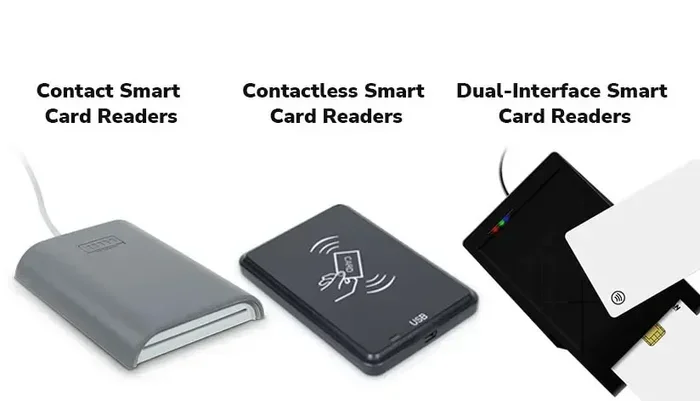
Contact-based readers require you to physically insert the card. These are common in older systems and some banking applications. Contactless readers use near-field communication, or NFC, to read the card when it is held close. Both types offer strong security, but contactless options are faster and more convenient for everyday use.
Many modern readers support both contact and contactless cards, giving you flexibility. If you are shopping for one, look for dual-interface readers that handle both types seamlessly.
Types Of Smart Card Readers For Laptops
Not all smart card readers are the same. Different types serve different needs, and choosing the right one depends on how you plan to use it. Here are the most common types you will encounter.
USB Smart Card Readers
A USB smart card reader is the most popular external option. You plug it into a USB port on your laptop, and it is ready to go. These readers are compact, portable, and work with most operating systems including Windows and macOS. They are ideal for people who need a temporary or travel-friendly solution.
USB readers are also affordable. You can find reliable models for under fifty dollars. They are perfect for occasional use, such as accessing a secure corporate network or signing digital documents.
Built-In Laptop Card Readers
Some laptops come with a card reader built right into the chassis. These are usually located on the side or front of the device. Built-in readers are convenient because you do not need any extra cables or dongles. They also tend to be more durable since they are part of the laptop itself.
If your laptop has a built-in reader, you are already set for most smart card tasks. However, not all built-in readers support every card type. Check your laptop’s specifications to confirm compatibility with the smart cards you plan to use.
SD Card Readers Vs Smart Card Readers
It is easy to confuse an SD card reader with a smart card reader, but they serve very different purposes. An SD card reader reads memory cards used in cameras and phones. A smart card reader reads chip-based cards used for security and authentication. Always make sure you are buying the right type for your needs.
If you are unsure about your laptop’s current memory capabilities, you might want to check What Is A Good Ram Size For A Laptop to understand how your device handles data storage overall.
Benefits Of Using A Smart Card Reader With Your Laptop
Adding a smart card reader to your laptop setup offers several real advantages. These go beyond just convenience and touch on security, compliance, and everyday usability.
Enhanced Security
The biggest benefit of a smart card reader is improved security. Smart cards use encryption and mutual authentication, which means both the card and the reader verify each other before any data is exchanged. This makes it extremely difficult for hackers to steal your information.
For businesses, this level of security helps meet compliance requirements. Many industries, including finance and healthcare, require strong authentication methods. A smart card reader helps organizations meet these standards without adding complicated processes for employees.
Convenient Identity Verification
Smart card readers make identity verification quick and painless. Instead of typing in a long password, you simply insert your card or tap it on the reader. This saves time and reduces the frustration of forgotten passwords. Many government services now use smart cards for citizen identification, making these readers essential for accessing online portals.
Digital Signatures And Document Signing
If you sign documents digitally, a smart card reader can store your private key securely. When you sign a document, the reader authenticates your card, and the signature is applied with a digital certificate. This is legally binding in many countries and is widely used in legal and business environments.
Portable And Easy To Use
Most USB smart card readers are small enough to fit on a keychain. You can carry one in your laptop bag and use it on any compatible device. This portability makes them ideal for professionals who travel frequently or work from multiple locations.
When pairing a reader with your laptop, it helps to ensure your device has enough memory and processing power. Checking Is 8Gb Of Ram Good For A Laptop can give you insight into whether your system is ready for secure, smooth operation with external devices.
How To Choose The Right Smart Card Reader
Buying a smart card reader does not have to be confusing. By focusing on a few key factors, you can find the right one for your needs without overspending.
Check Compatibility First
The most important step is confirming that the reader works with your laptop and your smart cards. Check the card type, such as ISO 7816 contact cards or ISO 14443 contactless cards. Also verify that the reader supports your operating system, whether that is Windows, macOS, or Linux.
Some readers work only with specific card types, so always read the product description carefully. If you are unsure about your laptop’s overall specifications, reviewing What Is A Good Ram For A Laptop can help you determine if your device is compatible with modern peripherals.
Consider Connection Type
USB is the most common connection type for external readers. However, some newer readers use Bluetooth or USB-C. Choose a connection type that matches your laptop’s available ports. USB-C readers are especially useful if your laptop has moved away from traditional USB-A ports.
Look For Driver Support
Good driver support makes setup a breeze. Most reputable brands provide drivers for major operating systems. Some readers are plug-and-play, meaning you do not need to install anything. Check the manufacturer’s website for driver availability and updates before purchasing.
Read Reviews And Ratings
Customer reviews give you real-world insights into reliability and performance. Look for readers with consistently high ratings and positive feedback about ease of use. Avoid readers with frequent complaints about connectivity issues or poor build quality.
Price And Brand Reputation
You do not need to spend a fortune on a smart card reader. Reliable models are available at various price points. Stick with trusted brands known for producing secure and durable hardware. Spending a little extra on a well-known brand often saves you from compatibility headaches down the road.
Setting Up Your Smart Card Reader On A Laptop
Setting up a smart card reader is straightforward in most cases. Here is a simple step-by-step guide to get you started.
- Plug in the reader. Connect the USB reader to an available port on your laptop.
- Install drivers if needed. Windows usually installs drivers automatically. On macOS, you may need to download software from the manufacturer’s website.
- Insert your smart card. Place the card chip-side down into the reader slot or hold it near a contactless reader.
- Wait for recognition. Your laptop should detect the card within seconds. You may see a notification or a prompt to open the associated application.
- Test the connection. Open the application or portal that uses the smart card and verify that it recognizes your card properly.
If your reader is not working, try a different USB port or cable. Outdated drivers can also cause issues, so check the manufacturer’s website for updates. For general troubleshooting with laptop peripherals, understanding your system’s overall specs, such as checking What Is A Good Ram Size For A Laptop, can help rule out broader compatibility problems.
Common Smart Card Reader Problems And Fixes
Sometimes a smart card reader may not work as expected. Here are the most common issues and how to fix them.
- Reader not detected: Try a different USB port. Restart your laptop and reinstall the drivers.
- Card not recognized: Make sure the card is clean and properly inserted. Check if the card type is supported by the reader.
- Slow response times: Update the reader firmware and drivers. A slow USB hub can also cause delays.
- Driver conflicts: Uninstall old drivers before installing new ones. Use the manufacturer’s cleanup tool if available.
Most issues are easy to resolve with basic troubleshooting. Keeping your drivers up to date and handling the reader with care will extend its lifespan significantly.
Who Uses Smart Card Readers The Most?
Smart card readers are not just for tech professionals. A wide range of people and industries rely on them every day. Here are some of the most common users.
- Corporate employees: Many companies use smart cards for building access and secure login to internal systems.
- Government workers: Government agencies issue smart card IDs for secure access to classified information.
- Healthcare providers: Smart cards help verify patient identity and protect sensitive medical records.
- Bankers and financial professionals: Smart cards add a second layer of protection for online banking and transactions.
- Everyday consumers: More people are using smart card-based payment methods, making these readers increasingly relevant for personal use too.
As digital security continues to evolve, the demand for smart card readers will only grow. Whether you are a professional handling sensitive data or an individual protecting personal information, a smart card reader is a worthwhile investment.
The Future Of Smart Card Readers
The technology behind smart card readers is advancing quickly. Future readers will likely support faster data transfer speeds, stronger encryption, and broader compatibility with different card types. Biometric integration, such as combining a smart card with fingerprint or facial recognition, is already on the horizon.
Laptops are also starting to include smarter built-in readers. As more laptops adopt USB-C and Thunderbolt ports, external readers will become even more versatile. The shift toward contactless technology means that tap-to-read smart cards will become the norm rather than the exception.
Staying informed about these trends helps you make smarter purchasing decisions. When choosing a reader today, look for models that are forward-compatible and support the latest standards in smart card technology.
In short, a smart card reader is a small but powerful tool that enhances security and convenience for laptop users. Whether you need it for work, government services, banking, or personal use, understanding how these readers work and how to choose the right one puts you ahead of the curve.
Frequently Asked Questions
What Is A Smart Card Reader Used For?
A smart card reader is used to read and write data on a smart card. Common uses include secure login, digital document signing, banking transactions, and identity verification. These readers add an extra layer of protection beyond traditional passwords.
Do All Laptops Have A Smart Card Reader?
No, not all laptops have a built-in smart card reader. Many modern business laptops include one, but budget and consumer models often do not. You can easily add an external USB reader if your laptop lacks a built-in option.
Is A Smart Card Reader The Same As An SD Card Reader?
No, they are very different. A smart card reader reads chip-based cards used for security and authentication. An SD card reader reads memory cards used in cameras and phones. Always check the product description to make sure you are buying the correct type.
Can I Use A Smart Card Reader On Any Laptop?
Most laptops can use a smart card reader as long as they have a compatible port, such as USB. The reader usually works with Windows, macOS, and Linux. Check the manufacturer’s specifications to confirm compatibility with your specific laptop model.
Are Smart Card Readers Secure?
Yes, smart card readers are very secure. They use encrypted communication and chip-based authentication that is much harder to compromise than magnetic stripe cards. The data stored on the chip is protected by strong encryption standards.
How Much Does A Smart Card Reader Cost?
Basic USB smart card readers cost between twenty and sixty dollars. More advanced models with multiple card slot support or biometric features can cost more. For most users, a reliable reader in the thirty-to-fifty-dollar range is more than enough.
=== CONCLUSION ===
A smart card reader is a simple yet powerful device that makes your laptop more secure and versatile. Whether you need it for work, banking, or personal identification, there is a reader that fits your needs. The setup is easy, the prices are reasonable, and the security benefits are hard to ignore.
Now that you understand how these readers work and what to look for, you can make a confident choice. Pick a compatible model, follow the setup steps, and enjoy the peace of mind that comes with stronger digital protection. A smart card reader is one of those small investments that pays off big in security and convenience.
=== INTERNAL LINKS USED ===
Internal links used: 3