What Is the Asus E Green Utility
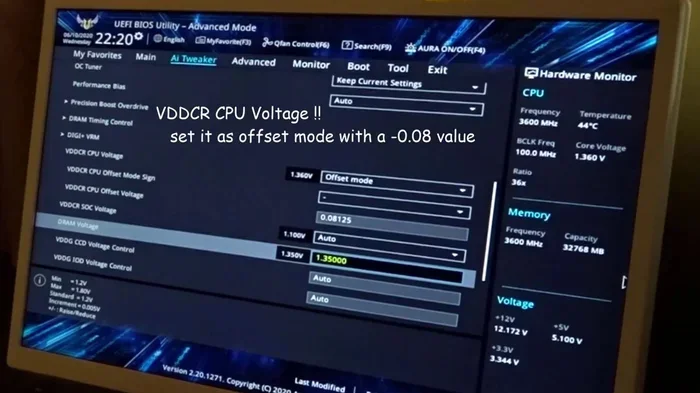
The Asus E Green Utility is a free software tool that helps you monitor and reduce your PC’s power consumption. It works by automatically adjusting system settings to save energy without hurting performance. If you care about green computing and lower electricity bills, this utility is worth exploring.
The Asus E Green Utility is a software program made by ASUS to help you save energy on your computer. It might sound like a small thing, but it can make a real difference over time. If you have an ASUS laptop or desktop, this tool is already on your system or easy to download. Many users never even notice it is there, but it works quietly in the background to cut down on wasted power.
In this guide, we will break down everything you need to know about the Asus E Green Utility. You will learn what it does, how it works, and whether it is worth using. We will also look at the benefits, limitations, and practical tips for getting the most out of it. By the end, you will have a clear picture of how this tool fits into your computing life.
Before we dive deeper, let us talk about why energy efficiency matters in computing. Your PC uses electricity every time you turn it on. Over months and years, that adds up to real costs on your power bill. It also adds to your carbon footprint. Tools like the E Green Utility help address both of these concerns. They make your system smarter about how and when it uses power.
Green computing is not just a buzzword. It is a growing movement in the tech world. Companies like ASUS are building software and hardware that use less energy. The Asus E Green Utility is one of the simplest ways everyday users can participate. You do not need to be a tech expert to benefit from it.
Key Takeaways
- Energy Savings: The Asus E Green Utility can significantly reduce your PC’s power usage through smart adjustments.
- Easy to Use: It runs in the background with minimal setup, making it accessible for all users.
- Performance Balance: The tool adjusts power settings without noticeably slowing down your system.
- Eco-Friendly Computing: Using this utility supports broader environmental goals by reducing energy waste.
- ASUS Exclusive: This utility is designed specifically for ASUS hardware, though similar tools exist for other brands.
- Free Software: There is no cost to download or use the E Green Utility.
📑 Table of Contents
What Is the Asus E Green Utility?
The Asus E Green Utility is a lightweight application designed to manage your computer’s power consumption. It is part of ASUS’s broader effort to promote eco-friendly computing. The software monitors your system’s energy use and makes automatic adjustments to reduce waste. Think of it as a personal energy manager for your PC.
ASUS developed this utility to give users more control over their system’s power profile. Instead of relying solely on Windows power settings, the E Green Utility adds an extra layer of optimization. It works with ASUS motherboards and laptops that support ASUS AI Suite and other companion software. The tool is free and easy to install.
The utility focuses on several key areas of power management. These include CPU power scaling, system idle state management, and display brightness adjustments. By targeting these areas, the E Green Utility can reduce energy consumption without a noticeable drop in performance. It is designed to be invisible to the average user, which is exactly how it should be.
How Does It Work?
The Asus E Green Utility uses a simple but effective approach. It detects when your computer is idle or under light load. When this happens, the software automatically scales back power to components that are not being heavily used. For example, it might reduce CPU clock speed slightly or lower the power draw on your graphics card.
When you need full performance again, the utility ramps things back up quickly. This dynamic adjustment happens in the background without any input from you. The result is a system that uses less power during everyday tasks like browsing the web or watching videos. You get the performance you need when you need it, and you save energy when you do not.
The utility also provides basic monitoring features. You can check your system’s current power state and see how much energy you are saving. While it is not a full power meter, it gives you a good sense of your PC’s efficiency. Some users pair this with tools that show GPU temperature or CPU power draw for a more complete picture.
Key Features of the Asus E Green Utility
The Asus E Green Utility comes with several features that make it useful for everyday computing. Here is a closer look at what you can expect:
- Automatic Power Scaling: The utility adjusts your system’s power usage based on current workload. This happens without you lifting a finger.
- Idle State Optimization: When your PC is not doing much, the tool reduces power to unused components. This is one of the biggest energy savers.
- Performance Mode Toggle: You can switch between power-saving and high-performance modes with a simple click.
- System Monitoring: Basic stats on your system’s power state are available right from the utility interface.
- Low Resource Usage: The utility itself uses very little CPU or memory, so it does not slow your system down.
- ASUS Hardware Integration: It works best with ASUS motherboards, laptops, and components that support the software.
Each of these features plays a role in making your PC more energy efficient. Together, they create a system that is both smart and responsive. You get the best of both worlds: lower power use when possible and full performance when you need it.
Benefits of Using the Asus E Green Utility
There are several real-world benefits to running the Asus E Green Utility on your system. Let us walk through the most important ones.
1. Lower Electricity Bills
This might be the most appealing benefit for many users. A computer that uses less power costs less to run. Over a year, those savings can add up. If you use your PC for long hours every day, the difference can be significant. Even a modest reduction in power draw translates to real money saved over time.
2. Reduced Heat Output
When your PC uses less power, it generates less heat. This means your fans do not have to work as hard. Lower temperatures can extend the life of your components. It also makes your system quieter, which is a nice bonus. If you have been dealing with a noisy PC fan or overheating issues, this utility can help.
3. Environmental Impact
Every watt of power you save reduces demand on the electrical grid. Over millions of users, this adds up to a meaningful reduction in energy consumption. ASUS has positioned the E Green Utility as part of its commitment to sustainable technology. By using the tool, you are contributing to a larger effort to reduce the tech industry’s environmental footprint.
4. Better Battery Life on Laptops
If you use a laptop, the Asus E Green Utility can help extend your battery life. By reducing power draw during light tasks, your laptop can run longer on a single charge. This is especially useful for people who work on the go and do not always have access to a power outlet. Pair this with good laptop battery habits and you will see a noticeable improvement.
Who Should Use the Asus E Green Utility?
The Asus E Green Utility is a great fit for a wide range of users. Here are some examples of who benefits most:
- ASUS PC Owners: If you have an ASUS laptop or desktop, the utility is designed to work seamlessly with your hardware.
- Office and Home Users: People who use their PCs for browsing, email, and light tasks will see the most benefit from power savings.
- Eco-Conscious Users: Anyone who wants to reduce their energy consumption and environmental impact will appreciate this tool.
- Laptop Users on the Go: The battery life extension alone makes this worth installing for frequent travelers.
- Budget-Conscious Users: Lower power use means lower electricity costs, which adds up over time.
On the other hand, power users who always run demanding tasks like video editing or gaming might not notice a big difference. The utility is designed for everyday computing scenarios. If your PC is always under heavy load, the power savings will be minimal. That said, there is no harm in having it installed and letting it run in the background.
How to Install and Set Up the Asus E Green Utility
Setting up the Asus E Green Utility is straightforward. Here is a simple guide to get you started:
- Check Compatibility: Make sure your system is an ASUS product. The utility works best with ASUS motherboards and laptops.
- Download the Software: Visit the ASUS support website and search for the E Green Utility. Download the latest version for your system.
- Install the Utility: Run the installer and follow the on-screen prompts. The process takes just a few minutes.
- Launch the Utility: Once installed, open the E Green Utility from your system tray or Start menu.
- Configure Your Preferences: Choose your preferred power mode. You can switch between energy-saving and performance modes at any time.
- Let It Run: The utility works automatically in the background. You do not need to adjust it constantly.
Most users find that the default settings work perfectly fine. The utility is designed to be a set-and-forget tool. You can check in occasionally to monitor your energy savings, but it is not something you need to manage actively every day.
Quick Tips
- Keep the utility updated through ASUS support to get the latest power optimization features.
- Combine the E Green Utility with Windows power settings for even better results.
- If you notice any performance issues, switch to the performance mode temporarily.
- Check your system’s power savings in the utility dashboard to track your progress.
Common Mistakes to Avoid
While the Asus E Green Utility is easy to use, there are a few mistakes users sometimes make. Avoiding these will help you get the best results.
- Ignoring Updates: ASUS releases updates that improve compatibility and efficiency. Skipping updates means you miss out on optimizations.
- Disabling the Utility Without Trying: Some users uninstall it because they do not notice an immediate difference. Give it time to work in the background.
- Expecting Huge Performance Gains: The E Green Utility is about efficiency, not speed. It will not make your PC faster, but it will use less power.
- Using It on Non-ASUS Systems: The utility is designed for ASUS hardware. It may not work correctly or at all on other brands.
- Overriding Settings Too Often: Constantly switching modes can reduce the effectiveness of the automatic power management features.
By steering clear of these common pitfalls, you can ensure the utility runs smoothly and delivers the energy savings it promises. A little patience goes a long way with this type of software.
Expert Insights on Green Computing
Green computing is becoming a bigger focus across the tech industry. Companies are investing in energy-efficient hardware and software solutions. The Asus E Green Utility represents a practical, consumer-facing approach to this trend. It shows that even small software tools can contribute to meaningful energy savings.
Experts in PC hardware often recommend using multiple tools together for the best results. For example, pairing the E Green Utility with a good CPU cooler and keeping your RAM on a laptop optimized can create a system that runs cooler, faster, and more efficiently. The goal is to build a setup that wastes as little energy as possible.
Another important consideration is the overall lifecycle of your PC. When you are shopping for a new machine, look for brands and models that prioritize energy efficiency. ASUS has made green computing a part of its brand identity, and the E Green Utility is a reflection of that commitment. If you are in the market for a new system, check out our guide on when is the best time to purchase a laptop to make a smart, energy-conscious choice.
Remember that every bit of energy savings counts. Whether you are using the E Green Utility or simply turning off your PC when you are done, these small actions add up. The tech industry as a whole benefits when consumers make energy-efficient choices.
Conclusion
The Asus E Green Utility is a simple yet effective tool for managing your PC’s power consumption. It works quietly in the background, making smart adjustments that save energy without sacrificing performance. Whether you are looking to lower your electricity bills, extend your laptop battery life, or simply reduce your environmental impact, this utility delivers real value.
It is free, easy to install, and designed specifically for ASUS hardware. If you have an ASUS system, there is no reason not to give it a try. The Asus E Green Utility proves that green computing does not have to be complicated. Sometimes the simplest tools make the biggest difference. Start using it today and see the benefits for yourself.
Frequently Asked Questions
Is the Asus E Green Utility free to use?
Yes, the Asus E Green Utility is completely free. You can download it from the ASUS support website at no cost. There are no hidden fees or premium tiers.
Will the Asus E Green Utility slow down my PC?
No, the utility is designed to use very little system resources. It runs in the background and should not cause any noticeable slowdown. In fact, it may even help reduce heat and fan noise by lowering power usage.
Can I use the Asus E Green Utility on non-ASUS computers?
The utility is specifically designed for ASUS hardware. It may not work correctly on computers from other manufacturers. Always check compatibility before installing.
Does the Asus E Green Utility work with gaming PCs?
Yes, it works with gaming PCs that use ASUS components. However, the power savings will be most noticeable during light tasks. During heavy gaming, the utility will allow full power performance.
How do I update the Asus E Green Utility?
You can update the utility through the ASUS support website or through the ASUS Live Update tool. Keeping the software up to date ensures you get the latest power optimization features and bug fixes.
Can the Asus E Green Utility improve my laptop battery life?
Yes, it can help. By reducing power consumption during light tasks, the utility can extend your laptop’s battery runtime. This is especially useful for users who work away from a power outlet regularly.