What Is Ram Good for in a Laptop

RAM is the short‑term memory that lets a laptop run apps smoothly, switch between tasks quickly, and handle demanding programs like games or video editors. Choosing the right amount of RAM can dramatically improve speed, battery life, and future‑proofing, while too little can bottleneck even the fastest CPU.
Key Takeaways
- Speed boost: More RAM lets the CPU access data faster, reducing lag.
- Better multitasking: Sufficient RAM prevents slowdowns when many apps run together.
- Gaming & creative work: High‑performance games and editing software need 16 GB + for smooth operation.
- Battery impact: Proper RAM size can improve power efficiency by avoiding constant swapping.
- Upgradeability: Knowing your laptop’s RAM limits helps you plan future upgrades.
- Cost‑vs‑benefit: You don’t always need the maximum; balance price with real‑world needs.
- Future‑proofing: Choosing a bit more RAM now extends the laptop’s useful life.
📑 Table of Contents
- Introduction: Why RAM Matters More Than You Think
- 1. How RAM Works Inside a Laptop
- 2. How Much RAM Do You Actually Need?
- 3. RAM’s Impact on Real‑World Performance
- 4. How to Choose the Right RAM for Your Laptop
- 5. Practical Tips to Optimize RAM Usage
- Conclusion: RAM Is the Unsung Star of Laptop Performance
Introduction: Why RAM Matters More Than You Think
When you buy a laptop, the headline specs that catch your eye are usually the processor, storage, and screen size. Yet, hidden behind those flashy numbers is a quieter hero: RAM, or Random‑Access Memory. Think of RAM as the desk you work on. The bigger the desk, the more papers you can spread out without constantly shuffling them off to a drawer.
In everyday use, RAM determines how quickly a laptop can open a web page, launch a game, or edit a photo. It also influences battery life, because a system that constantly reaches for the slower hard drive or SSD wastes power. This article breaks down exactly what RAM does, how much you really need, and how to choose the right amount for your lifestyle.
1. How RAM Works Inside a Laptop
What RAM Actually Is
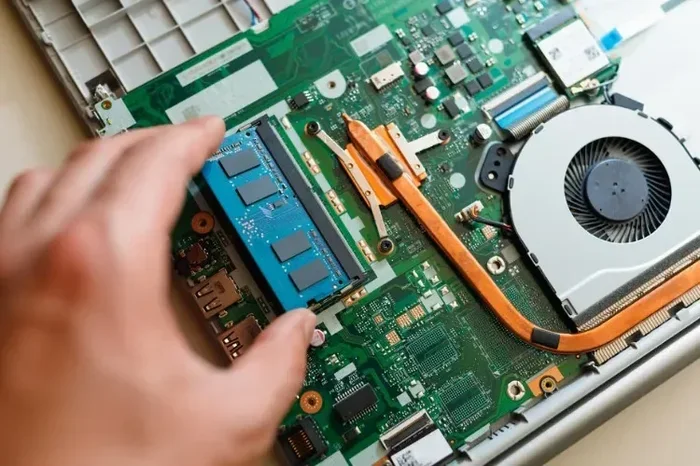
RAM is a type of volatile memory. “Volatile” means it only holds data while power is supplied. When you turn off the laptop, everything stored in RAM disappears. This is different from the SSD or HDD, which keeps data even when the machine is off.

Visual guide about What Is Ram Good for in a Laptop
Image source: images.ctfassets.net
The Data Flow: CPU ↔ RAM ↔ Storage
The CPU (central processing unit) is the brain, but it can’t store large amounts of data on its own. It pulls instructions and temporary data from RAM. If RAM runs out, the system resorts to the storage drive, a process called “paging” or “swapping.” This is much slower, causing the dreaded lag spikes.
Types of RAM: DDR3, DDR4, DDR5
- DDR3: Older laptops, slower speeds, usually 1333‑1600 MT/s.
- DDR4: Most modern laptops, speeds from 2133‑3200 MT/s, lower power draw.
- DDR5: Emerging in high‑end ultrabooks, speeds above 4800 MT/s, better efficiency.
While speed matters, the capacity (how many gigabytes) usually has a bigger impact on everyday performance.
2. How Much RAM Do You Actually Need?
Basic Tasks: 4 GB–8 GB
If you mainly browse the web, check email, and use Office apps, 4 GB can suffice, but 8 GB provides a smoother experience and room for a few browser tabs.

Visual guide about What Is Ram Good for in a Laptop
Image source: wishgoodmorning.org
Power Users: 12 GB–16 GB
Content creators, programmers, and heavy multitaskers benefit from 12 GB–16 GB. Photo editors (Adobe Photoshop), light video editing, and multiple IDEs run without constant swapping.
Gaming & Pro‑Level Editing: 16 GB–32 GB
Modern AAA games and 4K video editing demand at least 16 GB. For 8K workflows or VR development, 32 GB gives you future‑proof headroom.
Future‑Proofing Tips
- Buy a laptop with at least one free RAM slot.
- Check the maximum supported RAM on the manufacturer’s spec sheet.
- Consider laptops with soldered RAM only if you’re sure the 16 GB limit is enough for you.
3. RAM’s Impact on Real‑World Performance
Speedier Boot Times
During startup, the OS loads core services into RAM. More RAM lets the system keep more of these services ready, cutting boot time by a few seconds.

Visual guide about What Is Ram Good for in a Laptop
Image source: robots.net
Smoother Multitasking
When you have 8 GB and open Chrome with 20 tabs, each tab consumes a chunk of RAM. If you exceed the limit, the OS swaps to the SSD, and you feel the slowdown. With 16 GB, those tabs stay in fast memory, and switching feels instant.
Gaming Performance
Games load textures, maps, and AI data into RAM. Insufficient RAM forces the game to constantly fetch data from the SSD, causing frame drops. A solid 16 GB kit eliminates most of these hiccups.
Battery Life Benefits
Swapping to the SSD uses more power than staying in RAM. Laptops with adequate RAM often show a modest but noticeable boost in battery endurance, especially during web browsing or video playback.
4. How to Choose the Right RAM for Your Laptop
Check Compatibility
Look at the laptop’s manual for:
- Supported DDR generation (DDR4, DDR5).
- Maximum capacity per slot and total.
- Clock speed (e.g., 2666 MHz, 3200 MHz).
Single vs. Dual Channel
Two identical sticks (e.g., 2 × 8 GB) enable dual‑channel mode, effectively doubling memory bandwidth. This yields noticeable gains in gaming and rendering tasks compared to a single 16 GB stick.
Latency Matters Too
Latency is expressed as CL (CAS Latency). Lower CL numbers mean faster response. For most users, the difference between CL16 and CL18 is negligible, but enthusiasts may prefer lower latency kits.
Upgrade Path
If your laptop has a single RAM slot and 8 GB soldered, you may be stuck at 8 GB. Opt for models with two slots or removable modules for future upgrades.
5. Practical Tips to Optimize RAM Usage
Manage Startup Programs
Disable unnecessary apps that load at startup via Task Manager (Windows) or System Preferences (macOS). Fewer background processes free up RAM.
Use Light‑Weight Alternatives
Choose browsers like Microsoft Edge or Brave, which consume less RAM than Chrome when many tabs are open.
Regularly Restart
Over time, some apps leak memory. A quick restart clears the RAM and restores performance.
Utilize Built‑In Memory Optimizers
Windows 10/11’s “Memory Compression” and macOS’s memory management are automatic, but third‑party tools can help you monitor usage and spot leaks.
Conclusion: RAM Is the Unsung Star of Laptop Performance
Whether you’re a casual surfer, a gamer, or a video editor, RAM plays a pivotal role in how responsive and future‑proof your laptop feels. Understanding how much you need, what type to choose, and how to keep it running efficiently can save you money, frustration, and countless minutes of waiting.
Next time you shop for a new laptop, look beyond the CPU and give RAM the attention it deserves. A well‑balanced system with the right amount of high‑quality RAM will keep you productive and entertained for years to come.
Frequently Asked Questions
What does RAM stand for and why is it called “random access”?
RAM stands for Random‑Access Memory. It’s called “random access” because the CPU can read or write data to any location instantly, unlike sequential storage devices.
Can I add more RAM to any laptop?
Not always. Some ultrabooks have RAM soldered to the motherboard, while others offer one or two upgradeable slots. Check the manufacturer’s specifications first.
Is more RAM always better?
More RAM improves performance up to the point where your typical workload can use it. Beyond that, extra RAM adds cost without noticeable benefit.
How does RAM affect battery life?
When enough RAM is available, the system avoids swapping to the SSD, which consumes more power. Adequate RAM can therefore extend battery life, especially during light tasks.
What is the difference between DDR4 and DDR5 for laptops?
DDR5 offers higher transfer speeds and better power efficiency than DDR4, but it’s currently found in premium and newer models. For most users, DDR4 3200 MHz is more than sufficient.
Should I prioritize a faster CPU or more RAM?
Both are important, but they serve different roles. A fast CPU handles calculations, while RAM provides quick data access. For balanced performance, pair a decent CPU with enough RAM for your typical tasks.