What Is the Function of a Computer Speaker
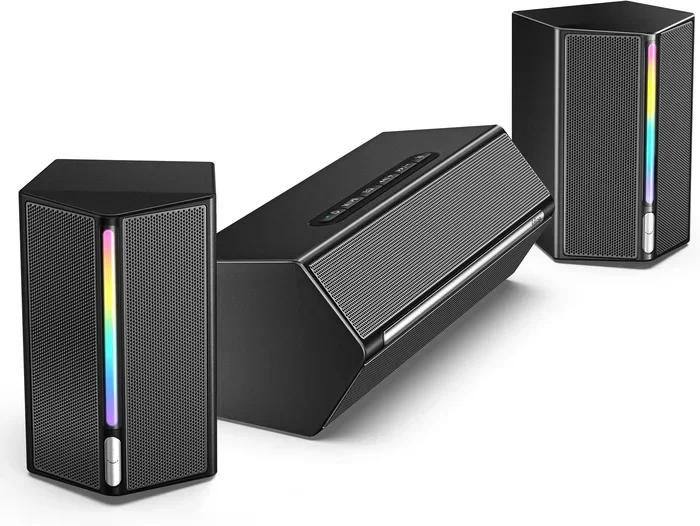
The function of a computer speaker is to convert electrical signals into audible sound, allowing you to hear audio from your computer. Whether built into your laptop or connected as external speakers, they handle everything from music and videos to system notifications. Understanding how they work helps you choose the right setup and troubleshoot common audio problems.
Have you ever wondered what your computer speaker actually does? It might seem simple. You plug it in, you hear sound. But there is a lot more going on behind the scenes. Computer speakers play a vital role in how we experience audio on our devices. From listening to music to joining video calls, they make our digital lives richer and more connected.
In this guide, we will break down the function of a computer speaker in plain language. You will learn how they work, the different types available, and what to look for when choosing a set. Whether you use a desktop setup or a laptop with built-in speakers, this article covers it all. Let us dive in.
Key Takeaways
- Core Function: Computer speakers turn electrical signals into sound waves you can hear.
- Types Matter: Built-in, external, Bluetooth, and 2-way vs 3-way speakers all serve different needs.
- Key Specs: Frequency response, wattage, and impedance determine speaker quality and performance.
- Placement Counts: Where you place your speakers affects sound quality significantly.
- Maintenance Helps: Regular care and proper connection prevent most common speaker issues.
📑 Table of Contents
- What Is the Function of a Computer Speaker?
- Types of Computer Speakers
- Key Features That Define Speaker Quality
- Common Functions of Computer Speakers
- How to Choose the Right Computer Speakers
- Quick Tips for Better Speaker Performance
- Common Mistakes to Avoid
- Expert Insights on Speaker Function
- Conclusion
What Is the Function of a Computer Speaker?
The main function of a computer speaker is to produce sound. But how does it actually do that? Inside every speaker is a component called a driver. The driver takes electrical signals from your computer and turns them into physical movement. This movement pushes air, creating sound waves that reach your ears.
Think of it like this. Your computer processes audio files and sends tiny electrical pulses. The speaker driver receives those pulses. It moves a cone back and forth very quickly. That motion creates the sounds you hear. It is a simple idea, but the technology behind it has come a long way over the years.
Without speakers, your computer would be a silent machine. You would have no way to hear music, game audio, video soundtracks, or even basic notification sounds. The computer speaker bridges the gap between digital data and real-world sound. It is one of the most important output devices you use every day.
How the Audio Signal Becomes Sound
The process starts when your computer sends an audio signal through the sound card or audio chip. This signal travels through a cable or wireless connection to the speaker. Inside the speaker, an amplifier boosts the signal. Then the driver converts it into motion. The result is the sound you hear coming out of the speaker cone.
Here is a simple breakdown of the steps:
- Step 1: The computer processes audio data and creates an electrical signal.
- Step 2: The signal travels to the speaker through a cable or Bluetooth.
- Step 3: An amplifier inside the speaker boosts the signal strength.
- Step 4: The driver moves the cone, creating sound waves in the air.
- Step 5: Your ears pick up the sound waves and your brain interprets them as audio.
Each step matters. If any part of the chain fails, your audio quality drops. That is why understanding the function of a computer speaker helps you troubleshoot problems and make better buying decisions.
Types of Computer Speakers
Not all speakers are the same. Different setups serve different purposes. Let us look at the most common types of computer speakers you will encounter.
Built-In Speakers
Most laptops and many monitors come with built-in speakers. These are small and convenient. They do not require any extra cables or setup. However, they often lack depth and volume. The sound can feel thin, especially for music or movies.
Built-in speakers work fine for casual tasks. Video calls, basic notifications, and light browsing are all doable. But if you want richer sound, you will likely need external speakers.
External Desktop Speakers
External speakers connect to your computer through a cable, usually a 3.5mm audio jack or USB. They are bigger and more powerful than built-in options. Many desktop setups use a pair of stereo speakers for a fuller sound experience.
Some external speakers come with a subwoofer. This adds deep bass that makes music and movies feel more immersive. If you are a gamer or a music lover, external speakers can make a big difference.
Bluetooth and Wireless Speakers
Wireless speakers connect to your computer using Bluetooth. They offer more flexibility since you do not need a physical cable. This makes them great for small desks or shared workspaces. Just keep in mind that Bluetooth speakers may have slightly more audio delay than wired ones.
Many modern Bluetooth speakers also double as portable speakers. You can use them with your phone or tablet too. This versatility makes them a popular choice for many users.
2-Way vs 3-Way Speakers
You may have heard the terms 2-way speakers and 3-way speakers. These refer to how many drivers a speaker has. A 2-way speaker uses two drivers, typically a woofer for low frequencies and a tweeter for high frequencies. A 3-way speaker adds a mid-range driver for a more balanced sound.
If you want to learn more about the differences, check out our guide on the difference between 2 and 3 way speakers. Understanding this helps you choose speakers that match your listening preferences.
Key Features That Define Speaker Quality
Not all speakers deliver the same experience. Several key features determine how good your audio will be. Here are the most important ones to consider.
Frequency Response
Frequency response measures the range of sounds a speaker can produce. A wider range means more detail in both the low and high ends. For example, a speaker with a frequency response of 20Hz to 20kHz covers the full range of human hearing.
If you are serious about audio quality, look for speakers with a strong frequency response. You can read more about what makes a good frequency response for speakers in our detailed guide.
Wattage and Power
Wattage tells you how much power a speaker can handle. Higher wattage generally means louder and clearer sound at higher volumes. However, wattage alone does not determine quality. A well-designed 10-watt speaker can sound better than a poorly designed 50-watt one.
For most home and office use, speakers in the 10 to 30-watt range work well. If you need louder sound for presentations or parties, look for higher wattage options.
Impedance
Impedance is measured in ohms and affects how much electrical current the speaker draws. Most computer speakers have an impedance of 4 to 8 ohms. Lower impedance speakers are easier to drive but may strain your computer’s audio output.
Higher impedance speakers tend to offer cleaner sound with less distortion. They are a good choice if you want reliable performance over long listening sessions.
Speaker Placement and Soundstage
Where you place your speakers matters more than you might think. For the best stereo effect, position your speakers at ear level and angle them slightly toward your listening position. This creates a wider soundstage, making audio feel more natural and immersive.
Avoid placing speakers in corners or against walls. This can cause bass to sound muddy. Give your speakers some breathing room for the clearest sound possible.
Common Functions of Computer Speakers
Computer speakers serve several important functions beyond just playing music. Let us explore what they do in everyday use.
Playing Music and Media
The most obvious function is playing music, movies, and videos. Good speakers bring your media to life with clear vocals, rich bass, and detailed highs. Whether you are streaming a playlist or watching a film, your speakers shape the entire listening experience.
System Notifications and Alerts
Your computer uses speakers to deliver notifications. New email alerts, calendar reminders, and system warnings all come through your speakers. Without them, you would miss important alerts unless you are constantly checking your screen.
Video Calls and Communication
In the age of remote work, speakers are essential for video calls. They let you hear colleagues, clients, and friends clearly. Many modern speaker systems also include built-in microphones, combining input and output in one convenient package.
Gaming Audio
Gamers rely on speakers for immersive gameplay. Sound effects, background music, and voice chat all come through your speakers. A good speaker setup can give you a competitive edge by helping you hear footsteps and in-game cues more clearly.
How to Choose the Right Computer Speakers
With so many options available, choosing the right speakers can feel overwhelming. Here are some practical tips to guide your decision.
- Consider your use case. Are you gaming, working from home, or just browsing? Different needs call for different speaker setups.
- Check the frequency response. Wider ranges generally mean better sound quality across all types of audio.
- Think about connectivity. Do you prefer wired or wireless? USB, 3.5mm jack, and Bluetooth are the most common options.
- Read reviews. Real-world user feedback helps you spot strengths and weaknesses that spec sheets might miss.
- Set a budget. Good speakers are available at every price point. You do not need to spend a fortune to get decent sound.
Remember, the best speakers are the ones that fit your needs and your space. A high-end setup in a small room may sound worse than a modest pair placed correctly.
Quick Tips for Better Speaker Performance
Want to get the most out of your computer speakers? Try these simple tips:
- Keep your speakers clean and dust-free for clear sound output.
- Update your audio drivers regularly to ensure optimal performance.
- Adjust your computer’s equalizer settings to match your listening preferences.
- Place speakers on a stable surface to reduce vibrations and distortion.
- Use speaker stands or isolation pads to improve bass response.
- Avoid running speakers at maximum volume for extended periods to prevent damage.
These small steps can make a big difference. Your speakers will sound better and last longer with proper care.
Common Mistakes to Avoid
Even experienced users sometimes make mistakes with their speaker setups. Here are a few to watch out for.
- Ignoring impedance matching. Connecting high-impedance speakers to a weak audio output can result in poor volume and distortion.
- Placing speakers too close together. This narrows the soundstage and makes audio feel flat.
- Neglecting driver updates. Outdated audio drivers can cause crackling, popping, or no sound at all.
- Overlooking the audio source. Sometimes the problem is not the speaker but the file quality or streaming bitrate.
- Skipping the break-in period. New speakers sound best after a few hours of use as the drivers loosen up.
Avoiding these mistakes helps you get the best possible sound from your setup.
Expert Insights on Speaker Function
Audio engineers often emphasize that the function of a computer speaker goes beyond just making noise. A well-designed speaker accurately reproduces the original audio signal. It preserves the nuances, dynamics, and spatial qualities of the recording. This is what separates a basic speaker from a truly great one.
The speaker driver is the heart of the system. Better drivers use higher-quality materials like woven cones and silk domes. These materials reduce distortion and produce cleaner sound. Even small improvements in driver design can lead to noticeable gains in audio quality.
Modern speakers also incorporate advanced technologies like Bluetooth codecs, built-in amplifiers, and digital signal processing. These features enhance the listening experience and make setup easier for everyday users. Understanding these elements helps you appreciate what your speakers are doing for you every day.
For more on how speaker design affects sound, you might find our article on 3-way vs 2-way speakers helpful. It explores how different speaker configurations impact the audio you hear.
Conclusion
The function of a computer speaker is to transform electrical signals into the sounds you enjoy every day. From built-in laptop speakers to powerful desktop setups, speakers are essential to the computer experience. They handle music, movies, gaming, calls, and notifications with ease.
By understanding how speakers work and what features matter, you can make smarter choices. You will get better sound, fewer problems, and a more enjoyable computing experience. Take the time to evaluate your setup. Your ears will thank you.
Whether you are upgrading your current system or buying speakers for the first time, keep the tips from this guide in mind. Choose the right type, check the key specs, and place your speakers thoughtfully. A great speaker setup turns ordinary moments into memorable audio experiences.
Frequently Asked Questions
What is the main function of a computer speaker?
The main function of a computer speaker is to convert electrical signals from your computer into audible sound waves. This allows you to hear audio from music, videos, games, system alerts, and more. Without speakers, your computer would be completely silent.
How do computer speakers produce sound?
Computer speakers use a driver that moves a cone back and forth when it receives electrical signals. This movement pushes air and creates sound waves. The amplifier inside the speaker boosts the signal before the driver converts it into physical motion. The result is the sound you hear.
What is the difference between 2-way and 3-way speakers?
A 2-way speaker uses two drivers, typically a woofer for low frequencies and a tweeter for high frequencies. A 3-way speaker adds a mid-range driver for more balanced sound reproduction. To learn more about this topic, check out our guide on the difference between 3-way and 2-way speakers.
Are built-in computer speakers good enough?
Built-in speakers work fine for everyday tasks like video calls and casual browsing. However, they usually lack depth, volume, and clarity compared to external speakers. If you listen to music or watch movies often, investing in external speakers will significantly improve your audio experience.
What should I look for when buying computer speakers?
Look at the frequency response, wattage, impedance, and connectivity options. A wider frequency response means better sound coverage. Higher wattage generally means louder and clearer audio. Also consider whether you want wired or wireless speakers based on your workspace and preferences.
Can speaker placement affect sound quality?
Yes, speaker placement has a big impact on sound quality. Placing speakers at ear level and angling them toward your listening position creates a wider soundstage. Avoid corners and walls, as they can muddy the bass. Proper placement makes a noticeable difference even with budget speakers.