What Is Warranty on Hp Laptops
HP laptop warranty protects your device against defects in parts and labor for a set period. Most HP laptops come with a standard one-year limited warranty, but you can extend coverage with HP Care Packs. Understanding what your warranty includes helps you avoid surprise repair costs and get help fast when something goes wrong.
If you just bought a new HP laptop or are thinking about buying one, you probably want to know what kind of protection comes with it. The HP laptop warranty is one of the most important things to understand before you run into any problems. It tells you exactly what HP will fix or replace if something goes wrong with your machine.
A warranty on HP laptops is not just a piece of paper. It is a real promise from the manufacturer to stand behind their product. Whether your screen goes blank, your keyboard stops typing, or your motherboard acts up, the warranty decides who pays for the fix. In this guide, we will walk you through everything you need to know about HP warranty coverage, from the basics to filing a claim like a pro.
Key Takeaways
- Standard Coverage: HP laptops typically include a one-year limited warranty covering parts and labor for manufacturing defects.
- Extended Options: You can purchase HP Care Packs or extended warranties to lengthen protection up to three years or more.
- What Is Covered: Hardware failures, processor defects, motherboard issues, and display problems are usually included under warranty.
- What Is Not Covered: Accidental damage, liquid spills, and unauthorized repairs are typically excluded from the standard warranty.
- Registration Matters: Registering your HP laptop online ensures your warranty is valid and makes filing claims much faster.
- Claim Process: You can file a warranty claim through HP Support online, by phone, or by visiting an authorized service center.
📑 Table of Contents
- What Does Hp Laptop Warranty Cover?
- How Long Is Hp Laptop Warranty?
- How To Register Your Hp Laptop Warranty
- What Is Not Covered Under Hp Warranty?
- How To File An Hp Warranty Claim
- Extended Warranty Options For Hp Laptops
- Tips To Keep Your Hp Laptop Warranty Valid
- Final Thoughts on Hp Laptop Warranty
What Does Hp Laptop Warranty Cover?
The standard HP laptop warranty is a limited warranty. This means HP covers certain parts and services when something breaks due to a defect in materials or workmanship. It does not cover damage you cause yourself, like dropping your laptop or spilling coffee on it.
Here is what the standard HP warranty coverage typically includes:
- Processor and CPU defects: If your processor fails due to a manufacturing issue, HP will fix or replace it.
- Motherboard problems: A faulty motherboard is covered under the hardware warranty.
- Memory and RAM issues: Defective RAM sticks are part of the covered components.
- Display and screen defects: Dead pixels or screen flickering caused by a defect are included.
- Battery defects: If your battery fails prematurely due to a manufacturing flaw, it is covered.
- Parts and labor: The standard warranty terms include both replacement parts and the labor to install them.
For example, if your HP laptop screen starts flickering within the first year and it is not caused by physical damage, HP will either repair it or send you a replacement. This is a huge benefit because screen repairs can be expensive otherwise.
Many people also wonder about HP Care Pack options. A Care Pack is an optional service plan you can buy separately. It extends your warranty period and sometimes adds better service levels. More on that below.
What Is a Limited Warranty?
A limited warranty is the most common type of warranty HP offers. It means HP promises to fix defects but puts limits on what it will cover. The limits are clearly spelled out in the warranty document. For instance, the limited warranty does not cover software problems caused by viruses or malware. It also does not cover damage from accidents or normal wear and tear.
How Long Is Hp Laptop Warranty?
Most HP laptops come with a warranty period of one year from the date of purchase. This is the standard manufacturer warranty that covers hardware defects. However, the length of coverage can vary depending on the model and where you bought it.
Here is a quick look at the typical warranty periods for HP laptops:
- Standard Limited Warranty: 1 year from purchase date. Covers parts and labor for defects.
- HP Care Pack Basic: Extends coverage to 2 or 3 years. Includes the same level of service.
- HP Care Pack Premium: Extends coverage to 3 years or more with advanced options like next-business-day on-site service.
- Battery Warranty: HP often covers the battery for 90 days or up to one year, depending on the model.
If you bought your laptop from a retailer like Best Buy or Amazon, they might offer their own extended warranty as well. This is separate from HP’s warranty. You can have both, but they cover different things. The retailer’s warranty might cover accidental damage, while HP’s warranty covers manufacturing defects.
One important thing to know is that the warranty period starts from the original purchase date, not from the date you set up the laptop. So keep your receipt or order confirmation. It is your proof of purchase and it matters when you file a claim.
Can You Transfer the Warranty?
Yes, in most cases, the HP laptop warranty is transferable to a new owner. If you sell your laptop, the remaining warranty coverage can pass along. However, you may need to register the transfer with HP. This is especially true for HP Care Pack plans that include on-site service.
How To Register Your Hp Laptop Warranty
Registering your HP laptop warranty is simple and free. It is one of the best things you can do right after buying a new laptop. Registration confirms that your warranty coverage is active and links your device to HP’s support system.
Here is how to register your warranty:
- Go to the HP Support website at support.hp.com.
- Click on “Register Your Product.”
- Enter your laptop’s serial number. You can find this on the bottom of the laptop or in the BIOS menu.
- Fill in your purchase details, including the date and where you bought it.
- Submit the form and you will receive a confirmation email.
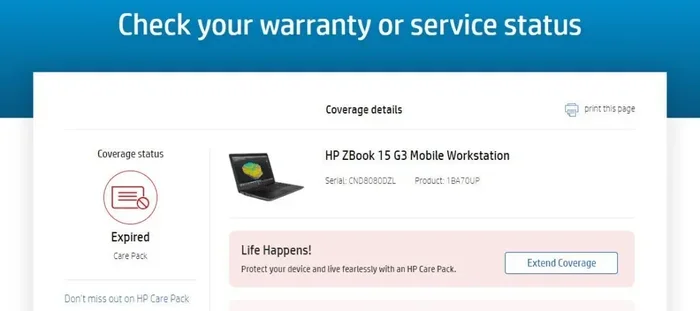
Once registered, you can easily check your warranty status anytime. This is very helpful when you need to contact HP Support or file a claim. Without registration, HP might ask for extra proof of purchase, which can slow things down.
Also, if you ever need to upgrade the RAM on your HP laptop or troubleshoot issues like a mouse locked on HP laptop, having your warranty registered makes it easier to get HP’s guidance on whether the issue is covered.
What Is Not Covered Under Hp Warranty?
Understanding what the HP laptop warranty does not cover is just as important as knowing what it does. Many people assume everything is covered, but that is not the case. The warranty terms clearly list exclusions.
Here are the most common things NOT covered under the standard HP warranty coverage:
- Accidental damage: Dropping your laptop, cracking the screen, or spilling liquids are not covered.
- Unauthorized modifications: If you opened the laptop yourself or had someone not authorized by HP repair it, the warranty may be voided.
- Software issues: Viruses, malware, operating system errors, and driver problems are not hardware issues and are not covered.
- Normal wear and tear: Scratches, worn-out keys, or a fading display over time are expected and not covered.
- Consumable parts: Items like batteries (after the initial battery warranty period), power adapters, and cables may not be fully covered.
- Environmental damage: Exposure to extreme heat, moisture, or dust can cause damage that is not covered.
This is why many people choose to buy an extended warranty or an HP Care Pack that includes accidental damage protection. It gives you peace of mind beyond the standard limited warranty.
What Happens If You Void the Warranty?
If HP finds that your laptop has been opened or modified by someone not authorized, they can deny your warranty claim. This is called voiding the warranty. To avoid this, always contact HP Support before opening your laptop. Even if you just want to install RAM on your HP laptop yourself, it is best to check with HP first.
How To File An Hp Warranty Claim
Filing a warranty claim with HP is straightforward. You have several options to choose from, and the process is designed to be as easy as possible. Here is how to do it step by step.
Step 1: Gather Your Information
Before you contact HP, have your laptop’s serial number ready. You should also know the purchase date and keep your proof of purchase handy. This speeds up the process significantly.
Step 2: Contact HP Support
You can reach HP Support in three ways:
- Online: Visit support.hp.com and use the warranty checker tool to start a claim.
- By Phone: Call HP Support and explain the issue. They will guide you through the next steps.
- In Person: Visit an authorized HP service center near you for hands-on help.
Step 3: Describe the Problem
When you contact HP, clearly describe the issue. If you get an error code or message, write it down. If your HP laptop keyboard is not working but the mouse is, for example, mention that specifically. This helps HP diagnose the problem faster.
Step 4: Follow HP’s Instructions
HP will either guide you through troubleshooting steps over the phone or arrange for a repair or replacement. If your laptop qualifies for a warranty repair, HP will cover all costs associated with parts and labor.
Many users find that having their warranty registered online makes this entire process much smoother. It gives HP instant access to your coverage details.
Extended Warranty Options For Hp Laptops
The standard HP laptop warranty is great, but it only lasts one year. If you plan to keep your laptop for several years, you might want to consider an extended warranty. These plans give you longer protection and often better service options.
Here are the main extended warranty options HP offers:
- HP Care Pack Essential: Extends your warranty to 2 or 3 years with standard service. Good for basic protection.
- HP Care Pack Premier: Includes next-business-day on-site service. A technician comes to your location to fix the issue.
- HP Care Pack Elite: Offers the highest level of service with 24/7 support and advanced replacement options.
- Accidental Damage Protection: Covers drops, spills, and other accidents that the standard warranty does not cover.
The cost of an extended warranty varies. It depends on the laptop model, the length of coverage, and the service level you choose. For a high-end HP laptop with a powerful processor, the Care Pack might cost between $100 and $300. For budget models, it could be less.
When deciding whether to buy an extended warranty, consider how you use your laptop. If you travel a lot, work in challenging environments, or just want the peace of mind, an extended plan is worth it. If you are very careful with your device and mostly use it at home, the standard warranty might be enough.
Some people also wonder if they should buy a third-party extended warranty instead of HP’s own. Third-party warranties can be cheaper, but they may not offer the same level of service or use genuine HP parts. For the best experience, sticking with HP’s official Care Pack is usually the safer choice.
How To Choose the Right Warranty Plan
Here are a few quick tips to help you pick the right HP warranty plan:
- Check how long you plan to keep the laptop. If three years or more, go with a Care Pack.
- Consider how fragile your laptop is. Thin and light models benefit from accidental damage protection.
- Think about your usage. If you use your laptop in tough conditions, more coverage is better.
- Compare the cost of the Care Pack against the cost of potential repairs. A screen replacement alone can cost several hundred dollars.
Tips To Keep Your Hp Laptop Warranty Valid
Once you have your HP laptop warranty, you want to make sure it stays valid. Here are some simple tips to follow:
- Keep your receipt: This is your proof of purchase. Store it digitally and physically.
- Do not open the laptop yourself: Unauthorized opening can void the warranty. Always contact HP first.
- Use genuine HP parts: If you need a replacement part, use HP-approved components.
- Keep your laptop clean: Regular cleaning prevents dust buildup, which can cause overheating and other issues.
- Update your software: Keeping your HP laptop updated helps avoid software-related problems that could be mistaken for hardware defects.
- Register your product: This is the single most important step to ensure your warranty coverage is active.
Following these simple steps means you will be ready if anything goes wrong. You will not have to worry about whether your HP warranty is still active or whether you followed the rules correctly.
Final Thoughts on Hp Laptop Warranty
The warranty on HP laptops is a valuable resource that every laptop owner should understand. From the standard one-year limited warranty to the comprehensive HP Care Pack options, there are several ways to protect your investment. The key is to know what is covered, how long the coverage lasts, and how to file a claim when you need help.
Taking a few minutes to register your laptop, keep your receipt, and understand the warranty terms can save you hundreds of dollars in repair costs down the road. Whether you are dealing with a hardware defect or just want to plan ahead for the future, your HP laptop warranty has you covered.
Remember, a warranty is not just a formality. It is HP’s commitment to standing behind the quality of their products. So make sure you know your coverage, keep your warranty valid, and enjoy your HP laptop with confidence.
Frequently Asked Questions
How long does HP laptop warranty last?
Most HP laptops come with a standard one-year limited warranty. You can extend this with an HP Care Pack to 2 or 3 years, or even longer depending on the plan you choose.
Does HP warranty cover accidental damage?
The standard HP warranty does not cover accidental damage like drops or spills. However, you can purchase an HP Care Pack with accidental damage protection for added coverage.
Is HP laptop warranty transferable to a new owner?
Yes, in most cases the HP warranty is transferable. If you sell your laptop, the remaining warranty coverage can pass to the new owner. You may need to register the transfer with HP.
How do I check my HP laptop warranty status?
You can check your warranty status by visiting the HP Support website and entering your laptop’s serial number. If you registered your product, the process is even faster.
What should I do if my HP laptop is not under warranty?
If your HP laptop is out of warranty, you can still contact HP Support for paid repair services. You can also consider third-party repair shops for more affordable options.
Can I upgrade my HP laptop without voiding the warranty?
Yes, you can upgrade certain parts like RAM or storage without voiding the warranty, as long as you do not damage other components. Always check with HP Support before opening your laptop to make sure you stay within the warranty guidelines.